Does Apple Music allow AI music? The 2026 rules, the 4 AI transparency tags and what gets hidden

SIQA Summit, LA, 12th November 2026 Ozzy Osbourne's former bassist is sharing a stage with Suno. I'm moderating:

Blasko
Bassist (Ozzy Osbourne, Rob Zombie)

Sam Berger
Artist Partnerships at Suno

RoccStar
Grammy Award-winning producer and songwriter

Drake Murphy
A&R at PlayPulse / Create Music Group

Janie Jennings
Founder, Creative's Flow Ecosystem

Chris Wieduwilt
Moderator
Limited capacity only
Does Apple Music allow AI music? Yes. Apple doesn’t ban songs made with Suno, Udio or any other AI tool, but it wants AI use tagged, and it hides releases that use AI to mislead listeners.
Apple added 4 AI transparency tags to its delivery format on March 4, 2026, one each for the artwork, the track, the composition and the music video. On August 20 it told partners those tags would turn into a visible Made With AI label in the app later this year.
This guide covers Apple Music’s AI policy tag by tag, how much AI music is already on the service, and how to release yours with the right tags. It’s one part of my platform-by-platform guide to AI music rules.
Does Apple Music allow AI music in 2026?
Apple Music allows AI-generated and AI-assisted music in 2026. Labels and distributors tag any release where AI made a material portion of the artwork, track, composition or music video. Apple hides releases that use AI to mislead listeners, and it removes AI songs whose plays come mostly from stream manipulation.
What Apple Music’s AI rules mean for a Suno or Udio release
The tagging job sits with whoever delivers your music. In its August 20 email to partners, quoted by 9to5Mac, Apple spelled out who has to declare what.
Content providers will be required to include AI Transparency Tags in any instance where AI was used to create a material portion of the content, including tracks that are AI platform generated.
Apple defines AI-platform-generated content as “anything that is primarily derived from a generative AI service.” So a song you prompted in Suno and downloaded counts.
Tagged doesn’t mean paid less. Apple’s own court filing in October says Apple Music “does not currently exclude AI-generated content from its royalty pool,” as I covered in the Suno subpoena fight. That’s a different line from TIDAL, which stopped paying fully AI tracks from July 15, 2026.
Apple Music’s 4 AI transparency tags, explained
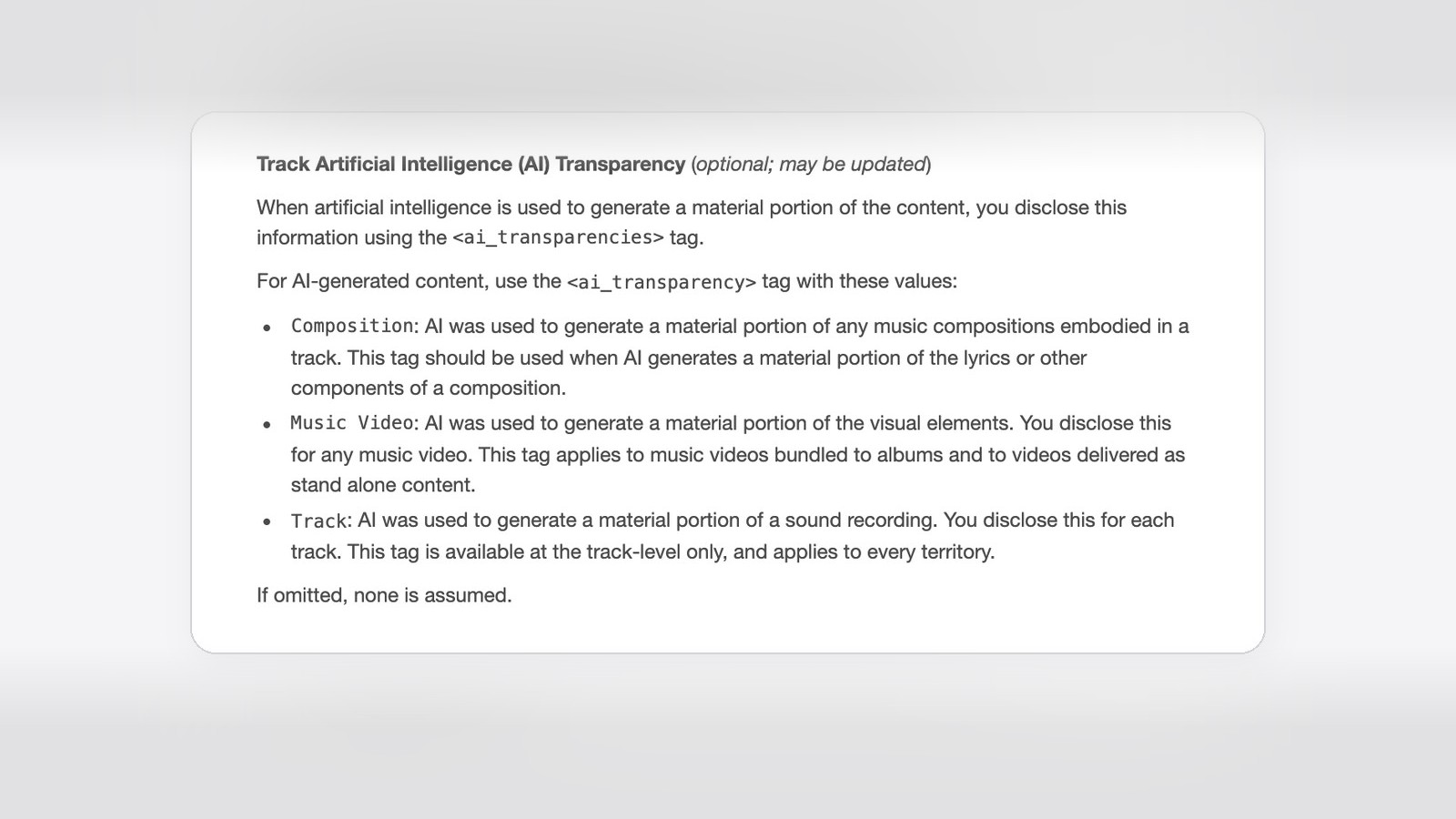
Apple Music’s AI transparency tags are 4 values in the Apple Music Specification, the document labels and distributors follow to deliver releases. Each one covers a different part of the release.
Artwork tag on Apple Music
The Artwork tag sits at album level. Apple’s spec says it “applies to Static and Motion Graphic Artwork,” so an AI-made cover or an animated cover both count.
Track tag on Apple Music
The Track tag means “AI was used to generate a material portion of a sound recording.” It goes on each track separately and applies in every country Apple Music runs in.
Composition tag on Apple Music
The Composition tag covers the song itself. Apple says to use it “when AI generates a material portion of the lyrics or other components of a composition.”
Music Video tag on Apple Music
The Music Video tag covers AI-generated visuals, whether the video ships with an album or on its own.
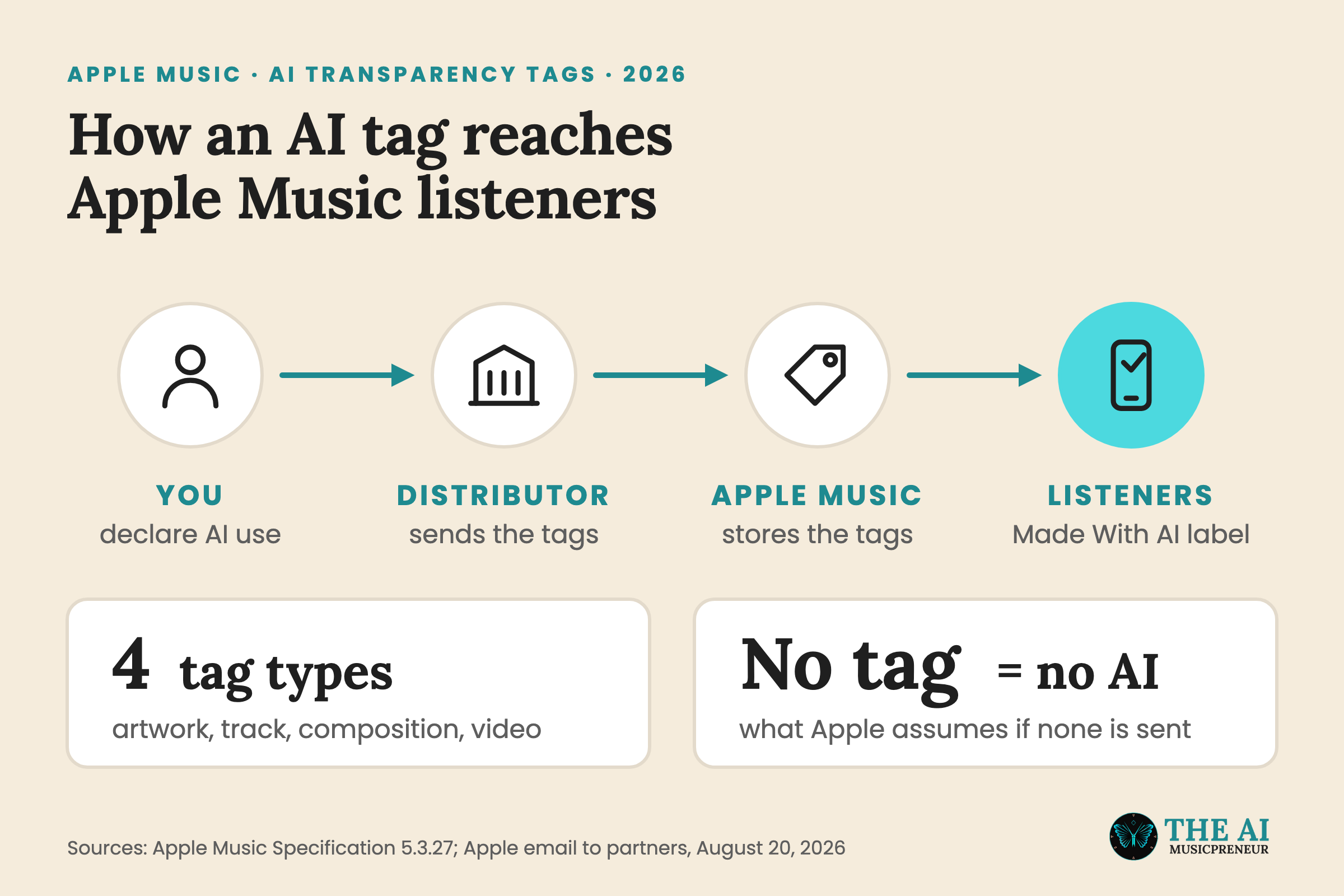
Every AI entry in the spec ends with the same line: “If omitted, none is assumed.” The current spec, version 5.3.27 from September 2026, still marks the tags as optional, even though the August email says they will be required.
My March write-up of the tagging rule has the launch details.
Does Apple Music have AI music? What Apple’s numbers show
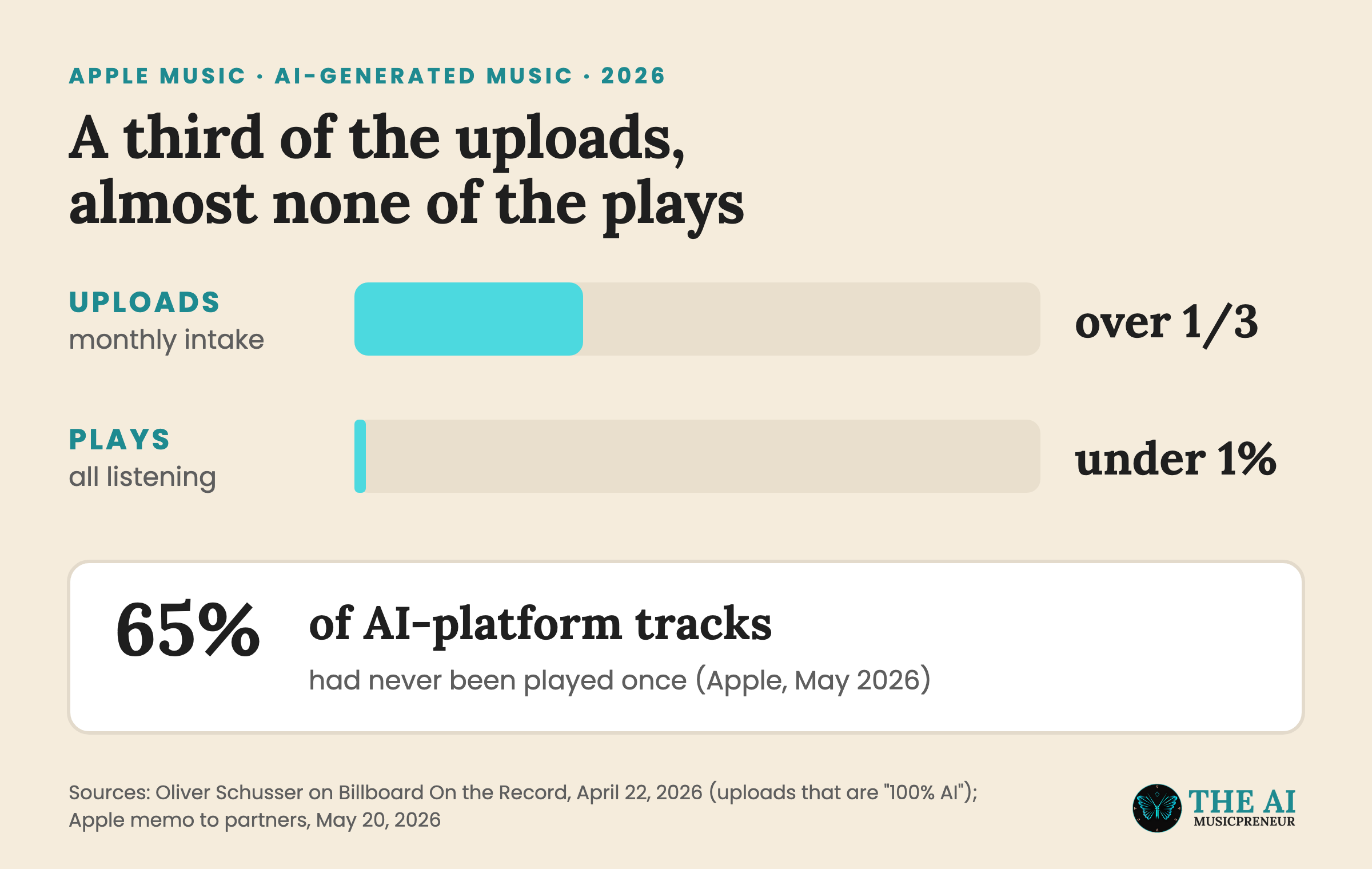
Yes, and a lot of it arrives every month. Apple Music VP Oliver Schusser told Billboard’s On the Record on April 22, 2026 that “more than a third of what we get today is actually what we would say is 100% AI”.
Hardly anyone plays it, though. Schusser put AI music at “below 0.5% of usage”, and Apple’s May 20 memo to partners said AI-platform-generated content made up less than 1% of all plays each week, according to Billboard. The same memo said 65% of AI-platform-generated tracks had yet to receive a single play.
Some of it still reaches the top. On November 3, the self-described AI act May the Lord Studio had the No. 1 song on US iTunes, and its Apple Music page carried no AI label.
How to release AI music on Apple Music with the right AI tags
You can’t upload to Apple Music yourself. Apple takes deliveries from content providers, the labels and distributors that send releases in its package format, so every step below runs through your distributor.
Step 1: Check your distributor’s AI rules before Apple Music’s
Your distributor decides first whether your track goes out at all. Believe and TuneCore, for example, block tracks made on unlicensed AI platforms like Suno.
So read your distributor’s AI policy before you pay for the release. My guides to DistroKid’s AI rules and TuneCore’s AI policy cover the two biggest, and my AI music distribution roundup compares the rest.
Step 2: Match each AI step to one of Apple Music’s 4 tags
Go through your release piece by piece and write down where AI did the work:
- An AI-generated cover or animated cover gets the Artwork tag.
- AI-written lyrics or an AI melody get the Composition tag.
- AI-generated vocals, instruments or a full Suno render get the Track tag.
- An AI-made video gets the Music Video tag.
Step 3: Fill in the AI fields when you upload
Your distributor’s upload form is where you declare AI use, and the distributor turns your answers into Apple’s tags. Leave a field empty and Apple reads it as “no AI”.
Step 4: Keep the title, artist name and artwork honest
Apple hides releases that borrow a famous artist’s name, sound or image. That rule doesn’t care whether a human or a model made the song (more on it in the next section).
Step 5: Keep your project files
Detection gets it wrong sometimes. In 2025 a real artist’s original song was flagged as AI and deleted from Apple Music and iTunes. Your stems, session files and drafts are your proof if it happens to you.
What gets AI music hidden or removed from Apple Music
Apple Music hides releases for being misleading, and AI is named in the rule. Section 1.13 of the Apple Music Style Guide covers content “designed to mislead customers,” and that includes “using AI in a misleading manner.” Apple said in its May memo that it added the AI wording in February 2026.
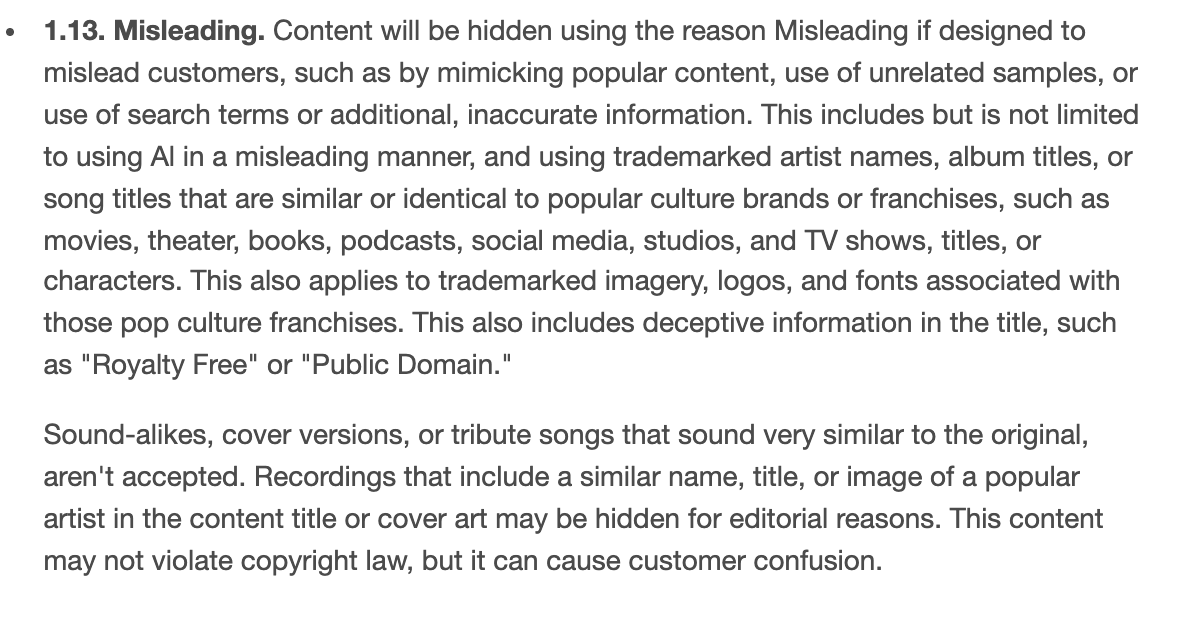
The same section says “Sound-alikes, cover versions, or tribute songs that sound very similar to the original, aren’t accepted.” An AI track built to sound like a famous singer falls under that.
Fake streams are the other trigger. Apple’s May 20 open letter said it automatically removes an AI song when a majority of its plays come from stream manipulation, and it doubled the penalty for extreme cases of stream manipulation in February.
Artwork has its own AI rule too. Section 7.20 says AI processing must not add “distorted text (e.g., titles), unnatural anatomical features, aberrant animations” to the album cover.
Apple Music AI release tips that are easy to miss
These two catch people out even when the music itself is fine.
Tag AI artwork on Apple Music even when the song is human-made
The Artwork tag is separate from the Track tag. A song you played and sang yourself still gets an AI tag if the cover came out of an image generator.
Don’t expect the Made With AI label in the Apple Music app yet
Apple said in August the label would arrive “later this year” and gave no date. Until it ships, the tags only live in Apple’s systems, and listeners can’t see them. My piece on the Made With AI label compares it with Spotify’s AI Persona badge.
Apple Music AI rules: key takeaways
Here’s the short version of Apple Music’s AI rules:
- Apple Music allows AI music, but AI use has to be tagged and can’t mislead listeners.
- The 4 tags are Artwork, Track, Composition and Music Video, and a missing tag reads as “no AI”.
- More than a third of uploads are 100% AI, while AI-platform music gets less than 1% of weekly plays.
- Your distributor sends the tags, and its own AI rules apply before Apple’s.
- Misleading AI use, sound-alikes and fake streams get music hidden or removed.
Releasing beyond Apple Music? Here’s how Spotify and Bandcamp handle AI music, and the full platform comparison puts them side by side.
Frequently asked questions
Can you upload AI music to Apple Music without a distributor?
No. Apple takes music from content providers, the labels and distributors that deliver releases in its own package format. Your distributor's AI rules apply before Apple's, and some, like TuneCore, block tracks made with AI models trained on unlicensed music.
Does AI mastering or stem separation need an AI tag on Apple Music?
Apple's spec only asks for a tag when AI generates a material portion of the artwork, track, composition or video. It doesn't mention mastering or stem separation, and Apple has said it leaves the call on what counts as AI-generated to the content provider.
Can you add AI tags to a song that's already on Apple Music?
Yes. Apple's spec marks the AI transparency tag as one that may be updated, so your distributor can send it later as a metadata update. Ask your distributor whether its dashboard lets you change the AI fields on a live release.
When do Apple Music's AI transparency tags become mandatory?
Apple hasn't given a date. Its August 20, 2026 email said content providers will be required to include the tags, but the public Apple Music Specification 5.3.27 from September 2026 still lists them as optional.
About the author
Covering AI music tools, industry shifts, and news for music creators and professionals. Twice-weekly newsletter at aimusicpreneur.com.