What Are Stems in Music? The AI Stem Separation Cheatsheet (2026)
My stack My fav 6 tools for AI music after testing 70+
-
 ElevenMusic · Music generation
 -
 Moises · Stem separation
 -
 Controlla · Voice swap & cloning
 -
 Cryo Mix · Mixing + mastering
 -
 Neural Frames · Music videos
 -
 ONCE · Distribution
Some links are affiliate links — I earn a commission at no cost to you. Every tool here is one I run myself and truly believe in. This stack is proven.
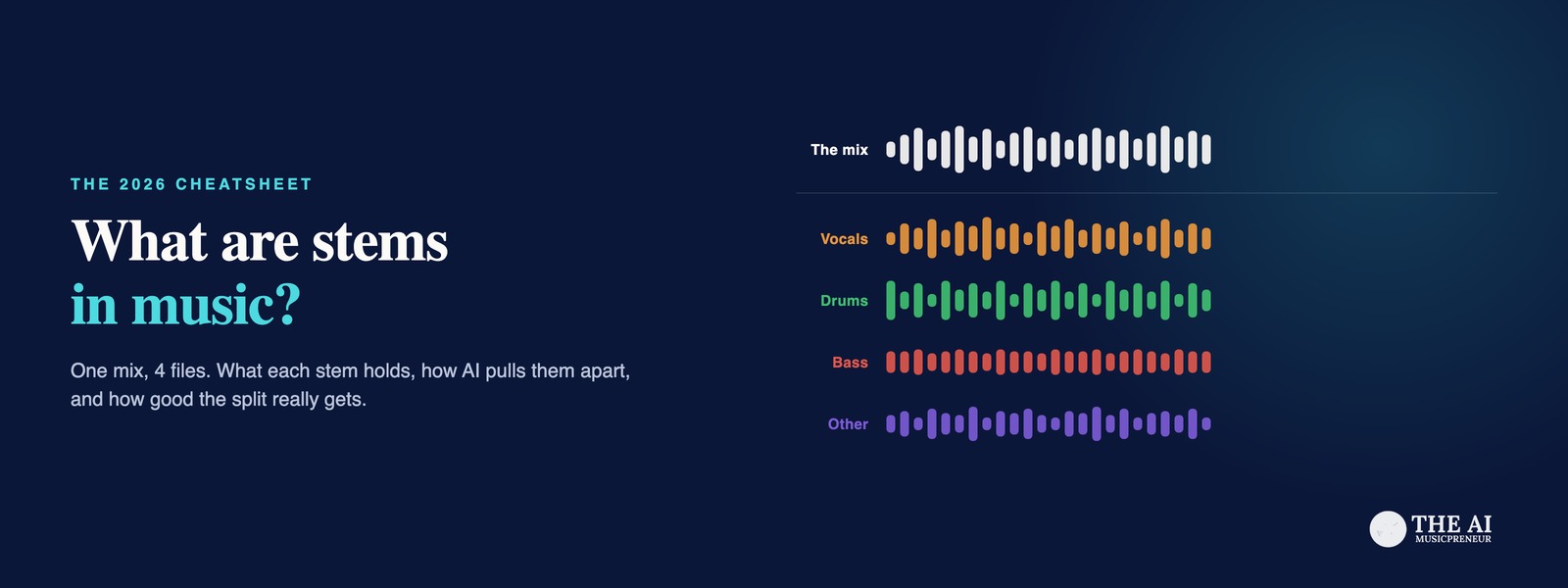
Stems are the parts of a song, mixed down into a few files: the vocals in one, the drums in one, the bass in one, and everything else in a fourth. If you’ve asked what are stems in music, or wondered why an engineer got short with you for calling 40 session tracks “stems”, this page answers it. Then it goes further: what each stem holds, how AI stem separation rebuilds stems from a finished MP3, how anyone measures whether a split is any good, and a chart of which stems 12 tools and 4 DAWs can pull apart.
This is the reference behind the cheatsheet, and it explains stems without ranking the tools. The ranking, with test results per stem, lives in my roundup of the best AI stem splitters. Read this page first, then pick a tool there.
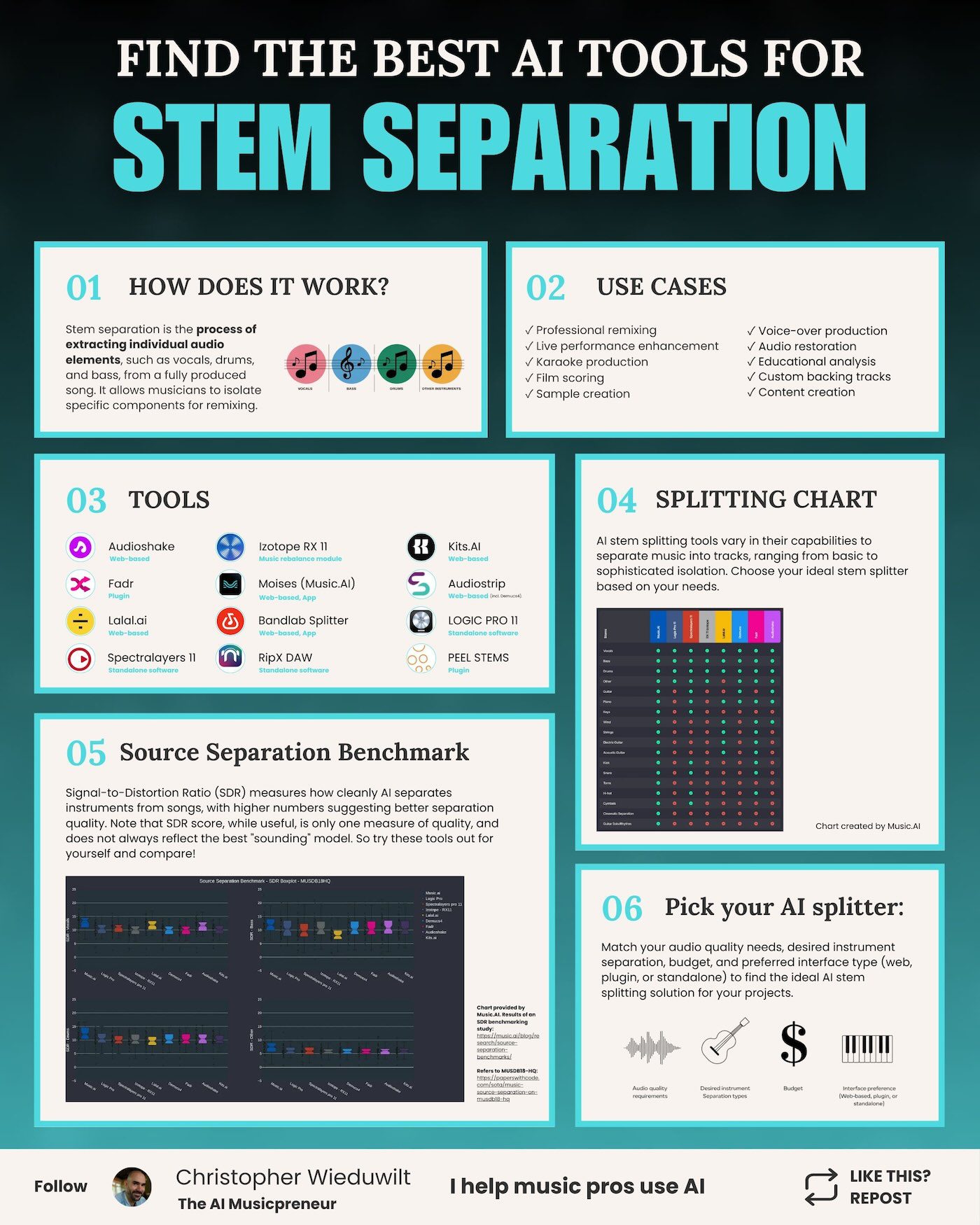
Here is the whole thing on one page. Download it, or open it and zoom in to read any panel.
What are stems in music?
Stems in music, defined
Stems are audio files that each hold one mixed group of a song’s related tracks, such as all the drums or all the vocals. Each stem keeps its panning, effects and level, so when you play every stem together you hear the finished mix. Producers export stems for remixes and live shows. AI stem splitters rebuild them from a finished song.
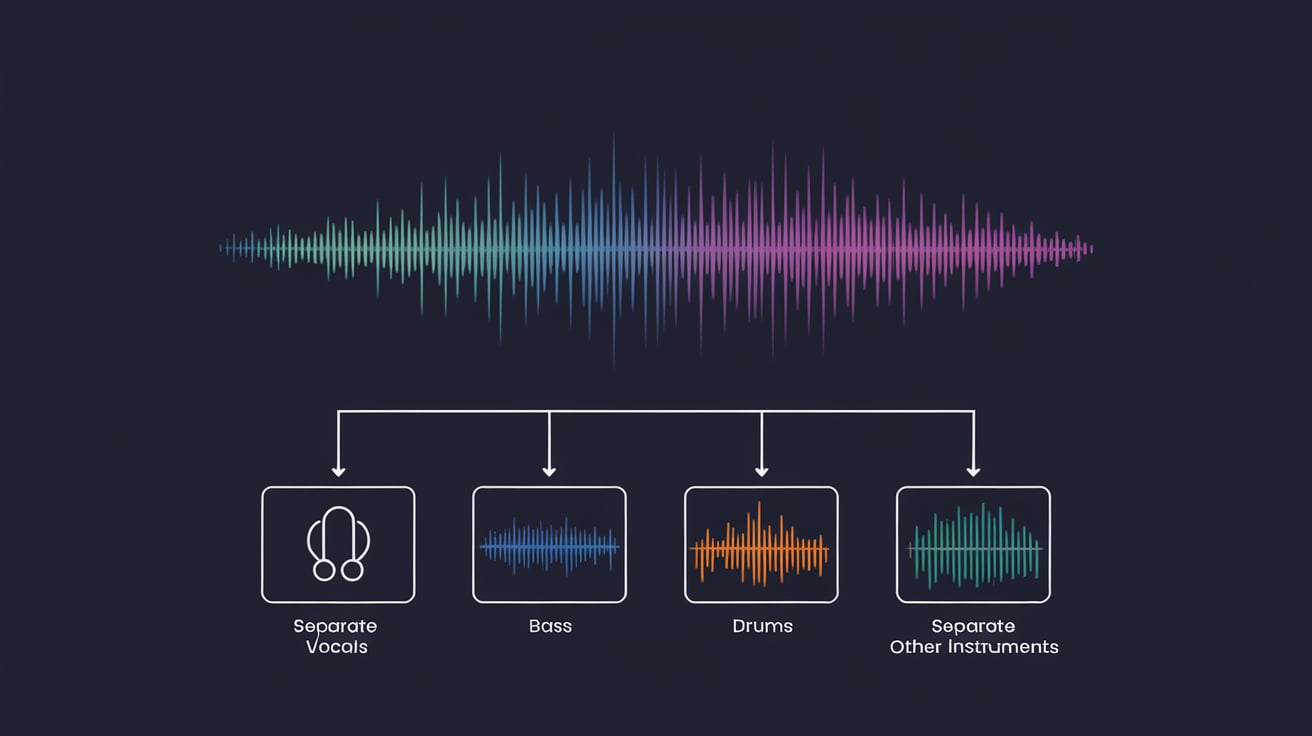
Film sound has used stems for decades. A finished film travels to a foreign dub studio as 3 files, dialogue, music and effects, so the dubbing team can replace the dialogue and keep everything else. Music borrowed the idea, and iZotope’s Nick Messitte gives the tightest definition I’ve read: a mixed group of related tracks, printed as one file.
I couldn’t find a documented origin for the word itself. Every engineer I’ve asked has a different story.
What are the 4 types of stems?
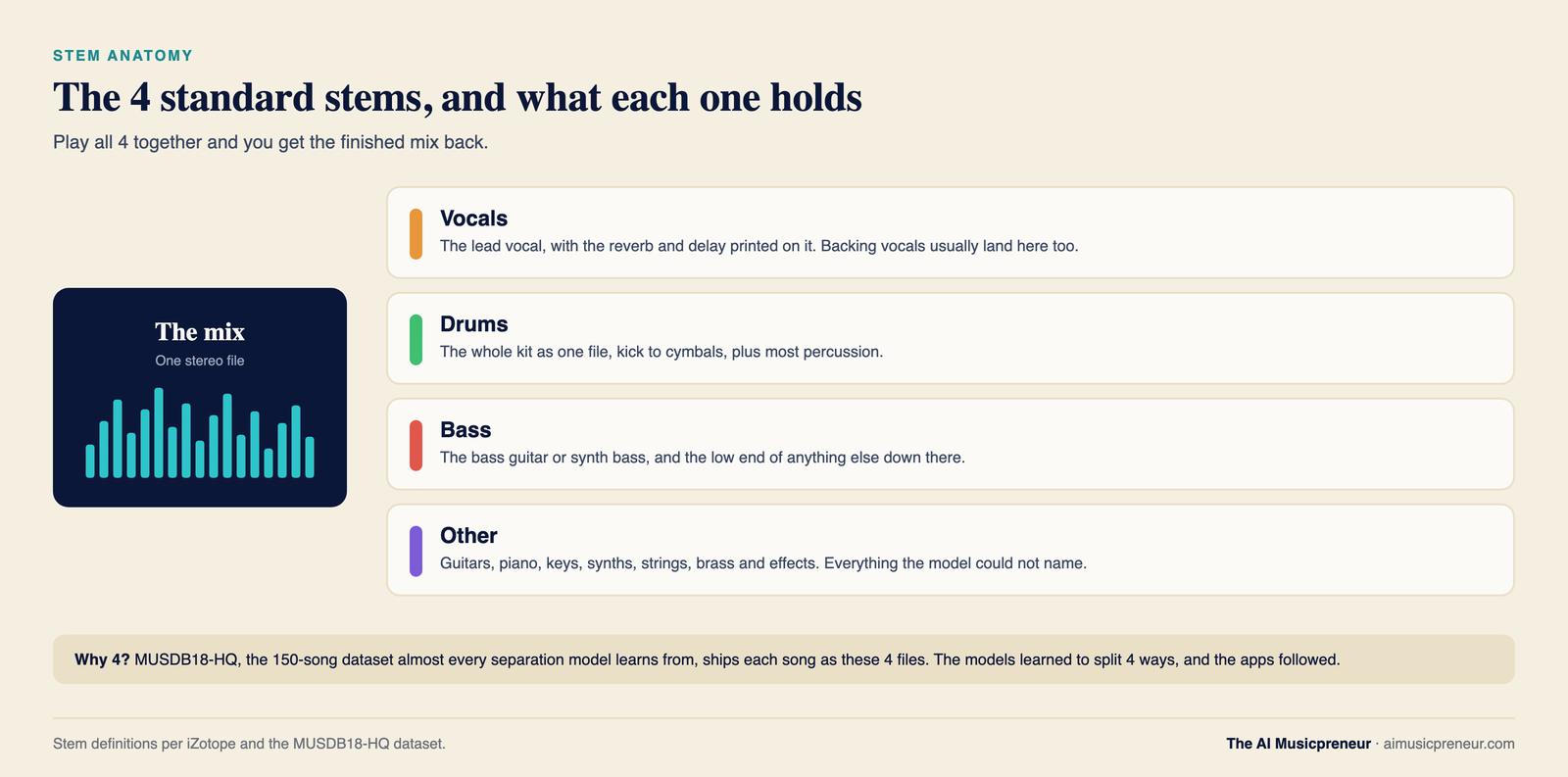
The 4 standard stems are vocals, drums, bass and other, and the reason is a dataset, not a mixing tradition. MUSDB18-HQ, the 150-song set almost every separation model learns from, ships each song as those 4 files, so the models learned to split 4 ways and the apps followed.
What each of the 4 stems holds:
- Vocals: the lead vocal, plus whatever reverb and delay was printed on it. Backing vocals usually land here too.
- Drums: the whole kit as one file, kick to cymbals, plus most percussion.
- Bass: the bass guitar or synth bass, and often the low end of anything else that sits down there.
- Other: everything left. Guitars, piano, keys, synths, strings, brass, effects. The bucket the model couldn’t name.
What else can a stem be?
A stem is whatever group the job needs. A remix pack might ship 8 stems. A film mix ships 3. A beat sold with a “Premium Stem License” on BeatStars ships every tracked-out part the producer bounced.
Stems you’ll meet beyond the standard 4:
- Guitar, piano and keys: Logic Pro, LALAL.AI, Moises, AudioShake, Fadr and SoundBoost’s paid tier each add some of these.
- Backing vocals: harmonies and doubles as their own file, separate from the lead.
- Strings, winds and brass: AudioShake, LALAL.AI and Music AI offer them. SpectraLayers 13 has a sax and brass stem.
- Drum parts: kick, snare, toms, hi-hat and cymbals as separate files. Five tools in the chart below do it.
- FX and reverb stems: the wet returns, printed separately so the remixer can keep or drop the space.
- Dialogue, music and effects: the film split. iZotope RX and SpectraLayers can pull it apart from a finished soundtrack.
Stems vs multitracks vs tracks: what is the difference?
A track is one recorded source. A multitrack session is all of them. A stem is a group of them, already mixed. The 3 words get swapped around constantly, and the difference costs real time when a remixer asks for stems and gets 40 raw files with no effects on them.
| Term | What it is | Count in a typical song | What you hear when you sum them |
|---|---|---|---|
| Track | One recorded source: kick, snare top, snare bottom, one guitar take, one vocal take | 20 to 80 | The raw, unmixed song |
| Multitracks | Every track in the session, exported with effects and levels bypassed, all the same length so they line up | Same as tracks | The raw song again, ready for someone else to mix |
| Stem | A submix: a group of tracks printed as one stereo file with panning and effects kept | 4 to 12 | The finished mix, exactly |
That last cell is the test engineers use. Play the stems together against the master and flip the polarity on one side. If the stems are right, the two cancel to silence. That’s called a null test, and exported stems pass it every time. Most AI-separated stems don’t, and the measurement section below says which ones do.
The Audio University video walks through the export dialog in Reaper, where both stems and multitracks come out of the same “Render” menu. That shared menu is most of why people mix the terms up.
One decision the video flags that catches beginners: reverb returns. Either they get their own stem, or each stem carries its own share of the reverb. Ask which before you export, because a remixer who wants a dry vocal can’t remove reverb that was baked in.
What is a vocal stem, a drum stem, a bass stem and an instrumental?
Every stem fails in its own way. Vocals separate best and drag their reverb tail with them. Bass comes out clean but loses its top end. Piano bleeds into everything. The numbers below come from MVSEP’s Multisong leaderboard, a public test that scores separation models against the real stems of 100 songs, and from Music By Mattie’s 13-song, 12-splitter listening test.
What is a vocal stem?
A vocal stem is the lead vocal as one file, with the reverb, delay and compression that was printed on it in the mix. It’s the stem people want most, which is why half the tools in the chart started life as a vocal remover, and why “isolate vocals” is still the most-searched job in this whole category.
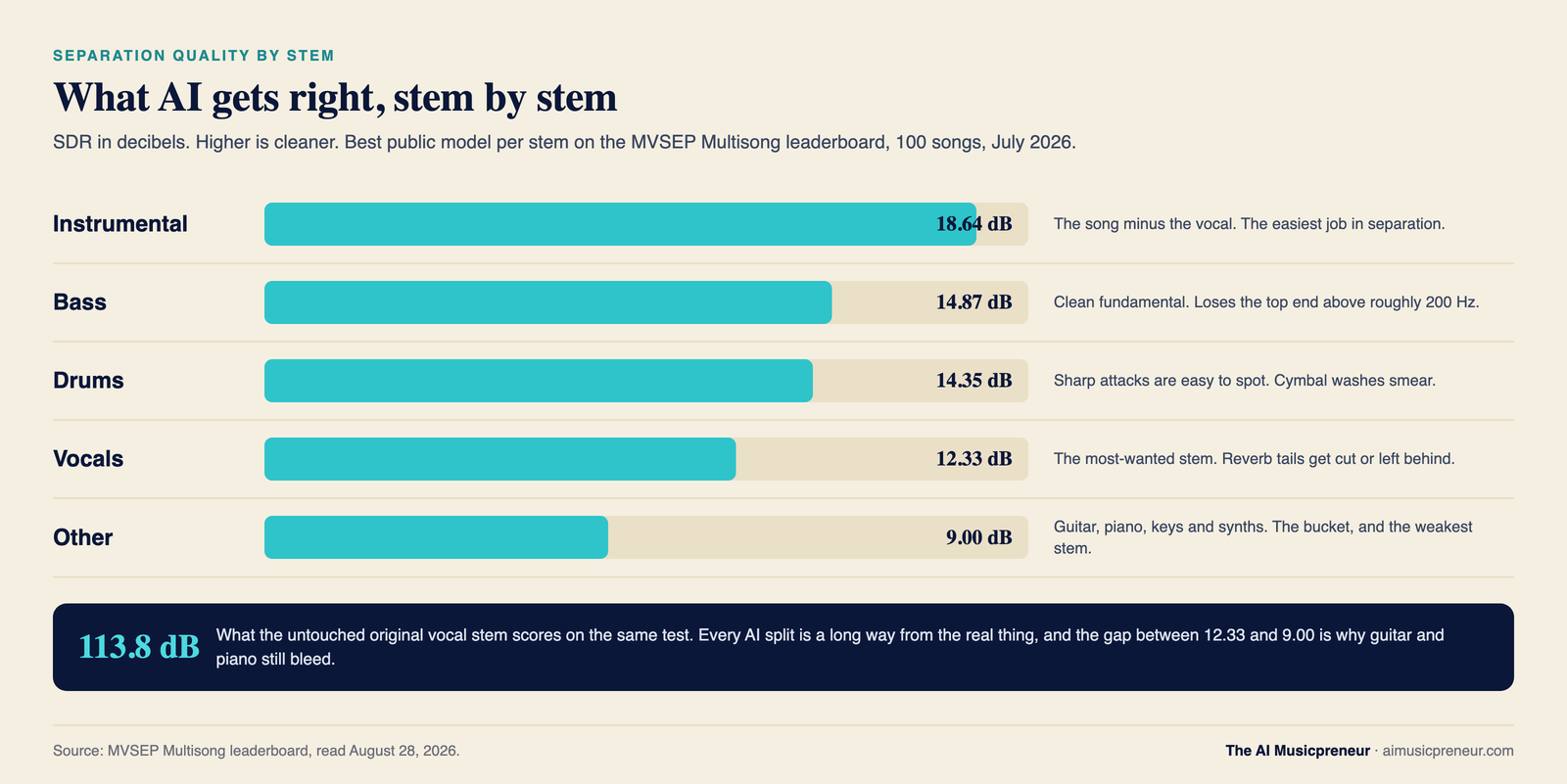
It’s also the stem AI does best. The top model on MVSEP scores 12.33 dB on vocals, and AudioShake’s own vocal model reports 13.5 dB on MUSDB-HQ. What still goes wrong: long reverb tails get cut short or left behind in the instrumental, doubled vocals smear, and a breath before a phrase sometimes lands in the drum stem. In Mattie’s test, UVR’s Kim Vocal 2 model kept the cleanest reverb tails and Cubase 15 showed transient problems on the same songs.
If your job is removing a vocal rather than keeping it, my LALAL.AI vocal removal walkthrough covers the clicks. For which tool wins on this stem, see the roundup’s vocals pick.
What is a backing vocal stem?
A backing vocal stem holds the harmonies, doubles and ad-libs, separate from the lead. Most tools don’t offer it. The 4-stem models were never taught the difference between a lead and a harmony, so both land in one vocal file.
The tools that do split them are in the chart: Music AI, Moises, LALAL.AI, AudioShake and Kits.AI (which calls it harmonies) in the browser, and UVR’s karaoke models on the desktop. Moises won this stem in Mattie’s test, and the roundup’s backing vocals section has the detail.
What is an instrumental stem?
The instrumental is the song minus the vocal, and it’s the highest-scoring stem in existence: 18.64 dB for the best public model, against 12.33 dB for the vocal it was cut away from. That gap is the reason karaoke tracks from a stem splitter sound better than acapellas from the same tool. Removing one thing is easier than isolating it.
The instrumental is the stem you want for karaoke, for a backing track at a gig, or for singing your own melody over someone else’s production to test an idea. Mattie’s winner was UVR’s MDX23C-InstVoc HQ model, and the roundup’s instrumental pick explains why.
What is a drum stem?
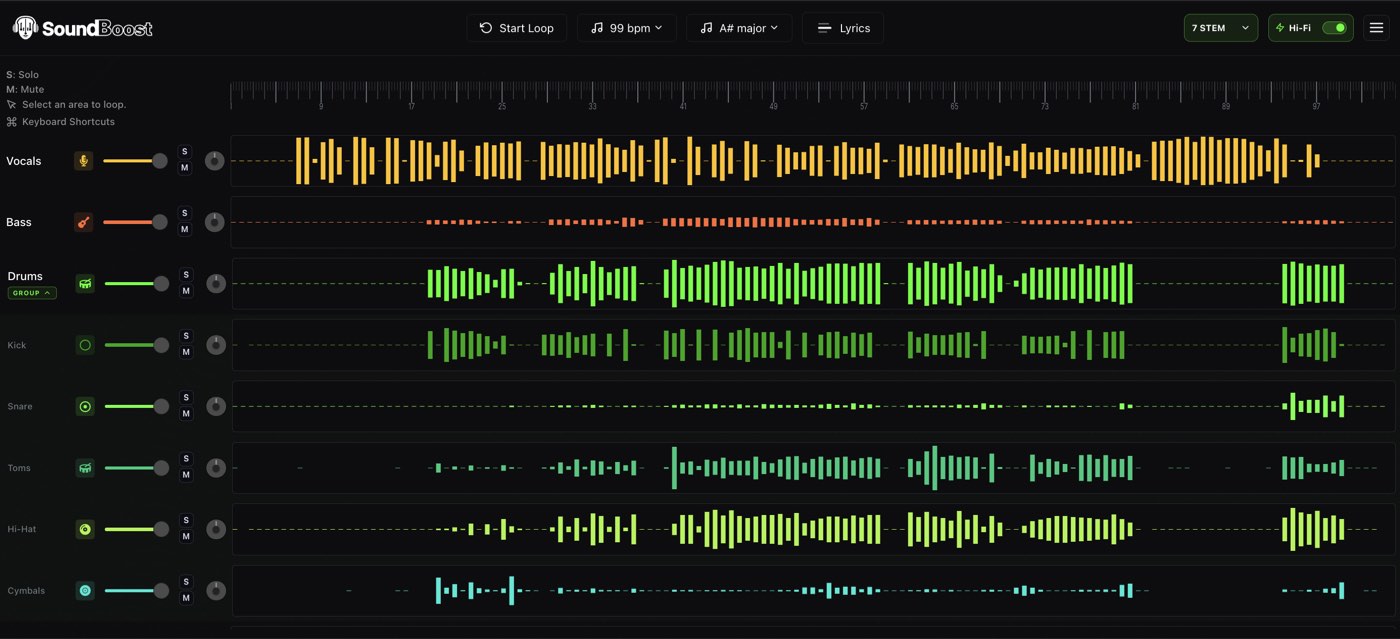
A drum stem holds the whole kit as one file, and on 5 tools you can split it again into kick, snare, toms, hi-hat and cymbals. Drums separate well because a hit has a sharp start and a fast decay, which is easy for a model to spot in a spectrogram, the picture of a sound’s frequencies over time that most models work from.
The best drum score on MVSEP is 14.35 dB, from a combination of models rather than a single one. Mattie found that programmed, processed drum-machine kits come out cleanest and that drums translate better than bass across every tool he tried. What goes wrong: cymbal washes smear into the other stem, and a snare with a long room reverb leaves half its tail behind. Which tool to use for the kit is in the roundup’s drums section.
What is a bass stem?
A bass stem is the bass guitar or synth bass on its own, and every tool loses the same thing on it: the top end. The bass sits in a narrow band below about 200 Hz where little else lives, so the fundamental separates cleanly and scores 14.87 dB on MVSEP. The finger noise, the pick attack and the harmonics above 200 Hz share space with guitars and get left behind.
Mattie’s advice after 13 songs was blunt: if you need the bass for a release, recreate it yourself or get the original. For a practice track or a reference, the separated bass is fine. The roundup’s bass section names the 2 tools that lose the least.
What is a guitar stem, and what is a piano stem?
Guitar and piano stems are the hardest ask in this whole page, because both instruments live in the other bucket, and the other bucket scores about 9 dB on MVSEP, 3 dB below the vocal. In audio, 3 dB is half the power. That’s how much less of the original survives.
LALAL.AI’s engineers explained why in their Andromeda notes: a piano “spreads across almost the entire frequency range and rings out”, and guitars are “usually several, doubled or layered”. Meta’s Demucs README says its piano source has “a lot of bleeding and artifacts”. Mattie found denser mixes separate worse on every tool, and guitar and piano are what makes a mix dense.
So audition these two stems on your own track before you pay for a plan that promises them. The roundup’s guitar and piano section lists which tools got closest on mine.
How do you get stems from a song?
There are 2 roads to music stems. Road 1 is the original parts, exported from the session by whoever mixed the song. Road 2 is AI stem separation, which guesses the parts back out of the finished stereo file when no session exists. Road 1 is always better. Road 2 is the one you can take tonight.
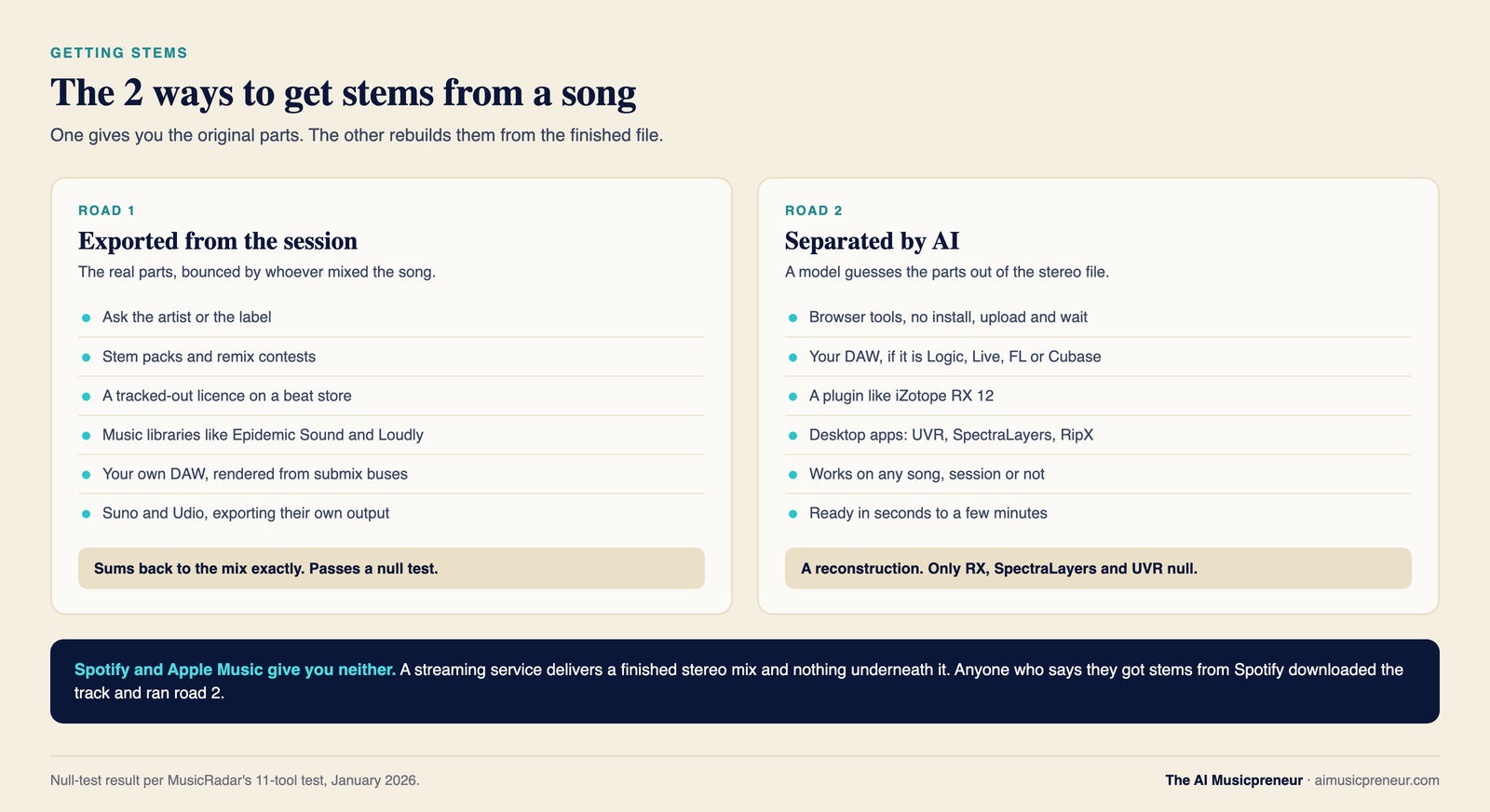
Where original stems come from:
- The artist or label. Ask. Remix stems get handed out more often than people expect, especially for a remix that will get released.
- Stem packs and remix contests. Labels and artists publish official stems for contests, and some sell stem packs with the single.
- Beat stores. A “Premium Stem License” or “tracked out” licence on BeatStars or Airbit includes every stem the producer bounced.
- Music libraries. Epidemic Sound and Loudly sell library tracks with stems included, so a video editor can duck the drums under a voiceover.
- Your own DAW. In Logic, File then Export then Tracks as Audio Files. In Reaper, Render then Selected tracks (stems). Route your tracks to a few submix buses first, then export the buses.
- AI music generators. Suno and Udio export stems of the songs they generate. My Suno stem separation guide covers the 12-stem Auto Split and what the stems are good for.
Spotify and Apple Music give you none of these. A streaming service delivers a finished stereo mix and nothing underneath it. When someone says they “got the stems from Spotify”, they downloaded the track and ran it through a stem splitter, which is road 2.
Road 2 is every tool in the charts further down. It exists because most songs you’ll ever want to remix, practise to or sample have no session you can reach, and the next 2 sections explain what the tool is doing to the audio and how well it does it.
What is stem separation, and how does AI separate stems?
Stem separation is the process of taking a finished stereo mix and splitting it back into stems: vocals, drums, bass and other, or more. Researchers call the same thing music source separation or audio source separation. Every tool that does it in 2026 runs a machine-learning model, so ai stem separation and stem separation now mean the same thing in practice.
Here’s how the model does it. Someone collects songs where the real stems are known, such as MUSDB18-HQ’s 150 songs, Moises’ MoisesDB, or a vendor’s private library of licensed multitracks. The model gets the mixed song, guesses the stems, and gets corrected against the real ones, millions of times. After training, it has learned what a vocal looks like inside a mix, what a kick looks like, and what it should leave alone.
Where the models differ is what they look at:
- Spectrogram models turn the song into a picture of frequencies over time and paint a mask over the parts that belong to each stem. Spleeter (Deezer, 2019) and MDX-Net work this way.
- Waveform models read the raw audio samples instead. Meta’s original Demucs did.
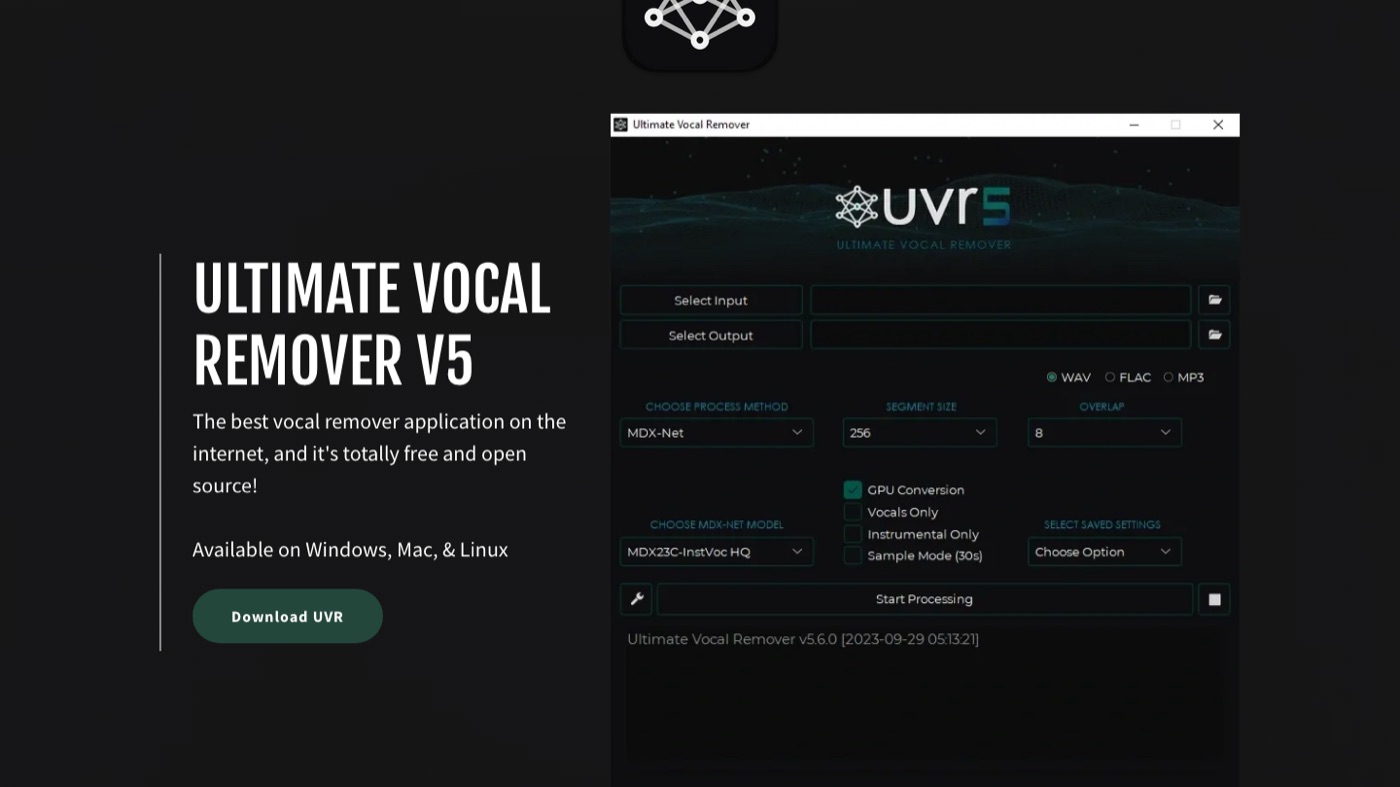
- Hybrid models do both and let a transformer, the same architecture behind language models, decide between them. Hybrid Transformer Demucs, or HTDemucs, is the open model inside FL Studio, UVR and dozens of free tools. Meta archived the repo on January 1, 2025, and the model still runs everywhere.
- Band-split transformers cut the spectrogram into frequency bands and process each with its own attention layers. BS-RoFormer (ByteDance, 2023) won the Sound Demixing Challenge that year, and its Mel-RoFormer cousin and the BS Roformer models on MVSEP lead the public leaderboard in 2026.
- Prompt-driven generative models are the new arrival. Meta’s SAM Audio takes a text, visual or time-span prompt, so you ask it for “guitar” instead of picking from a fixed list of 4 stems. It can chase sounds nobody trained a stem model for.
The commercial tools run private cousins of these. Music AI’s engine powers Moises and licenses to Ableton. LALAL.AI runs Andromeda in the cloud and Lyra on your machine. AudioShake trains its own, and iZotope’s Music Rebalance is the one inside RX. None of them publish the architecture, so treat the open families above as the map and the vendors as unlabelled points on it.
Three things follow from how the models learn. First, the other stem is a bucket: anything the model wasn’t taught to name goes there, which is why guitar and piano bleed. Second, a separated stem is a reconstruction, so it carries artefacts, the watery, tremolo-like flutter you hear on a cymbal wash or a held piano chord, plus bleed from the stems next to it. Third, some tools rebuild the stems so that they sum back to the exact original, and most don’t. MusicRadar’s null test in January 2026 found only iZotope RX, SpectraLayers and UVR’s MDX-Net mode cancelled to silence. Every browser tool left a residue.
That last family works differently enough to matter to you. Every other model on this page is targeted and discriminative: it decides which parts of your audio belong to the vocal and hands back only those, so nothing new is invented. A generative model draws the stem instead. AudioShake, which Meta benchmarked against SAM Audio, points out the practical cost: the output level does not match the original mix, and the model can hallucinate, so a passage can come back sounding like an instrument that was never there. It cannot pass a null test by design. For a remix that might not bother you. For dubbing a film, clearing a sample or feeding a training set, it rules the approach out.
The last split that matters is where the model runs. Logic Pro, Ableton Live, FL Studio, Cubase, UVR, RX, SpectraLayers, RipX and LALAL.AI’s Lyra run on your computer, and your audio never leaves it. Every other tool in the chart uploads the file to a server, separates it there, and sends the stems back.
How is stem separation quality measured, and who measures it?
Take a separated stem, subtract the real stem, and what’s left is the error. Compare the power of the real stem to the power of that error, in decibels, and you have the number every researcher, and now Ableton’s manual, uses to grade a model. It’s called SDR, the signal-to-distortion ratio. Higher is cleaner. A perfect stem scores in the hundreds, because the error is silence.
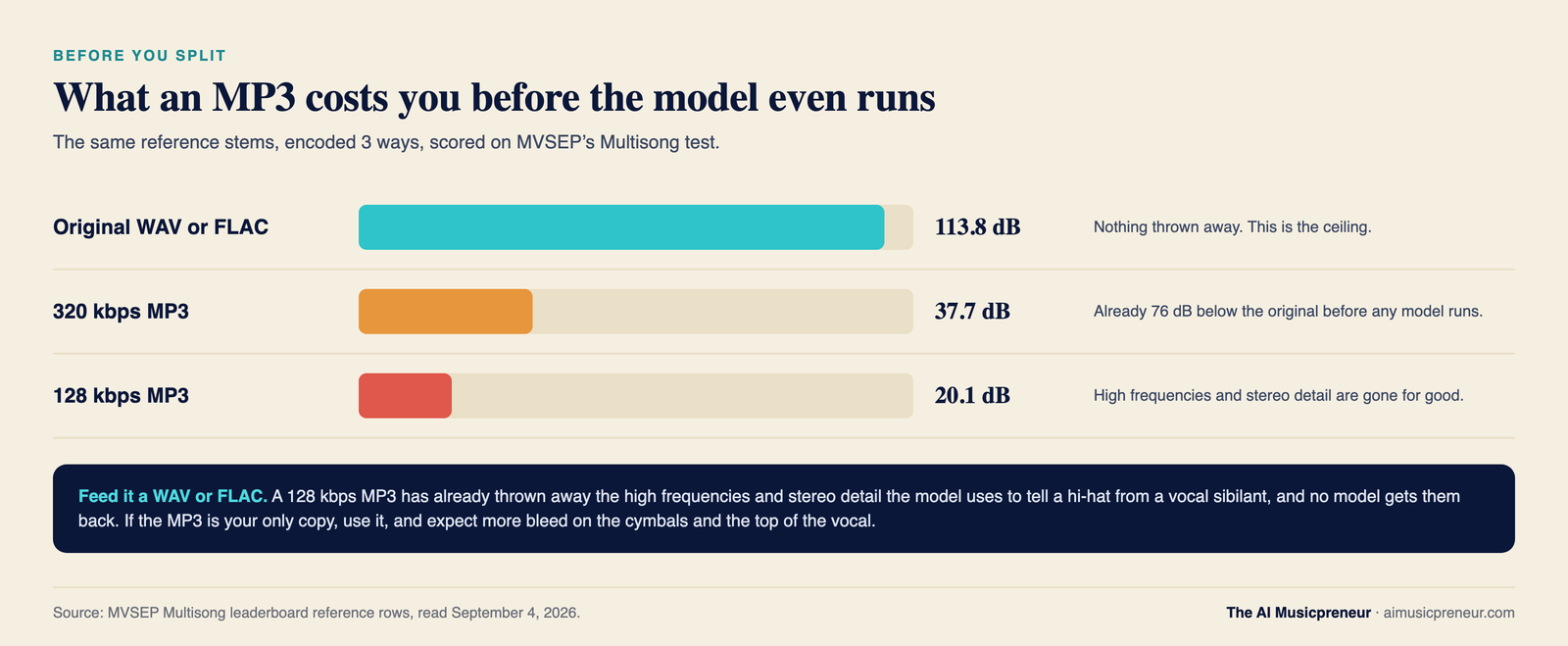
That MP3 number is the one to remember from this section. A 320 kbps MP3 lands at 37.7 dB, a 128 kbps file at 20.1 dB. The model then starts from there. Feed it a WAV.
Who measures separation quality, and what each source is worth:
| Source | Date | What it is | Headline number | Who ran it |
|---|---|---|---|---|
| MUSDB18-HQ | Aug 2019 | The reference dataset: 150 songs, 100 to train and 50 to test, 44.1 kHz stereo WAV, 4 stems. Used in nearly every claim on this page. | 150 songs | SigSep research community. Small, educational licence, mostly 2010s indie rock, and models can overfit to it. |
| MoisesDB | 2023 | Second public dataset with finer labels (guitar, piano, keys, drum parts). Papers cite 240 tracks. I couldn’t confirm the count on the README. | 240 tracks, unverified | Moises, a vendor. |
| Hybrid Transformer Demucs | Nov 2022 | The open model family behind FL Studio, UVR and most free tools. Trained on MUSDB HQ plus 800 extra songs. | 9.00 dB average SDR, 9.20 dB fine-tuned | Meta’s own authors. |
| BS-RoFormer | Sep 2023 | Band-split transformer that won the 2023 Sound Demixing Challenge. The family behind today’s leaderboard leaders. | 9.80 dB average SDR on MUSDB18-HQ, no extra data | ByteDance researchers, peer-reviewed paper. |
| Music.AI SDR study | Sep 2024 | Music.AI vs Logic Pro, LALAL.AI, RX 11, SpectraLayers, Demucs, Fadr and AudioShake on a 47-song MUSDB18-HQ subset plus 90 private songs. The boxplot below. | Music.AI 15.8% higher average SDR than the runner-up | The vendor, with a university partner. The vendor won, and every competitor was its 2024 version. |
| AudioShake vocal model | May 2025 | Vendor benchmark of its new vocal model on MUSDB-HQ, plus internal listening tests. | 13.5 dB vocals, up from 12.5 | The vendor. |
| SDX23 organisers’ report | Aug 2023, published in TISMIR 2024 | The people who ran the challenge scored every entry on SDR, then ran a separate listening test with working producers and musicians on the same systems. | Best system beat the 2021 winner by over 1.6 dB SDR | The organisers. The one study here that measures the yardstick itself. |
| Meta SAM Audio evaluation | Dec 2025 to Jan 2026 | Meta’s listening tests across 11 systems: AudioShake, Moises and Music AI, Fadr, LALAL.AI, Demucs, Spleeter, ElevenLabs, Auphonic, Tiger, Mossformer3 and Fast GeCo. Ears, no SDR, because SDR does not apply to a generative model. | AudioShake rated highest of the targeted models, and listeners preferred it to SAM Audio itself on instrument separation | Meta ran it. AudioShake published the reading of it, and it is the vendor that came first. |
| MVSEP Multisong leaderboard | Rolling, read Aug 28, 2026 | 100 songs, anyone can submit a model, scores recalculated every 3 hours. The only rolling public benchmark. | 12.33 dB vocals, 18.64 dB instrumental, 14.87 dB bass, 14.35 dB drums, about 9 dB other | The community that writes the open models. Browser vendors mostly don’t submit. |
| MusicRadar 11-tool test | Jan 2026 | Listening test scored out of 20, plus a null test. | Logic Pro 16/20. Only RX, SpectraLayers and UVR MDX-Net nulled. | One journalist, one set of songs. |
| Music By Mattie 12-tool test | Apr 2026 | 13 songs graded for separation, artefacts, tone and ease of use, on YouTube. | UVR 8.05, Moises 7.85 out of 10. Bass loses top end everywhere. | One creator, subjective, and the source of most per-stem findings above. |

That chart was the whole of this section in 2024, presented as a recent study. It’s now one row in the table, and the row says who ran it. SoundBoost, BandLab, Fadr and LALAL.AI appear in none of these tests with a number of their own. SoundBoost publishes no SDR at all: it ships a standard model and a paid Hi-Fi model (June 2026), and the only outside test I found, from AI Tune Craft the same month, called the standard split “not flawless” and the Hi-Fi re-split cleaner with less bleed.
Now the part that undoes the table. SDR and ears disagree, and the people who run these benchmarks say so themselves. The SDX23 organisers scored every entry on SDR and then sat producers and musicians down to listen to the same systems, and the two rankings did not line up. AudioShake, which competed, reads that paper as finding very little correlation between the best scores and the best-sounding output, with the top-scoring music model placing third in some of the listening tests. I have not verified that placement in the paper myself, so take the specific ranking as AudioShake’s account rather than mine. What is not in doubt is the direction: an audio engineer told me the same thing back when this page was first written, and by 2026 AudioShake had moved its own evaluation away from SDR toward perceptual metrics, while Meta skipped SDR entirely.
So SDR punishes a tiny timing or phase error the ear never notices, and forgives a quiet bleed the ear hates. Use the table to rule tools out, then run your own track through 2 or 3 of them before you pay.
Enough about the maths.
What can you do with stems? 13 use cases
Stems turn a finished song into raw material again. The list from 2024 had 10 jobs on it. Three more have become normal since, all of them driven by the free tiers.
| Use case | What you do with the stems |
|---|---|
| Remixing | Pull the vocal, drop it over a new arrangement, keep the hook people already know |
| Karaoke | Remove the vocal, keep a full-quality instrumental. My AI karaoke maker comparison covers the tools built for only this |
| Live backing tracks | Mute the part you’ll play live, keep the rest as your band |
| Practice with chords and a metronome | Solo the bass, loop 8 bars, slow it down, read the chord timeline. SoundBoost, Moises and BandLab all do this in the browser now |
| Splitting your own AI-generated song | Separate a Suno or Udio track so you can re-mix it, replace the vocal, or master the parts properly |
| Sampling | Isolate a horn stab or a drum break that was never released on its own |
| DJ sets | Swap one track’s vocal onto another’s beat live, on the deck (next section) |
| Film and video scoring | Pull the music out from under dialogue, or lift one element of a soundtrack for a scene |
| Voice-over and dubbing | Separate dialogue from music and effects for translation |
| Audio restoration | Clean one element of an old recording without touching the rest |
| Transcription and study | Isolate the piano to work out the voicings, or the bass to learn the line |
| Custom backing tracks | Build a play-along with the exact instrumentation a student needs |
| Content and social clips | Lift an acapella or a drum loop for a short video, a podcast bed or a mashup |
Two of those carry a licence question. Practice, study and a mashup for your own speakers use nothing you need to clear. A remix you release, a sample in a song you sell, or a backing track you perform for money uses someone else’s recording, and a separated stem is still their recording. Clear it before it ships.
What are stems in DJing?
In DJing, stems are the 4 parts of a track, drums, bass, vocals and melody, that the software can mute, swap or mix live. Native Instruments defined the format in 2015: a .stem.mp4 file that holds the full mix plus the 4 parts, sold pre-split on Beatport-era stores such as Juno, Traxsource and Bleep, and played in Traktor. Stems were a niche format for 8 years because so few tracks shipped in it.
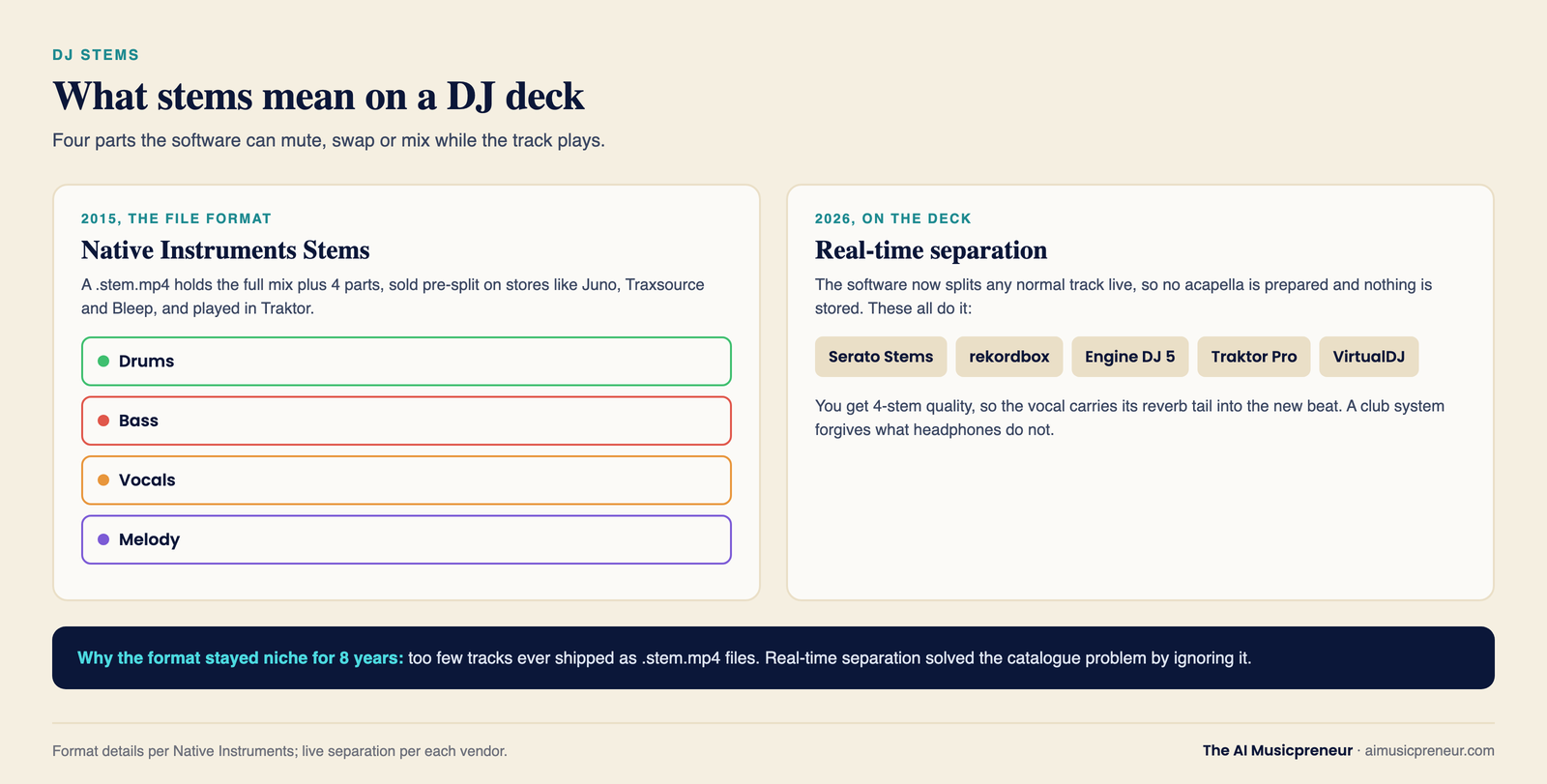
Real-time separation ended that. Serato Stems, rekordbox, Engine DJ 5 on Denon hardware, Traktor Pro and VirtualDJ now split any normal track into stems on the deck while it plays. A DJ can drop the vocal from one song over the drums of another with no acapella prepared, and the acapella never touched a hard drive. The quality is the 4-stem quality from the chart below, so the vocal carries its reverb tail into the new beat, and it works because a club system forgives what headphones don’t.
For the creative side, my 5 remixing tips for DJs covers what to do with the parts once you have them.
Which stems can each AI tool separate? The cheatsheet
Two charts, then the tool table. Chart A is the browser and app tools. Chart B is desktop software and the 4 DAWs that now split stems without a plugin. Columns run alphabetically, there are no ratings, and every cell comes from the vendor’s own docs or my own test. Which of these to use is the roundup’s job, and the AI stem splitter category lists every tool I track with a full page each.
Legend: ✅ separates it. † paid tier only. ❌ not offered. ? listed by the vendor but not confirmed in the app at the time of writing.
Chart A: browser and app stem splitters
| Stem | AudioShake | BandLab | Fadr | Kits.AI | LALAL.AI | Moises app | Music AI platform | SoundBoost |
|---|---|---|---|---|---|---|---|---|
| Vocals | ✅ | ✅ | ✅ | ✅ | ✅ | ✅ | ✅ | ✅ |
| Backing vocals | ✅ | ❌ | ? | ✅ (harmonies) | ✅ | ✅ | ✅ | ❌ |
| Bass | ✅ | ✅ | ✅ | ❌ | ✅ | ✅ | ✅ | ✅ |
| Drums | ✅ | ✅ | ✅ | ❌ | ✅ | ✅ | ✅ | ✅ |
| Other / instrumental | ✅ | ✅ | ✅ | ✅ | ✅ | ✅ | ✅ | ✅ |
| Guitar | ✅ | ✅† | ? | ❌ | ✅ | ✅† | ✅ | ✅† (Plus) |
| Piano | ✅ | ✅† | ? | ❌ | ✅ | ✅† ? | ✅ | ✅† (Plus) |
| Keys / synth | ✅ | ❌ | ? | ❌ | ✅ (synth) | ❌ | ✅ | ❌ |
| Winds / brass | ✅ | ❌ | ? | ❌ | ✅ | ❌ | ✅ | ❌ |
| Strings | ✅ | ✅† | ? | ❌ | ✅ | ❌ | ✅ | ❌ |
| Electric guitar | ✅ | ❌ | ? | ❌ | ✅ | ✅† | ✅ | ❌ |
| Acoustic guitar | ✅ | ❌ | ? | ❌ | ✅ | ✅† | ✅ | ❌ |
| Kick | ❌ | ❌ | ✅† | ❌ | ❌ | ✅† (Pro) | ✅ | ✅† (Plus) |
| Snare | ❌ | ❌ | ✅† | ❌ | ❌ | ✅† (Pro) | ✅ | ✅† (Plus) |
| Toms | ❌ | ❌ | ? | ❌ | ❌ | ? | ✅ | ✅† (Plus) |
| Hi-hat | ❌ | ❌ | ✅† | ❌ | ❌ | ? | ✅ | ✅† (Plus) |
| Cymbals | ❌ | ❌ | ? | ❌ | ❌ | ✅† (Pro) | ✅ | ✅† (Plus) |
| Dialogue / music / effects | ✅ (enterprise) | ❌ | ❌ | ❌ | ❌ | ❌ | ✅ | ❌ |
| Guitar solo / rhythm | ❌ | ❌ | ❌ | ❌ | ❌ | ✅† | ✅ | ❌ |
Music AI and Moises share an engine and get 2 columns on purpose. Music AI is the platform that sells the full stem catalogue to companies. Moises is its $3.99-a-month app, and the app exposes a smaller set, so a reader shouldn’t assume the app does everything the platform does. Fadr’s free tier splits 4 stems, and Fadr+ lists 16, of which digitalDrummer confirmed the kick, snare and hi-hat split in May 2026. The rest carry a question mark until I’ve run them.
SoundBoost’s free 5-stem mode counts the metronome as the fifth track. Guitar, piano and the drum-kit split need Unlimited Plus, and the studio shows a Separate button on the drums lane once you’re on it.
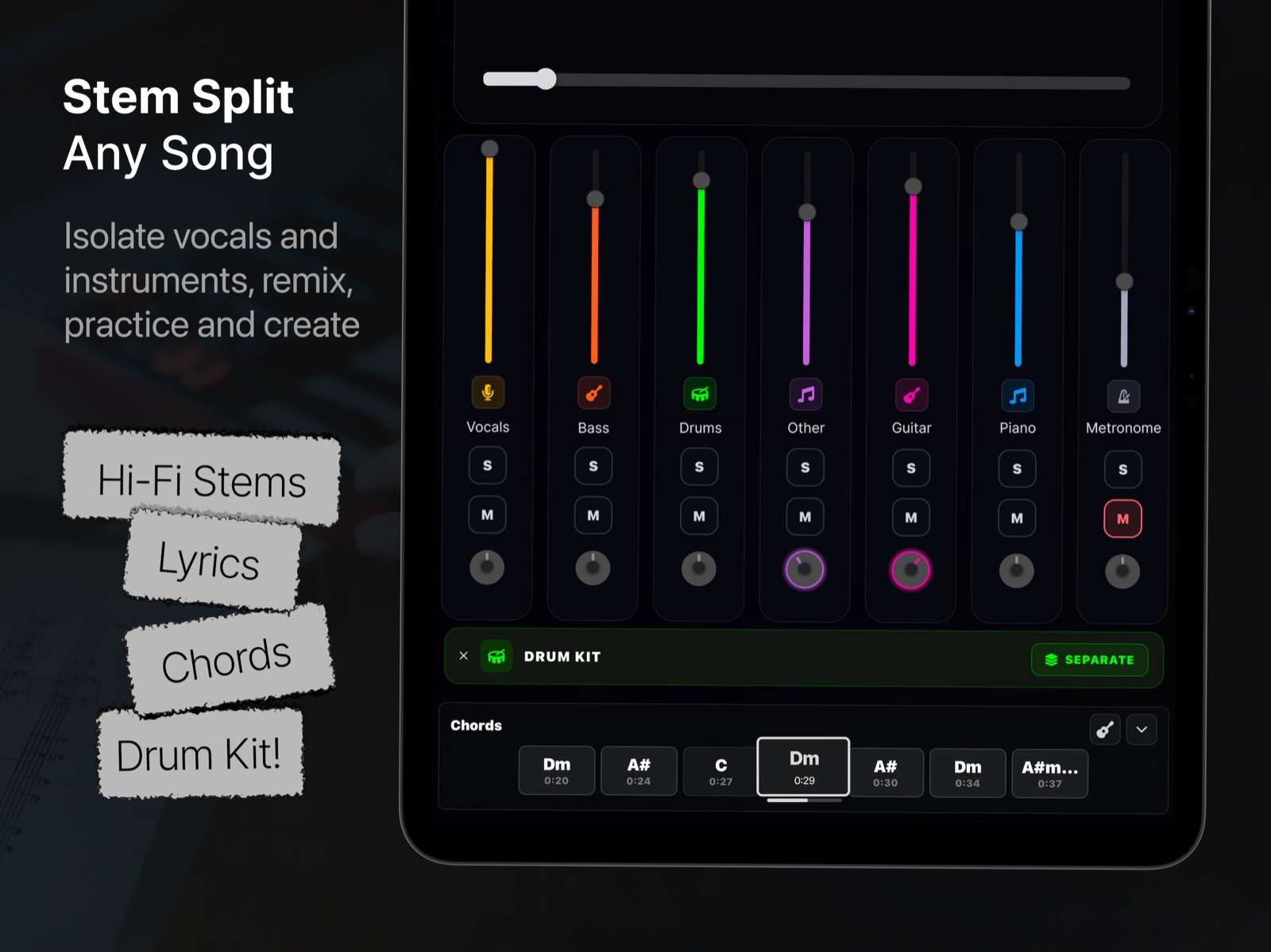
Chart B: desktop software and DAW built-ins
| Stem | Ableton Live 12.4 | Cubase 15 | FL Studio 2026 | iZotope RX 12 | Logic Pro 12 | RipX DAW PRO 8 | SpectraLayers 13 Pro | UVR5 |
|---|---|---|---|---|---|---|---|---|
| Vocals | ✅ | ✅ | ✅ | ✅ | ✅ | ✅ | ✅ | ✅ |
| Backing vocals | ❌ | ❌ | ❌ | ❌ | ❌ | ? | ❌ | ✅ (karaoke models) |
| Bass | ✅ | ✅ | ✅ | ✅ | ✅ | ✅ | ✅ | ✅ |
| Drums | ✅ | ✅ | ✅ (percussion) | ✅ (percussion) | ✅ | ✅ | ✅ | ✅ |
| Other / instrumental | ✅ | ✅ | ✅ | ✅ | ✅ | ✅ | ✅ | ✅ |
| Guitar | ❌ | ❌ | ❌ | ❌ | ✅ | ✅ | ✅ | ✅ (htdemucs_6s) |
| Piano | ❌ | ❌ | ❌ | ❌ | ✅ | ✅ | ✅ | ✅ (htdemucs_6s, weak) |
| Keys / synth | ❌ | ❌ | ❌ | ❌ | ❌ | ? | ❌ | ❌ |
| Winds / brass | ❌ | ❌ | ❌ | ❌ | ❌ | ❌ | ✅ (sax and brass) | ❌ |
| Strings | ❌ | ❌ | ❌ | ❌ | ❌ | ❌ | ❌ | ❌ |
| Electric guitar | ❌ | ❌ | ❌ | ❌ | ❌ | ❌ | ❌ | ❌ |
| Acoustic guitar | ❌ | ❌ | ❌ | ❌ | ❌ | ❌ | ❌ | ❌ |
| Kick | ❌ | ❌ | ❌ | ❌ | ❌ | ? | ✅ (Unmix Drums) | ❌ |
| Snare | ❌ | ❌ | ❌ | ❌ | ❌ | ? | ✅ | ❌ |
| Toms | ❌ | ❌ | ❌ | ❌ | ❌ | ? | ✅ | ❌ |
| Hi-hat | ❌ | ❌ | ❌ | ❌ | ❌ | ? | ✅ | ❌ |
| Cymbals | ❌ | ❌ | ❌ | ❌ | ❌ | ? | ✅ (ride, crash) | ❌ |
| Dialogue / music / effects | ❌ | ❌ | ❌ | ✅ (Dialogue Isolate) | ❌ | ❌ | ✅ (Unmix Soundtrack) | ❌ |
| Guitar solo / rhythm | ❌ | ❌ | ❌ | ❌ | ❌ | ❌ | ❌ | ❌ |
Four stems inside the DAW is the new floor. Ableton Live 12.4 (Suite only), Cubase 15 (Pro and up), FL Studio 2026 and iZotope RX 12 all stop at vocals, drums, bass and other. Logic Pro is the outlier at 6, adding guitar and piano on any M1 or later Mac, and it won MusicRadar’s January test. UVR’s drum-part models live on MVSEP rather than in the app. SpectraLayers 13 Pro is the only desktop tool that splits the kit, and its cheaper Elements edition unmixes vocals only.
Stem separation tools compared: type, pricing and max stems
| Tool | Type | Pricing model | Starting price | Max stems |
|---|---|---|---|---|
| AudioShake Indie | Browser and API | Paid per stem | $20/mo for 4 stems, 10 for $39, 20 for $60 | 13 stem types |
| BandLab Splitter | Browser, iOS, Android | Free, Membership for 7 | Free, unlimited uploads, 15-minute cap | 7 on Membership (adds guitar, strings, piano), MIDI export |
| Fadr | Browser, plus a VST3 and AU plugin | Freemium | Free 4 stems as MP3. Fadr+ $10/mo or $100/yr | 16 on Fadr+ |
| Kits.AI | Browser | Freemium | Free. Starter $10/mo | Vocals, instrumental, harmonies |
| LALAL.AI | Browser, desktop, VST on Pro | Freemium subscription | Free 10 minutes, previews. Lite 6.75 euros/mo billed yearly | 6 per pass, 11 stem types |
| Moises | Browser, iOS, Android, desktop | Freemium | Free 5 tracks/mo. Premium $3.99/mo. Pro $9.99/mo | 6 tracks with guitar models, drum parts on Pro |
| MVSEP | Browser | Free with a queue, credit bundles | Free, about 50 separations a day, signup for WAV | Dozens of models, drum parts, choir SATB |
| SoundBoost | Browser, iOS, Android | Freemium | Free 5 stems, MP3, no signup, 750 MB. Unlimited $16/mo or $48/yr. Unlimited Plus $24/mo or $72/yr | 5 free, 7 on Plus, plus 5 drum parts on Plus |
| Ableton Live 12.4 | DAW built-in, on-device | Included in Suite | Suite price | 4, High Speed or High Quality mode |
| Cubase 15 | DAW built-in | Included from Pro | Pro price | 4 |
| FL Studio 2026 | DAW built-in, Remix a Song | Free update, lifetime free updates | Edition price | 4 |
| iZotope RX 12 | Plugin (AU, VST3, AAX) and editor | One-time | Elements $99, Standard $399, Advanced $1,399 | 4, Music Rebalance runs in real time |
| Logic Pro 12 | DAW built-in, on-device, M1 or later | Included | Logic price | 6, with presets and custom submixes |
| RipX DAW PRO 8 | Standalone AI DAW | One-time | From $99 (DAW), 21-day trial | 6 plus note-level layers |
| SpectraLayers 13 | Standalone and ARA2 plugin | One-time | Elements $89.99 (vocals only), Pro $359.99 | 7, plus 6 drum-kit pieces on Pro |
| Ultimate Vocal Remover 5 | Desktop, Windows, Mac, Linux | Free, MIT licence | Free, GPU recommended | 2 per model, 4 with Demucs, 6 with htdemucs_6s |
BandLab doesn’t print its Membership price on a page I can reach without logging in. Third parties say $14.99 a month or $99 for the first year, and I can’t confirm either, so the table leaves it out. SoundBoost’s own tool page has the full review, and my coverage of its free stem splitter launch has the January details.
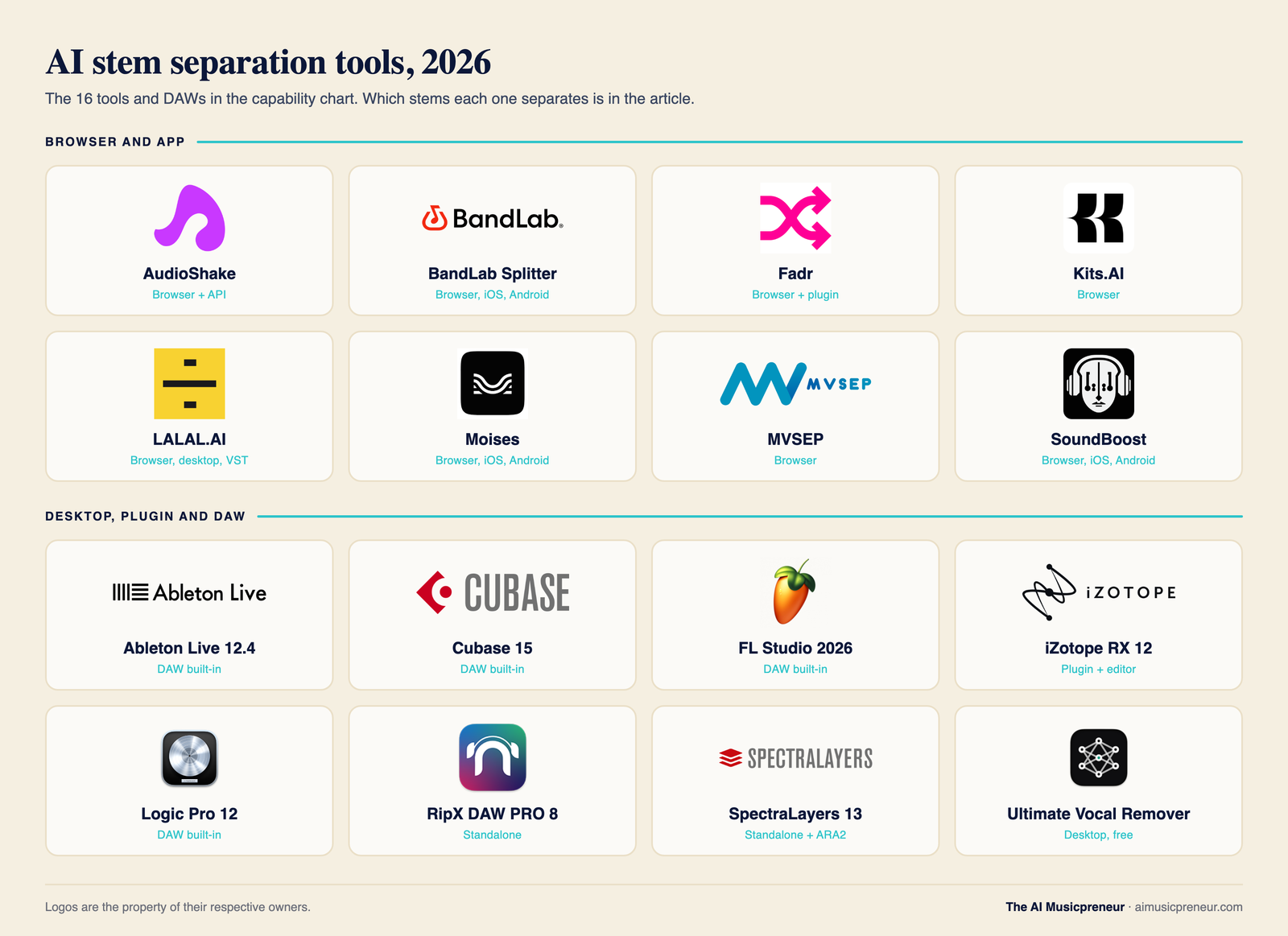
Every row above is on the cheatsheet. Download it, or jump back to the preview to read it on screen first.
What to check before you split a track
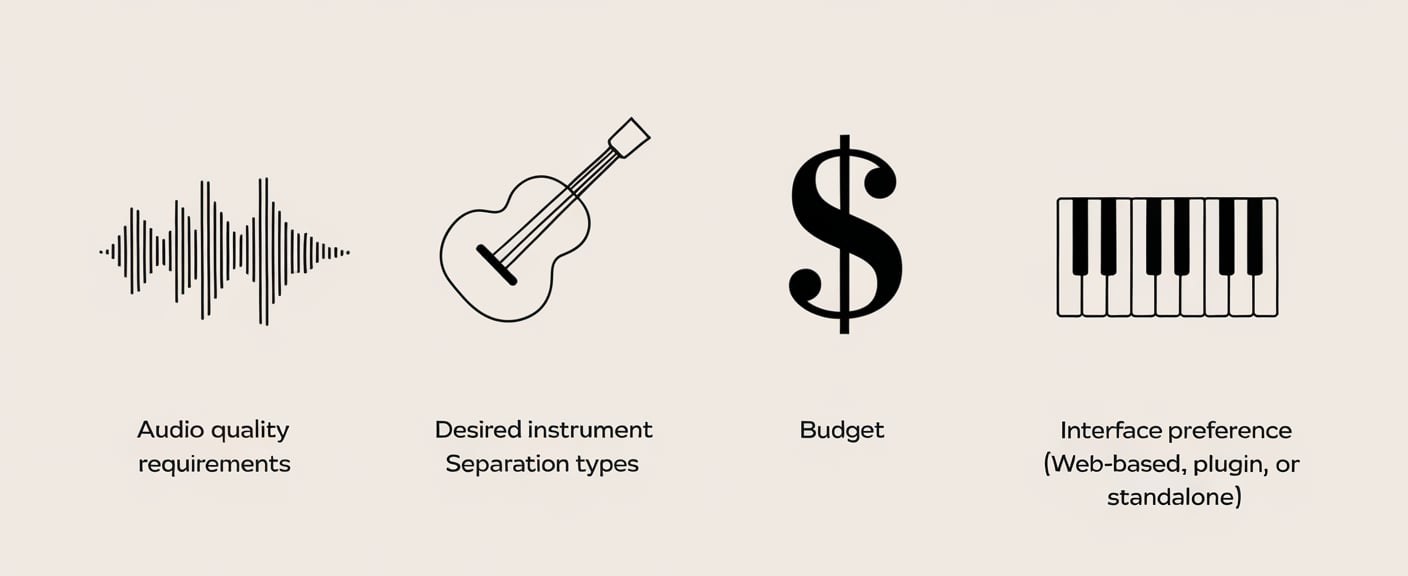
The roundup tells you which tool. This list is about the track and the job, and it applies to every tool in the charts. I learned most of it by running an old recording from my former band through a 5-stem and a 7-stem split: a live band bleeds into every microphone, and the stems showed every bit of it.
Feed it a WAV or FLAC before an MP3
The MVSEP numbers above are the whole argument. A 128 kbps MP3 has already thrown away the high frequencies and stereo detail the model uses to tell a hi-hat from a vocal sibilant, and no model gets them back. If the only copy you have is an MP3, use it, and expect more bleed on the cymbals and the top of the vocal.
Count the stems the job needs
Karaoke needs 2. A remix needs 4. Learning a piano part needs the piano on its own, which means a paid tier on every browser tool and a 6-stem DAW on the desktop. Decide the count first, because the free tiers all stop at 4 or 5 and the price jump is for the stems past that.
Decide whether the file may leave your machine
Unreleased music, a client’s session, a demo under NDA: those stay on the desktop. UVR, RX, SpectraLayers, RipX and the 4 DAWs never upload. Browser tools do, and only SoundBoost prints a line saying it doesn’t train on what you upload. Moises, LALAL.AI, BandLab and Fadr publish no such line either way, which means you check the privacy policy before you send them something that matters.
Check the licence on the source
A stem you pulled from someone else’s record is a copy of their record. For practice and for a mashup that stays on your laptop, no clearance is needed. For a release, a sample in a song you sell, or a paid performance, you need the same clearance you’d need for the whole song. Your own AI-generated tracks and your own recordings carry no such question, and that’s a large part of why Suno creators have become the fastest-growing group splitting stems.
Know the budget shape
Free tiers cover a lot in 2026. BandLab splits 4 stems for free with no upload limit, and SoundBoost’s free stem splitter gives 5 stems and a practice studio with no signup, with a paid ceiling of $48 a year for unlimited splits. Fadr+ is $100 a year, LALAL.AI Lite 81 euros, Moises Premium $35.88. Above that you’re paying for the drum kit, the piano stem, Hi-Fi models or WAV export, and the tool table shows who charges for which.
One thing that’s specific to SoundBoost and worth knowing before you compare: its stems open in a browser studio with solo, mute, loop, pitch and tempo controls and a chord timeline, and a Send to Mastering button pushes the stem mix into its online mastering engine. If your workflow ends in a master rather than a DAW, that’s a shorter path than any other tool on this page offers.
Then pick the tool. The roundup ran 7 of them against the same track, and the per-stem sections there answer the question this page deliberately doesn’t.
Stems in music: the recap
What to keep from this page:
- A stem is a group of related tracks mixed down to one file. Sum the stems and you get the finished mix.
- Multitracks are the raw individual tracks. Stems are submixes of them. The words are swapped so often that engineers now ask which one you mean.
- The 4 standard stems (vocals, drums, bass, other) come from the MUSDB18 dataset, and other is a bucket for everything the model wasn’t taught.
- Exported stems are the original parts and pass a null test. AI-separated stems are a reconstruction, and only RX, SpectraLayers and UVR’s MDX-Net mode null.
- Vocals and instrumentals separate best (12.33 and 18.64 dB), drums and bass next (14.35 and 14.87 dB), guitar and piano last (about 9 dB in the other bucket).
- SDR is the yardstick, ears overrule it, and an MP3 costs 80 dB of headroom before any model runs.
- 12 tools and 4 DAWs are in the charts. Four stems inside the DAW is the floor, Logic Pro does 6, and 5 tools split the drum kit.
- Free tiers cover practice, karaoke and most remixes. The paid tiers sell the stems past 4, WAV export and the bigger models.
Spotify still doesn’t hand out stems. The tools in this cheatsheet are how everyone gets them anyway.
Frequently asked questions
What are the 4 types of stems in music?
The 4 standard stems are vocals, drums, bass and other, where other holds everything the first 3 don't: guitars, keys, synths, strings and effects. The split comes from MUSDB18, the dataset almost every separation model trains on, so most AI tools default to it. Logic Pro, LALAL.AI, Moises and SoundBoost's paid tier add guitar and piano on top.
What is the difference between stems and multitracks?
Multitracks are the individual recorded tracks in a session: kick, snare, each guitar, each vocal take. Stems are groups of those tracks mixed down into one file each, with the panning and effects kept, so a song might have 40 multitracks but only 5 stems. Sum the stems and you get the finished mix back. Sum the multitracks and you get the raw, unmixed song.
Can you get stems from Spotify or Apple Music?
No. Spotify and Apple Music stream a finished stereo mix, and neither offers stems for download. To get stems from a streamed song you need the original session from the artist or label, a stem pack sold with the release, or an AI stem splitter that rebuilds the stems from the stereo file.
Does stem separation use AI?
Yes. Every modern stem separation tool runs a machine-learning model trained on multitrack recordings, such as Demucs, MDX-Net or BS-RoFormer. Older methods used phase cancellation or centre-channel extraction, which only removed a vocal sitting dead centre and left the reverb behind. Since Deezer released Spleeter in 2019, trained models have replaced those tricks in every tool in this cheatsheet.
What are stems in DJing?
In DJing, stems are the 4 parts of a track (drums, bass, vocals, melody) that the software can mute, swap or mix live. Native Instruments defined the format in 2015 as a .stem.mp4 file sold pre-split, and Serato, rekordbox, Engine DJ, Traktor and VirtualDJ now separate stems in real time on the deck from any normal track. That lets a DJ drop one song's vocal over another's beat without preparing an acapella first.
Why does the piano stem sound worse than the vocal stem?
A piano spreads across nearly the whole frequency range and rings out for seconds, so its notes overlap with guitars, synths and vocals in every part of the spectrum. The model also has fewer clean examples of it: the main training set, MUSDB18-HQ, files piano under other with no separate label. On MVSEP's Multisong leaderboard the best vocal model scores 12.33 dB SDR, while the other stem, where piano lives, scores about 9 dB.
About the author

Covering AI music tools, industry shifts, and news for music creators and professionals. Twice-weekly newsletter at aimusicpreneur.com.