LALAL.AI
LALAL.AI splits vocals, instruments, drums, bass, and 10+ stem types with pro-grade AI — web, desktop, mobile, and VST plugin. Free plan + pay-as-you-go.
What is LALAL.AI and how does it work?
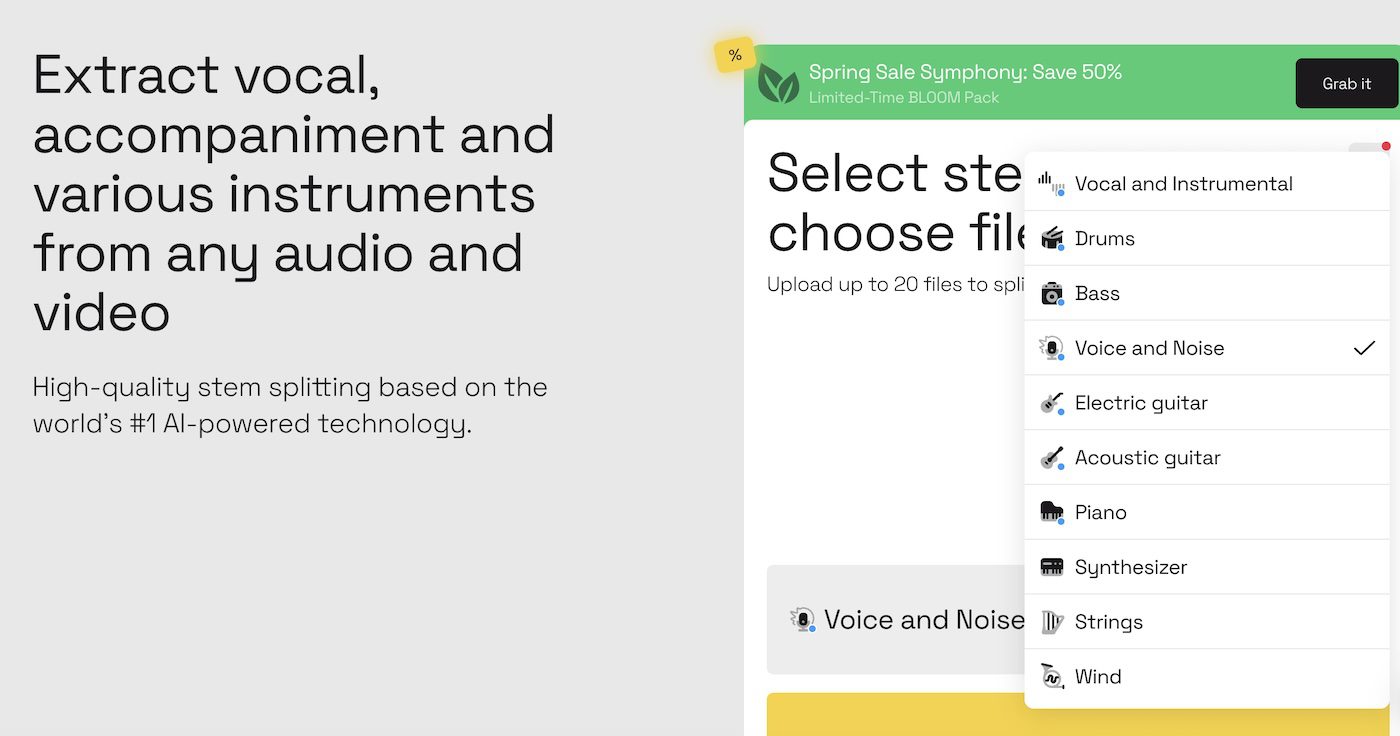
LALAL.AI is one of the best-known AI stem splitters on the market — used by producers, remixers, DJs, and post-production studios for clean source separation. It extracts vocals, accompaniment, and individual instruments from any audio or video file using a proprietary neural network.
The product spans every form factor a musician might want:
- Web app — upload and split directly in the browser
- Desktop apps — Mac and Windows for batch processing offline workflows
- Mobile apps — iOS and Android for on-the-go separations
- VST Plugin — runs inside your DAW for native integration
- API — developer access for integrating LALAL.AI into your own product
LALAL supports 10+ stem types: Vocal/Instrumental, Drums, Bass, Piano, Voice/Noise, Electric Guitar, Acoustic Guitar, Synthesizer, Strings, and Wind instruments.
How much does LALAL.AI cost?
LALAL.AI offers both subscription and one-time minute packs:
| Plan | Price | Best for |
|---|---|---|
| Starter | Free | Testing the platform |
| Lite | €8.99/mo (€81/year — €6.75/mo annual) | Regular use, single stem types |
| Pro | €17.99/mo (€162/year — €13.5/mo annual) | Producers needing multiple stems per track |
Pay-as-you-go minute packs:
- Starter — 750 minutes for €50
- Premium — 3000 minutes for €190
- Enterprise — 5000 minutes for €300
Important: minutes are consumed per stem-type, per file. A 5-minute file split into 3 stem types (e.g. Vocal/Instrumental + Drums + Piano) consumes 15 minutes total. Plan accordingly.
How does LALAL.AI compare to other stem splitters?
LALAL sits at the professional, pay-per-use end of the stem splitter market:
- vs Sesh / BandLab Splitter — those are free with simpler output; LALAL has more stem types, better quality, and broader form factors (mobile, VST, API)
- vs Music AI — both are pro-grade with subscription + pay-as-you-go pricing; LALAL has more stem types and a stronger VST plugin offering
- vs Moises — Moises bundles separation into a wider practice/voice/AI ecosystem; LALAL focuses specifically on best-in-class separation across every form factor
- vs RipX DAW — RipX adds note-level editing inside a DAW environment; LALAL stays focused on separation and meets you wherever you work
Choose LALAL.AI when separation quality and form-factor flexibility matter most — and when you want the option to switch between web, desktop, mobile, and DAW plugin without changing tools.
What are some use cases for LALAL.AI?
- Remix and mashup production — extract clean vocals or instrumentals from any track
- DJ edits — strip drums or vocals for live edits and bootlegs
- Karaoke and vocal practice — instrumental versions of any song
- Post-production audio repair — isolate dialog from background music in video and broadcast
- Music education — break down recordings to teach arrangement and instrumentation
- Sample creation — pull individual elements from existing tracks for new productions
- DAW workflow — the VST plugin lets you run separations inside Logic, Ableton, FL Studio, or Pro Tools without leaving your project
- Multilingual content production — separate dialog from music for video re-dubbing
- Mobile-first workflows — the iOS and Android apps let you split tracks anywhere, anytime
- Developer products — integrate LALAL.AI separation into your own app via the API
LALAL.AI is most valuable to producers, audio engineers, and platforms who need professional stem separation across multiple form factors — and who appreciate the flexibility of choosing subscription, minute packs, or per-track pricing depending on usage patterns.