
What's new in FL Studio 2026? A beginner's guide to every major update
My stack My fav 6 tools for AI music after testing 70+
-
 ElevenMusic · Music generation
 -
 Moises · Stem separation
 -
 Controlla · Voice swap & cloning
 -
 Cryo Mix · Mixing + mastering
 -
 Neural Frames · Music videos
 -
 ONCE · Distribution
Some links are affiliate links — I earn a commission at no cost to you. Every tool here is one I run myself and truly believe in. This stack is proven.
Most DAW updates hand you 30 small fixes and 1 feature you’ll never open. You skim the changelog, hit install, and nothing about your workflow changes.
FL Studio 2026 is a different kind of update. It shipped on July 7, 2026, it’s free for every license holder, and its biggest additions target the exact points where beginners get stuck: finding sounds, losing projects, and turning a finished song into a remix.
This guide covers what FL Studio 2026 is, the 6 new features worth your attention, and how to update step by step.
What is FL Studio 2026?
FL Studio 2026 is the newest version of Image-Line’s DAW, released on July 7, 2026. It rebuilds the FLEX synthesizer, upgrades the Gopher assistant so it can perform tasks inside your project, and adds cloud project backup, the Transmitter plugin, and a 1-click Remix a Song tool. Every existing user gets it free.
Image-Line walks through the full release in its official video:
Why the FL Studio 2026 update matters for beginners
FL Studio comes with Lifetime Free Updates. Buy it once and every future version, including this one, costs you nothing. Compare the official FL Studio 2026 release page with last year’s FL Studio 2025 update and you’ll see a pattern: the AI and workflow tools keep landing in the version you already own.
For beginners the 2026 release matters for a simpler reason. The 3 headline features (FLEX, Gopher, Remix a Song) remove work you’d otherwise need experience, or extra tools, to handle.
The 6 biggest new features in FL Studio 2026
Here’s what deserves your attention, in the order you’ll probably meet it inside the DAW.
FLEX rebuilt: lighter on CPU, over 200 free presets
FLEX is FL Studio’s preset instrument. You open it, pick a polished sound, and play, with no synthesis knowledge required. In FL Studio 2026 it got its first full rebuild since 2019.
The new browser searches across all sound packs and filters by genre. Large piano and orchestral patches load faster. And every user gets over 200 new presets across 8 free Core Series packs, built for the new engine.
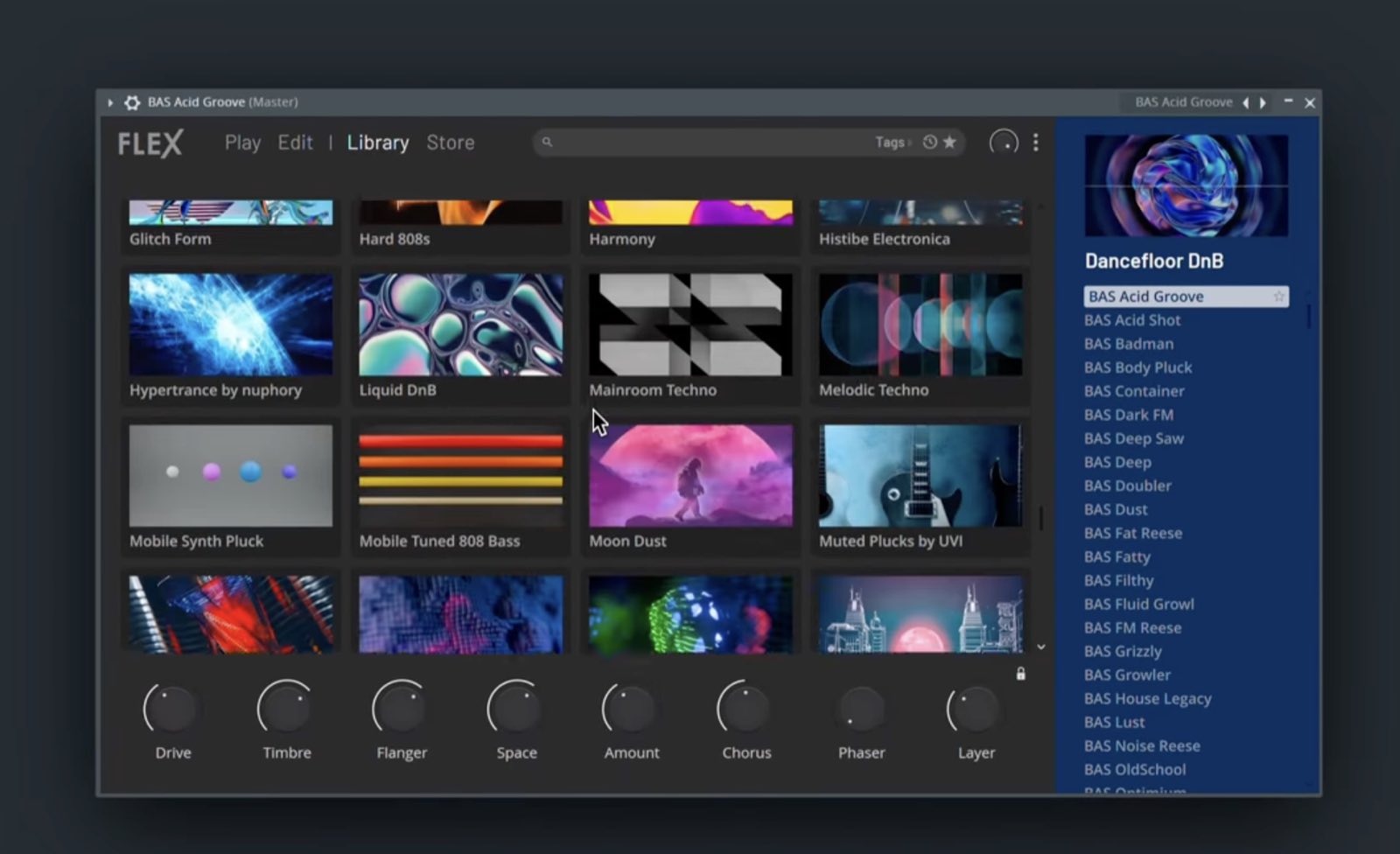
Your old FLEX packs keep working. If you miss the old look, open the theme settings and pick Blue Alt, the closest match to the previous design.
Gopher goes hands-on: your prompts now change the project
Gopher used to answer production questions. In FL Studio 2026 it acts on them. Tell it to color your tracks, sort them by name, set mixer levels, or route audio, and it does the work. It also writes Piano roll and VFX scripts from a plain-language request, in your native language.
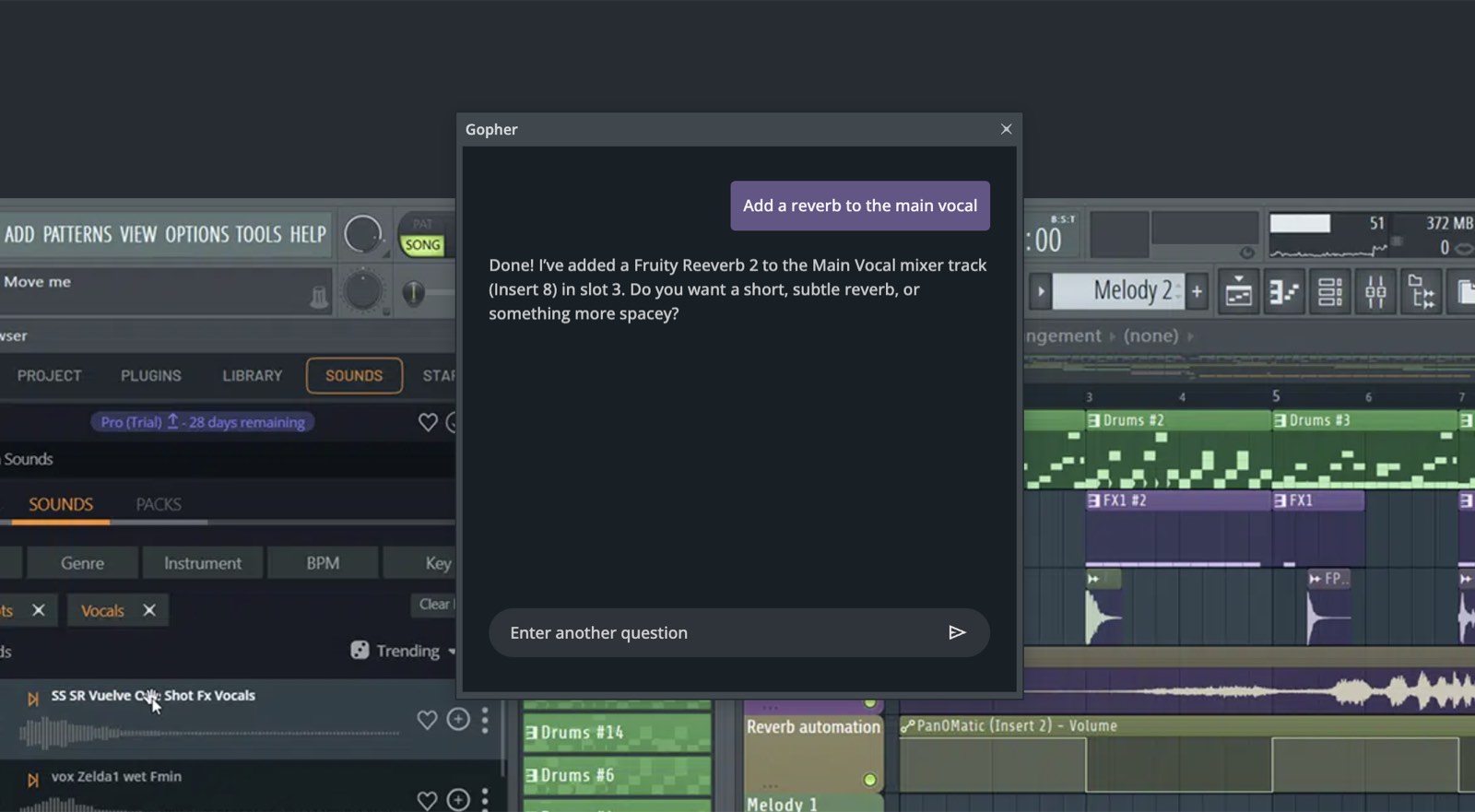
New users get one more gift: Gopher now walks you through your first steps in FL Studio with scripted tutorials, listed under the Help menu.
I broke down the full assistant upgrade, and Image-Line’s no-training pledge, in my FL Studio 2026 Gopher launch coverage.
FL Cloud project backup: 500 MB free, up to 1 TB
Every producer knows someone who lost a project to a dead laptop. FL Studio 2026 closes this gap with FL Cloud project backup: tick 1 option in the save dialog and your project uploads to encrypted cloud storage on every save.
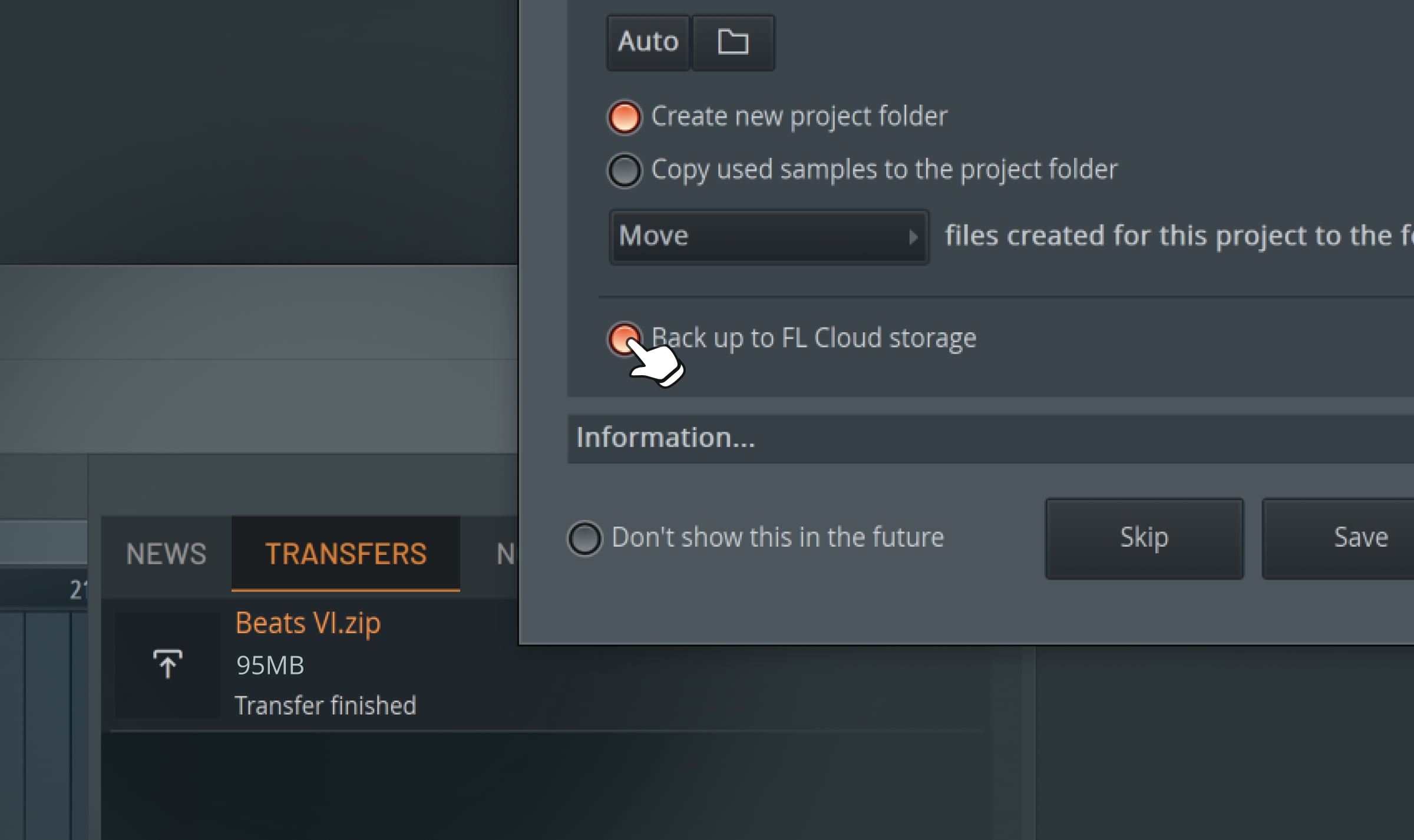
Every account gets 500 MB free. FL Cloud Plus raises it to 5 GB, and Pro goes up to 1 TB, as Attack Magazine’s coverage details. Image-Line is direct about the privacy question:
It's private, it's encrypted, and we never use it to train AI.
Transmitter splits a sound into hit and tail
Transmitter is a new plugin in the All Plugins Edition. It splits any signal into 2 components: the transient (the hit) and the sustain (the tail). Each component gets its own output channel, so you can route the crack of a snare and its ring to different mixer tracks and process them on their own.
For drums, percussion, and plucks, this gives you control most beginners only get from expensive third-party tools.
Audio Logger records your last 60 seconds, always
The Audio Logger continuously captures the audio passing through your master track in the background. Played the perfect take while recording was off? Open the logger and FL Studio transfers the last 60 seconds straight into the Edison editor.
Every producer has lost an idea this way. Now the idea survives.
Chord detection lands on the toolbar
A new chord panel on the toolbar identifies notes and chords in real time, whether you play them on a MIDI keyboard, the typing keyboard, or select them in the Piano roll.
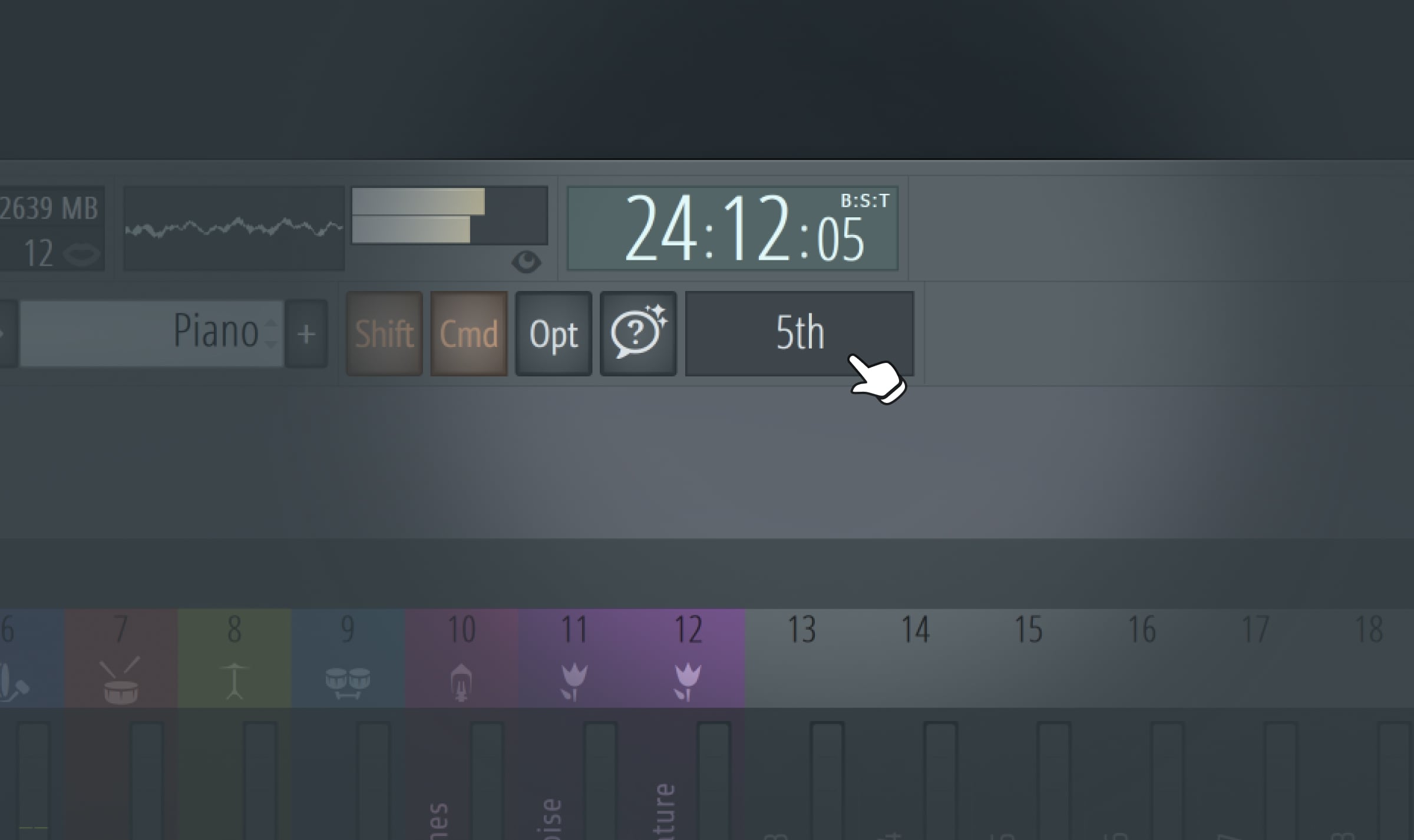
The Piano roll gains renameable keys and a smarter chord stamp tool with 2 new modes: top down builds the chord under your melody note, bottom up picks a matching chord for you. Both use voice leading, so progressions sound smooth instead of jumpy. If you want to go deeper on harmony helpers, read my guide to FL Studio’s chord progression tool.
How to remix a song in FL Studio 2026 with 1-click stem separation
Remixing used to demand prep work: find the tempo, split the vocals from the instrumental in a separate tool, import everything, and hope it lines up. The new Remix a Song tool compresses all of it into 1 click.
Here’s how it works:
- Open FL Studio 2026. The Welcome window shows a new Remix a song option.
- Click it and pick the track you want to remix.
- FL Studio detects the tempo, sets your project BPM to match, and separates the track into stems on the Playlist.
- Mute the stems you don’t need, keep the one you want (the vocal or the drums), and start chopping.
Since the project BPM already matches the source track, every loop and sample you add stays in time.
The built-in separation is fast and convenient. If you need cleaner isolated vocals for a release-ready remix, compare the dedicated options in my AI stem separation tools roundup.
Smaller FL Studio 2026 upgrades you’ll feel every session
The 2026 release also ships a long list of quality-of-life fixes. These stood out to me:
- Right-click a gain handle on any audio clip and pick Normalize, individually or relative to the loudest clip in your selection.
- Pan individual audio clips without making them unique first.
- Sort the Channel rack by type: samplers, instruments, automation clips, audio clips.
- The plugin manager scans noticeably faster when you have a big plugin folder.
- Browser tabs can show inline waveform previews of your samples.
- On Apple Silicon Macs, FL Studio now uses Apple’s audio workgroups API, which reduces audio dropouts under sudden CPU load.
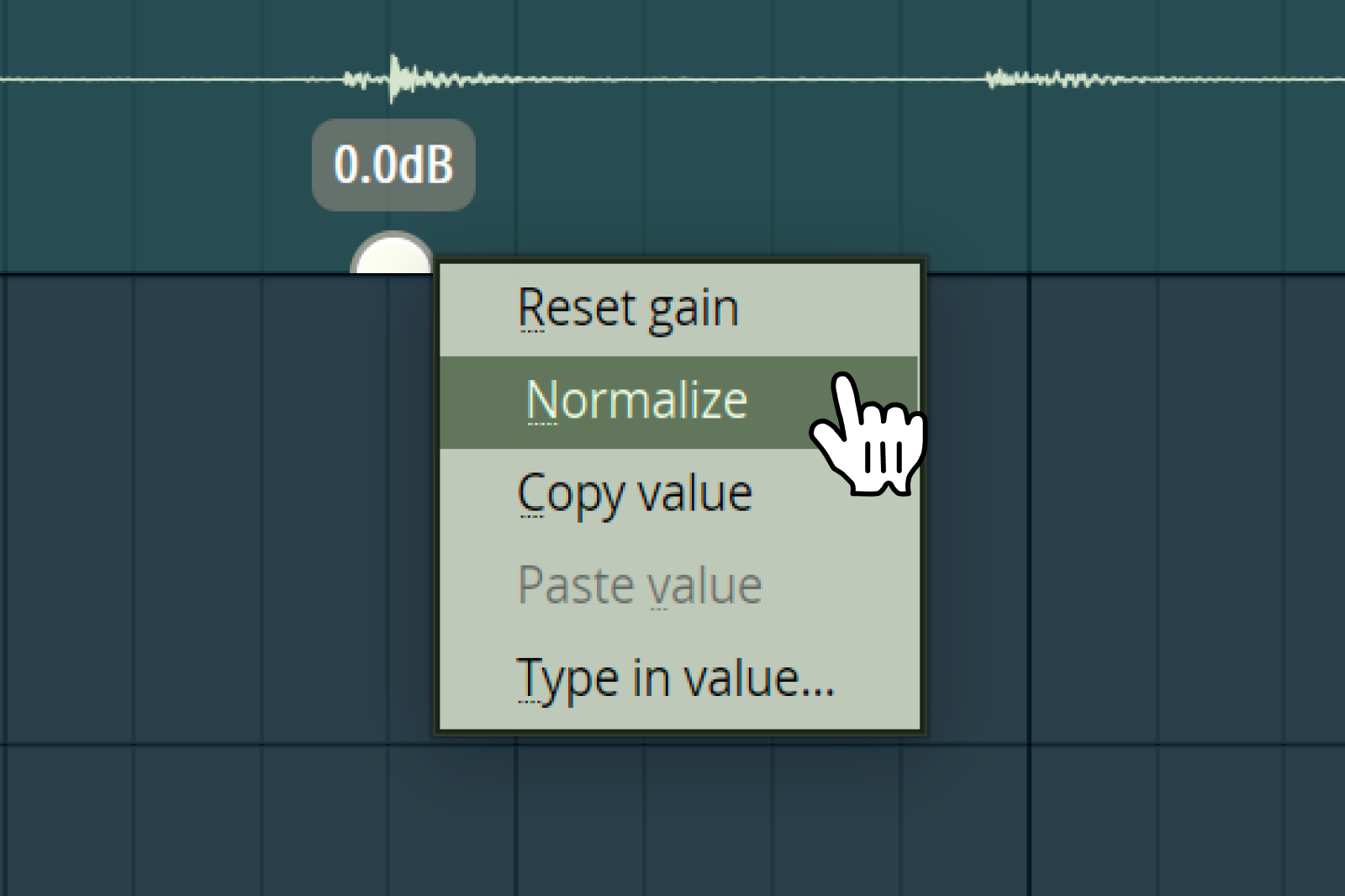
None of these make a launch headline. All of them shave seconds off things you do 50 times per session.
How to download the FL Studio 2026 update
Updating takes about 10 minutes:
- Go to the official FL Studio download page and grab the installer for Windows or macOS.
- Run it over your current installation. No uninstall needed, and your projects, settings, and plugins stay safe.
- Open FL Studio and sign in with your Image-Line account when prompted.
The update is free for every license holder. If you don’t own FL Studio yet, the trial never expires and includes all features; the only limit is you can’t reopen saved projects until you buy an edition.
Check the system requirements before you install: Windows 10 or 11 with 4 GB of RAM, or macOS 10.15.7 and newer on Intel or Apple Silicon. Image-Line recommends 8 to 16 GB of RAM and an SSD.
Key takeaways on the FL Studio 2026 update
FL Studio 2026 is a free update aimed at removing friction. The flashy AI assistant gets the headlines, but the everyday tools carry the release.
What to remember:
- FL Studio 2026 came out on July 7, 2026, free under Lifetime Free Updates.
- The rebuilt FLEX cuts CPU use by up to 50% and adds over 200 free presets.
- Remix a Song gives you tempo detection and stem separation in 1 click.
- Gopher now executes tasks in your project and never trains on your data.
- FL Cloud backup protects your projects with 500 MB of free encrypted storage.
Image-Line keeps folding AI into the DAW itself, and this release won’t be the last step. For an earlier example of the same strategy, see how FL Studio integrated ElevenLabs sample generation.
Which feature will you try first: the new FLEX or the 1-click remix?
Frequently asked questions
When did FL Studio 2026 come out?
Image-Line released FL Studio 2026 on July 7, 2026. The update is free for everyone who owns a license, under the company's Lifetime Free Updates policy. The Windows build is version 26.1.0.5530, and the macOS build is 26.1.0.5294.
What are the system requirements for FL Studio 2026?
On Windows you need Windows 10 or 11, a 2 GHz CPU with SSE2 support, 4 GB of RAM, and 4 GB of free disk space. On Mac you need macOS 10.15.7 or newer on an Intel or Apple Silicon machine. Image-Line recommends a quad-core CPU, 8 to 16 GB of RAM, and an SSD for smooth sessions. Windows on ARM is not supported.
Does FL Studio 2026 have stem separation?
Yes. The new Remix a Song option in the Welcome window loads a track, detects its tempo, and separates it into stems on the Playlist in 1 click. You can then mute, chop, and rearrange each stem on its own.
What changed in FLEX in FL Studio 2026?
FLEX got its first full rebuild since 2019. The new engine cuts CPU use by up to 50% with updated packs, loads large multi-sample patches faster, and adds a new browser with Library and Store pages. Every user gets over 200 new presets across 8 free Core Series packs, and old FLEX packs keep working.
What is the difference between FL Studio 2025 and FL Studio 2026?
FL Studio 2025 introduced Loop Starter and Gopher as a question-and-answer helper. FL Studio 2026 turns Gopher into an assistant able to change your project, rebuilds FLEX, and adds FL Cloud project backup, the Transmitter plugin, an Audio Logger, toolbar chord detection, and the Remix a Song tool.
About the author

Covering AI music tools, industry shifts, and news for music creators and professionals. Twice-weekly newsletter at aimusicpreneur.com.
