iZotope Photon launches at $349, splitting stems and cleaning audio on your own GPU with no cloud upload

My stack My fav 6 tools for AI music after testing 70+
-
 ElevenMusic · Music generation
-
 Moises · Stem separation
-
 Controlla · Voice swap & cloning
-
 Cryo Mix · Mixing + mastering
-
 Neural Frames · Music videos
-
 ONCE · Distribution
Some links are affiliate links — I earn a commission at no cost to you. Every tool here is one I run myself and truly believe in. This stack is proven.
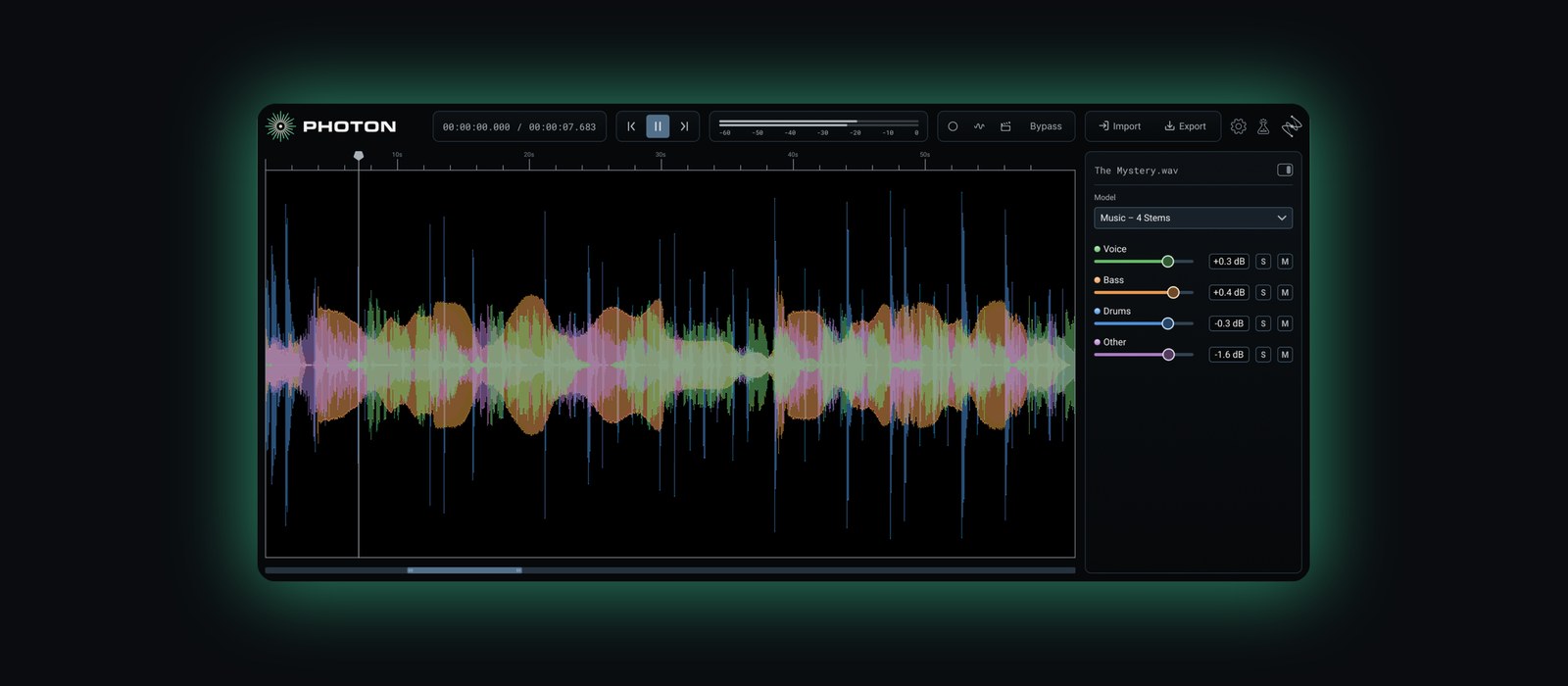
iZotope launched Photon on November 3, 2026, and the pitch fits in one line: your audio never leaves your computer.
Photon is a standalone app and ARA2 plugin that splits finished songs into stems and cleans up noisy recordings. It runs 12 custom-trained AI models on your own GPU, so there’s no upload, no queue and no credit balance running out halfway through an album.
It costs $349. Until December 7, a cyber sale takes it down to $259.
Photon is also the first product iZotope’s researchers built together with Boris FX, which bought iZotope on July 2. Here’s iZotope’s own walkthrough:
What iZotope Photon does: 6 models that split audio and 6 that clean it
Photon’s 12 models come in 2 groups. Demix pulls a file apart. Denoise cleans it up.
The Demix side is the one musicians will care about:
- Music 4 Stems and Music 4 Stems Ultra split a song into vocals, drums, bass and other. Ultra is the sharper of the two, meant for stems that have to hold up on their own.
- Drums 5 Stems breaks a kit into kick, snare, hi-hat, toms and cymbals, from a drum bus or from a full song.
- Voice 2 Stems splits voice from music, so it’s the quick acapella or karaoke job.
- Voice Separator pulls up to 6 speakers out of one recording, plus room tone and background noise.
- Cinema 4 Stems splits a film scene into dialogue, music, sound effects and everything else.
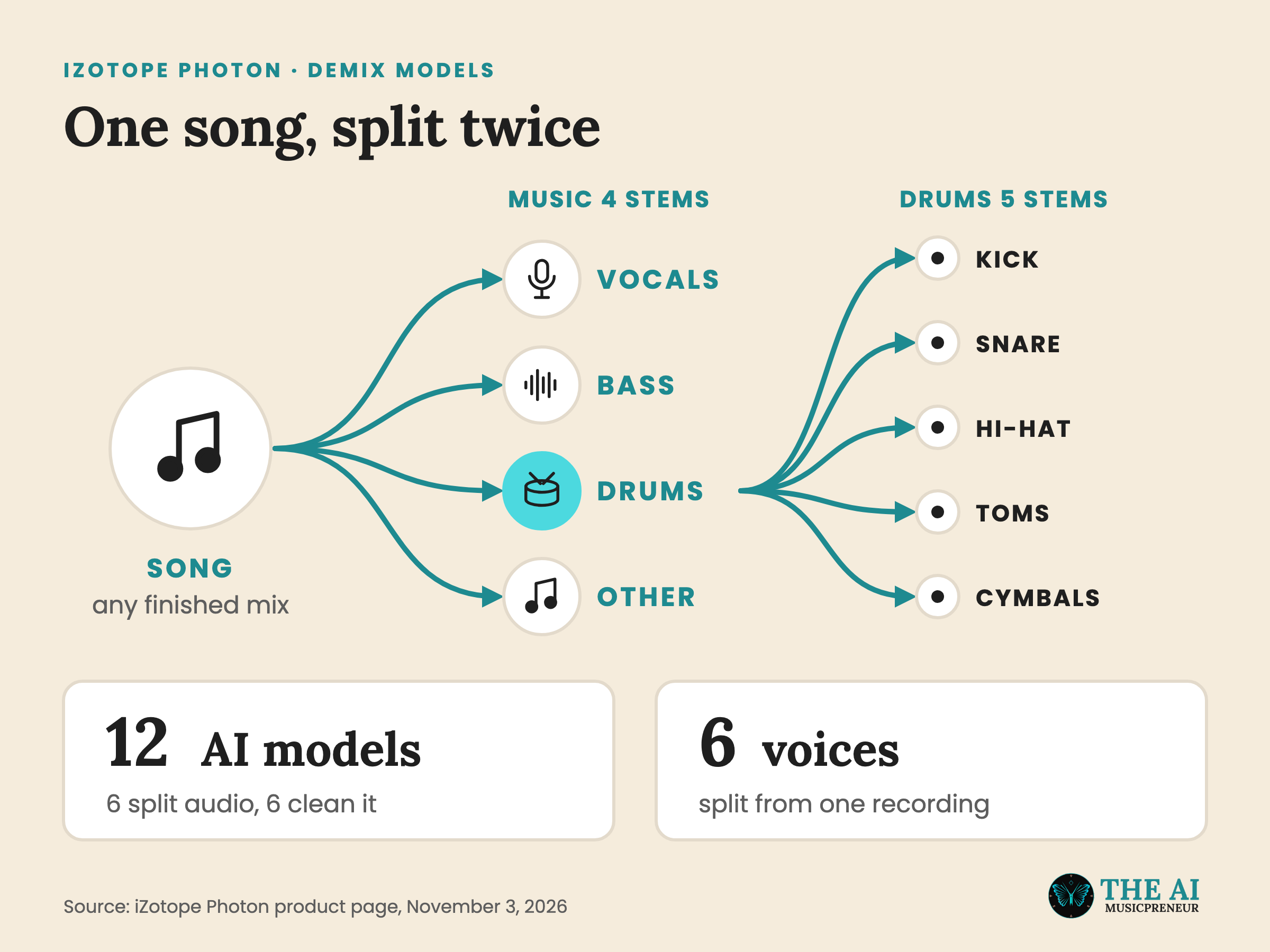
For a producer, the drum model is the interesting one. Music 4 Stems gives you one drum stem, and Drums 5 Stems takes that stem apart again. So you can lift the snare from a reference track, or turn up a kick that isn’t hitting hard enough in a bounced demo (both are iZotope’s own examples).
The Denoise side is aimed at speech: Voice Restore, Indoor, Indoor Noisy, Outdoor, Outdoor Traffic and Outdoor Wind. In its launch post, iZotope says the Indoor and Outdoor models also even out levels and bring the voice forward while they clean. If you record podcasts, interviews or talking-head videos next to your music, that’s the half you’ll use.
The bigger change is where all 12 of them run.
How iZotope Photon’s local GPU processing differs from browser stem splitters
With a browser splitter like Moises, your song goes up to someone else’s server, gets split there and comes back to you. You work inside a monthly quota or a credit balance.
Photon skips that whole trip. The models run on your GPU, and iZotope’s line is that “nothing touches the cloud” and “nothing leaves your device.”
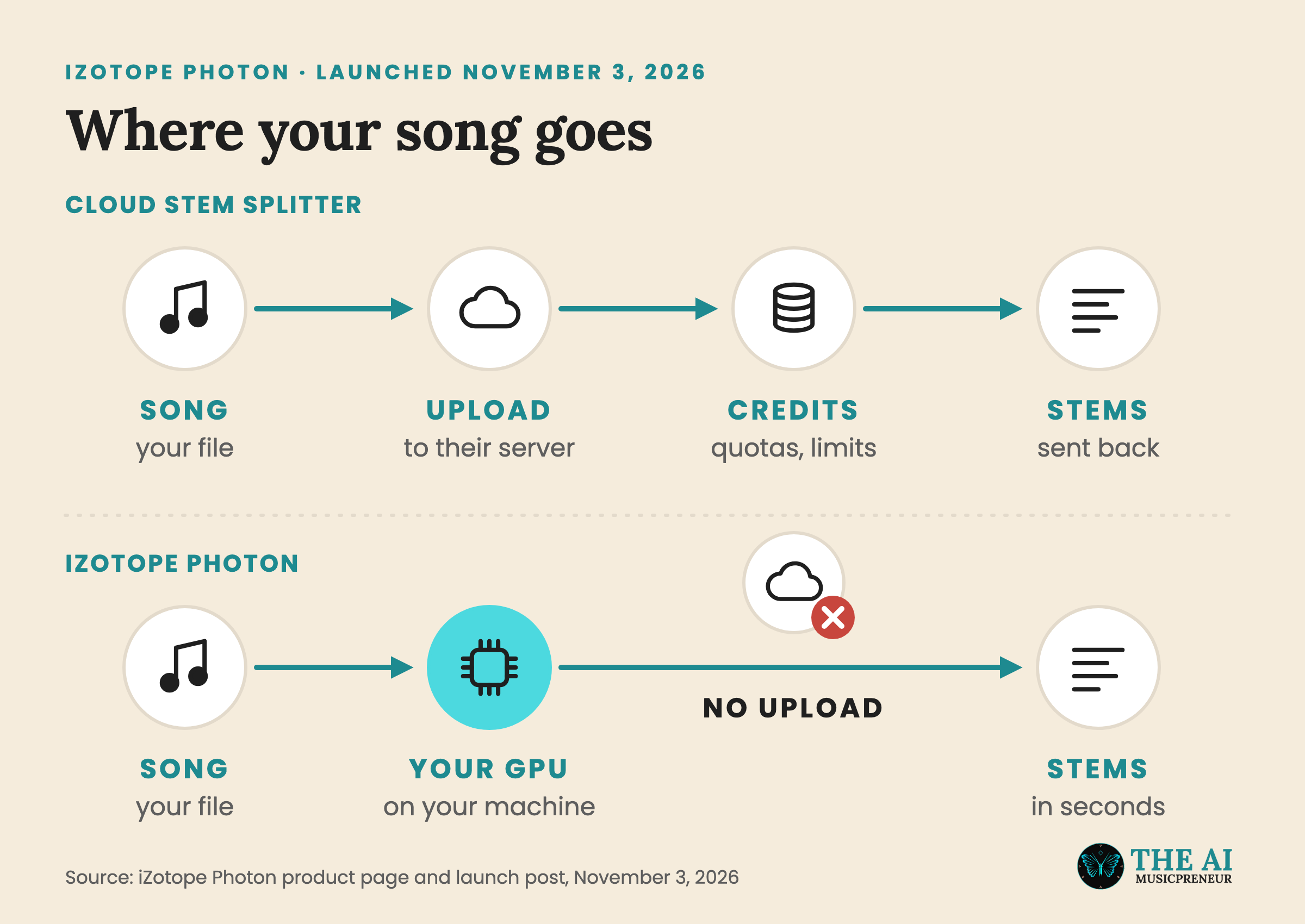
That matters most when the file isn’t yours to upload. iZotope names embargoed material and files that are “simply not yours to share”, which covers an unreleased master, a client’s mix or a session under NDA.
It also changes how you listen. You can click anywhere in a clip and Photon starts processing from that spot, so you hear the result in seconds instead of waiting for the whole file to render.
The price of running local is hardware. iZotope lists these requirements:
- An Apple silicon Mac (M1 or later) on macOS 14 or later, so Intel Macs are out.
- Or a 64-bit Windows 10 or later PC with a GPU that has at least 4 GB of VRAM.
- 16 GB of RAM, recommended on both.
Inside a DAW, Photon runs as an ARA2 plugin in Pro Tools, REAPER and Cubase on Mac and Windows, plus Sequoia and Samplitude on Windows, MusicTech reports. ARA hands Photon the whole clip instead of a real-time buffer, so the model hears the full file before it splits. Exports come out as WAV, FLAC or MP3, or as a video file with the original picture untouched.
One thing iZotope doesn’t spell out is the training data. It says the models are “custom-trained on our own real-world audio data”, which is a different claim from “trained on licensed music”. If that difference matters for your release, ask before you build a workflow on it. Stem separation is also in court right now: Grammy-winning drummer Trevor Lawrence Jr. used it as his example in a brief arguing AI training is fair use.
iZotope Photon vs RX 12, UVR5 and your DAW’s splitter: which one do you need?
Honestly, $349 is a lot for stems alone, because a lot of you already own a stem splitter and might not know it.
Here’s where Photon sits next to the options from my stem splitter test:
- iZotope RX 12 costs $399 for Standard. Its Music Rebalance gives you 4 stems inside your session, and the spectral editor fixes the artefacts every splitter leaves behind.
- Ultimate Vocal Remover is free and also runs locally, if you have a GPU and the patience for its setup.
- Logic Pro, Ableton Live 12.4 Suite and FL Studio ship their own splitters, at no extra cost if you already own them.
- SpectraLayers 13 Pro costs $359.99 and edits the split audio as spectral layers.
iZotope pitches Photon and RX as a pair:
Think paint roller and paintbrushes: grab Photon when you want to cover a lot of ground quickly, and RX when you need precise detail work.
Where Photon pulls ahead on paper is the bundle. Drum parts, 6-speaker separation, the cleanup models and video in and out all sit in one local window.
Where it falls short is the music model itself. Music 4 Stems means 4 stems, so no guitar and no piano. LALAL.AI and Logic Pro split both, so if you need the guitar from a Suno track as its own file, Photon won’t hand it to you. My stems cheatsheet lists which tool splits which instrument.
So who is it for? If you edit video, podcasts or interviews next to your music, Photon covers all of it in one app that never uploads anything, and the $259 sale price makes that easier to justify. If you only make music and already own Logic or Ableton Live Suite, try your DAW’s splitter first.
I haven’t run Photon on my own test track yet, so everything above comes from iZotope’s spec sheet. The question I want answered is whether Music 4 Stems Ultra holds up on a dense mix, because if it does, the browser splitters finally have a local rival worth $259.
Frequently asked questions
How much does iZotope Photon cost?
iZotope lists Photon at $349. A cyber sale drops it to $259 until December 7, 2026. Owners of any paid iZotope product get a crossgrade price when they log in, and iZotope says RX owners get the deepest discount.
What computer do I need to run iZotope Photon?
Photon runs on an Apple silicon Mac (M1 or later) with macOS 14 or later, or on a 64-bit Windows 10 or later PC with a GPU that has at least 4 GB of VRAM. iZotope recommends 16 GB of RAM. Intel Macs are not on the list.
Which DAWs can run iZotope Photon as an ARA plugin?
Photon runs as an ARA2 plugin in Pro Tools, REAPER and Cubase on Mac and Windows, and in Sequoia and Samplitude on Windows. iZotope says other ARA2 hosts work too. In any other DAW you can use the standalone app and import the exported stems.
What is the difference between iZotope Photon and iZotope RX 12?
Photon is the fast option: drop in a file, pick a model, export stems or clean audio. RX 12 is the detailed one, with a spectrogram editor for fixing single sounds like a cough under a vocal line. iZotope built Photon to sit next to RX, and each app has its own models.
About the author
Covering AI music tools, industry shifts, and news for music creators and professionals. Twice-weekly newsletter at aimusicpreneur.com.