YouTube's Replace song tool now makes 4 AI instrumentals to clear copyright claims outside the US, but not in the EU

My stack My fav 6 tools for AI music after testing 70+
-
 ElevenMusic · Music generation
-
 Moises · Stem separation
-
 Controlla · Voice swap & cloning
-
 Cryo Mix · Mixing + mastering
-
 Neural Frames · Music videos
-
 ONCE · Distribution
Some links are affiliate links — I earn a commission at no cost to you. Every tool here is one I run myself and truly believe in. This stack is proven.
YouTube now lets creators in most countries outside the European Economic Area fix a music copyright claim with an AI track. You click Create in YouTube Studio’s Replace song tool, you get 4 royalty-free instrumentals, and once one of them replaces the claimed song, the Content ID claim comes off.
TeamYouTube announced the expansion on November 3, 2026 in a post on the YouTube Community forum, as PPC Land reported. Until then, the Create button only worked for US creators on desktop, where it launched on May 1. YouTube’s Help Center page on claimed content now says the feature “is available in most countries outside of the European Economic Area.”
That leaves out all 27 EU countries, plus Norway, Iceland and Liechtenstein. YouTube hasn’t said why, and the post doesn’t list which countries got it.
How YouTube’s Replace song Create button clears a Content ID claim
A Content ID claim happens when your upload matches a song a rights holder has registered with YouTube. Replace song already let you swap that song for a track from the YouTube Audio Library. The Create button adds a second option: music YouTube generates for you on the spot.
The Help Center lists the steps:
- In YouTube Studio, open Content, click the notice on the claimed video and pick View details.
- Find the claim, click Take action, then Replace song.
- Under the Suggestions tab, click Create and wait for the tracks.
- Play them, and hover over a track title to see its licensing information.
- Click Add on the one you want, drag it over the claimed part of the timeline, and click Save.
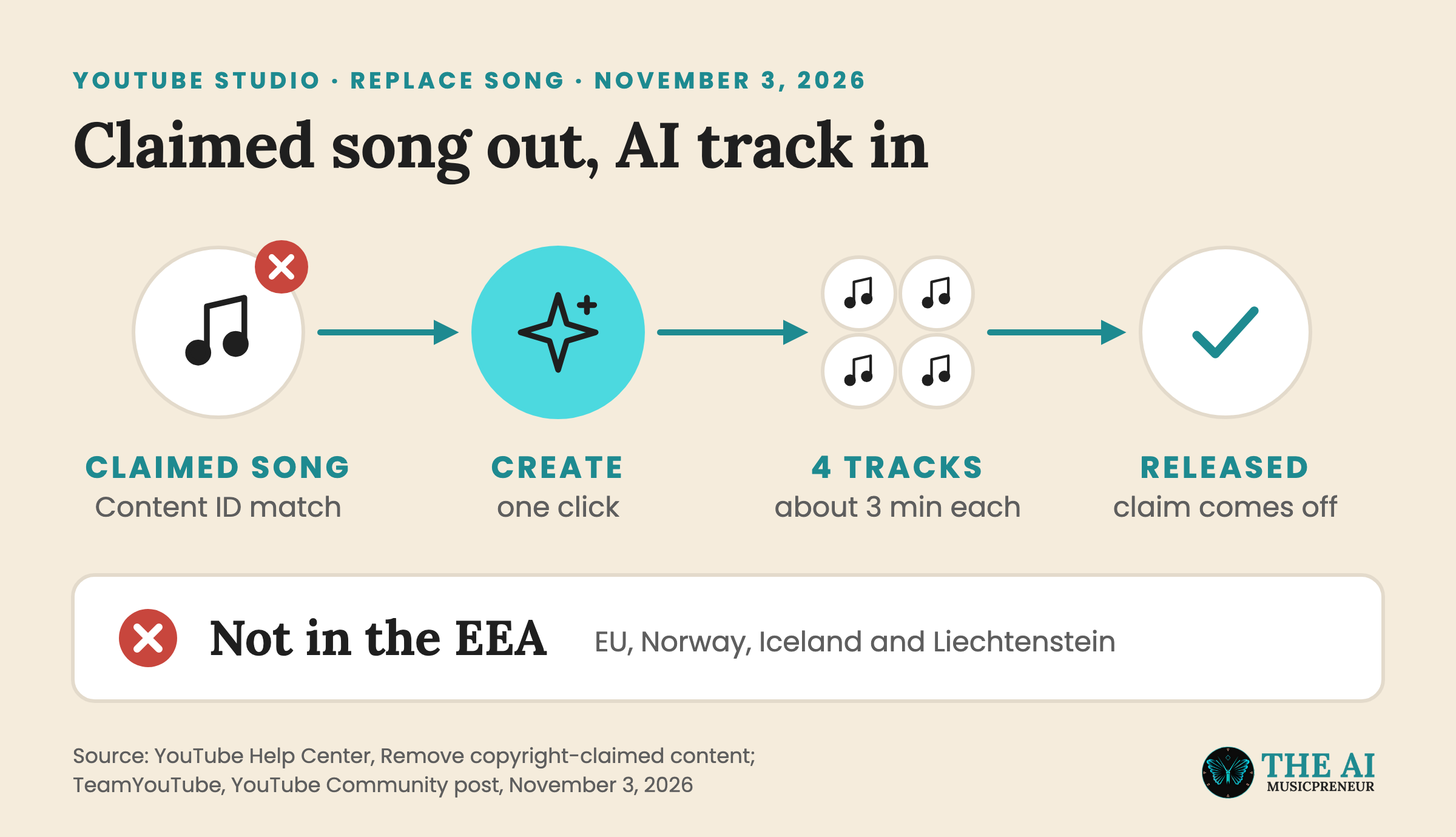
Each track runs about 3 minutes, so a longer claimed segment means looping it on the timeline, as ShiftDelete notes. By default, YouTube removes only the music from your original soundtrack across the whole claim, so your speech stays in, and the claim comes off once the claimed audio is fully replaced.
Where YouTube’s AI Replace song tracks work, and where they don’t
YouTube creator liaison Rene Ritchie presented the Create button on the Creator Insider channel on May 1, 2026. The segment starts at 1:54.
“Hit it and YouTube will generate four royalty-free instrumental tracks that you can use to replace copyrighted audio in your videos and release Content ID claims,” Ritchie said in the video. He also said a global launch and a Studio mobile rollout were planned for later in the year, as Music Business Worldwide reported at the time.
The global part arrived on November 3, minus the EEA. The mobile part hasn’t. The Create button still sits in YouTube Studio on desktop, and YouTube gave no timetable for the app.
TeamYouTube’s post says the feature launched for US creators “earlier this year” and is now reaching “creators in more countries,” without naming them. So “most countries outside the EEA” is as precise as it gets for now. PPC Land points to the EU AI Act transparency rules, which made AI tool makers mark AI-generated output from August 2, 2026, as the backdrop, but YouTube itself gives no reason.
What you can and can’t do with YouTube’s AI Replace song tracks
The Help Center and the FAQ in TeamYouTube’s post set 4 limits:
- The tracks are instrumental only. “For now, the Replace song tool only generates instrumental background music,” the FAQ says.
- There’s no prompt box. “As of now, there is no option to use your own prompt to generate a track,” per the Help Center. If you don’t like the 4 tracks, you refresh the page and click Create again.
- You can download the tracks as MP3 files, but “music generated by this feature is intended solely for use in videos and other content that you create on YouTube,” the post says. So it’s not a free library for TikTok, Reels or a release.
- Since June 2025, edits saved in the YouTube Studio editor can’t be reverted, so your original soundtrack is gone once the change goes through.
YouTube hasn’t named the AI model either. That sets it apart from Music Assistant, which YouTube launched in April 2025 for Partner Program members in its Creator Music marketplace. Music Assistant takes text prompts and runs on Google DeepMind’s Lyria, the model family behind Lyria 3.5 in the Gemini app. It’s also separate from YouTube’s speech-to-song tool for creators.
If you need a prompt, a genre or a vocal, a standalone generator still does that. I compared 7 of them in my AI instrumental generators roundup.
Who loses when YouTube’s AI track replaces a claimed song
A rights holder can set a Content ID claim to block a video, track its views, or monetize it by running ads, “sometimes sharing revenue with the uploader,” according to YouTube’s page on copyright claims. The same page says “Monetize” is “the most common policy applied to music claims.”
So on a typical music claim, the ads on your video pay the rights holder. Swap the song for an AI track, and the claim comes off that video, along with the rights holder’s ad money from it.
Royalty-free music libraries sit in the same spot. When the Create button launched in May, Tubefilter asked how it would affect the companies that sell background music to creators. Uppbeat, which runs one of those libraries, found in its 2026 creator survey that 6.7% of 1,792 creators accept fully AI-generated work.
What’s next for YouTube’s Replace song AI tool: mobile, the EEA and vocals
YouTube hasn’t put a date on any of the 3 open pieces: the Studio mobile app, creators in the EEA, and vocals or custom prompts. PPC Land also notes that YouTube hasn’t said whether 2 creators could get the same track, or whether a generated track could later get matched and claimed by Content ID itself.
This is YouTube’s second AI music change in a month, after YouTube Music started labeling AI-generated songs in October. If you’re in the EEA, the Audio Library swap and the Erase song option in the same menu still work while you wait.
Frequently asked questions
When did YouTube first launch the Create button in the Replace song tool?
Rene Ritchie presented it on YouTube's Creator Insider channel on May 1, 2026. At launch it only worked for creators in the US using YouTube Studio on desktop. TeamYouTube opened it to most countries outside the European Economic Area on November 3, 2026.
Is YouTube's Replace song AI generator the same tool as YouTube Music Assistant?
No. Music Assistant launched in April 2025 for YouTube Partner Program members in the Creator Music marketplace, takes text prompts and runs on Google DeepMind's Lyria model. The Replace song generator only appears on videos with an audio claim, takes no prompt, and YouTube hasn't named the model behind it.
Can a creator undo a Replace song edit in YouTube Studio after saving it?
No. Since June 2025, edits saved in the YouTube Studio editor can't be reverted, and that includes swapping a claimed song for an AI track. YouTube's Help Center tells creators to check the result before they click Save.
What happens if the AI track doesn't cover the whole claimed segment on YouTube?
It depends on the Mute all sounds in the claimed segment toggle. With the default setting, YouTube removes the music across the whole claim and the claim is released. With the toggle on, music is removed only where the new track plays, and if the track doesn't cover the full claimed segment, it turns red and the claim stays.
About the author
Covering AI music tools, industry shifts, and news for music creators and professionals. Twice-weekly newsletter at aimusicpreneur.com.