Google Flow Music now exports your AI-built instruments and effects as VST3 and AU plugins, Mac only for now
My stack My fav 6 tools for AI music after testing 70+
-
 ElevenMusic · Music generation
 -
 Moises · Stem separation
 -
 Controlla · Voice swap & cloning
 -
 Cryo Mix · Mixing + mastering
 -
 Neural Frames · Music videos
 -
 ONCE · Distribution
Some links are affiliate links — I earn a commission at no cost to you. Every tool here is one I run myself and truly believe in. This stack is proven.
You can now build a synth or an effect by typing a sentence in Google Flow Music, then open it as a plugin in your DAW. Google added VST3 and AU export to Spaces on October 6, 2026.
Google announced it on its blog: “Producers can now export their custom Spaces as VST3/AU plugins, to run inside their Digital Audio Workstations (DAWs).” Spaces is the part of Flow Music where you describe an instrument or effect and Google builds it, with no coding.
There’s a catch, though. It only runs on a Mac for now, and it doesn’t carry over the AI audio that Flow Music is known for. More on that below.
How to get a Google Flow Music Space into your DAW as a plugin
Google’s help page, Use Flow Music instruments & effects in your DAW, lays it out in 4 steps:
- On your Mac, ask Flow Music for an instrument or effect and include the word “plugin” or “VST.” Google’s examples are “Make a warm analog-style synth plugin” and “Create a tape delay VST effect.”
- When it’s ready, select Use in DAW in the side panel. If you don’t see that button, ask the producer to make it a VST plugin.
- Download and install the Flow Music plugin once, by dragging the .component and .vst3 files into their folders. That adds 2 plugins to your DAW, Flow Instrument and Flow Effect.
- Download your build as an .fmx file and drag it onto Flow Instrument or Flow Effect in your DAW.
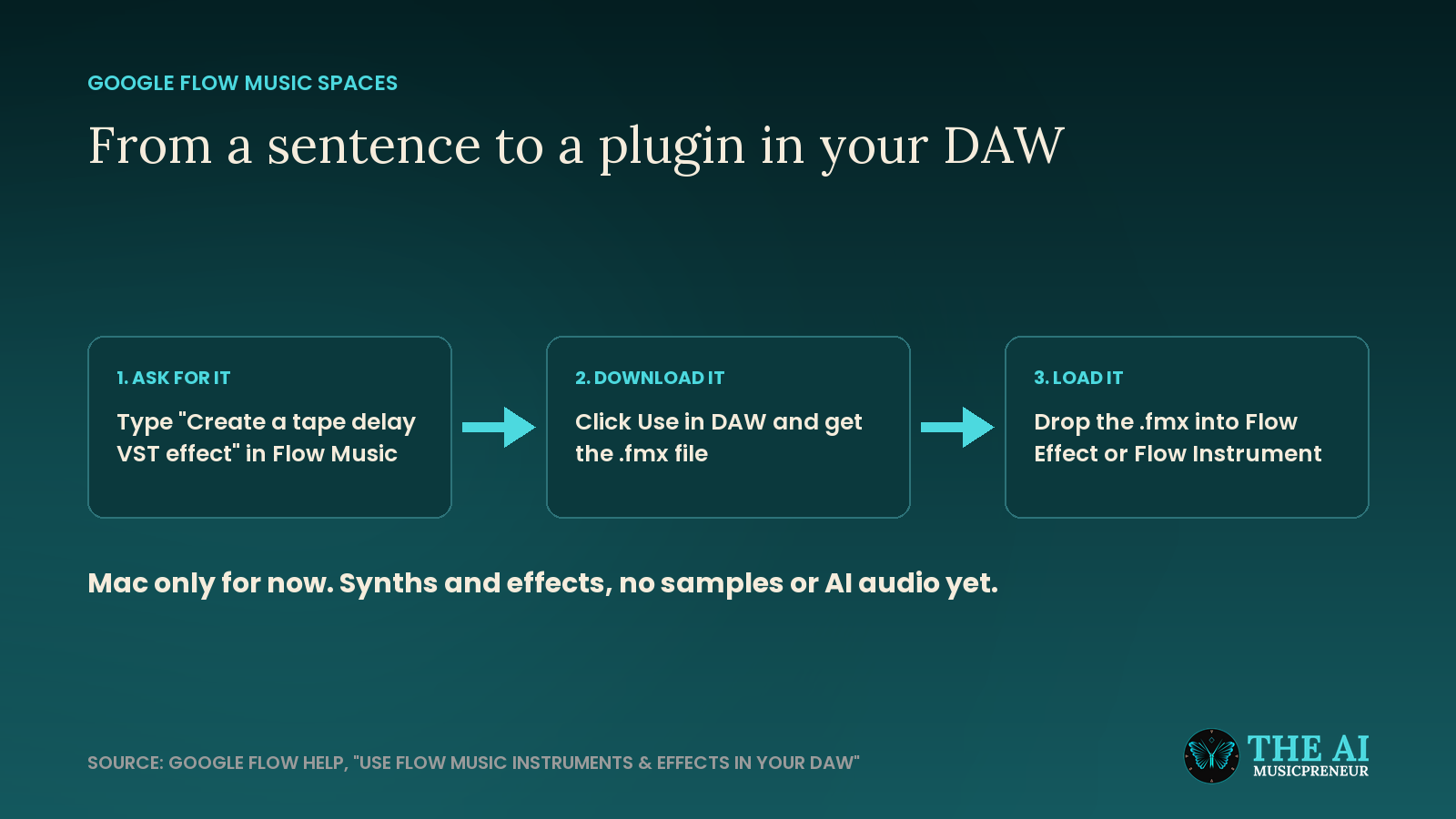
So the plugin you install is really a player, and each thing you build is a file it loads. You install once, and every new build is a download and a drag.
That workflow has some hard limits right now.
What Google Flow Music plugins can’t do yet
The help page is clear about the limits, and they matter more than the headline:
- Mac only. “Plugins currently work on macOS only.” Google hasn’t given a date for Windows.
- Synths and effects only. Instrument plugins “can only use standard synthetic audio.” Sample-based instruments and anything that uses generative AI audio can’t be exported yet.
- Not every account has it. If you don’t see the Plugins filter in Spaces, Google says plugins may not be available for your account yet.
To use Flow Music at all, you need to be 18 or older with a verified age and live in a supported region. The core features are free, and Google AI Plus, Pro and Ultra members get Flow Music’s paid plan benefits. Google didn’t say whether plugin export needs a paid plan.
The best way to see what that tool can be is Google’s own example.
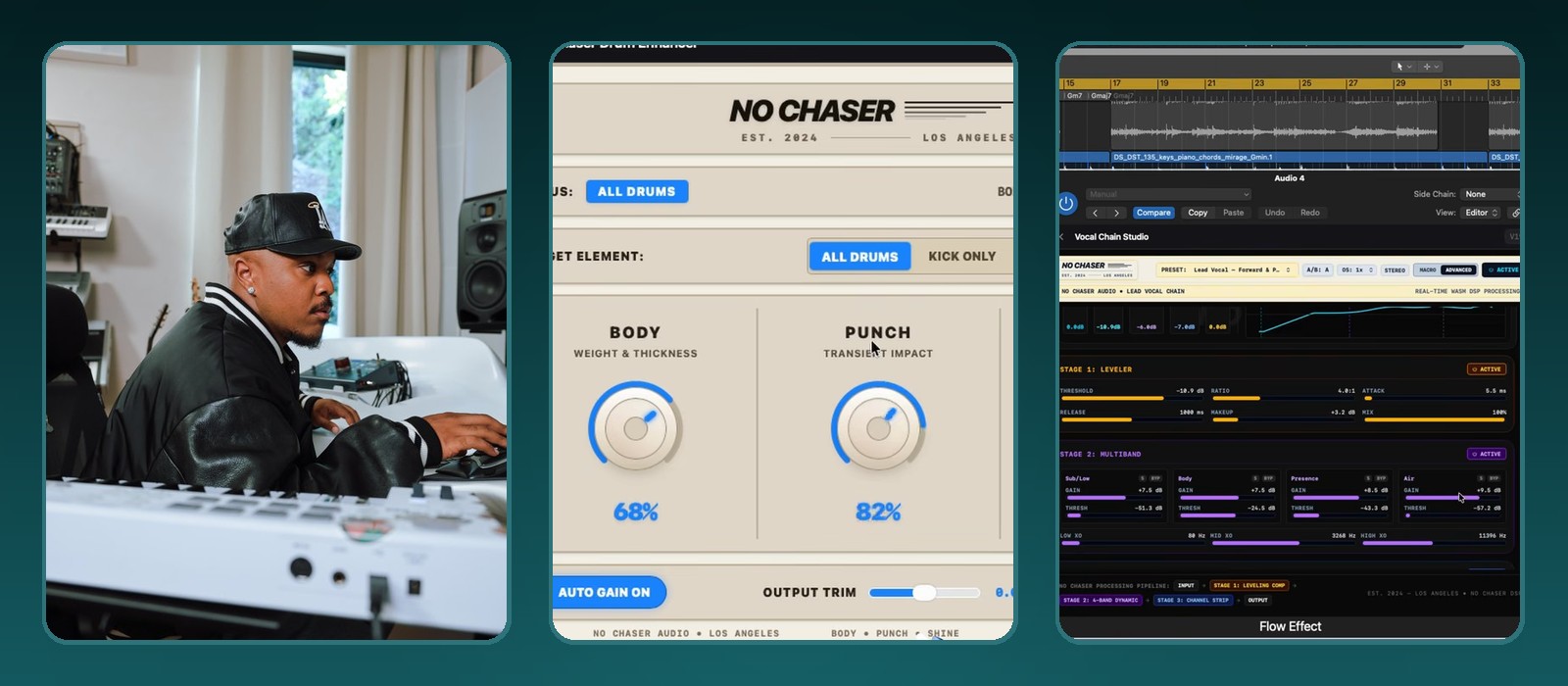
What Khris Riddick-Tynes built with Google Flow Music: the No Chaser plugin
Google picked Khris Riddick-Tynes for the launch. He co-wrote and co-produced SZA’s “Snooze,” the 2024 Grammy winner for Best R&B Song. His plugin, No Chaser, is meant to make instrumentals and vocals sound “sharp and studio-quality, no matter where they were recorded,” Google says.
In the video, No Chaser shows up as 2 things running inside Logic Pro under Flow Effect:
- A lead vocal chain with 3 stages: a leveler, a 4-band multiband stage and a channel strip.
- A drum enhancer with 2 big knobs, Body and Punch, and an All Drums or Kick Only switch.
So Google’s launch example is a vocal chain a producer would otherwise rebuild from several plugins on every session, saved as one tool with his own names on the knobs.
Google Flow Music vs Suno Studio and Sonorie for building your own plugin
Google isn’t the first to let you describe a plugin. What’s new is a big AI music platform letting you take the result out of its own app:
- Suno Studio 2.0 builds plugins from a text description since August 13, 2026, but they only run inside Suno Studio and can’t be exported as VST or AU.
- Sonorie turns a chat description into a compiled VST3, AU or CLAP plugin you can even sell, for $19.99 a month with no free tier.
- Google Flow Music exports VST3 and AU on macOS, inside a platform with a free tier, but only through its own Flow Instrument and Flow Effect hosts.
Flow Music started life as Riffusion, became ProducerAI and joined Google Labs in February. Google already pitched Spaces back then as a way for artists to build their own instruments and effects, and in July it shipped Lyria 3.5 in Flow Music.
If you’re on a Mac, ask Flow Music for the one plugin you wish existed, and drop it on a track tonight.
Frequently asked questions
What is an .fmx file in Google Flow Music?
An .fmx file is how Google Flow Music packages one instrument or effect you built in Spaces. You download it from the Use in DAW window and drag it onto the Flow Instrument or Flow Effect plugin in your DAW, which then runs it. You install the Flow Music plugin once, and every new build after that is just another .fmx file.
Which DAWs can run Google Flow Music plugins?
Any macOS DAW that loads VST3 or Audio Units plugins should see them, under the manufacturer name Google Flow Music. Google's help page names Ableton Live, Logic Pro and FL Studio as examples. In Ableton Live you may have to turn on Use Audio Units v2 and Use VST3 Plug-Ins System Folders and rescan.
Who is Khris Riddick-Tynes, the producer behind the No Chaser plugin?
Khris Riddick-Tynes is a songwriter and producer who co-wrote and co-produced SZA's "Snooze", which won the 2024 Grammy for Best R&B Song. As one half of the Rascals with Leon Thomas, he has worked with Kehlani, Ariana Grande and Toni Braxton. Google used his No Chaser plugin as the example for Flow Music's plugin export.
How do you find a Google Flow Music plugin you built earlier?
Sign in to Google Flow Music on your Mac, open Spaces on the left and select the Plugins filter. Next to the plugin, select More, then Use in DAW, and download the .fmx file again. If the Plugins filter is missing, Google says plugins may not be available for your account yet.
About the author

Covering AI music tools, industry shifts, and news for music creators and professionals. Twice-weekly newsletter at aimusicpreneur.com.