Logic Pro 13 is out: its AI assistant sets up tracks from a prompt, but only with a Creator Studio subscription

My stack My fav 6 tools for AI music after testing 70+
-
 ElevenMusic · Music generation
-
 Moises · Stem separation
-
 Controlla · Voice swap & cloning
-
 Cryo Mix · Mixing + mastering
-
 Neural Frames · Music videos
-
 ONCE · Distribution
Some links are affiliate links — I earn a commission at no cost to you. Every tool here is one I run myself and truly believe in. This stack is proven.
Logic Pro now has an assistant that works inside your session. You type what you want, and it builds the track, opens the plugin or moves the faders for you.
Update, November 6, 2026: Logic Pro for Mac 13.0 shipped on November 5, and the assistant turned out to need an Apple Creator Studio subscription. If you paid $199.99 for Logic Pro, you get the update but not the assistant. Apple’s support page also names Google Gemini as the engine, not OpenAI as reported in October, so I’ve corrected that below.
Apple announced all this on October 27, 2026, as part of a bigger Apple Creator Studio update. The assistant is a beta, and it needs macOS 27 or later on Apple silicon.
The same update lets Stem Splitter split a drum recording into 6 parts, and it rebuilds the Browser around on-device sound tagging with a Splice library inside. Apple’s release notes call the version 13.0.
What the Logic Pro 13 AI assistant can do in a session
Apple’s description is short. The assistant helps you “navigate production workflows, start a new song, set up a vocal track from a single prompt, or refine an active project.”
MusicRadar’s Matt Mullen adds the practical part: it works in a chatbot-style panel, and it can add tracks, open plugins and adjust levels when you ask it to.
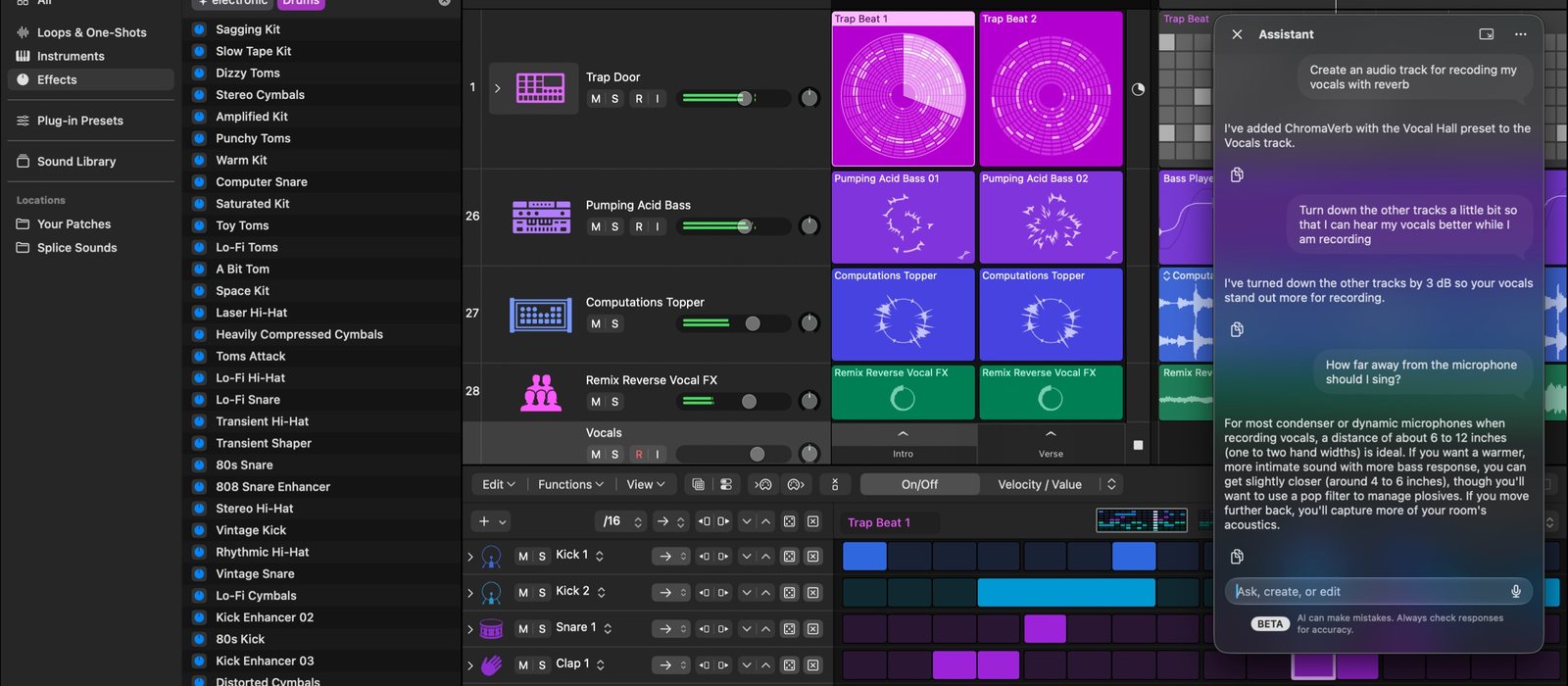
Apple’s demo screenshot, the image at the top of this page, shows 3 exchanges:
- Asked for an audio track to record vocals with reverb, it replies that it added ChromaVerb with the Vocal Hall preset to the Vocals track.
- Asked to turn the other tracks down so the vocals are easier to hear while recording, it turns them down by 3 dB.
- Asked how far from the microphone to sing, it answers 6 to 12 inches for most condenser or dynamic mics.
Under the input box, the panel carries a beta label and the line “AI can make mistakes. Always check responses for accuracy.”
The release notes now answer MusicRadar’s question about where it stops, because they list what it can do. Example prompts include “Add kick steps at 1 and 3 and snare steps at 2 and 4”, “Add a vibey chord progression”, “Make the bass player follow the drums” and “Isolate the drums from the selected region”. It answers production questions too, like “What’s a good way to mic an acoustic guitar?”
On the models, Apple’s press release only said “a combination of Apple-built and third-party models”, and MusicRadar named the third party as OpenAI. Apple’s support page for Creator Studio’s intelligence features is more specific: the assistant in Logic Pro for Mac is “powered by Google Gemini”.
On privacy, the release notes say: “Your projects and the prompts you send to the Assistant are never used to train models.”
The chat bar in Suno Studio 2.0 works on the same idea, but it generates audio and MIDI clips onto the timeline. Apple’s release notes don’t list audio generation. Splice Create, which launched the same day as Logic Pro 13, goes the same way with its assistant, Rheo.
And the assistant capabilities in Logic Pro, Keynote, Pages, and Numbers are going to change the game for how people interact with and learn to use these apps.
Logic Pro 13’s redesigned Browser tags your sounds on the Mac
The Browser now holds loops, instruments, effect patches and more in one place. Apple calls the engine behind it music understanding, “an on-device audio analysis tool” that analyzes, classifies and tags the sounds you add.
So you can search your whole collection, or drag in a loop and get matching audio back. MusicRadar’s examples of plain-language searches are “heavy techno drums” and “jangly electric guitar”.
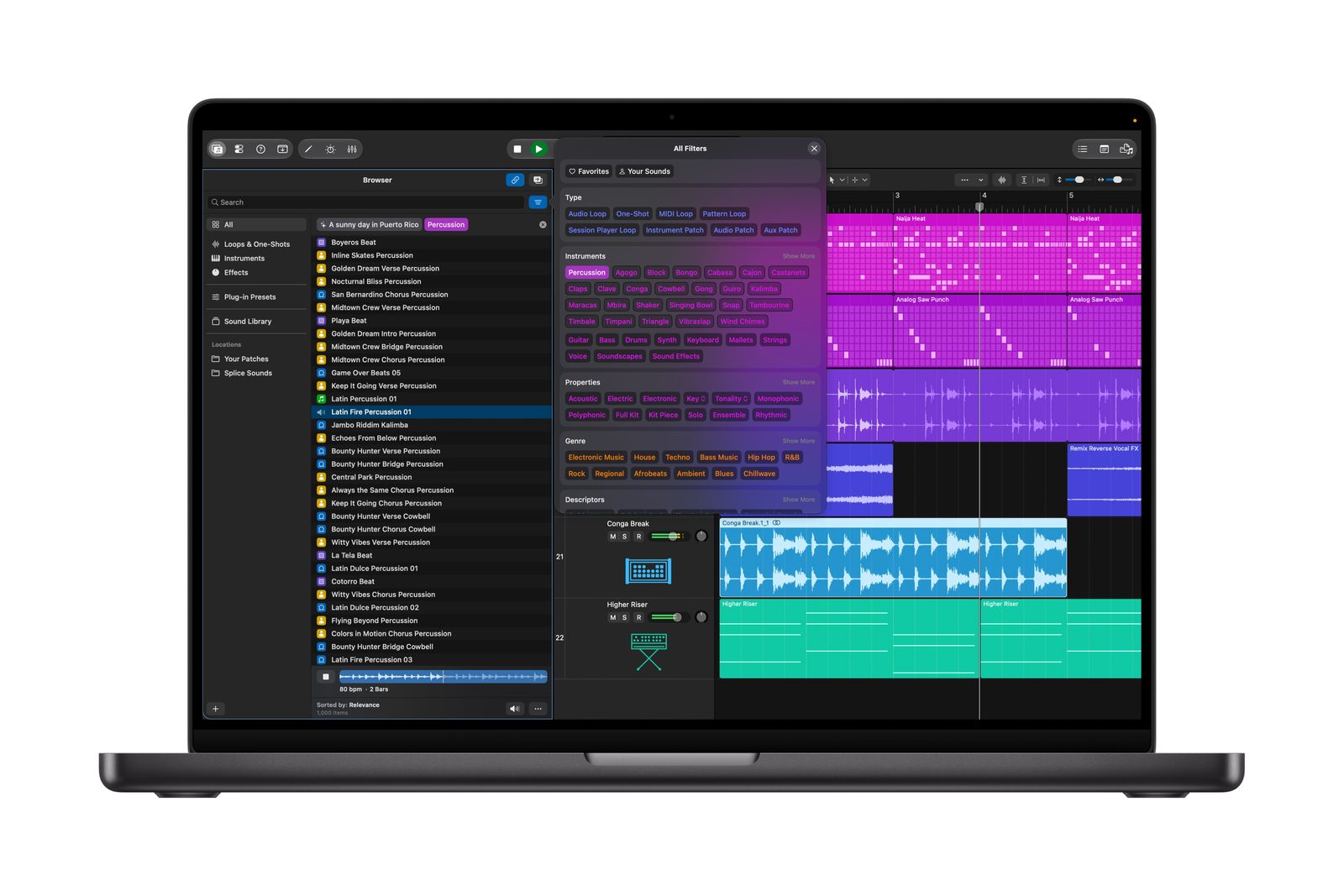
Apple also lists a Splice library inside the Browser, and Apple’s screenshot shows a Splice Sounds location in the sidebar. MusicRadar points out that Ableton and Avid already built Splice into Live and Pro Tools (I covered the Pro Tools 2025.6 integration).
Logic Pro 13 Stem Splitter now splits drums into 6 parts
Stem Splitter arrived in Logic Pro in 2024. Today it splits a mix into 6 stems, which Apple’s Logic Pro page lists as drums, bass, vocals, guitar, piano and other instruments.
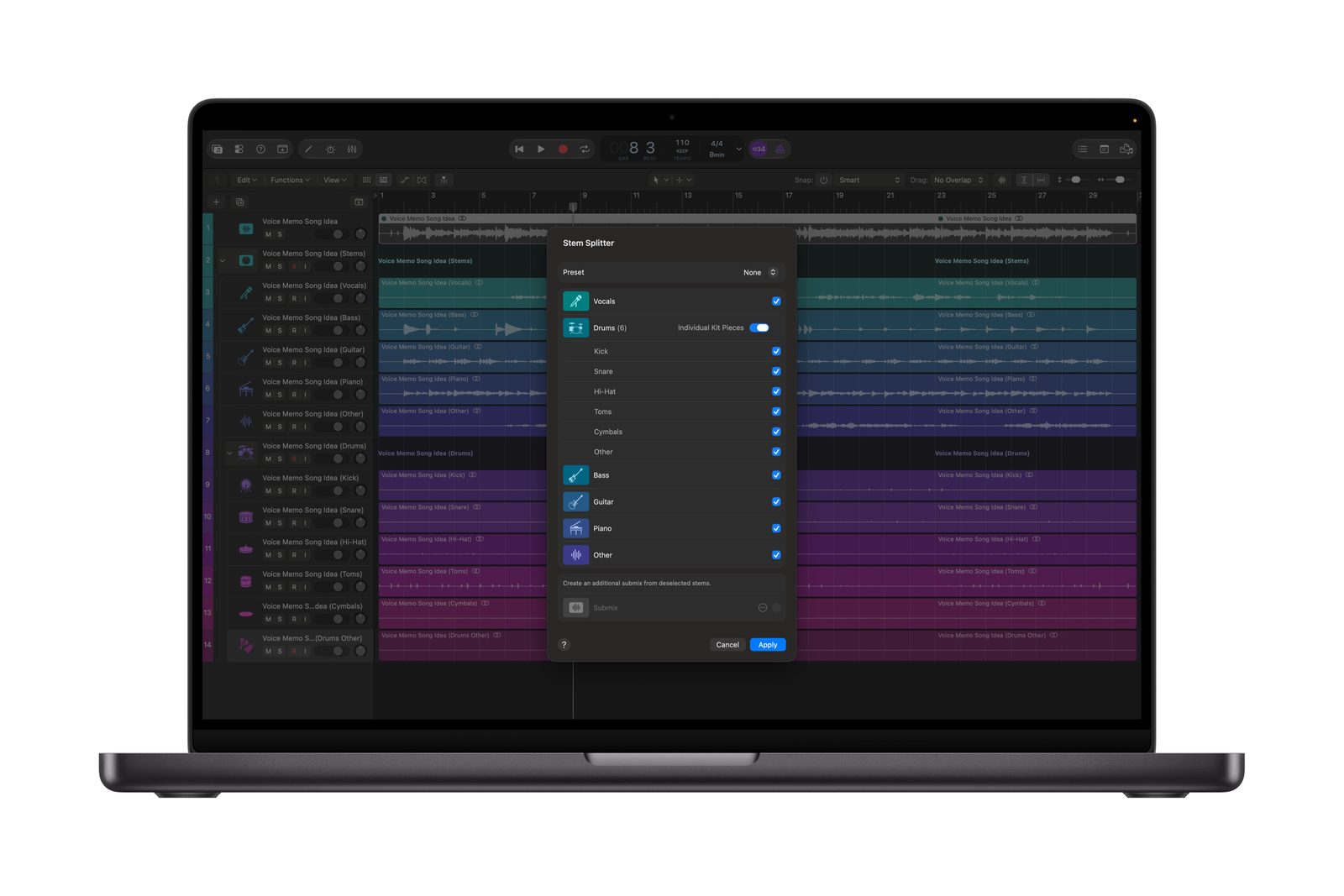
The new part is drums. Apple says you can “isolate, replace, or rebalance drum parts without needing the original multitracks.” Its screenshot splits a track called Voice Memo Song Idea, with an Individual Kit Pieces switch that breaks the drum stem into kick, snare, hi-hat, toms, cymbals and other.
If stems are new to you, my stems cheatsheet covers the basics, and my stem splitter roundup compares 7 tools I tested.
The update also adds 2 smaller things. A Producer Pack from 20-time Grammy winner Sergio George brings his signature piano sound plus Latin jazz and salsa loops. And Voice Memo Studio Sound reduces room ambience and background noise in recordings from supported iPhone models, which you can keep fine-tuning in Logic Pro.
Logic Pro 13 release date, price and requirements
Logic Pro for Mac 13.0 came out on November 5, 2026, MacRumors reports, in both the Creator Studio version and the standalone version. The other Creator Studio apps follow later in November.
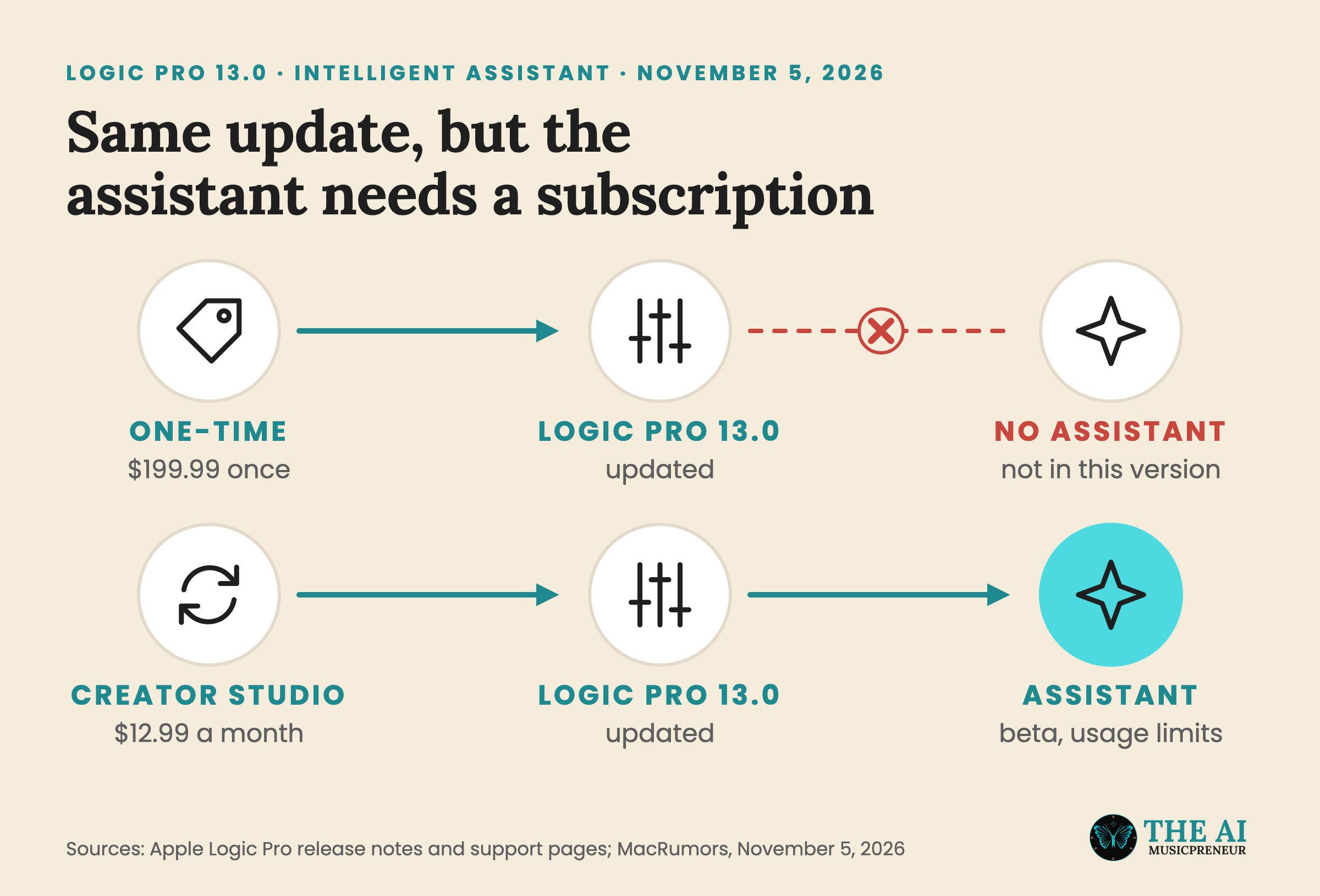
The catch is in a footnote. Apple’s release notes say: “The intelligent assistant (beta) requires an Apple Creator Studio subscription, a Mac with Apple silicon, and macOS 27 or later.” Apple’s October press release didn’t mention the subscription, as MacRumors points out.
If you’re buying in, here is what Apple lists:
- Logic Pro as a one-time purchase costs $199.99 on the Mac App Store.
- Apple Creator Studio costs $12.99 a month or $129 a year, with a 1-month free trial.
- A new Mac or qualifying iPad comes with 3 months of Creator Studio for free.
- College students and educators pay $2.99 a month or $29.99 a year.
Even with a subscription, the assistant has limits. Apple’s support page says monthly usage depends on how complex your conversations are, and limits reset each month. Subscribers in 8 countries, including the US, UK and Germany, can buy one-time usage packs when they run out.
It also has stricter requirements than the rest of the app. It needs macOS 27 or later on Apple silicon, and an Apple Account with iCloud set up. Apple’s support page says U.S. English only, and Apple only lists it for Logic Pro for Mac. Logic Pro for iPad gets the new Liquid Glass design in this update, without the assistant.
Apple’s footnotes list Logic Pro for Mac itself at macOS 26.1 or later on Apple silicon, so the assistant is the part that needs macOS 27.
One thing is still missing. Apple says nothing about editing single notes inside recorded audio, which is what Samplab’s AI editor did before Apple bought it in a June asset deal.
Frequently asked questions
Does the Logic Pro 13 AI assistant work on Logic Pro for iPad?
Not according to Apple's announcement. Apple says the assistant joins Logic Pro for Mac and requires macOS 27 Golden Gate or later on an Apple Intelligence-capable Mac. Logic Pro for iPad gets the new Liquid Glass design in the same update, but Apple doesn't list the assistant for it.
Which AI models power the Logic Pro 13 assistant?
Apple's Creator Studio support page says the assistant in Logic Pro for Mac is powered by Google Gemini. Apple's press release only described a combination of Apple-built and third-party models, and MusicRadar had reported the third party as OpenAI.
Is Logic Pro 13 free for people who bought Logic Pro outright?
The update is, the assistant isn't. MacRumors reports that the standalone $199.99 version was updated to 13.0 on November 5, 2026, but Apple's release notes say the intelligent assistant requires an Apple Creator Studio subscription.
What is in the Sergio George Producer Pack for Logic Pro?
The Producer Pack comes from Sergio George, a 20-time Grammy winner known as the King of Modern Salsa. Apple says it includes his signature piano sound and Latin jazz and salsa loops, including a full salsa percussion section, a brass ensemble and basses.
About the author
Covering AI music tools, industry shifts, and news for music creators and professionals. Twice-weekly newsletter at aimusicpreneur.com.