Native Instruments' Massive XL turns a 4-second audio clip into 4 editable synth presets
My stack My fav 6 tools for AI music after testing 70+
-
 ElevenMusic · Music generation
 -
 Moises · Stem separation
 -
 Controlla · Voice swap & cloning
 -
 Cryo Mix · Mixing + mastering
 -
 Neural Frames · Music videos
 -
 ONCE · Distribution
Some links are affiliate links — I earn a commission at no cost to you. Every tool here is one I run myself and truly believe in. This stack is proven.
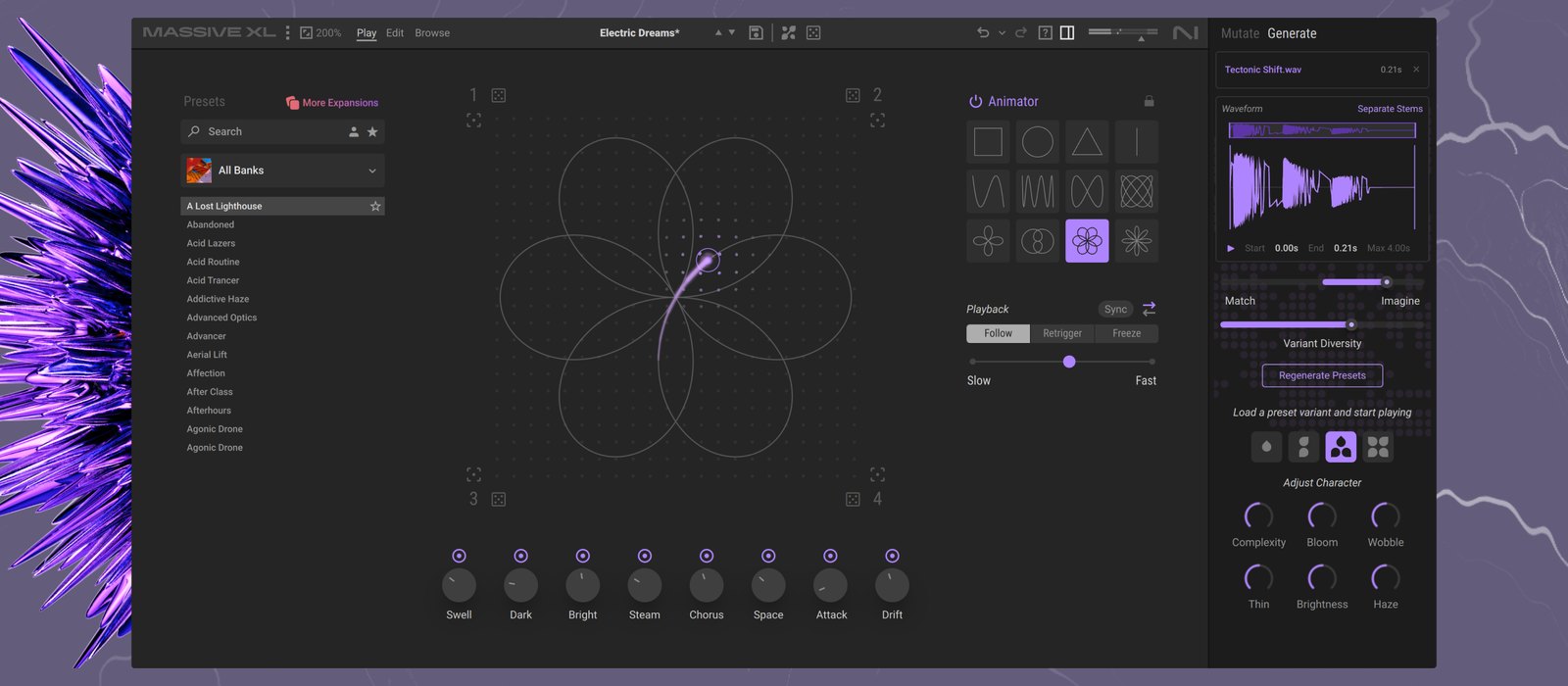
Native Instruments released Massive XL on October 27, 2026, and its headline feature is the Preset Generator. You drop in any audio file and pick a slice of up to 4 seconds, and the synth hands back 4 presets you can edit down to the last parameter.
It can split a full song into stems first, so the slice can be just the bass line.
Massive XL is the successor to Massive X and the third generation of a synth that turned 20 this month. It costs $199, €199 or £179, and $99, €99 or £89 until December 31.
It’s also the first major instrument from Native Instruments since inMusic, the owner of Akai and Moog, bought the Native Instruments group in May 2026. That sale came after the company went into preliminary insolvency in January (I covered the split in my iZotope and Boris FX piece).
One caveat before the details: I haven’t run the Preset Generator on my own audio yet. Everything below comes from Native Instruments’ product page and FAQ, plus launch coverage in MusicRadar and MusicTech.
How the Massive XL Preset Generator turns audio into a synth patch
The Preset Generator sits in a new Generate tab on the right side of the synth, next to Mutate. You drop an audio file in, and the panel shows its waveform with a start point, an end point and a hard limit of 4.00 seconds.
Above the waveform is a Separate Stems button. MusicRadar reports that it splits a mixed file into vocals, bass, drums and other, so you can take a sample from a finished song and build a patch from one part of it (my stems cheatsheet explains what each stem holds).
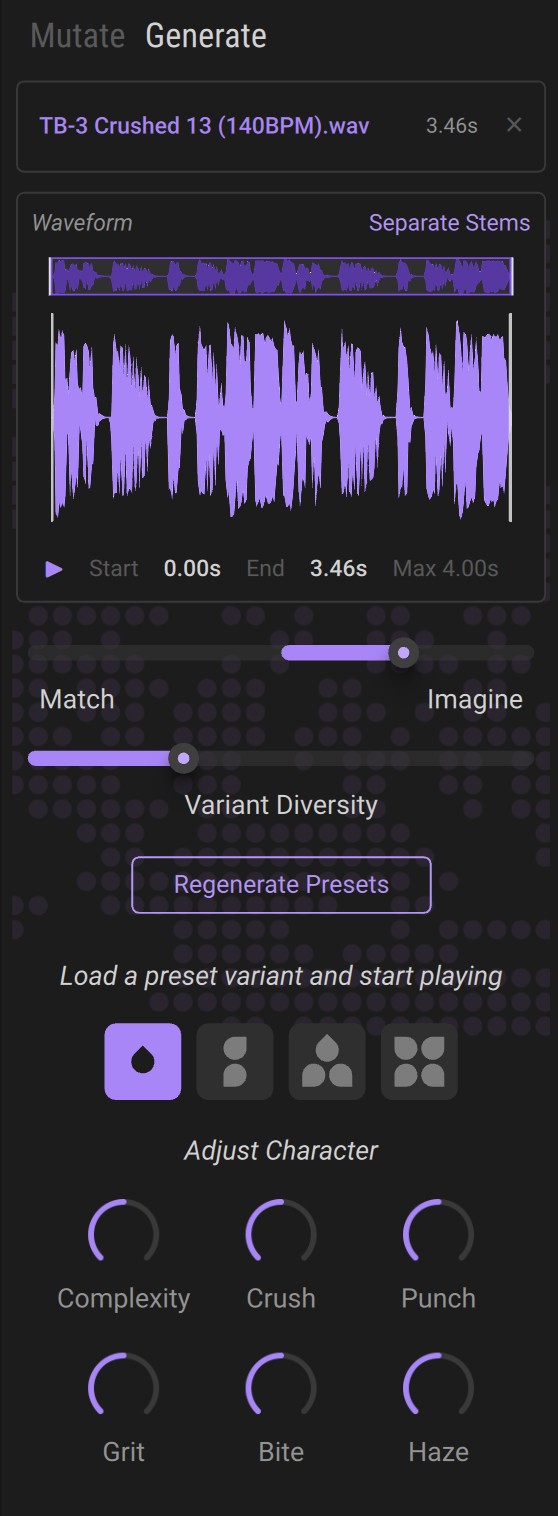
Then 2 sliders shape the result. Match to Imagine sets how far the presets can drift from the original: at Match, Native Instruments says the engine gets as close to the sound as it can, and toward Imagine the result can stray further. Variant Diversity sets how different the 4 presets are from each other.
Each of the 4 presets comes with 6 macro knobs under Adjust Character, and the labels change with the sound. Native Instruments’ own screenshots show Complexity, Crush, Punch, Grit, Bite and Haze on one sample, and Bloom, Wobble, Thin and Brightness on another.
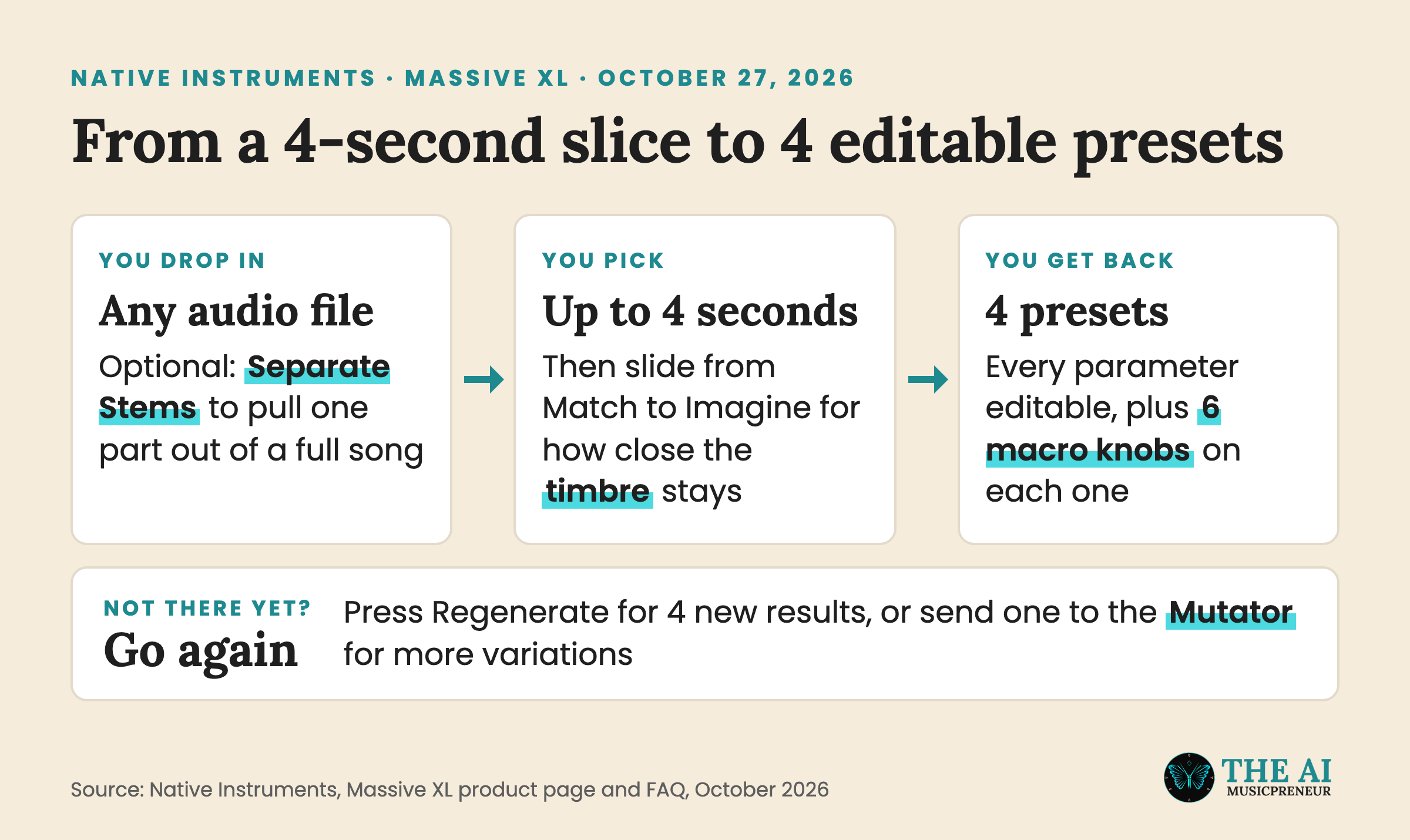
If none of the 4 land, Regenerate Presets gives you a new set, or you can send one to the Mutator for more variations.
MusicRadar describes the Preset Generator as an AI model Native Instruments built in-house. Native Instruments’ own product page doesn’t use the word AI, and none of the launch material I read says what the model was trained on.
Audio-to-patch isn’t a brand-new idea either. As CDM points out, Sonic Charge’s Synplant 2 did it in 2023. Massive XL puts the same trick inside a much bigger wavetable synth. If you’re comparing it with other plugins that have AI inside, my AI VST plugin roundup covers the 11 I tested.
Stem separation keeps turning up inside music software too. Universal Audio put 4-track stem separation in the free LUNA 3.0 in September, and 6 weeks later it’s inside a synth.
What else is new in Massive XL: Mutator, custom wavetables and polyphonic aftertouch
Native Instruments pitches the whole update around speed. “With Massive XL, we’ve focused on helping users reach those sounds faster,” Tim Adnitt, Native Instruments’ Senior Director of Product Management, said in the launch press release.
The second shortcut is the Mutator, borrowed from Native Instruments’ Absynth 6. It swaps the building blocks of a preset (the type of oscillator, filter or effect) for ones taken from other presets in your library. You can mutate the whole patch or one module at a time, and MusicRadar counts 4 levels of how far a mutation goes.
The Randomizer does the opposite job. It keeps the building blocks and only changes their settings, or in Native Instruments’ words, “the Mutator changes the ingredients, and the Randomizer changes how they’re used.”
If you’d rather build sounds from scratch, this is what changed for you:
- Custom wavetables, made by dragging any audio file or single-cycle waveform into the oscillator section.
- More than 100 new wavetables, including tables from the original Massive and classic PPG synths, on top of the 170+ already in Massive X, plus over 100 new noise tables.
- 3 effects taken from other Native Instruments plugins: the Raum reverb, Replika Shimmer and Tape Wobble.
- Polyphonic aftertouch, so each held note responds to its own pressure on keyboards that send it (there’s no full MPE support).
- A full edit history you can jump back through at any point, and user banks for your own presets.
Every Massive X preset and Expansion loads in Massive XL, and the factory library ships with 1,000 presets.
Massive XL price, upgrade cost and system requirements
Massive XL costs $199, €199 or £179. From October 27 to December 31, 2026, the introductory price is $99, €99 or £89.
Owners of the older versions pay less, according to the launch pricing Synthtopia published:
- Massive X owners can update for $69, €69 or £59, or $49, €49 or £44 during the introductory period.
- Original Massive owners can crossgrade for $129, €129 or £109, or $79, €79 or £69 during the introductory period.
Native Instruments’ store shows your own upgrade price once you log in.
What you need to run Massive XL:
- macOS 14, 15 or 26, or 64-bit Windows 10 or 11.
- An Intel Core i5 or equivalent with AVX support, or Apple Silicon, and 4 GB of RAM (6 GB recommended).
- A DAW that loads VST, VST3, AU or AAX plugins on Mac, or VST, VST3 or AAX on Windows.
- 2.1 GB of disk space on Mac or 1.8 GB on Windows, and an internet connection to install and activate (offline use works afterwards).
If you own Massive X, the $49 update price runs until December 31. And if you want to try Massive XL before paying, Native Instruments’ demo route is the free Massive XL Player: open it and switch on Demo Mode from the welcome screen or the Settings menu.
Frequently asked questions
Does the free Massive XL Player include the Preset Generator?
No. Massive XL Player plays the included presets plus presets from any Massive X Expansion you own, and it keeps the Morpher and Animator. Full editing, the Preset Generator and the Mutator are only in the paid Massive XL.
Does Massive XL run as a standalone app?
No. Native Instruments says Massive XL doesn't currently run in standalone mode, so you need a DAW or another plugin host. It loads as a VST, VST3, AU or AAX plugin on macOS and as a VST, VST3 or AAX plugin on Windows.
Is Massive XL included in the Native Instruments 360 subscription?
Not yet. Native Instruments says Massive XL will be added to its 360 subscription in 2027. Until then, Massive XL is a one-off purchase at $199, or $99 until December 31, 2026.
What happens to Massive X now that Massive XL is out?
MusicRadar reports that Native Instruments is retiring Massive X and the free Massive X Player with the release of Massive XL. Native Instruments says every Massive X preset and Expansion works in Massive XL, and Massive X owners get a discounted update.
About the author

Covering AI music tools, industry shifts, and news for music creators and professionals. Twice-weekly newsletter at aimusicpreneur.com.