Splice launches Create, a full DAW with an AI assistant called Rheo, in Mac beta with exports from $9.99 a month

My stack My fav 6 tools for AI music after testing 70+
-
 ElevenMusic · Music generation
-
 Moises · Stem separation
-
 Controlla · Voice swap & cloning
-
 Cryo Mix · Mixing + mastering
-
 Neural Frames · Music videos
-
 ONCE · Distribution
Some links are affiliate links — I earn a commission at no cost to you. Every tool here is one I run myself and truly believe in. This stack is proven.
Splice just released its own DAW. Splice Create launched in beta for Mac on November 5, 2026, with the Splice sample catalog built into the session and an AI assistant called Rheo that you can talk to.
The download is free, but exporting a song isn’t. You need Create Pro at an introductory $9.99 a month, or an existing Splice Creator or Creator+ plan.
Splice announced it in its launch post, and MusicRadar and Gearnews have already tried it.
What Splice Create is: a full DAW with the Splice catalog inside
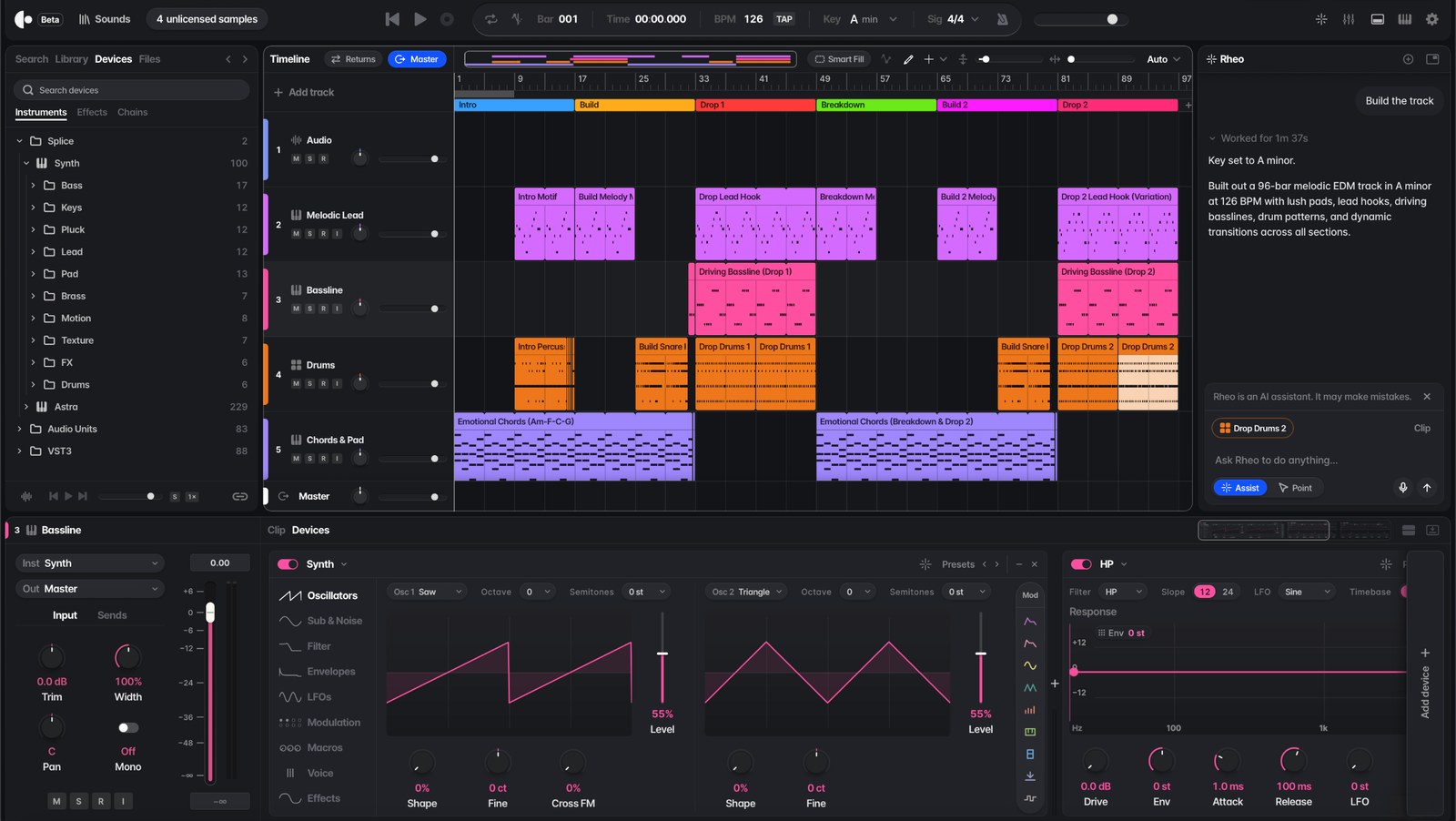
If you’ve used any DAW, the layout will look familiar. There’s a central timeline with 5 track types, and below it a mixer, clip editor, piano roll, sequencer or device chain, depending on what you’ve selected.
Here’s what comes in the box, per MusicRadar:
- 5 instruments: Sampler, Drum Rack, Splice INSTRUMENT, a new 2-oscillator Synth and Astra, a hybrid synth.
- 38 stock effects and utilities.
- Support for third-party plugins, so the plugins you own still work.
The big difference from other DAWs is the catalog. You search Splice’s samples from inside the session instead of switching to a browser, and Gearnews points out that Drum Rack can load a whole sample pack in one click, with several samples on each pad.
MusicTech reports preset shortcuts for people coming from Ableton Live, FL Studio and Pro Tools. And you aren’t locked in: Splice’s Create page says you can export stems or open the session in Ableton Live.
Most music tools either make the song for you, or assume you already know how to do everything – Create is different.
The part getting the attention sits in the side panel, though.
What Rheo does in Splice Create: Assist and Point modes
Rheo is the AI assistant inside Create. You type or speak a request, and it works in one of 2 modes:
- Assist does the task for you. Splice’s examples include labeling tracks, grouping drums and side-chaining your bass to your kick.
- Point shows you how instead. MusicRadar describes text instructions plus a glowing cursor that points at each step on screen.
MusicRadar also got it to design a TB-303-style acid bass patch in Astra, write a MIDI clip with a specific chord sequence, and polish a mix with EQ and compression. Rheo will even build a full song on demand, using Splice samples and the stock instruments.
Splice’s own screenshot, the image at the top of this page, shows that last one: Rheo worked for 1 minute 37 seconds and built a 96-bar melodic EDM track in A minor at 126 BPM.
You can aim Rheo at one track or one section, and Splice says one undo reverses the whole request.
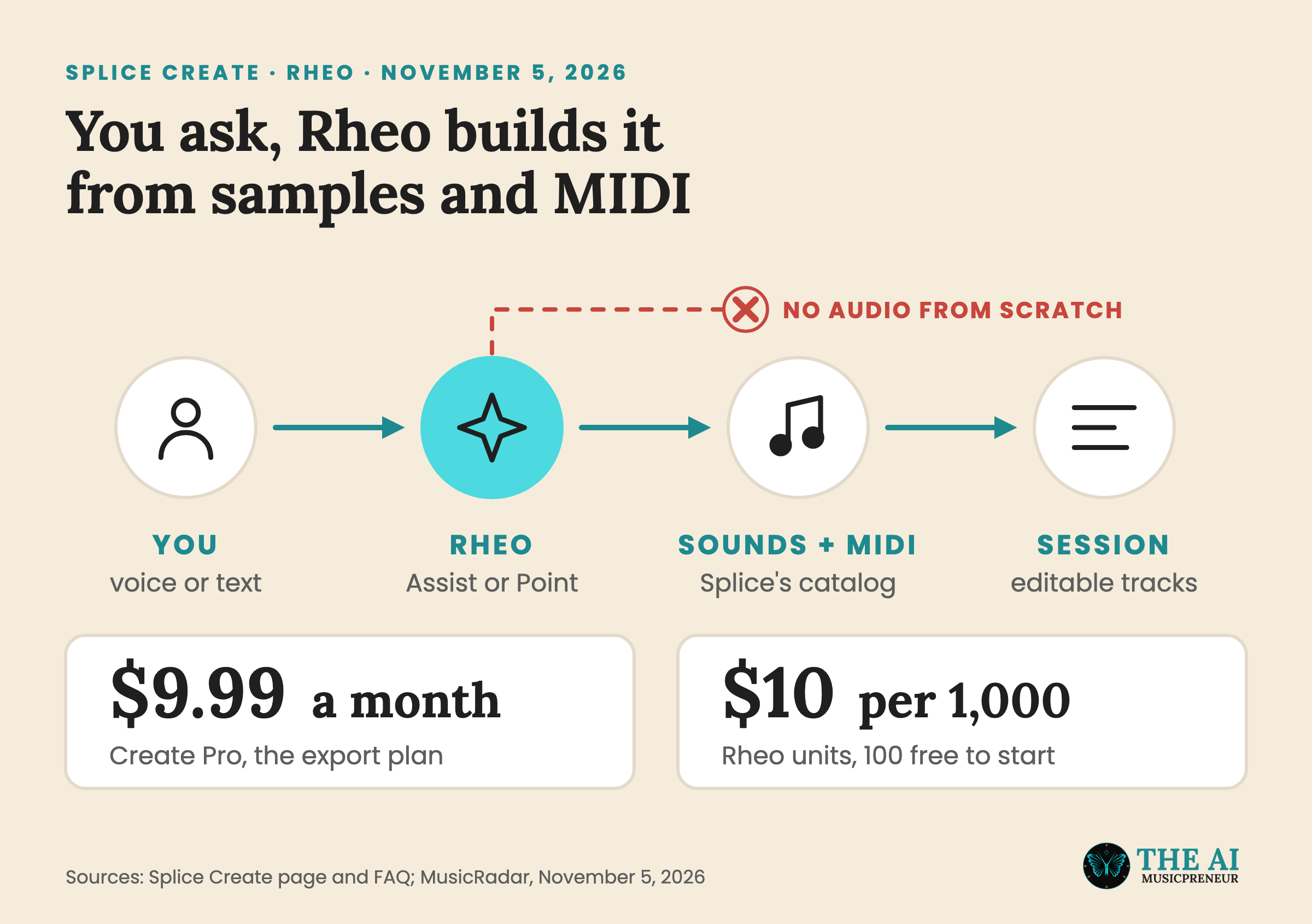
Rheo isn’t unlimited. It runs on Rheo units, which are separate from Splice credits and cost $10 per 1,000, according to MusicRadar. Free users get 100 to start, Create Pro includes monthly usage, and Splice’s page offers discounted packs on top. Splice doesn’t say on that page how many units Create Pro includes, or how many a request uses.
So when Rheo builds a full song, what is it actually making?
Does Splice Create generate AI music? Where Rheo stops
Rheo doesn’t generate songs the way Suno does. Splice’s FAQ says: “Assist does not generate new sounds. It can search the Splice catalog for human-made samples, write a MIDI pattern, or interface with Variations. Everything lands in your project as editable audio.”
Variations is the one exception. It’s Splice’s AI tool that makes new versions of human-made samples, and MusicRadar confirms it’s the only place Create produces new audio. Splice says the original creator gets paid when you download a sound or a Variation of it.
On training, Splice says it “only trains on fully licensed data from our catalog.” MusicRadar pushes on this. Splice told the outlet that Rheo uses in-house models plus third-party ones, including “classic LLMs”, and all of it was trained on “fully licensed” data. MusicRadar calls what that covers “an open question”, because LLMs are typically trained on vast amounts of web data.
MusicRadar’s bigger question is about creativity: if an agent designs your patches and digs out your samples, do you still build your own sound? That’s the “one big question” in its headline, and Create’s answer is that the features are optional.
Splice isn’t alone in putting an assistant in a DAW this month.
Splice Create, Logic Pro 13, FL Studio and Suno Studio all have AI inside the session
Here’s how the AI assistants compare so far:
- Splice Create: Rheo writes MIDI and picks samples, and its usage is metered in Rheo units.
- Logic Pro 13: the assistant shipped on November 5, the same day as Create, and it needs a $12.99 a month Creator Studio subscription.
- FL Studio 2026: Gopher, its AI assistant, came with a no-AI-training pledge.
- Suno Studio 2.0: the chat bar generates audio and MIDI clips onto the timeline.
The other thing Splice brings is the catalog, because Rheo’s raw material is samples you can clear for release.
Skepta is the first big name attached. MusicTech quotes him saying Create “gives people just starting out that same feeling, and you pick up how it works as you go.”
What’s missing from the Splice Create beta
Create only runs on macOS 12 and later for now. Splice lists Windows and web as coming soon, without a date.
Gearnews calls the free version “strictly a demo” because you can’t export audio from it. Splice’s own screenshot shows a counter reading “4 unlicensed samples” in the top bar, so the app tracks what you still have to license before you release.
And $9.99 is introductory pricing. Splice doesn’t say how long it lasts or what the price becomes.
If you’re on a Mac, the free way to judge it is to download it and ask Point to walk you through something you’ve never set up.
Frequently asked questions
Is Splice Create the same as the older Create mode in the Splice app?
No. Splice used the name Create for an AI feature, launched in 2024, that matched sounds from its catalog into stacks. Splice Create, released in November 2026, is a standalone DAW with a timeline, mixer, instruments and effects.
Does Splice train AI on music you make in Splice Create?
No, according to Splice's FAQ: 'We do not train on any music that you make in Create or upload into the product.' Splice says it only trains on fully licensed data from its catalog.
Do you own the music you make in Splice Create?
Yes, according to Splice, and you can export and share it with a qualifying subscription: Create Pro, Splice Creator or Splice Creator+. Splice says it can supply documentation if you ever need to prove your music is royalty-free and properly licensed.
Can you move a Splice Create session into Ableton Live?
Yes. Splice's Create page says you can export full-resolution stems or open the session in Ableton Live. The FAQ also lists shortcut presets for Ableton, Logic, Bitwig and Pro Tools during setup.
About the author
Covering AI music tools, industry shifts, and news for music creators and professionals. Twice-weekly newsletter at aimusicpreneur.com.