Beat Shaper
Beat Shaper generates editable MIDI drums, basslines and synth parts for electronic music producers, on licensed training data, with Ableton export.
What is Beat Shaper and how does it work?
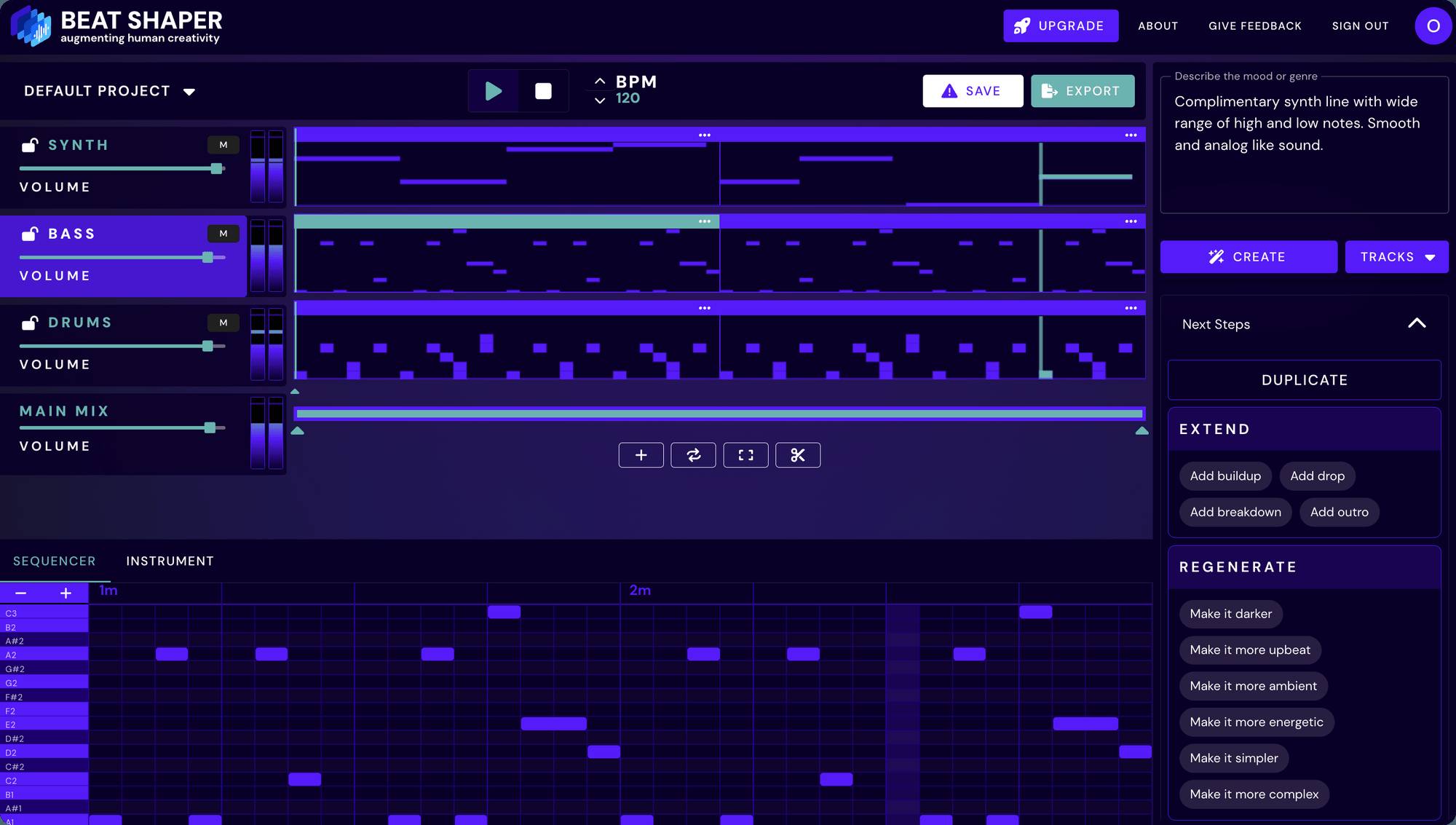
Beat Shaper is a browser-based AI MIDI generator built for electronic music producers. You type a text prompt or set genre and mood sliders, and it generates a multitrack loop: drums, a bassline, and a synth part, all as editable MIDI. It comes from Beat Shaper FlexCo in Vienna, founded by ML engineer Taylor Peer, and I broke down how Beat Shaper trains its model on licensed MIDI loops rather than scraped catalogs.
How it works:
- Describe a mood or genre in the prompt box, or blend the genre, mood, and energy sliders
- The engine writes a two-bar multitrack MIDI loop and renders it to audio in near real time
- Edit notes, timing, and synth parameters in the piano roll, or regenerate single parts
- Export as MIDI, WAV, MP3, or a complete Ableton Live project
The text-to-MIDI workflow suits producers who want fresh ideas fast but finish every track themselves in a DAW.
How much does Beat Shaper cost?
Beat Shaper runs a freemium model in euros, including VAT:
| Plan | Price | What you get |
|---|---|---|
| Starter | Free | Unlimited generations, MP3 downloads, non-commercial use |
| Creator | 9 euros/month | MIDI and WAV export, unlimited song length, commercial rights |
| Producer | 28 euros/month | Ableton Live project export, Max for Live device, real-time MIDI output |
The free tier is unusual among AI MIDI generators: unlimited generations instead of a credit allowance. You own the output on every plan. Pricing changes frequently, verify current plans on the Beat Shaper pricing page.
Does Beat Shaper export to Ableton Live?
Yes, and the integration goes deeper than plain MIDI files. On the Producer plan, Beat Shaper exports what the company calls “an entire Ableton Live project file”:
- Drums arrive in an Ableton Drum Rack loaded with the Beat Shaper kit
- Bass and synth MIDI load into Ableton Drift instruments with patches matched to the browser sound (Live 11.3 or newer)
- The Max for Live device generates MIDI clips directly inside Live 12, with genre dials, mood dials like Darkness and Weirdness, and automatic target-track routing
- Plain MIDI and WAV exports work in every DAW
The company documents the MIDI-first architecture in its white paper: the model generates symbolic note data first and renders audio second, so the MIDI needs no cleanup. I covered the full export workflow in my Beat Shaper launch coverage.
How does Beat Shaper compare to Staccato and Magenta Studio?
All 3 generate MIDI, but each lives in a different part of the workflow.
| Beat Shaper | Staccato | |
|---|---|---|
| Starting price | Free (unlimited generations) | Subscription |
| Core use case | Multitrack loops in the browser, Live project export | Text-to-MIDI inside any DAW |
| Key differentiator | Licensed training data + Drift/Drum Rack translation | Chat-style refinement of existing MIDI |
| Best for | Ableton-based electronic producers | Producers wanting MIDI prompts in every DAW |
| Beat Shaper | Magenta Studio | |
|---|---|---|
| Starting price | Free (unlimited generations) | Free |
| Core use case | Prompted multitrack loops with synth patches | Generative MIDI experiments in Ableton |
| Key differentiator | Text prompts + cohesive drum, bass, and synth output | Open-source Google research tools |
| Best for | Producers wanting usable club loops fast | Tinkerers comfortable with dated M4L devices |
Choose Staccato when you work outside Ableton and want a chat-style MIDI co-writer. Choose Magenta Studio when you want free generative experiments. Choose Beat Shaper when you want cohesive electronic loops with the deepest Ableton Live handoff.
What are some use cases for Beat Shaper?
- Beating the blank session: prompt a loop instead of staring at an empty arrangement
- Club tracks with clean rights: the licensed dataset removes training-data uncertainty from commercial releases, the same posture Lemonaide takes with producer partnerships
- Sound-design separation: keep the generated melody, swap the sound, because notes and synth patches stay separate
- Groove repair: regenerate the drums while keeping a bassline you like
- Learning arrangement: study how the model voices basslines against kick patterns across Techno, House, Acid, Drum & Bass, Hip-Hop, and Trance
- Sketching inside Live: generate variations from the Max for Live device without leaving the session, one of the tools I track in my AI VST plugins roundup
For producers who want finished songs with vocals from a single prompt, an audio-first generator like ElevenMusic is the better lane. Beat Shaper is for the ones who finish the track themselves.
Frequently Asked Questions
Is Beat Shaper free?
The Starter plan is free with unlimited generations, MP3 downloads, and non-commercial use. Paid plans start at 9 euros per month for MIDI and WAV export with commercial rights.
Can you use Beat Shaper music commercially?
Yes, from the Creator plan at 9 euros per month upward. You own the musical ideas you create on every plan, and the free Starter tier is limited to non-commercial use.
What file formats does Beat Shaper export?
MIDI, WAV, and MP3, per track or combined, plus complete Ableton Live projects on the Producer plan. Files download from the browser and then drag into any DAW.
What genres does Beat Shaper support?
Techno, House, Acid, Drum & Bass, Hip-Hop, and Trance, with 15 custom drum kits from House to Berlin Techno. Orchestral music and pop songwriting are outside its range.
Does Beat Shaper work with FL Studio and Logic Pro?
Yes, through standard MIDI and WAV exports, which open in FL Studio, Logic Pro, Cubase, and every Ableton Live edition. The Drum Rack and Drift project export and the Max for Live device are Ableton-only.