Staccato
Staccato is an AI MIDI generator inside your DAW — type a prompt or upload a clip, get drums, bass, chords, melodies, and full sections in seconds.
What is Staccato and how does it work?
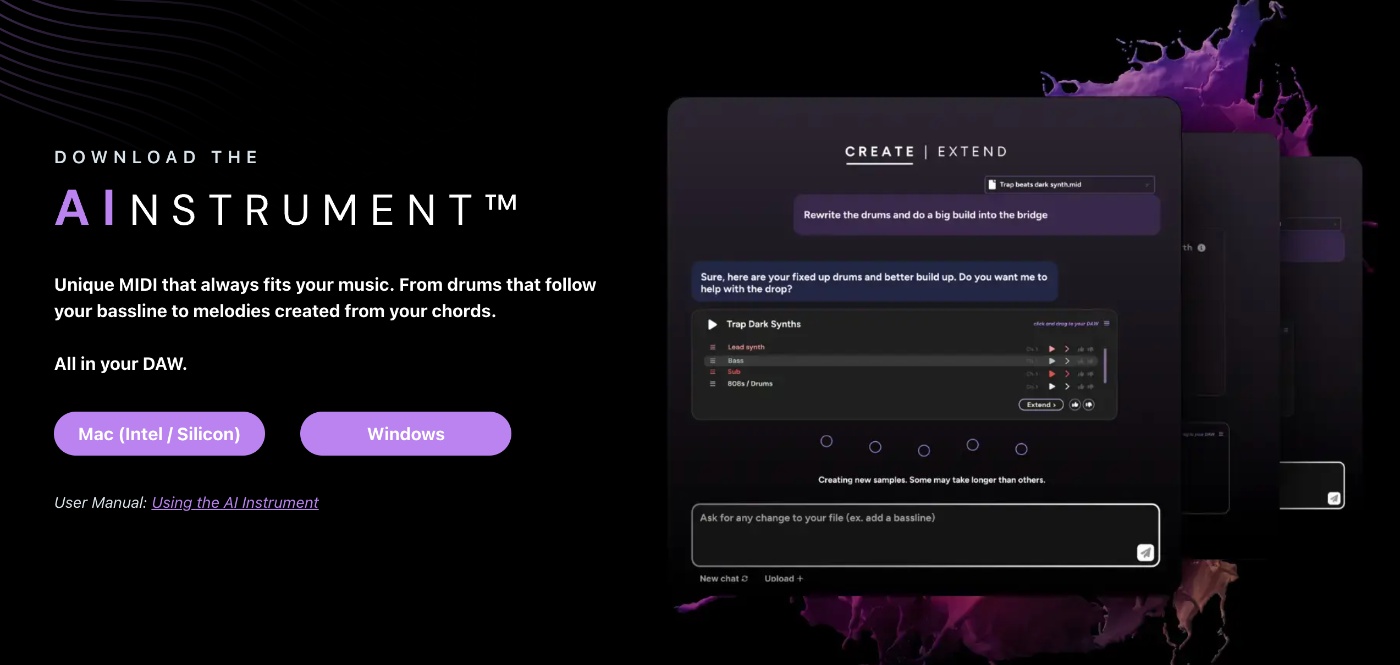
Staccato AI Instrument is an AI MIDI generator that lives inside your DAW. You describe what you want in plain language — “sad piano melody in B minor” or “fast trap hi-hat pattern” — and Staccato generates fresh MIDI you can drop straight into your project.
Unlike audio-first AI music generators (Suno, Udio), Staccato outputs MIDI, which means you keep full control over instruments, sound design, mixing, and arrangement. The AI gives you the musical idea; you handle the production.
How it works:
- Type a prompt: “Sad piano melody in B minor” or upload a MIDI clip as a reference
- The AI offers several versions — pick the one you like
- Refine with chat-style commands (“make it more syncopated”) or hit Extend to continue the idea
- Drag the resulting MIDI into your DAW timeline
Ideal for producers, beat-makers, composers, and anyone stuck on the next musical step.
How much does Staccato cost?
Staccato AI Instrument uses a subscription model with monthly and yearly plans. Notable inclusions:
- No prompt credits — generate as many prompts as you want on paid tiers
- Unlimited generations — iterate as freely as you need
- Drag-and-drop MIDI — full integration with any DAW
- Royalty-free output — usable in commercial projects
Verify the current plan structure on the Staccato site before subscribing — paid tier pricing changes periodically as the platform evolves.
How does Staccato compare to other AI music tools?
Staccato is in a specific lane — AI MIDI generation inside the DAW:
- vs Suno / Udio — those generate finished audio with vocals; Staccato generates MIDI you produce yourself
- vs Output Co-Producer — Output suggests samples; Staccato generates MIDI parts
- vs Magenta Studio — Magenta is free open-source and Ableton-only; Staccato is paid but works in any DAW with a chat-style interface
- vs MusicGen — MusicGen is open-source audio generation; Staccato is MIDI generation with iterative refinement
Choose Staccato when you want AI-generated musical ideas you can produce yourself with full sound-design control. Choose Suno or Udio when you want finished songs without producing them.
What are some use cases for Staccato?
- Jump-starting a blank session — get ready-to-edit MIDI in seconds
- Transforming a loop into a full section — extend a 4-bar idea into a bridge or drop
- Re-voicing parts — turn a piano line into guitar, strings, or synth instantly
- Genre exploration — sketch ideas in styles you don’t usually write (chiptune, jazz, lo-fi)
- Beat sketching — TikTok and short-form producers iterate fast on hook ideas
- Film and game scoring — generate motifs and variations for cues and themes
- Production education — see how MIDI parts are constructed across genres
- Songwriter idea capture — translate hummed ideas into MIDI by uploading audio references
Staccato is most valuable to producers, beatmakers, and composers who already work in MIDI and want AI-assisted idea generation — without giving up control of the production process.