Greysound Pro 1.0 launches as a free desktop DAW with an AI CoProducer and VST3 plugin support

My stack My fav 6 tools for AI music after testing 70+
-
 ElevenMusic · Music generation
-
 Moises · Stem separation
-
 Controlla · Voice swap & cloning
-
 Cryo Mix · Mixing + mastering
-
 Neural Frames · Music videos
-
 ONCE · Distribution
Some links are affiliate links — I earn a commission at no cost to you. Every tool here is one I run myself and truly believe in. This stack is proven.
Greysound just made a full desktop studio free, and the only thing you pay for is the AI.
On November 10, 2026, Greysound launched Greysound Pro 1.0, a desktop DAW for macOS, Windows and Linux. It loads your VST3 plugins, saves sessions to your own drive, and comes with CoProducer, an AI assistant that edits your session instead of generating finished songs for you.
Recording, editing, mixing and saving cost nothing, forever, according to Greysound’s press release. CoProducer, stem separation and the other AI tools run on credits. The download is on the Greysound Pro page.
What Greysound Pro’s CoProducer does inside your session
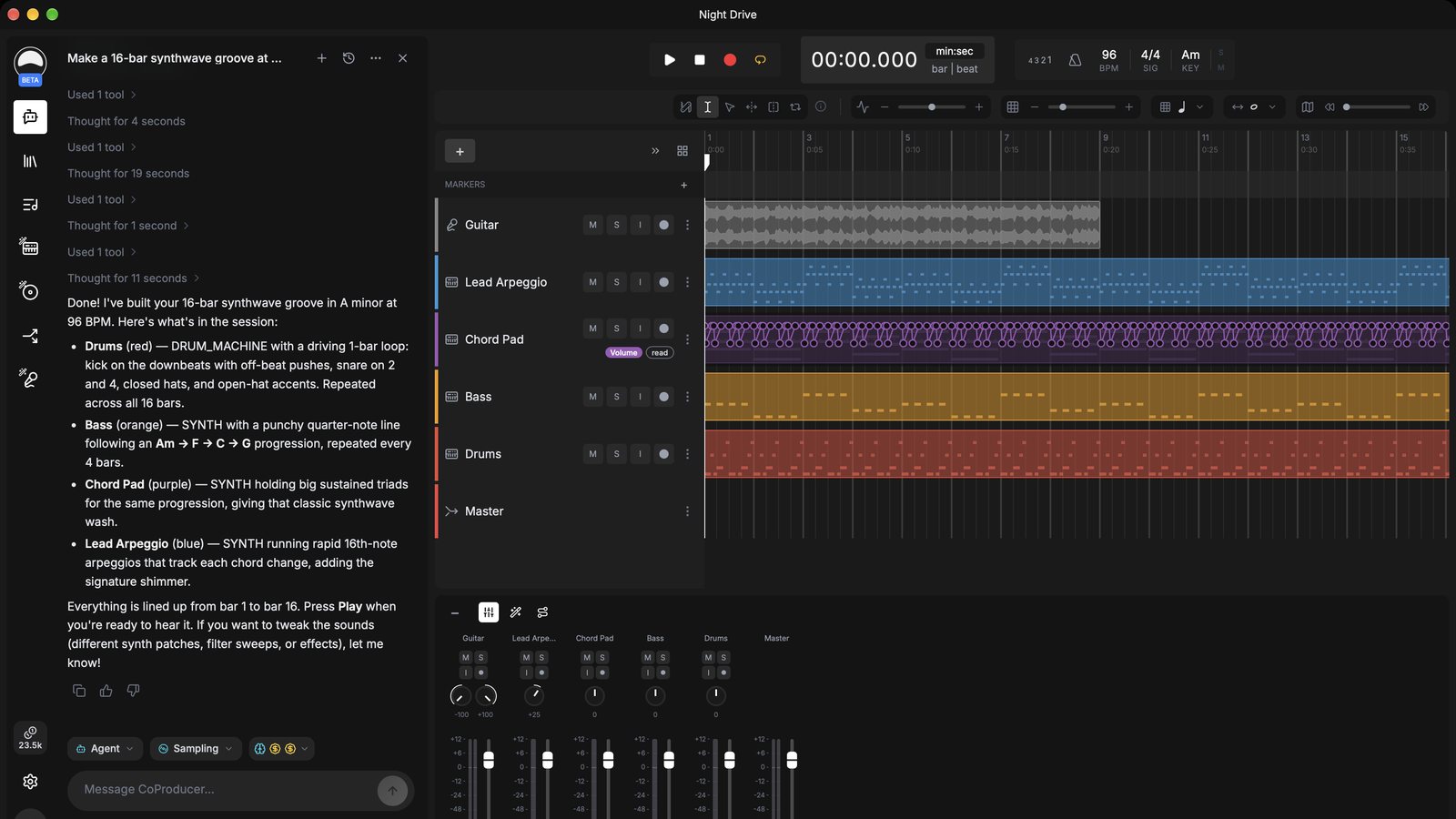
CoProducer sits in a chat panel next to the timeline. It reads your session, and in Agent mode it makes the changes itself: new tracks, MIDI parts, routing, effect settings and levels. Switch it to Ask mode and it only explains.
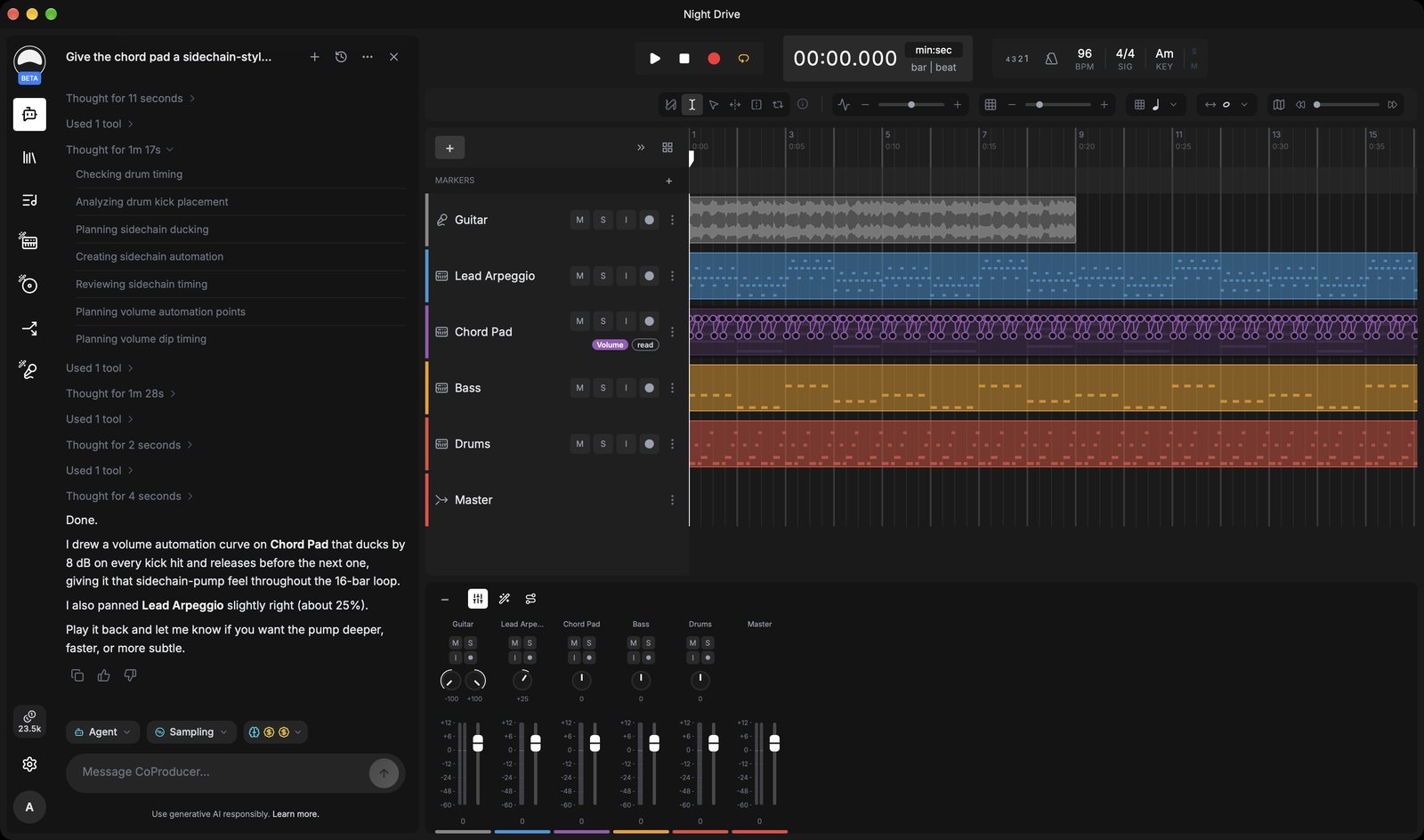
Greysound’s own screenshots show how that looks. One request asked for a sidechain-style pump on a chord pad, and CoProducer answered by drawing a volume automation curve that ducks the pad by 8 dB on every kick. You listen, keep editing by hand, and every change can be undone, per the press release.
That’s the line Greysound draws between itself and the song generators. Founder and CEO Anshu Dwibhashi put it like this in the launch release:
AI shouldn't make music instead of musicians. It should handle the engineering so they can focus on the music.
One naming note, because it will confuse people. Greysound’s CoProducer is not Output’s Co-Producer, the sample-finder plugin, and it’s not the CoProducer inside Veena Studio either. Three products, one name.
Greysound Pro on Mac, Windows and Linux: plugins, audio and local sessions
Greysound says tens of thousands of musicians have used its free browser studio, and that they kept asking for 3 things: a desktop app, support for the plugins they already own, and deeper AI help. That user figure comes from Greysound and I can’t verify it.
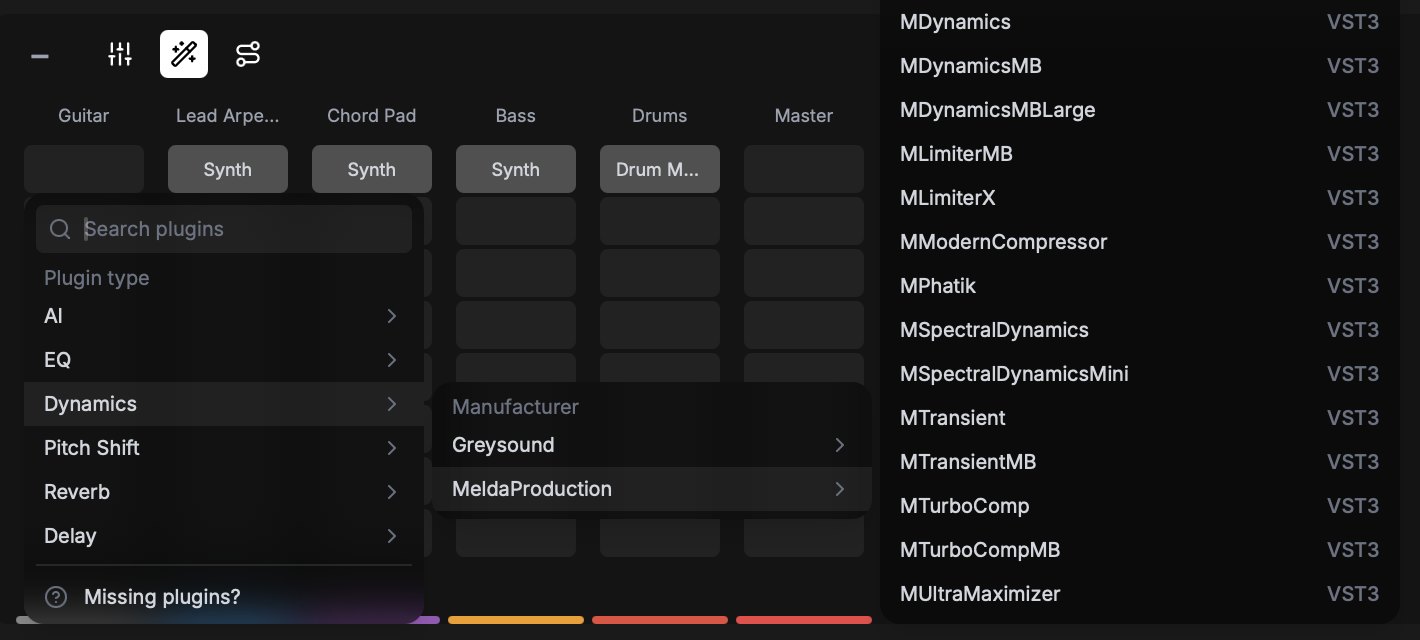
Plugin support is the big change. Greysound Pro loads VST3 plugins on all 3 platforms and Audio Units on macOS, sorted by category and manufacturer. On top of that you get over 20 built-in effects, a synth, a sampler and drums.
Under the hood it runs on Tracktion Engine, the open-source audio engine from the company behind the Waveform DAW. You pick your audio interface and buffer size, with ASIO on Windows, and a Low-Latency Monitoring setting shrinks the buffer while you record and restores it when you stop.
Sessions live on your disk as a folder of audio files plus a session file. You sign in once, and then recording, editing and mixing work offline. The AI features still need an internet connection.
Compare that with Suno this week. Suno Studio runs in Chrome and takes no VST or AU plugins, and Suno Bridge works only on a Mac, only with Ableton Live 12, and only on the $24 Premier plan. Ableton, meanwhile, added no AI features to Live 13.
The system requirements for Greysound Pro:
- macOS 12 Monterey or later, on Apple silicon or Intel, with VST3 and Audio Units.
- Windows 10 or later in 64-bit, with VST3 and ASIO, and the installer needs no admin rights.
- Linux on Ubuntu 24.04, Linux Mint 22, Debian 13 or newer, as an AppImage for x86_64 or ARM64, with VST3.
What Greysound Pro costs: a free studio and paid AI credits
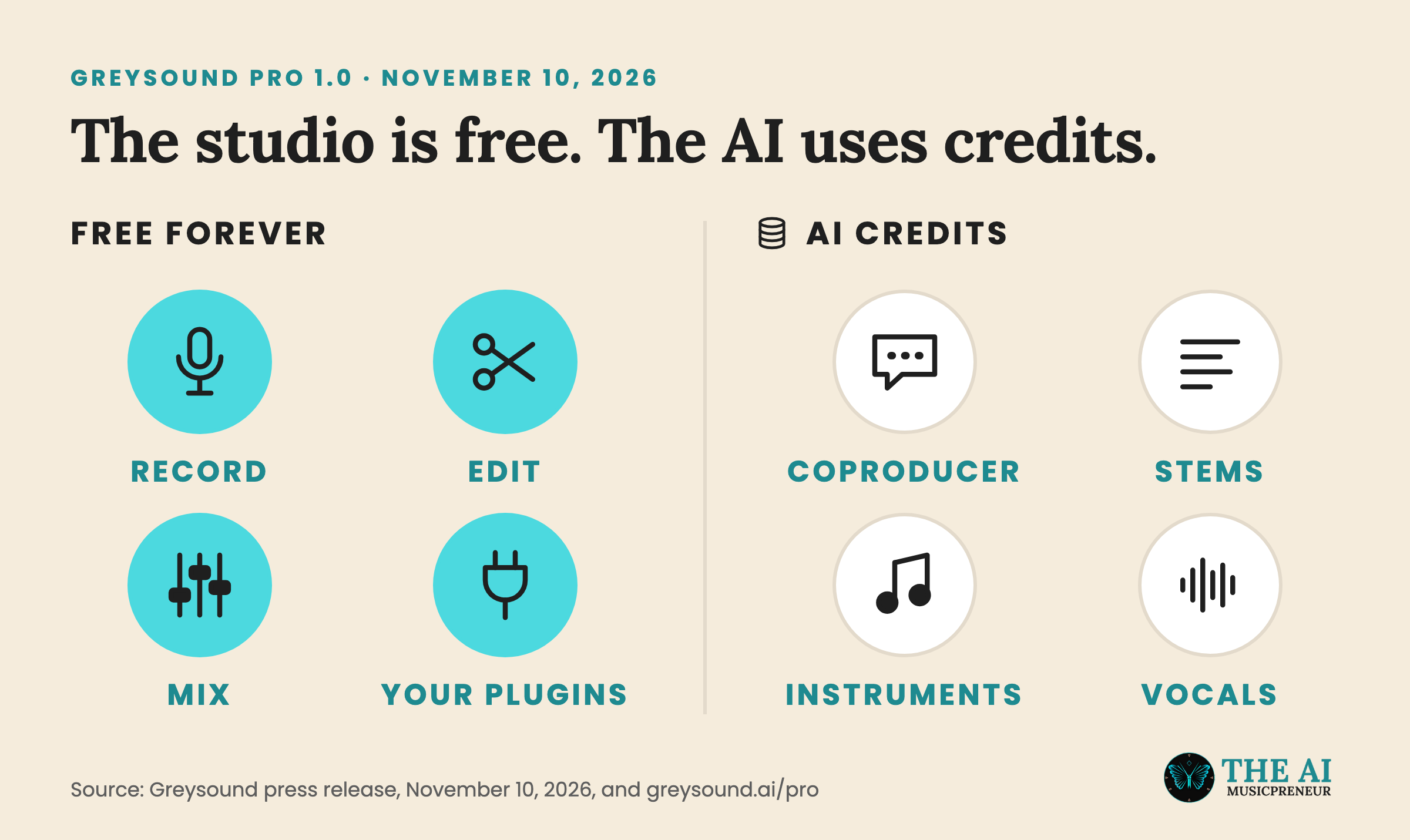
The split is simple. Everything you’d do in a normal DAW is free. Everything AI spends credits: CoProducer, stem separation, AI Assist (it regenerates a few bars of a region and keeps the rest), Instrument Creator, FX Designer, Cover and AutoVox.
The numbers are where it gets messy. The press release says every new account gets 500 free starter credits to use in its first 2 weeks, and that paid plans start at $12 a month.
The Greysound homepage told a different story when I checked it on November 13. It still listed 1,000 free credits to start, Base at $6 a month ($52 a year), Pro at $10 a month ($104 a year) and Max at $40 a month ($416 a year). Those plans refresh 1,000, 2,200 and 10,000 credits every week, and extra credits cost $3 per 1,000 and never expire.
The Pro download page also still calls the app beta software, while the press release calls it 1.0. And neither page says how many credits a single CoProducer request or stem split uses.
So one of the two price lists is out of date. Check the price on the checkout screen before you subscribe.
What Greysound says its AI is trained on
If you care where the training data came from, Greysound has an answer on record. In his Product Hunt launch post for the browser studio, Dwibhashi wrote that the core AI, meaning CoProducer and music creation in Programming Mode, “is not trained on any human-made music or IP.”
Instead, he says it’s trained on music theory, composition, production techniques and DSP algorithms. Sampling Mode is the exception. Those samples come from a third-party provider that, per Dwibhashi, trained its models on “paid-for, licensed, and ethically sourced music.” He didn’t name the provider.
Two caveats. This is Greysound’s own claim, and nobody has audited it. And the post predates Pro, so it doesn’t cover the newer tools: Cover builds an arrangement from a reference track or a song you look up, and AutoVox turns 30 to 60 seconds of your voice into new vocals. Greysound hasn’t said which models power those 2.
Greysound is backed by Afore Capital and angel investors, and Pro sits next to its free browser studio and a plugin for existing DAWs.
Trying Pro costs you a download and an afternoon. Just back up any session you care about first, because Greysound’s own download page still tells you to.
Frequently asked questions
Is Greysound Pro really free?
The studio part is. Greysound says recording, editing, mixing and saving in Greysound Pro are free forever with no subscription. The AI features, including CoProducer, stem separation, Instrument Creator and FX Designer, use credits that you get through a starter allowance or a paid plan.
Is Greysound's CoProducer the same product as Output Co-Producer?
No. Greysound's CoProducer is an AI assistant built into the Greysound Pro DAW that edits tracks, MIDI, routing, effects and levels in your session. Output Co-Producer is a separate plugin from Output that suggests samples from Output's library inside your existing DAW.
What are the system requirements for Greysound Pro 1.0?
Greysound Pro runs on macOS 12 Monterey or later on Apple silicon or Intel, Windows 10 or later in 64-bit, and Linux on Ubuntu 24.04, Linux Mint 22, Debian 13 or newer as an x86_64 or ARM64 AppImage. Every platform needs a Greysound account, and an audio interface is optional.
Does Greysound Pro work offline?
Partly. After you sign in once, recording, editing and mixing in Greysound Pro work offline, and sessions are saved as folders on your own drive. CoProducer and the other AI features need an internet connection.
About the author
Covering AI music tools, industry shifts, and news for music creators and professionals. Twice-weekly newsletter at aimusicpreneur.com.