Suno brings its Voices clone tool to iOS and Android, and free users get a limited version
My stack My fav 6 tools for AI music after testing 70+
-
 ElevenMusic · Music generation
 -
 Moises · Stem separation
 -
 Controlla · Voice swap & cloning
 -
 Cryo Mix · Mixing + mastering
 -
 Neural Frames · Music videos
 -
 ONCE · Distribution
Some links are affiliate links — I earn a commission at no cost to you. Every tool here is one I run myself and truly believe in. This stack is proven.
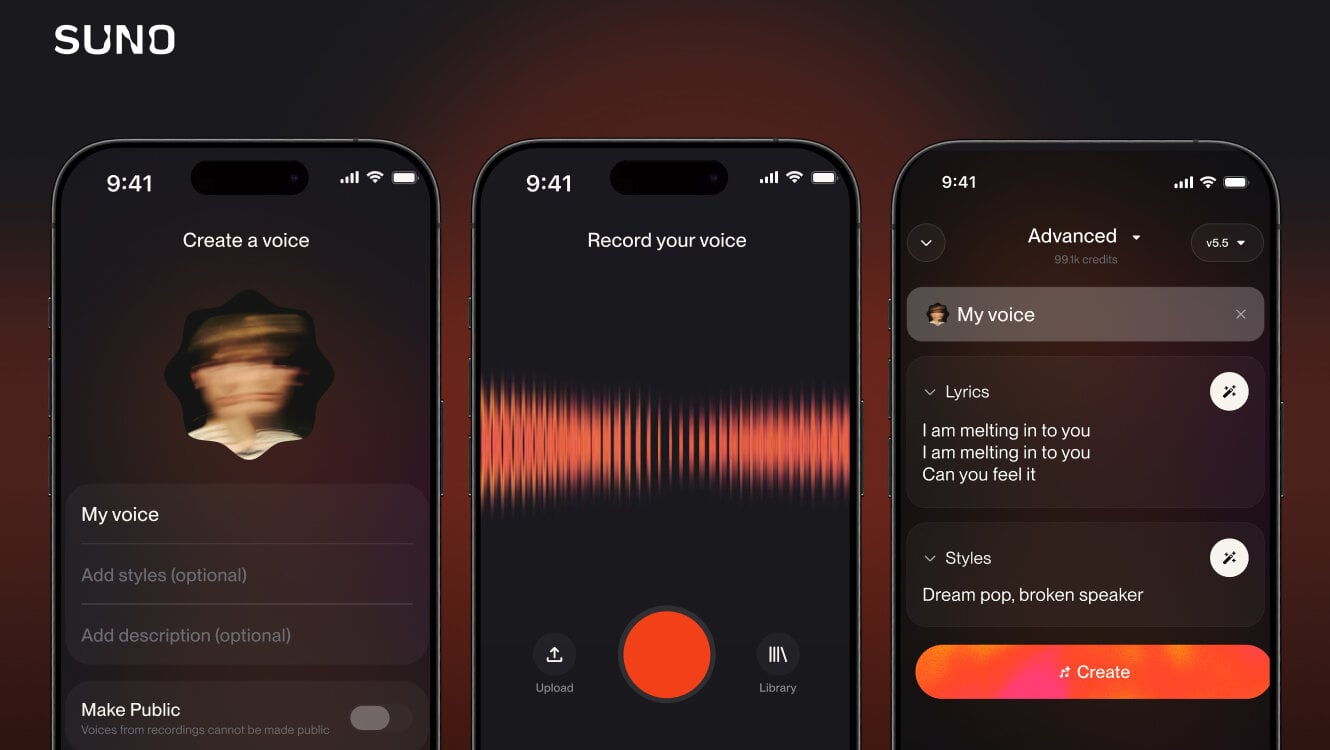
Suno put its voice clone tool Voices on iOS and Android, and opened a limited version to free users. The company confirmed the rollout in its release notes on Friday, August 7, 2026, telling users Voices is “now available to try on free plans.”
Voices generates new songs in your own singing voice. You record yourself in the app, upload an existing audio file, or pick a track from your Suno library, and Suno strips the vocal to train on. The feature launched in March with the v5.5 model but needed a desktop computer for setup until now.
How Suno’s mobile Voices setup and verification work
Before a voice goes live, Suno asks you to read a phrase aloud and checks it against the singing recording, confirming the voice belongs to the person setting it up, per Music Business Worldwide.
Captured voices stay private by default. Only the account holder can generate songs with one, and voices built from recordings cannot be made public. Free plans get a restricted version to try before the upgrade prompt appears; Pro and Premier subscribers keep unlimited access.
Where the Voices rollout fits in Suno’s August 2026 run
The mobile launch caps a fast product run: an iMessage keyboard, CarPlay and Android Auto support, and a stem-separation overhaul all shipped in recent months, plus a waitlist for Suno Vinyl.
The timing cuts both ways. One day earlier, Suno announced watermarking and transparency tools, and 3 days later it published download caps for every tier. Suno is widening what you can make while narrowing what you can take off the platform, and the free Voices tier fits that pattern: create on Suno, keep it on Suno.
Frequently asked questions
What does Suno's Voices feature do on mobile?
Voices lets you record or upload audio of yourself singing inside the iOS or Android app, and Suno then generates new songs in that voice. It first launched in March 2026 with the v5.5 model but needed a desktop setup until the August 7 mobile rollout.
Can free Suno users use the Voices voice clone tool?
Yes, with limits. Suno opened a restricted version of Voices to free plans in August 2026, enough to capture a voice and try it before the app prompts an upgrade. Pro and Premier subscribers keep unlimited access to the tool.
How does Suno verify a cloned voice belongs to you?
Before a voice is created, Suno asks you to read a phrase aloud and checks that recording against the singing audio you submitted. The check confirms the voice belongs to the person setting it up, and voices from recordings cannot be made public.
Are Suno Voices clones private?
Yes. Suno says captured voices are private by default and only the account holder can use one to generate songs. The Make Public toggle is disabled for voices built from recordings.
About the author

Covering AI music tools, industry shifts, and news for music creators and professionals. Twice-weekly newsletter at aimusicpreneur.com.