You wrote a song with help from an AI tool. Now you need to register it with ASCAP to collect performance royalties. ASCAP changed its policy in October 2025 to accept partially AI-generated works, but the registration process has new requirements.
This guide walks you through the updated ASCAP registration workflow for AI-assisted music. You will learn how to document your human contribution, complete the online registration form, answer the new AI disclosure questions, and track your submission. By the end, your AI-assisted work will be logged in the ASCAP database and eligible for royalty collection.
Table of Contents:
Preparing Your Music for Registration
 Credit: ASCAP website
Required tools and versions:
- Active ASCAP writer membership
- ASCAP Member Access account or ASCAP mobile app
- Web browser with JavaScript enabled
Supported platforms and system requirements:
- Desktop browser (Chrome, Firefox, Safari, Edge)
- iOS or Android device for mobile app registration
Prior knowledge expected:
- Basic understanding of music copyright terms (writer, publisher, share splits)
- Familiarity with your distributor’s ISRC codes
Time commitment and skill level:
- 5 to 10 minutes per song
- Beginner level
Access and permissions needed:
- ASCAP member login credentials
- Signed split sheet or written agreement with all co-writers
- Documentation of your human creative contribution
Before you start checklist:
- Confirm your song qualifies as partially AI-generated, not fully AI-generated.
- Gather song metadata (title, duration, release date, ISRC code).
- Document which parts you created and which parts AI generated.
- Obtain IPI numbers for all co-writers and publishers.
- Agree on writer and publisher share splits with collaborators.
Understanding AI-Assisted vs. Fully AI-Generated Music
ASCAP now accepts partially AI-generated musical works following its October 28, 2025 policy alignment with BMI and SOCAN. ASCAP’s policy mirrors the U.S. Copyright Office guidance that copyrightable works require human authorship. The society distinguishes between fully AI-generated works (ineligible) and partially AI-generated works (eligible).
ASCAP has not published detailed criteria for what qualifies as “partially AI-generated.” Based on the policy language and Copyright Office guidance, here’s what likely qualifies for registration:
Likely Eligible (AI as a Tool)
- AI stem splitters (Moises, Audioshake, Lalal.ai) for remixing tracks. These tools separate existing recordings into component parts. You make the creative decisions about arrangement and mixing.
- AI mixing and mastering tools like RoEx, iZotope Nectar and Ozone, and Masterchannel. These optimize technical audio quality. The creative composition remains yours.
- AI sample finders like WAVS and Splice that help you locate human-created samples. The AI assists discovery, not creation.
- AI sample generators that create variations of existing samples, such as Output’s co-producer re-imagine feature. You select and arrange these samples into your composition.
- AI chatbots like ChatGPT and Claude for lyric writing assistance. Your creative direction shapes the final lyrics. The ideas and artistic choices remain yours.
- AI voice cloning tools (Kits.AI, Controlla, Voice Swap) for fixing small vocal mistakes or creating backing vocals. Your original vocal performance provides the source material.
Real-world example: Sabrina Carpenter’s “Espresso” used three Splice samples. The human arrangement and creative choices made the song copyrightable.
Likely Ineligible (Fully AI-Generated)
AI song generators like Suno and Udio that create complete tracks from text prompts. If the AI generates both music and vocals without human creative input beyond the prompt, the work lacks sufficient human authorship.
The prompt alone does not count as copyrightable authorship under current Copyright Office guidance.
Fully AI-generated vocals with no human vocal source or performance. If you never sang or performed the melody, the vocal track lacks human authorship.
The Gray Area
AI voice synthesis for backing vocals remains unclear. If you perform the lead vocal but use AI for harmonies, this might qualify as partially AI-generated. ASCAP has not clarified this scenario.
When AI Use Does Not Require Disclosure
If you used AI only for non-creative technical tasks, treat your work as fully human-created and skip AI disclosure during registration. These tasks include:
- Noise reduction and audio cleanup
- Standard mastering optimization
- Pitch correction (Auto-Tune, Melodyne)
- Time alignment and editing
Now that you know if your song qualifies or not, let’s dive into how to register music with ASCAP.
Register music with ASCAP – Step-by-Step Instructions
1. Document your human contribution
Purpose: Create a written record proving which elements you authored before you register.
I put together a guide for musicians with tactics on how to prove they’re human. You can read more here.
Actions to complete before logging in:
- Write down which musical elements you created (melody, lyrics, chord progression, arrangement).
- Note which AI music tools you used and what it generated (beats, bassline, vocal harmonies, mixing).
- Save session files, DAW project timestamps, and prompt logs.
- Take screenshots of your AI tool interface showing input prompts and output.
- Store all documentation in a dedicated folder labeled with the song title and date.
Watch for these pitfalls:
- Vague descriptions like “I used AI for production” will not hold up under scrutiny. List specific elements.
- Missing timestamps make it harder to prove authorship order if disputes arise later.
Pro tip:
Keep a simple spreadsheet for every AI-assisted project with columns for song title, AI tool name, human elements, AI elements, and file paths to proof. This takes 30 seconds per song and protects you long-term.
Success check: You have a written document or spreadsheet entry listing your human contributions and AI contributions for this song.
2. Log into ASCAP member access
Purpose: Access the online work registration system where you will submit your song.
Steps to reach the registration form:
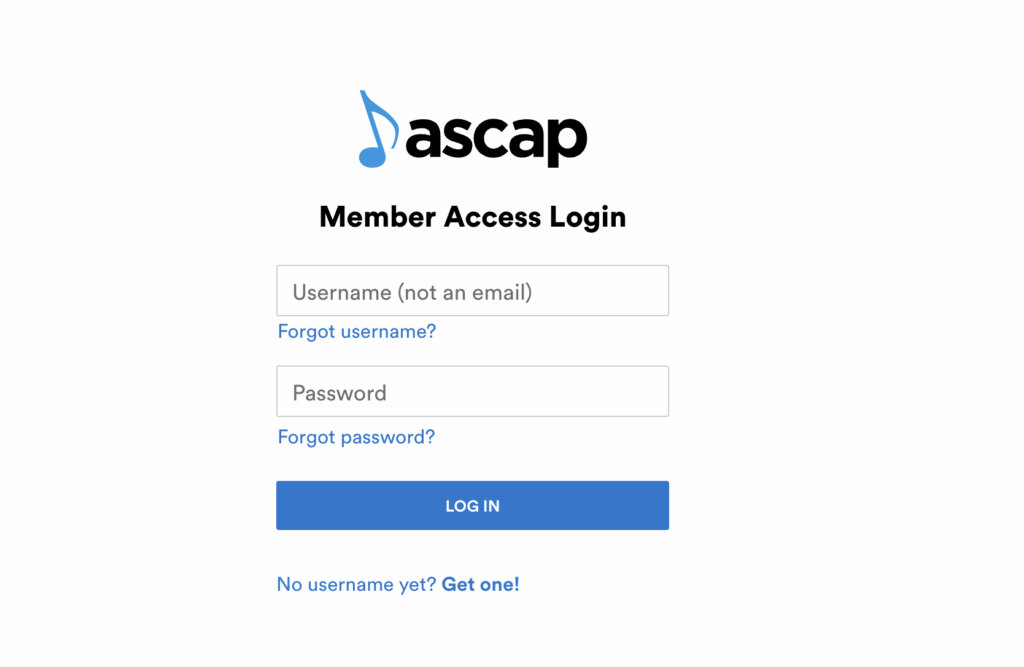
- Go to members.ascap.com and click the Music Creator Login button.
- Enter your username and password, then click Log In.
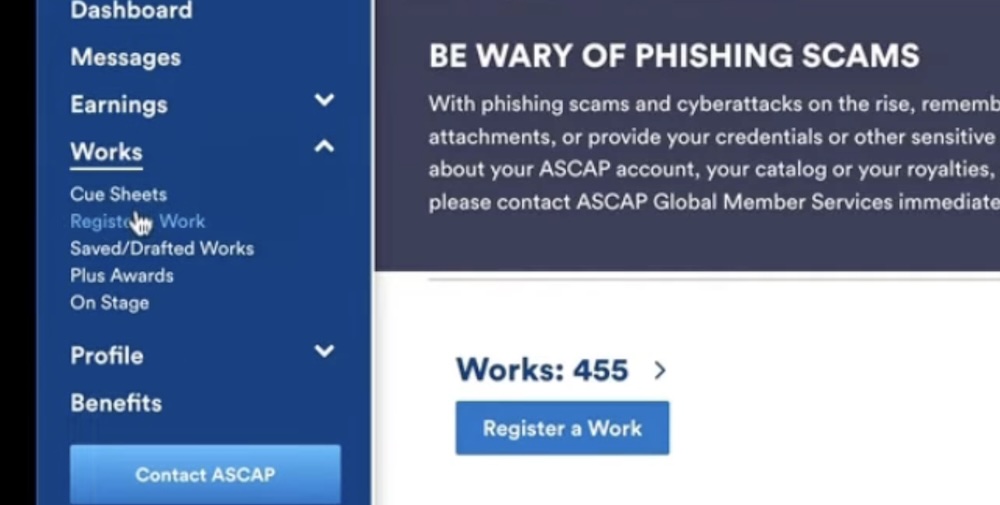
- On the left navigation bar, click Works, then click Register a Work.
Alternative path using mobile app:
- Open the ASCAP mobile app on your iOS or Android device.
- Log in with your member credentials.
- Tap Register on the bottom navigation bar.
- Choose Quick Registration for basic info or Guided Registration for step-by-step help.
Watch for these pitfalls:
- If you see a “Forgot password?” prompt, click it and reset your password. Do not create a second account.
- If you have both writer and publisher memberships, log in once. The work will appear in both catalogs automatically.
Success check: You see the Online Work Registration form or the mobile app registration screen with fields for song title and writer information.
Here’s some more help on how to register music with ASCAP.
3. Start a new work registration
 Screenshot
Purpose: Open a blank registration form for your AI-assisted song.
Steps to begin the form:
- On the Online Work Registration page, confirm you are starting a new work, not editing an existing one.
- Leave the form blank for now. You will fill fields in the next steps.
Quick rule:
Register each song separately, even if you are submitting an album. Each track gets its own ISRC code and its own registration.
Success check: You see empty fields for Work Title, Alternative Title, Writers, Publishers, and additional details.
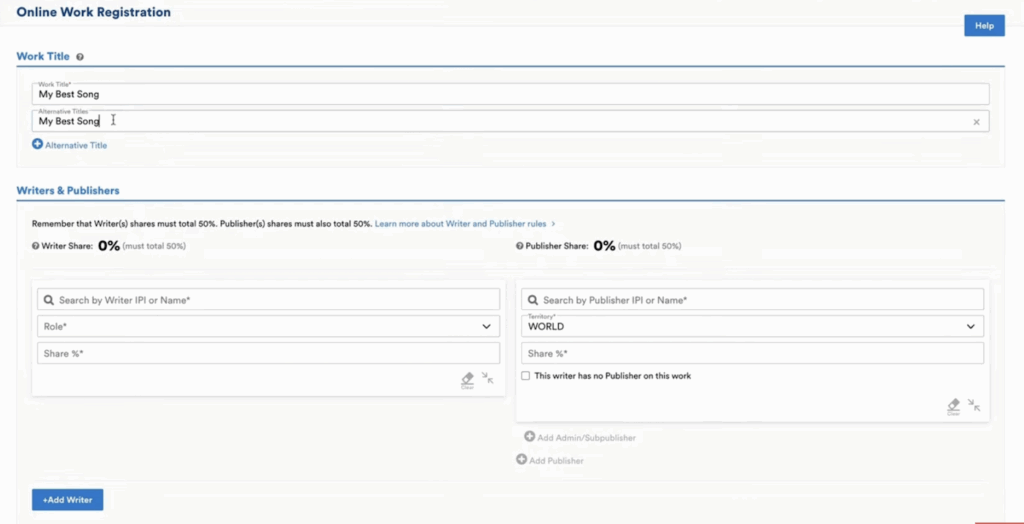
Purpose: Provide the basic identifying information ASCAP needs to track your song.
Core fields to complete:
- Work Title: Type the exact song title as it appears on streaming platforms.
- Alternative Title: Add alternate versions (sped up, slowed, instrumental) only if they share the same writers and splits.
- Performance Time: Enter the song duration in minutes and seconds (example: 3:02).
Watch for these pitfalls:
- Mismatched titles between ASCAP and your distributor will delay royalty matching. Copy the title character-for-character.
- Do not register instrumental and vocal versions separately unless the writer or publisher splits differ.
Success check: The Work Title field displays your song name and the Performance Time field shows the correct duration.
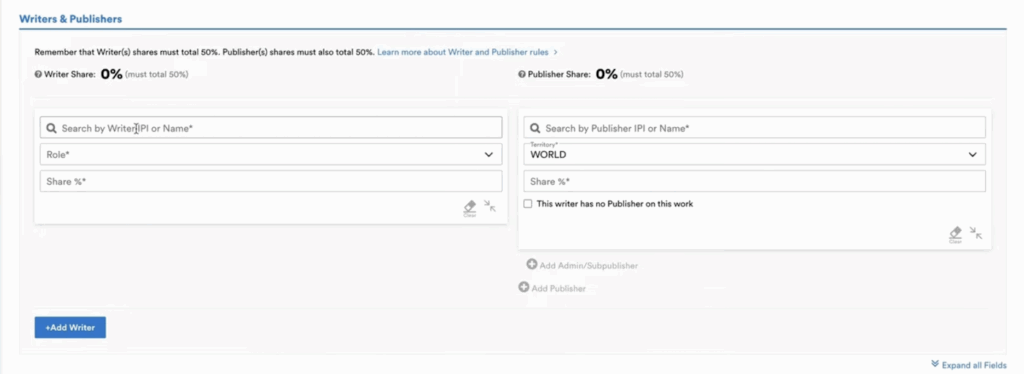
Purpose: Define who owns the song and how royalties will be split.
Steps to add each writer:
- Click Add Writer.
- Enter the writer’s IPI number in the search field. Delete leading zeros for BMI writers.
- Select the writer name from the dropdown results.
- Choose the writer’s role: Composer (music only), Author (lyrics only), or Composer and Author (both).
- Enter the writer’s share percentage in the Writer Share field.
Steps to add each publisher:
- Enter the publisher’s IPI number or name in the publisher search field.
- Select the correct publisher from the results.
- Choose the territory (World for most independent artists).
- Enter the publisher’s share percentage in the Publisher Share field.
- If the writer is self-published with no separate publisher entity, enter the writer’s publisher share and check “This publisher has no publisher on this work.”
Quick rule:
Writer shares must total 50 percent. Publisher shares must total 50 percent. The system will highlight shares in red until both sides equal 50 percent.
Example:
You and one co-writer split a song equally. You each get 25 percent writer share and 25 percent publisher share. If your co-writer is with BMI and self-published, enter their 25 percent writer share, then check “This publisher has no publisher on this work” and enter 25 percent publisher share.
Watch for these pitfalls:
- Entering shares that do not total 50 percent on each side will block submission.
- Registering without a signed split sheet risks payment disputes. Get written agreement before you submit.
Pro tip:
Save a template split sheet with IPI numbers and standard roles for your frequent collaborators. This cuts registration time from 10 minutes to 2 minutes per song.
Success check: The Writer Share and Publisher Share fields both show 50 percent in black text, not red.
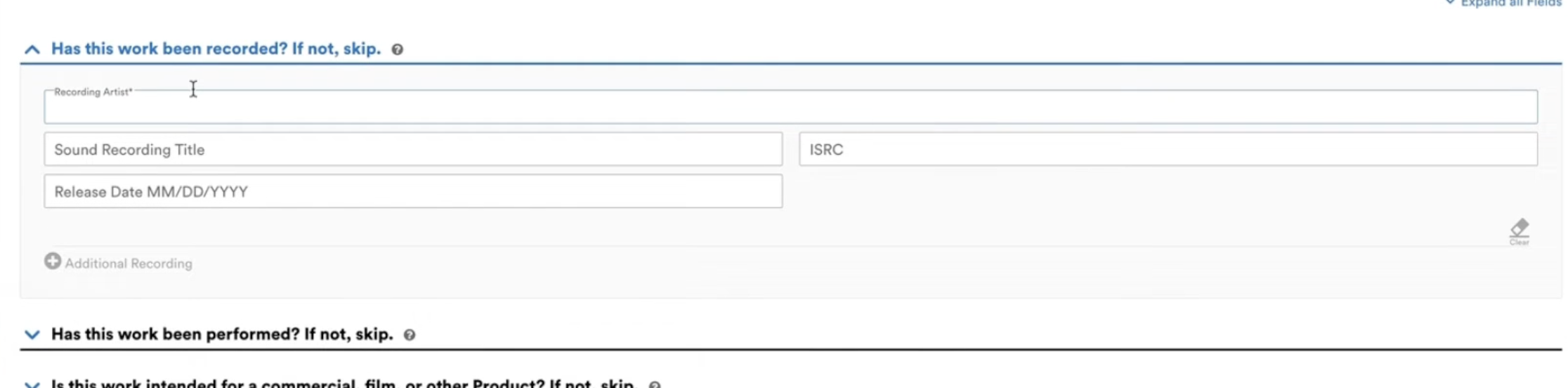

Purpose: Link your ASCAP registration to the actual recording and any live performances.
Steps to add recording information:
- Scroll to “Has this work been recorded?” and click Yes.
- Enter the recording artist name.
- Enter the song title as it appears on the release.
- Paste the ISRC code provided by your distributor (DistroKid, CD Baby, TuneCore, etc.).
- Enter the release date in MM/DD/YYYY format.
Steps to add performance information:
- Scroll to “Has this work been performed?” and click Yes if you have performed the song live or plan to.
- Enter your name or band name as the performer.
Watch for these pitfalls:
- Missing or incorrect ISRC codes prevent ASCAP from matching your registration to streaming platform data. Double-check the code in your distributor dashboard.
- If your release date uses single-digit months or days, add a leading zero (01/05/2025, not 1/5/2025).
Success check: The ISRC field displays a 12-character alphanumeric code and the release date field shows your planned or actual release date.
7. Answer AI and sample questions
Purpose: Disclose AI use and any sampled content so ASCAP processes your registration correctly.
Steps to complete AI disclosure:
- Scroll to the question “”Does this work use AI-generated content?””
- Select Yes if any part of the song was created by an AI tool.
- In the text field that appears, describe which elements are AI-generated and which are human-created (example: “AI-generated beat and bassline, human-written melody and lyrics”).
Steps to disclose samples:
- Scroll to “Does this work contain a sample?”
- Select Yes only if you sampled copyrighted music that is not royalty-free or from a licensed sample pack.
- Enter the original song title, writer names, and IPI numbers for the sampled work.
- Skip this section if you used Splice loops or other pre-cleared samples.
Quick rule:
If you used AI for non-creative tasks like mastering, EQ, or noise reduction, select No for AI-generated content. AI disclosure applies only to creative elements like melody, harmony, rhythm, or lyrics.
Watch for these pitfalls:
- Failing to disclose AI use violates ASCAP’s registration policy and risks removal from the database.
- Listing every sample pack or loop library clutters your registration. Only disclose samples that require copyright clearance.
Pro tip:
Keep your AI disclosure concise and factual. Write “AI-generated instrumental, human-written topline” instead of a paragraph. ASCAP needs clarity, not detail.
Success check: The AI disclosure field contains a one-sentence description of your human and AI contributions, or the field is blank if you selected No.
8. Review and submit your application
Purpose: Check all fields for accuracy before final submission.
Steps to review and submit:
- Scroll to the top of the form and verify the song title, writer names, and share splits.
- Confirm the ISRC code matches your distributor records.
- Check that writer and publisher shares both total 50 percent.
- Scroll to the bottom and click Submit.
- On the confirmation screen, click “Register another work with the same splits” if you are submitting multiple songs with identical collaborators.
Watch for these pitfalls:
- Submitting with incorrect splits requires a revision request and delays payment. Take 30 seconds to double-check math.
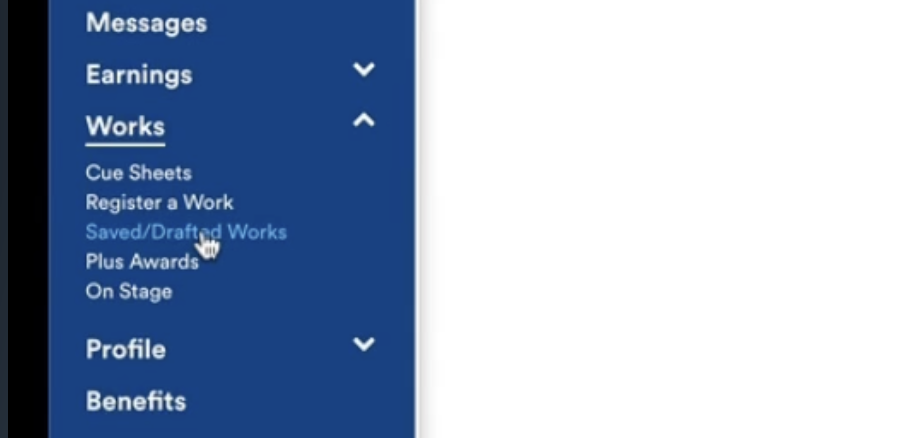
- If you need to save a draft instead of submitting, click Save at the bottom. Drafts appear under Works, Saved/Drafted Works.
Success check: You see a confirmation message stating “Your work has been successfully registered” and the song title appears in your Works catalog.
9. Track your registration status in member access
Purpose: Confirm ASCAP processed your submission and the work is live in the database.
Steps to check registration status:
- In Member Access, click Works on the left navigation bar.
- Locate your song title in the list.
- Check the Status column. “Registered” means the work is live and eligible for royalty collection.
- If the status shows “Pending,” wait 2 to 3 business days and check again.
Steps to edit a registered work:
- Click the song title in your Works list.
- Click Edit Work.
- Make changes to writer shares, publisher info, or metadata.
- Click Submit to save changes.
Watch for these pitfalls:
- Editing a work you did not originally register requires written consent from the other entitled parties. ASCAP will request signed correspondence.
- If you need to delete an entitled party or reduce their share, contact the party first and obtain written approval.
Success check: Your song appears in the Works list with a “Registered” status and all writer and publisher names display correctly.
AI-Assisted Music: Special Considerations
ASCAP’s AI policy allows partially AI-generated works but prohibits fully AI-generated works. A partially AI-generated work must contain human authorship in the melody, lyrics, harmony, rhythm, or arrangement. AI contributions to mixing, mastering, or sound design do not disqualify a work, but they also do not count as human authorship for copyright purposes.
The U.S. Copyright Office evaluates AI-assisted works case-by-case. Works entirely generated by AI are not copyrightable under current U.S. law. If your work combines AI-generated and human-created content, you can claim copyright for the human-created portions only. You must disclose AI use when applying for federal copyright registration.
ASCAP’s six AI principles guide the policy: Human Creators First, Transparency, Consent, Compensation, Credit, and Global Consistency. The society requires transparency about AI use during registration and reserves the right to request additional documentation proving human authorship.
Pro tip:
Register your AI-assisted work with the U.S. Copyright Office in addition to ASCAP. Copyright registration strengthens your legal rights and allows you to sue for statutory damages if someone infringes your work. Visit copyright.gov to file.
Common Mistakes to Avoid:
Top registration errors that delay payment:
- Waiting years after release to register. You lose retroactive royalties. Register as soon as you schedule the release with your distributor.
- Registering the same song twice. If a co-writer already registered the work with ASCAP, do not submit it again. Check with your collaborator first.
- Uploading audio files. ASCAP needs metadata, not audio. The registration form does not accept MP3 or WAV files.
- Registering draft beats or unfinished songs. Only register completed works intended for public performance.
- Confusing ASCAP registration with copyright protection. ASCAP collects royalties. The U.S. Copyright Office grants legal protection. You need both.
Share split mistakes that cause disputes:
- Submitting without a signed split sheet. Verbal agreements fail when memory conflicts arise. Get it in writing.
- Entering shares that do not total 100 percent (50 percent writer, 50 percent publisher). The system will reject the submission.
- Listing a producer as a writer without agreement. Producers contribute to recordings, not always to underlying compositions. Confirm roles with your collaborators.
AI disclosure mistakes that risk removal:
- Failing to disclose AI use when AI generated creative elements. ASCAP checks registrations and removes works that violate policy.
- Disclosing AI use for non-creative tasks like mastering. This confuses the record and is unnecessary.
Handling Registration Issues and quick fixes:
- Symptom: “Writer share does not equal 50 percent” error. Cause: Math error in share splits. Fix: Recalculate shares so all writers total 50 percent and all publishers total 50 percent.
- Symptom: Cannot find co-writer by name. Cause: Co-writer belongs to BMI or another PRO. Fix: Search by IPI number instead of name. Remove leading zeros for BMI members.
- Symptom: ISRC code rejected. Cause: Typo or wrong format. Fix: Copy the ISRC directly from your distributor dashboard. ISRC codes are 12 characters (example: USRC17607839).
- Symptom: Saved draft disappeared. Cause: Session timeout. Fix: Log in to Member Access, click Works, then Saved/Drafted Works. Drafts save automatically.
What to do when progress blocks at a step:
- Log out of Member Access and clear your browser cache, then log back in.
- Try the ASCAP mobile app if the desktop site fails. The app uses a different interface and often resolves browser issues.
- Contact ASCAP Member Services at 1-800-95-ASCAP (1-800-952-7227) or submit a message through Member Access under Messages, New Message, category “My Catalog.”
Updating Your ASCAP Records
When to update a registered work:
- A co-writer’s share changed after you submitted. Obtain written consent from all parties, then edit the work in Member Access.
- You added a new recording artist or alternate title. Edit the work and add the new information in the recording details section.
- You discovered an error in the ISRC code or release date. Edit the work immediately to ensure accurate royalty matching.
Steps to update a work you registered:
- Log in to Member Access and click Works.
- Click the song title in your catalog.
- Click Edit Work.
- Make changes to the relevant fields.
- Click Submit.
Steps to update a work someone else registered:
- Log in to Member Access and click Messages.
- Click New Message.
- Select category “My Catalog” and topic “Work Record Update.”
- Describe the change and provide the song title and current registration details.
- ASCAP will assign an inquiry number and notify you when the update is complete.
Protecting Your Music Rights
ASCAP registration collects performance royalties when your music plays on radio, streaming platforms, live venues, and other public performances. ASCAP does not protect your copyright or grant legal rights to sue infringers. You need federal copyright registration for legal protection.
Steps to strengthen your rights:
- Register your AI-assisted work with the U.S. Copyright Office at copyright.gov. Disclose AI use in the application and describe your human contributions.
- Keep detailed records of your creative process. Save DAW session files, MIDI files, lyric drafts, and AI tool screenshots.
- Use provenance tools like audio watermarking or blockchain timestamping to prove creation date and authorship.
- Monitor your music for unauthorized use with tools like YouTube Content ID or third-party monitoring services.
Pro tip:
Copyright registration before infringement occurs allows you to collect statutory damages up to $150,000 per work and recover attorney fees. Registration after infringement limits you to actual damages, which are harder to prove and often smaller.
ASCAP official resources:
U.S. Copyright Office guidance:
Additional guides:
Conclusion
You now know how to register AI-assisted music with ASCAP under the updated policy. The process mirrors standard registration with one critical addition: you must document and disclose your human creative contribution. ASCAP accepts partially AI-generated works but prohibits fully AI-generated works, following U.S. Copyright Office guidance that copyrightable works require human authorship.
Expect your registration to appear in the ASCAP database within 2 to 3 business days. Once registered, your work is eligible for performance royalty collection whenever it plays on radio, streaming platforms, live venues, or other public performances.
Next steps: Register your work with the U.S. Copyright Office to secure legal protection beyond royalty collection. Review your documentation practices and adopt a system to track human and AI contributions for every project. If you collaborate frequently, create a split sheet template with IPI numbers and standard roles to speed future registrations.
Register your next AI-assisted song today and start collecting the royalties you earned.