AudioAuditor bundles AI music detection, spectral analysis and AcoustID fingerprinting for free
My stack My fav 6 tools for AI music after testing 70+
-
 ElevenMusic · Music generation
 -
 Moises · Stem separation
 -
 Controlla · Voice swap & cloning
 -
 Cryo Mix · Mixing + mastering
 -
 Neural Frames · Music videos
 -
 ONCE · Distribution
Some links are affiliate links — I earn a commission at no cost to you. Every tool here is one I run myself and truly believe in. This stack is proven.
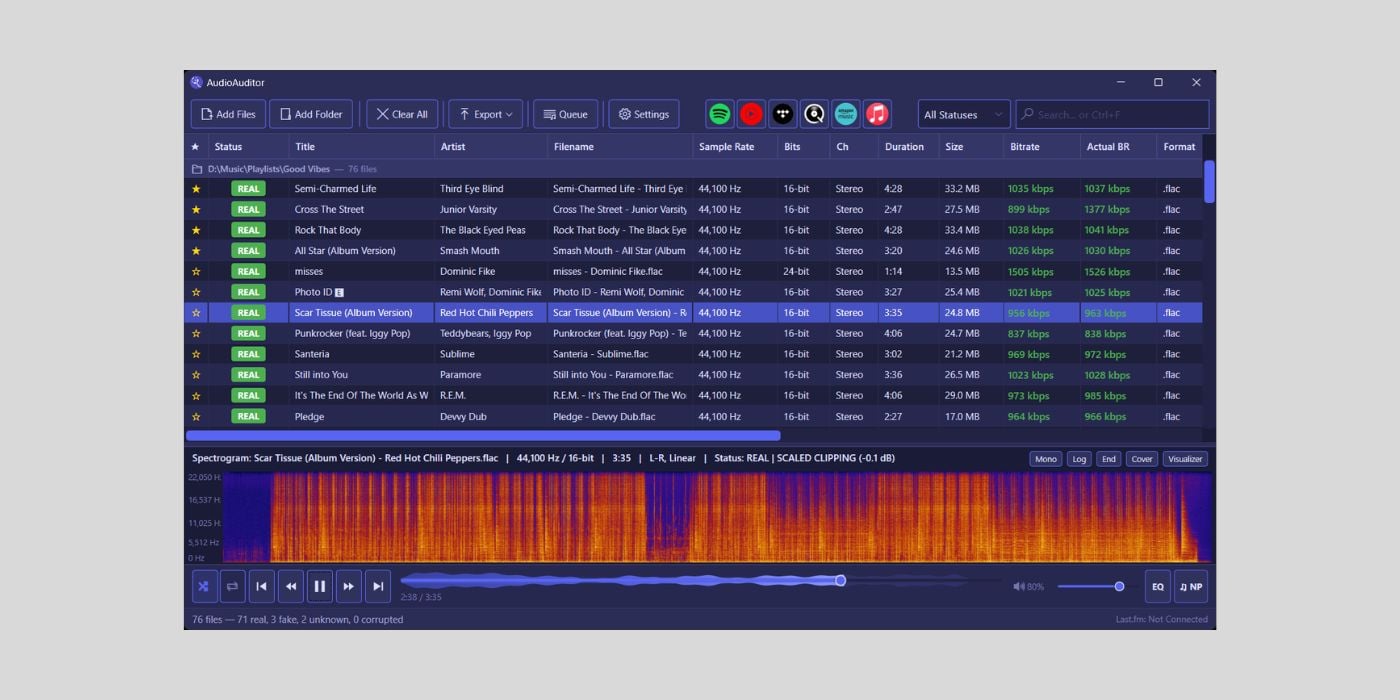
A free, open-source app called AudioAuditor now does AI music detection alongside a stack of audio forensics normally sold as paid software. Developer Angel2mp3 built it on Microsoft .NET 8, and it ships as both a desktop app and a command line tool.
Bedroom Producers Blog flagged it on July 28, 2026, noting the feature list runs deeper than paid alternatives like Fakin’ The Funk.
What AudioAuditor does beyond AI detection
The analysis engine covers ten checks, and AI detection is only one of them:
- Full metadata with an editor
- Advanced spectral analysis
- Fake stereo detection
- Fake lossless detection
- MQA detection
- AcoustID fingerprinting
- Loudness and dynamics
- Digital and scaled clipping detection
- Silence gap detection
- AI detection, marked beta
Most of these answer an older question than AI: is this file what it claims to be? Fake lossless detection catches an MP3 rewrapped as FLAC. Fake stereo catches a mono source spread across two channels. Producers buying sample packs and mastering engineers receiving client files have wanted this for years.
How AudioAuditor’s spectral analysis and metadata tools work
The spectrogram is full resolution, multi-mode, and zooms up to 20x, which is enough to see the shelf where a lossy encoder cut the top end.
Metadata is the other time saver. A batch GUI pulls missing tags from MusicBrainz, and AcoustID fingerprinting identifies tracks with no usable tags at all. Readouts cover artist and song info, sample rate, bit depth, file size, bitrate, BPM, and True Peak and LUFS values.
Batch operations extend to metadata stripping, duplicate detection, playlist import and auto-naming from tags. For anyone sitting on a disorganised sample library, that is the part worth the download.
Which platforms AudioAuditor runs on
This is where it thins out. The desktop app needs Windows 10 or later. The CLI covers Windows and Linux. macOS is listed as coming soon, which leaves a large share of music producers waiting.
Bedroom Producers Blog made the same point, saying it cannot judge whether AudioAuditor is a genuine one-stop solution or is trying to do too much until the macOS build lands.
Frequently asked questions
What is AudioAuditor?
AudioAuditor is a free, open-source desktop app and command line tool combining a music player with an audio analysis engine. Developer Angel2mp3 built it on Microsoft .NET 8, and it is aimed at music producers as well as listeners auditing their own libraries.
Is AudioAuditor's AI music detection reliable?
The developer labels the AI detection feature as beta, so treat its verdicts as a signal rather than proof. Like every output-based detector, it analyses the finished audio file and cannot see how a track was actually made.
Does AudioAuditor work on macOS?
Not yet. The desktop app requires Windows 10 or later. The command line version runs on Windows and Linux, and the developer lists macOS support as coming soon.
What can AudioAuditor detect besides AI music?
It flags fake stereo, fake lossless files and MQA encoding, and it measures loudness and dynamics, digital and scaled clipping, and silence gaps. AcoustID fingerprinting plus the MusicBrainz database can identify unknown tracks.
About the author

Covering AI music tools, industry shifts, and news for music creators and professionals. Twice-weekly newsletter at aimusicpreneur.com.