RoEx Phosphor turns your images into sound for free. Here’s why producers should care:
My stack My fav 6 tools for AI music after testing 70+
-
 ElevenMusic · Music generation
 -
 Moises · Stem separation
 -
 Controlla · Voice swap & cloning
 -
 Cryo Mix · Mixing + mastering
 -
 Neural Frames · Music videos
 -
 ONCE · Distribution
Some links are affiliate links — I earn a commission at no cost to you. Every tool here is one I run myself and truly believe in. This stack is proven.
Key Highlights
- RoEx launched Phosphor, a free macOS spectral synthesizer that converts drawings and images into audio with four synthesis engines
- The tool democratizes a sound design technique previously locked behind expensive software like MetaSynth
- Real utility lies in manual drawing tools for creating risers, drones, and textures impossible with traditional synthesizers
Aphex Twin’s Hidden Face Inspired This Free Tool
The famous demon face hidden in Aphex Twin’s Windowlicker spectrogram sparked decades of curiosity about image-to-sound synthesis.
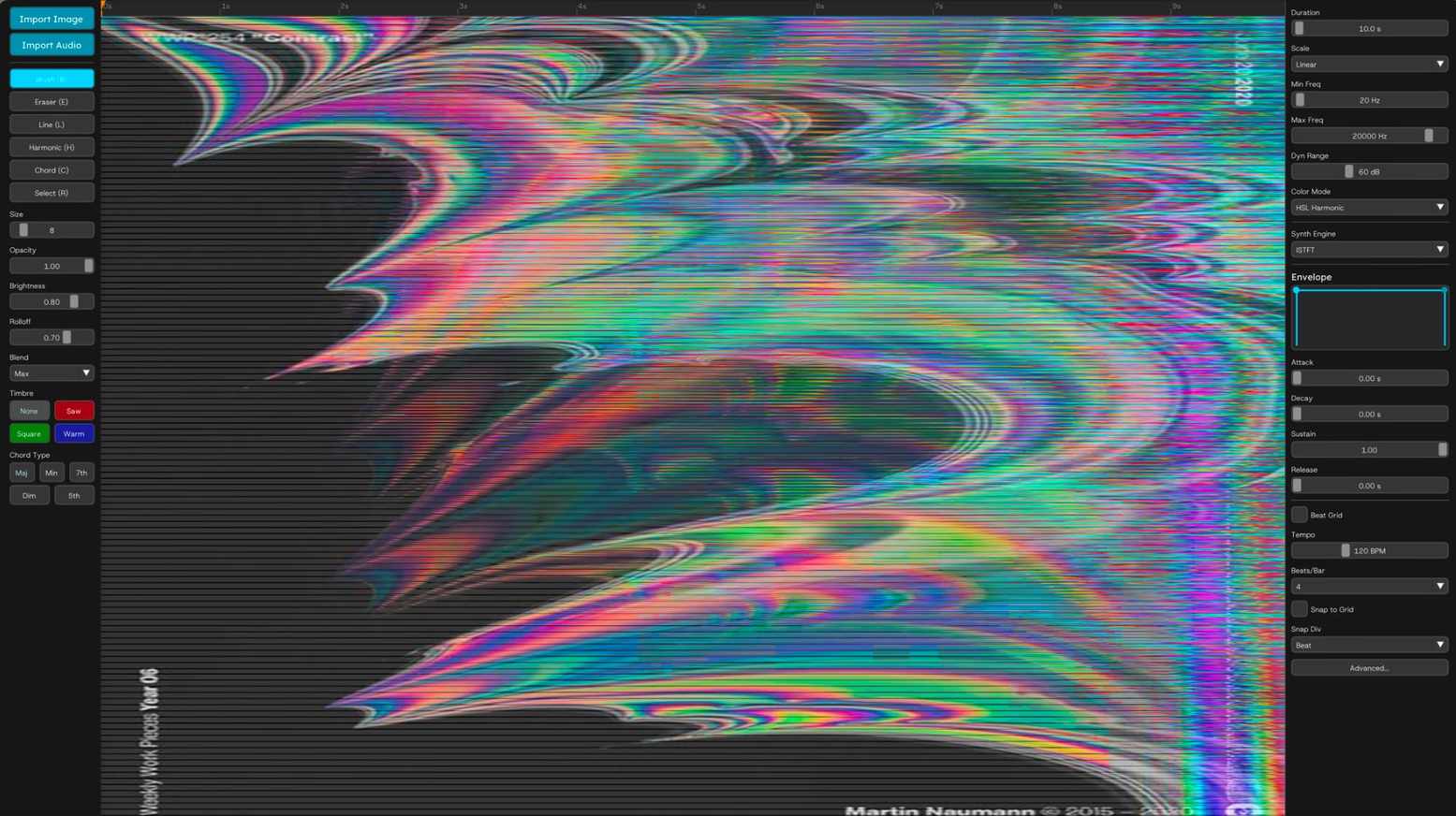
Now RoEx, the AI mixing company, has released RoEx Phosphor, a free spectral synthesizer that lets anyone paint audio directly onto a frequency canvas.
The macOS-only beta requires no account, no payment, and no limits on commercial use. You draw on a spectrogram where vertical position controls pitch, horizontal position controls time, and brightness controls volume. The software synthesizes audio in real-time as you work.
4 Synthesis Engines Power the Spectrogram Canvas
Phosphor offers four distinct ways to turn your drawings into sound. ISTFT provides classic spectral synthesis with iterative phase reconstruction. Additive uses an oscillator bank for cleaner tones. Noise Band creates textural, granular results. Blend mixes tonal and noise components.
“Phosphor gives you direct control over the frequency spectrum,” states the official product page. “Paint pads, textures, drones, risers, and evolving soundscapes by drawing them.”
A color mode adds another layer. Red pixels produce sawtooth harmonics. Green creates square wave tones. Blue generates soft, flute-like sounds. Export options include WAV, AIFF, FLAC, and MP3 at up to 32-bit float resolution.
Expensive Sound Design Tech Now Costs Nothing
The takeaway: RoEx is commoditizing synthesis methods that cost hundreds of dollars just years ago.
MetaSynth dominated image-based synthesis in the late 90s and early 2000s. The software created the bullet-time sound effects in The Matrix. It was expensive and complex. Phosphor strips away that barrier entirely.
The lineage goes back further. The Soviet ANS synthesizer from the 1930s used glass plates covered in black mastic to draw sound. Phosphor is the digital evolution of that 90-year-old innovation, now running on Apple Silicon.

This release follows a broader “visual audio” trend. Tools like the visual synthesizer from Neural Frames work in reverse, turning audio into reactive visuals. The barrier between seeing and hearing sound continues to dissolve.
RoEx’s strategy here is clear. They specialize in AI mixing and mastering. Giving away a creative tool captures producers at the start of their workflow. Those producers will eventually need AI mastering or mixing services.
Stop Loading Random Images and Start Drawing Frequencies
Here’s the uncomfortable truth about image sonification. Most photographs sound like harsh noise because of pixel density. A sunset does not inherently sound beautiful. The real power lies in Phosphor’s manual drawing tools.
Treat this as a frequency automation tool, not a novelty image converter. Draw a sound that starts as a pure sine wave at the bottom and dissolves into scattered noise at the top over exactly four bars. Design custom risers where you control the exact slope and timbre of every pitch bend.
Within two years, expect workflows combining AI image generators trained specifically to create spectrograms that sound musical.
About the author

Covering AI music tools, industry shifts, and news for music creators and professionals. Twice-weekly newsletter at aimusicpreneur.com.