ElevenLabs Flows: 5 node-based workflows to sync text-to-speech, SFX, music, and video in one canvas
My stack My fav 6 tools for AI music after testing 70+
-
 ElevenMusic · Music generation
 -
 Moises · Stem separation
 -
 Controlla · Voice swap & cloning
 -
 Cryo Mix · Mixing + mastering
 -
 Neural Frames · Music videos
 -
 ONCE · Distribution
Some links are affiliate links — I earn a commission at no cost to you. Every tool here is one I run myself and truly believe in. This stack is proven.
Launched in March 2026 inside ElevenCreative, ElevenLabs Flows is a multi-modal, infinite-canvas workspace that allows audio and music professionals to visually chain together AI text, voice, SFX, music, and video models. By uploading your own media files as input and context, you generate cohesive assets from AI-scored scene audio to multi-language dubs and visual storyboards. Download them directly or export to ElevenLabs Studio for final timeline editing. Read the official ElevenLabs Flows announcement for full details.
This guide walks sound designers, game developers, video localization teams, music producers, podcaster and more through five practical workflows. You will learn how to build reusable pipelines, execute batch variants, and export production-ready assets without switching between platforms.
Jump marks:
- What is ElevenLabs Flows?
- How node-based workflows eliminate the export-import cycle
- 5 Node-Based Workflows for Sound Designers, Game Devs, and Music Producers
- Workflow 1: SFX Scoring and Foley for Scene Uploads (Sound Designers)
- Workflow 2: Full AI Video Pipeline (Content Creators)
- Workflow 3: Bulk Multi-Language Dubbing Pipeline (Game Developers and Localization Teams)
- Workflow 4: Music Video Storyboard and B-Roll Engine (Music Artists & Musicians)
- Workflow 5: Podcast and Audio Show Prototyping (Podcast Producers)
- Step-by-Step: How to Build Your ElevenLabs Flows Pipeline
- ElevenLabs Flows pricing: credits per node, not a flat fee
- How to fix the five most common ElevenLabs Flows errors
- ElevenLabs Flows Best practices: What to do, What to avoid, and How to save time
- How to build your first ElevenLabs Flows pipeline today
- FAQ: ElevenLabs Flows for Audio Professionals
What is ElevenLabs Flows?
Flows is a visual pipeline builder housed within ElevenCreative. Instead of jumping between tabs for ChatGPT, Midjourney, Runway, and ElevenLabs, you drag and drop nodes to connect 35+ image and video models directly to the native audio suite.
The workspace operates on an infinite canvas with input and output ports. The biggest advantage is non-destructive iteration. Tweak or re-run a single node without regenerating the entire pipeline. This saves massive amounts of time and credits.
Here are the 10 confirmed node types available in Flows:
- Image Generation: Generate images from text prompts or references using 35+ models including Flux
- Video Generation: Animate images or generate video from prompts using Veo, Sora, Kling, Wan, Seedance
- Text to Speech: Generate voiceover from text input with TTS v3, voice cloning, multilingual support, and character voice presets
- Sound Effects: Generate SFX from text prompts for ambient, Foley, impacts, and transitions
- Music: Generate background music and scores with the ElevenMusic model
- Composition: Layer audio and video for final preview and export
- Text: Store and route text for prompts and scripts
- Upload Media: Import your own images, video, or audio as input
- Lipsync Generation: Sync speech to video or image
- Upscale: Increase resolution of generated visuals
The sweet spot for Flows is new content generation. Build complete creative assets from scratch on the canvas. For existing productions, the value is more targeted. Upload media as context, generate SFX or dubbed audio against it, and export files for use in your own tools.
How node-based workflows eliminate the export-import cycle
Node-based workflows eliminate the export-import cycle that kills momentum. When your Foley sounds perfect but one footstep effect needs tweaking, you adjust that single node. The rest of your pipeline stays untouched.
This approach works best when you need to generate multiple variations quickly or when your project requires tight synchronization between audio and visual elements. If you need frame-by-frame precision editing, export your Flows output to Studio for final adjustments. For creators exploring dedicated visual sync tools, a specialized AI music video generator offers advanced audio-reactive capabilities.
5 Node-Based Workflows for Sound Designers, Game Devs, and Music Producers
Each workflow below is labeled by profession. Jump to your specific use case and adapt the node chain to your project.
Workflow 1: SFX Scoring and Foley for Scene Uploads (Sound Designers)
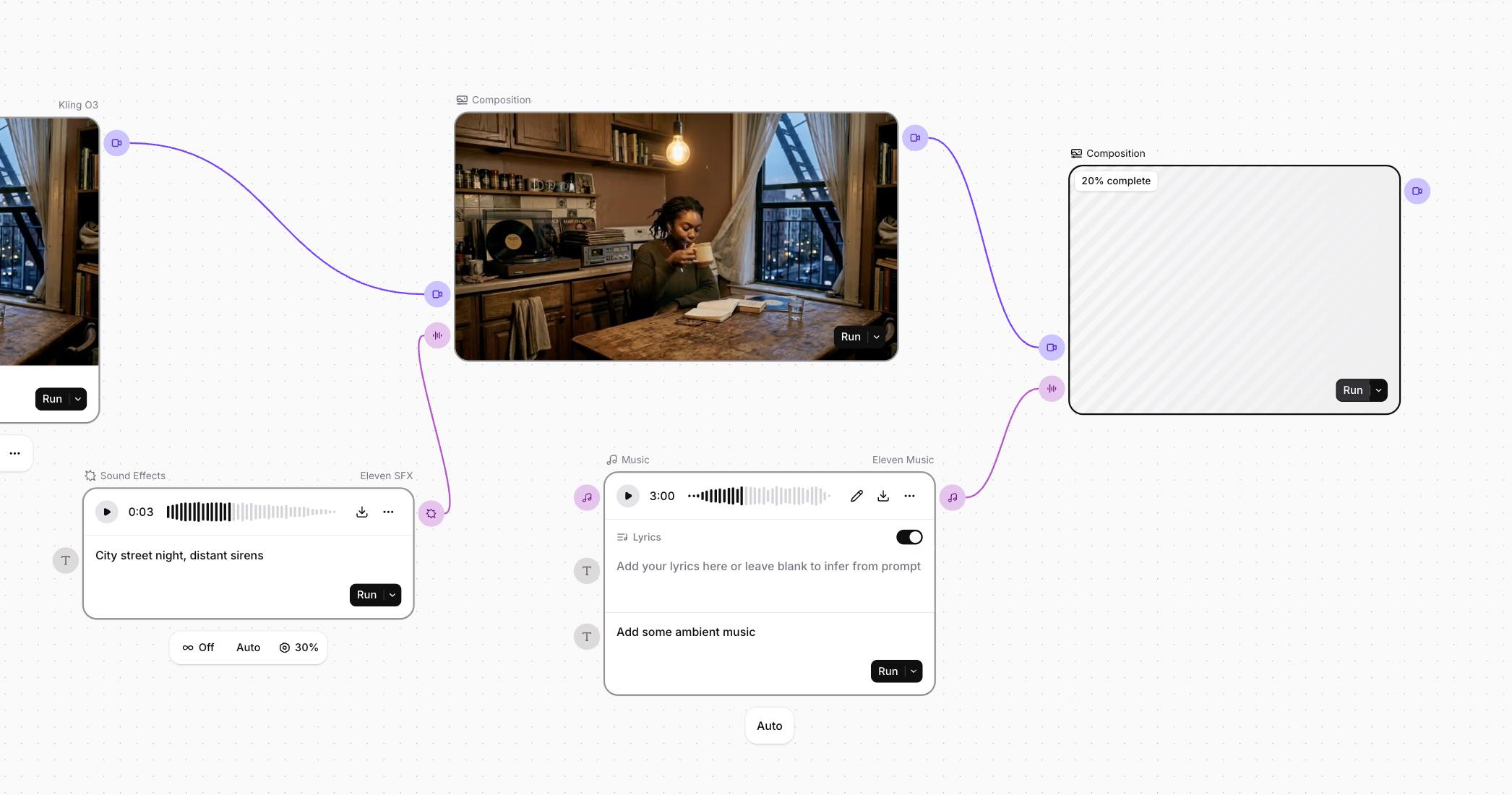
Upload a rough cut scene or clip and generate layered SFX, ambient beds, and background music. Preview everything in the Composition node before exporting. The AI sound effect generator from ElevenLabs powers this workflow.
The node chain follows this structure:
- Upload Media node holds your rough cut, clip, or still frame
- Parallel Sound Effects nodes generate ambient bed (“rain on city streets”), Foley (“footsteps on gravel”), and impact hits
- Music node creates background score matching the mood
- Composition node previews all audio layered over your uploaded scene
Non-destructive iteration shines here. If the ambient sounds perfect but the Foley is off, tweak that one SFX node and hit Run. Only that node regenerates. Learn more about the full capabilities at the official AI sound effects page.
Pro tip: Some uploaded content may not execute if it triggers ElevenLabs content policy filters. This workflow works best for original footage or content you own.
Workflow 2: Full AI Video Pipeline (Content Creators)
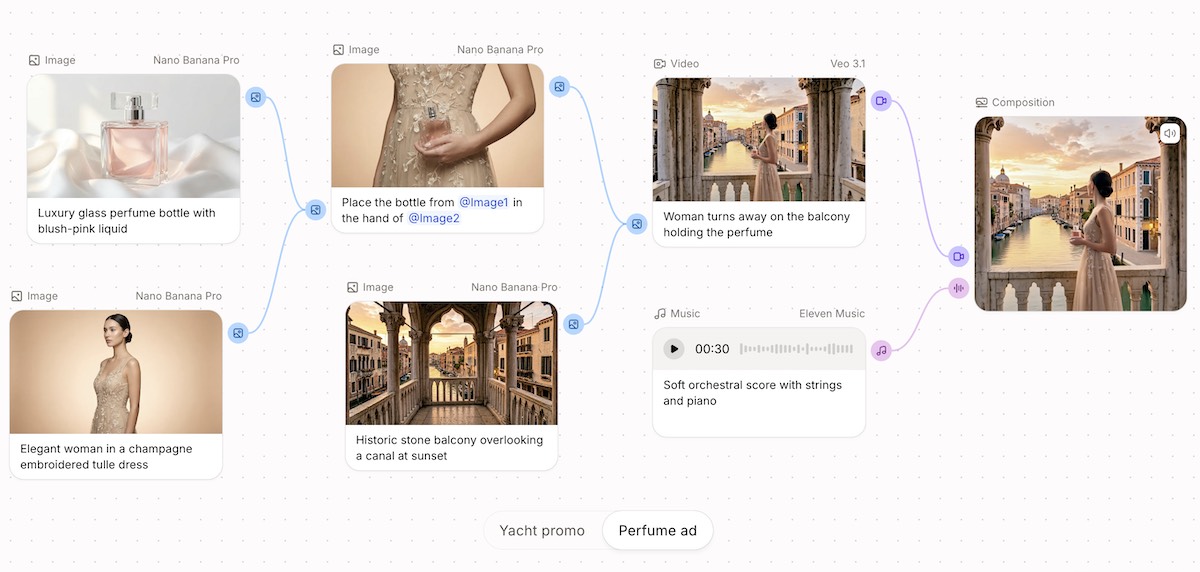
This workflow builds a complete video ad from scratch without leaving the canvas. Script, voiceover, visuals, music, SFX, and lip-synced talking head all generate and compose in one flow.
The node chain follows this sequence:
- Text node (script) connects to Text to Speech node (voiceover)
- Image Generation node creates visuals from prompts
- Video Generation node animates using Veo video model or Kling AI video
- Lipsync Generation node syncs speech to generated video
- Music node adds background score
- Sound Effects node layers transitions and ambient audio
- Composition node combines everything for final preview
Non-destructive iteration is the killer feature here. If the client wants a different voice, swap one TTS node and hit Run. The rest stays intact. Export the final composition or push to Studio for frame-level adjustments and captions.
Workflow 3: Bulk Multi-Language Dubbing Pipeline (Game Developers and Localization Teams)
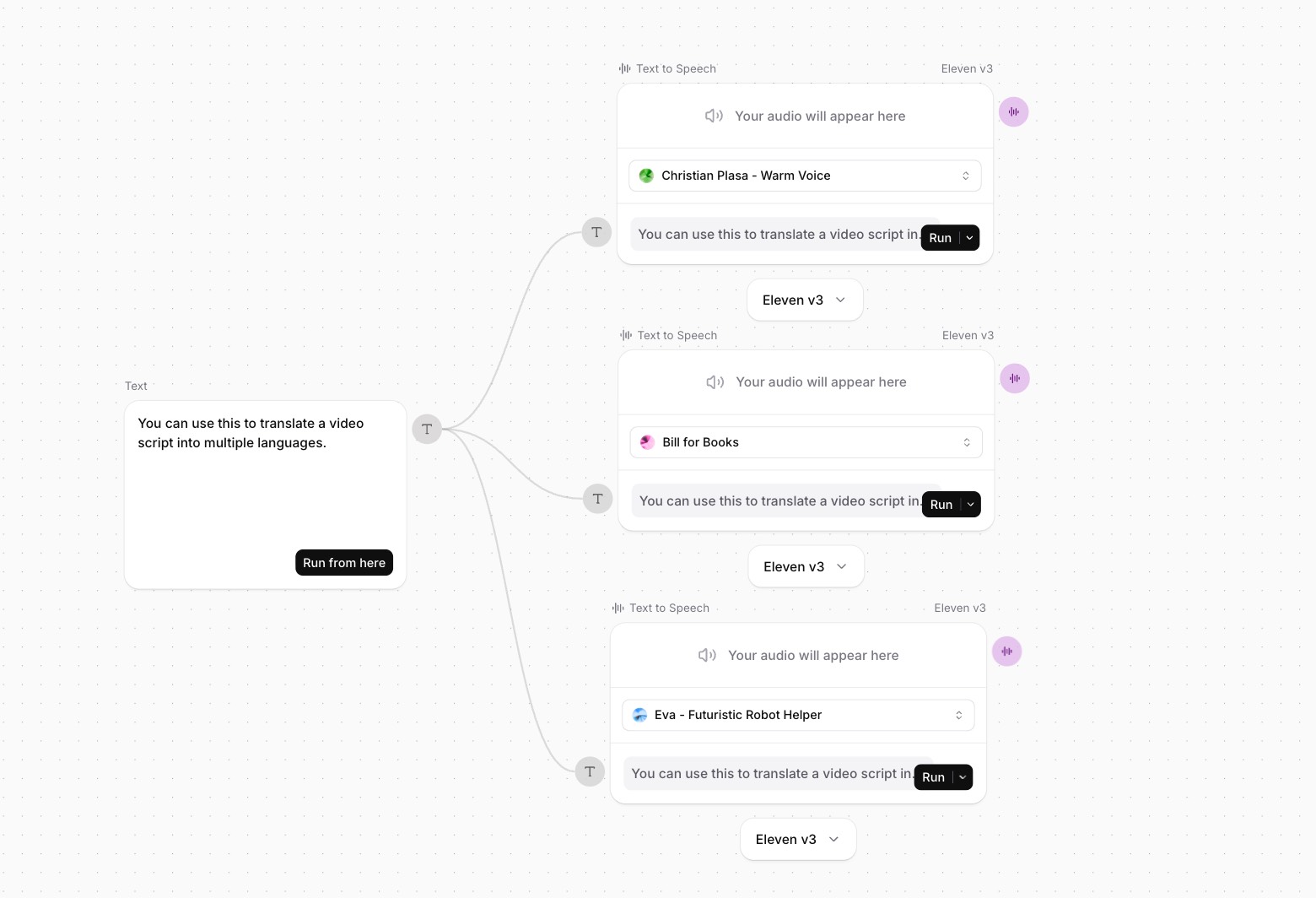
Take one script and generate dubbed voiceover audio in multiple languages simultaneously. Export audio files and sync them to existing video in your own editing software.
The node chain uses parallel branching:
- Text node holds the English script
- Branch into parallel Text nodes for translation (Spanish, German, Japanese, etc.)
- Parallel Text to Speech nodes generate audio for each language
- All branches run simultaneously
For game developers, generate NPC dialogue, UI prompts, and tutorial narration in 5+ languages from one master script. Select character voice presets (robotic, alien, monster) directly in the TTS node for creature and sci-fi voices.
Pro tip: Lip-sync for existing footage is handled outside of Flows. Export your dubbed audio files and sync them in Premiere, DaVinci, or your preferred NLE. For new talking-head content, chain TTS output into a Lipsync Generation node paired with a generated or uploaded image.
Workflow 4: Music Video Storyboard and B-Roll Engine (Music Artists & Musicians)
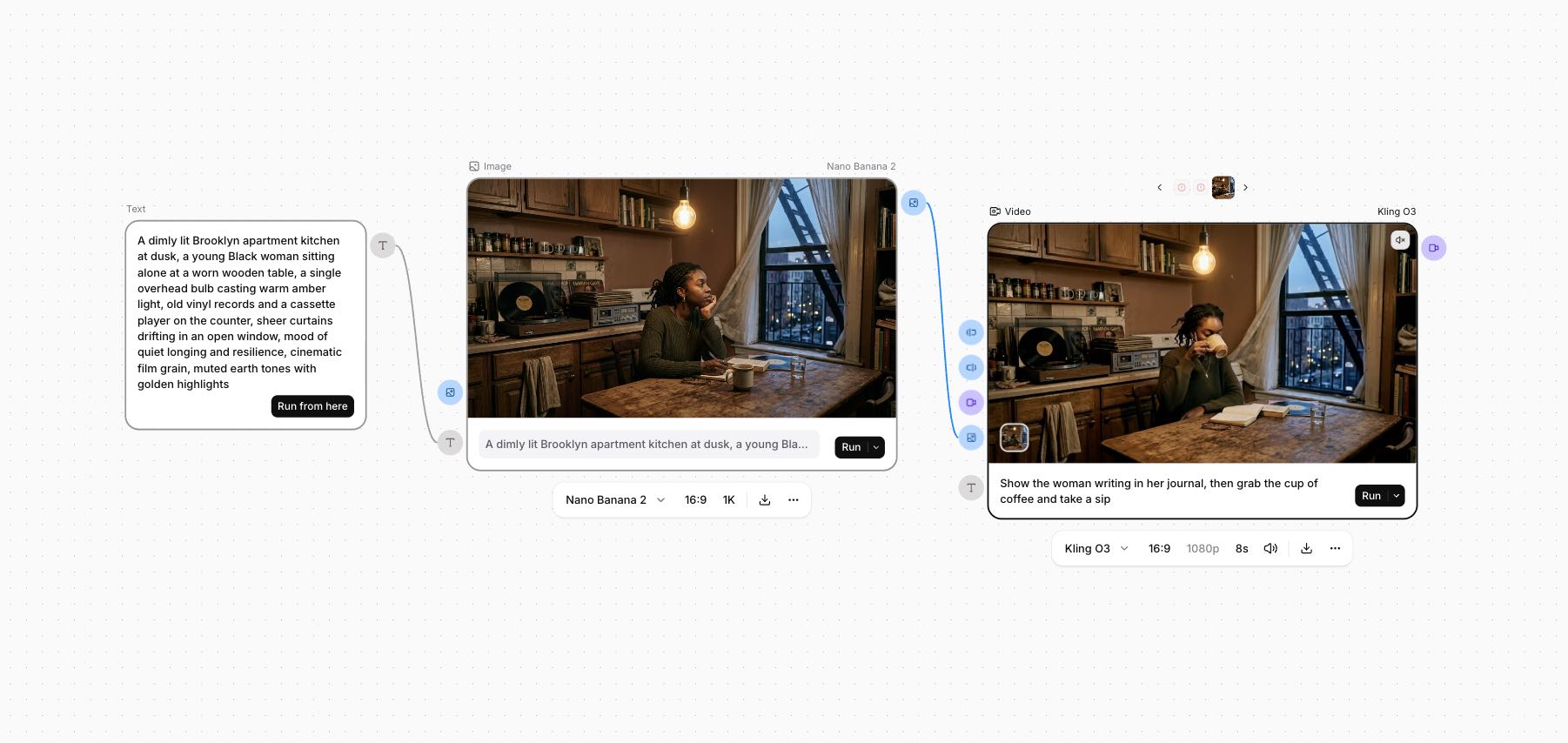
Use your finished track and lyrics as the creative anchor while generating all visuals around it. Create scene-by-scene storyboards, animated clips, or full B-roll packages.
Start by using your lyrics to generate image prompts in Claude or another chatbot. Feed those prompts into Flows. For a deeper dive into dedicated visual tools, explore the best AI music video generators available.
The node chain works like this:
- Upload Media node holds your track or stems as reference
- Text node stores scene descriptions per section
- Image Generation node creates visuals per scene
- Video Generation node animates using Kling, Veo, or Seedance
- Upscale node boosts output to 4K
- Composition node layers your track under generated visuals
Branch the Text node into multiple scene descriptions and generate variations for each section of the song. Download clips individually or export to Studio for timeline sync. For a timeline-based approach, check out this Neural Frames tutorial.
Workflow 5: Podcast and Audio Show Prototyping (Podcast Producers)
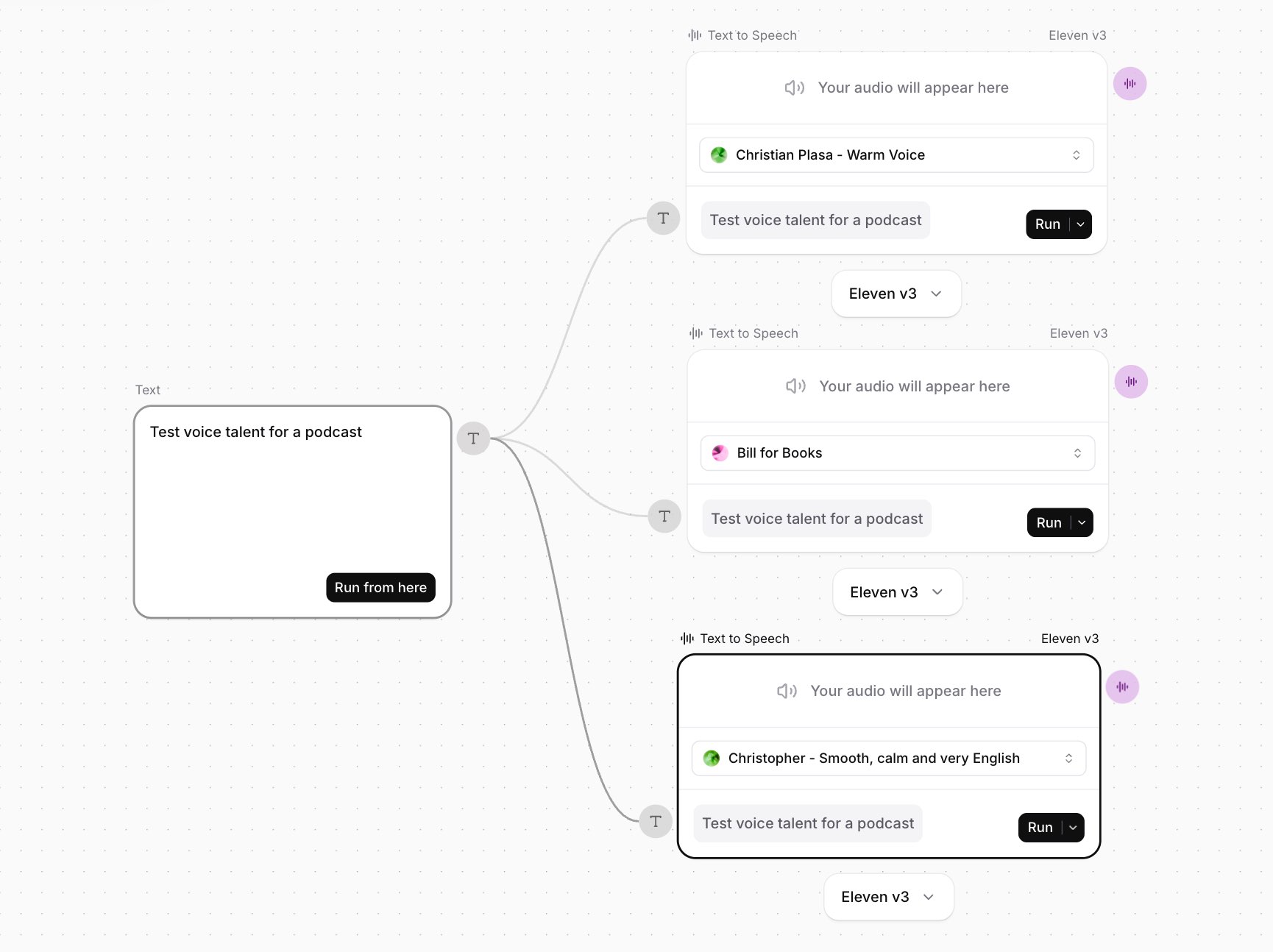
Prototype complete audio content with multiple voice options, custom music beds, and transition SFX. A/B test voice talent without rebuilding the pipeline. For related audio applications, see how to use the ElevenLabs reader app.
The node chain enables rapid testing:
- Text node holds intro script or ad read
- Branch into 3 parallel Text to Speech nodes (test different voices and styles)
- Music node generates custom intro jingle or background bed
- Sound Effects node adds transitions and ambient audio
- Composition node previews each voice option with music and SFX
Swap one TTS node, hit Run, and the rest stays. This is the fastest way to A/B test voice talent for a client without re-recording or re-editing. Download audio variants or export to Studio for timeline polish.
Step-by-Step: How to Build Your ElevenLabs Flows Pipeline
No matter which workflow you build, the physical mechanics of the Flows canvas remain the same.
Step 1: Create Your Workspace
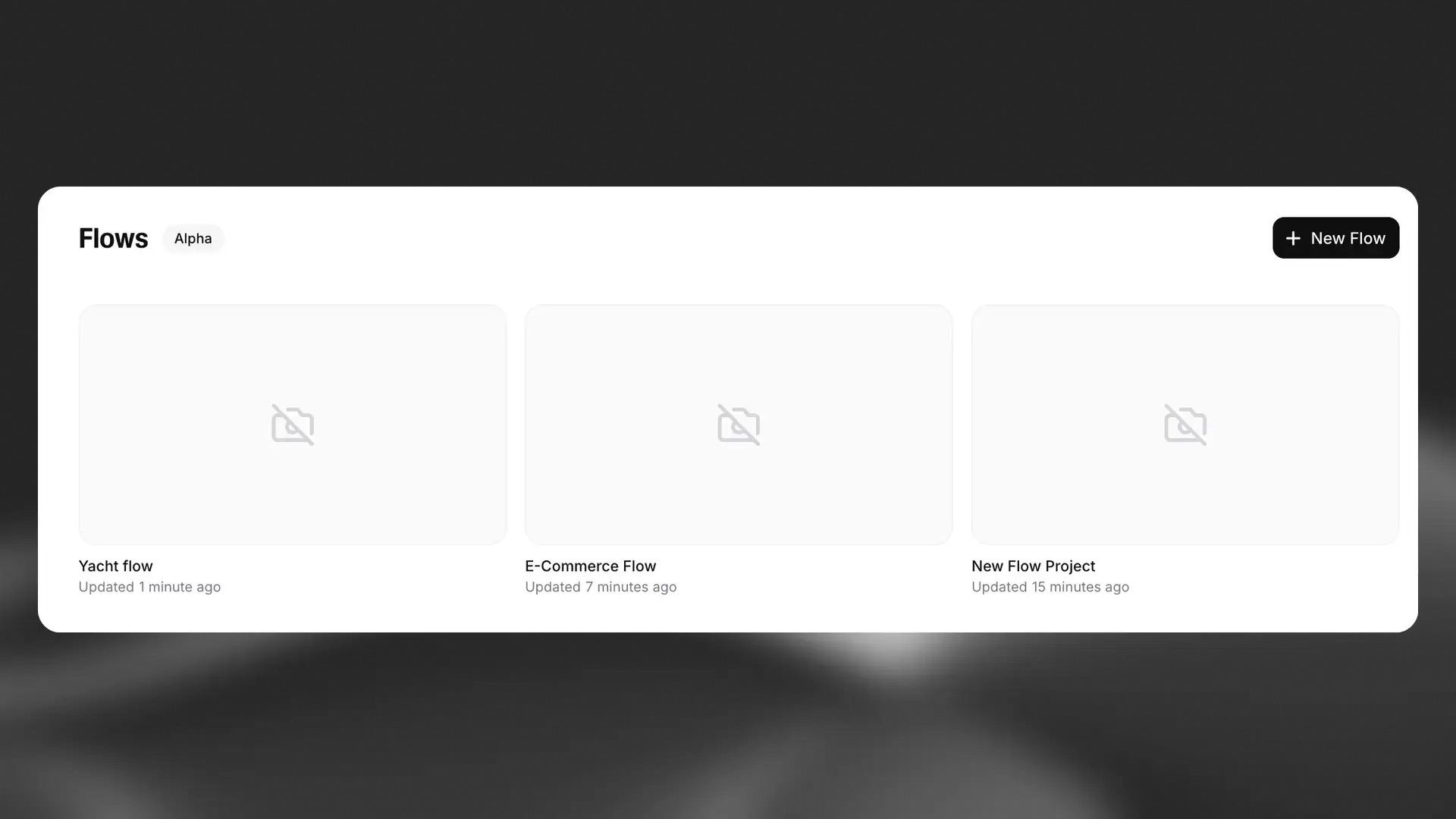
Purpose: Open a blank canvas or start from a pre-configured template.
Navigate to the Flows workspace:
- Go to Products, Flows in the ElevenLabs dashboard
- Click + New Flow to open a blank, infinite canvas
- Check the Template Library first for pre-configured node chains
Pro tip: Templates save setup time. Browse Flows built by leading creators and remix them for your project.
Success check: You should see an empty canvas with the node toolbar visible at the bottom.
Step 2: Add Nodes and Upload Media
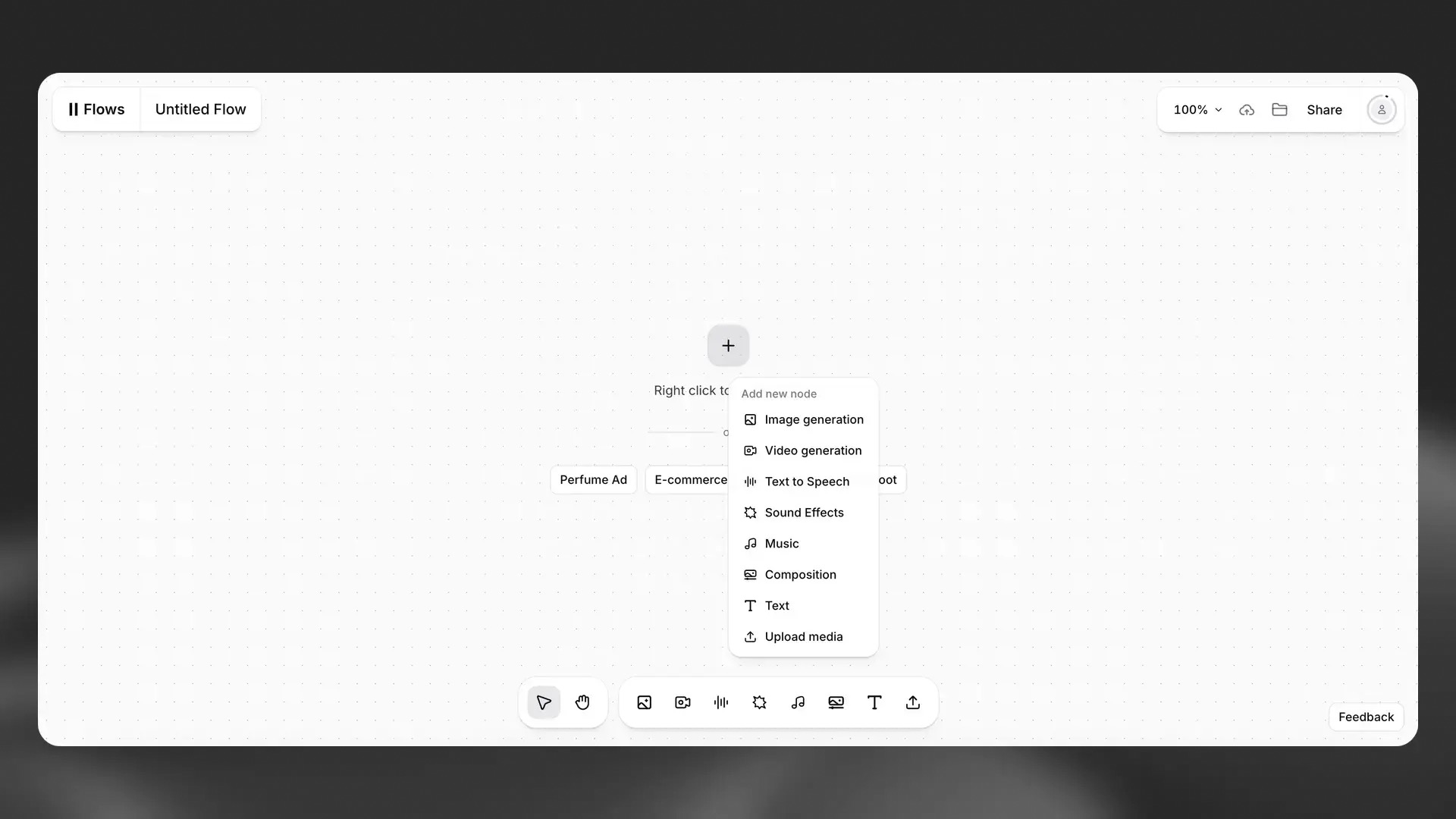
Purpose: Place generation models and utility nodes on the canvas.
Add nodes using these methods:
- Right-click anywhere on the canvas to open the node menu
- Use the bottom toolbar to add a node
- Select generation models (TTS v3, Sound Effects, Kling) or utility nodes (Text, Composition, Upscale, Lipsync Generation)
- Use Upload Media to import your own images, video, or audio files
The FL Studio and ElevenLabs partnership introduced an AI sample generator directly into FL Cloud Pro for additional sample creation options.
Success check: You should see your nodes placed on the canvas with visible input and output ports.
Step 3: Connect Your Workflow
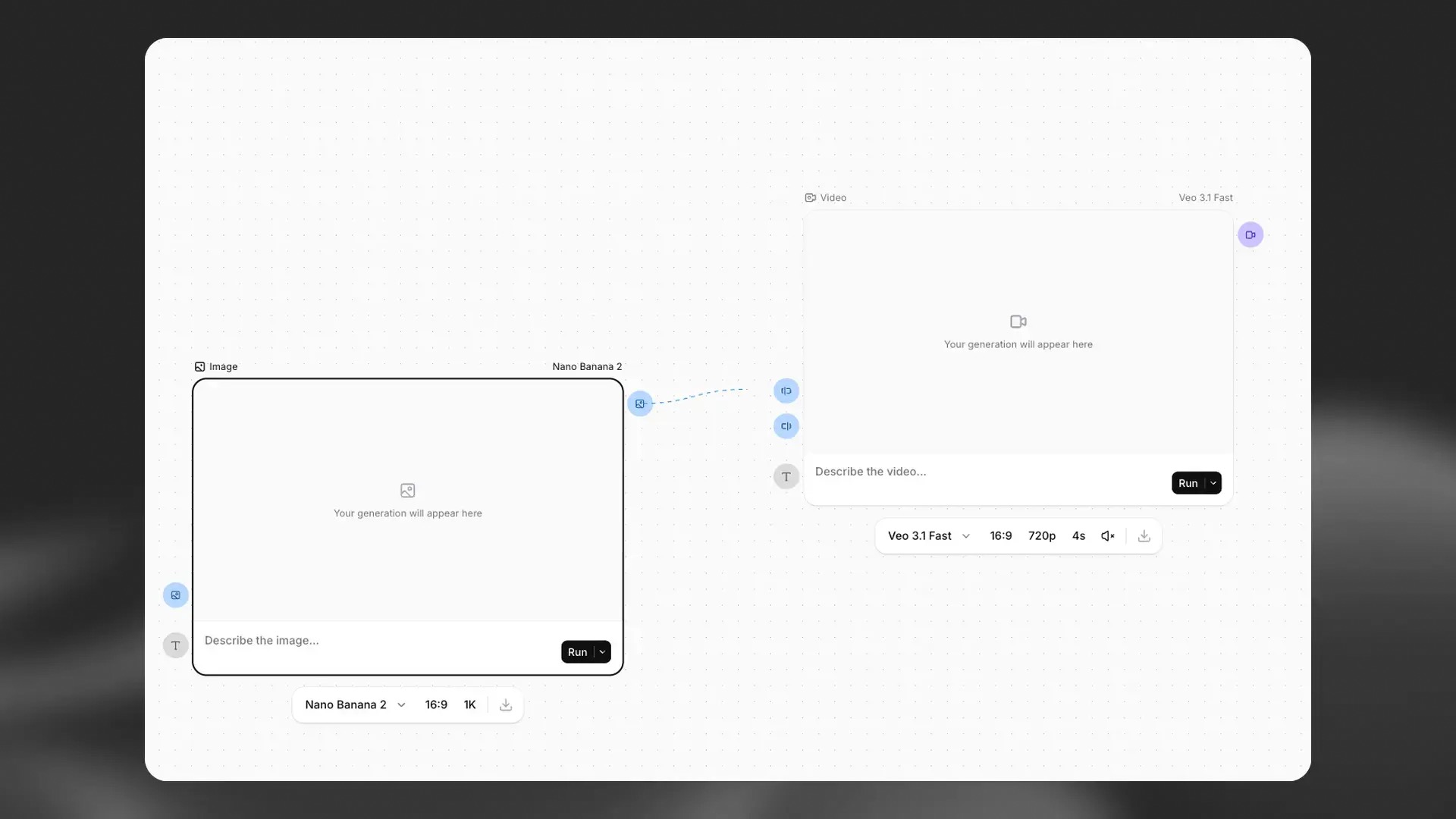
Purpose: Link nodes together to create your generation pipeline.
Connect nodes with these steps:
- Click and drag from the output port of one node to the input port of another
- Flows automatically suggests compatible next-step nodes when you drag a connection
- For Multi-Language Dubbing, connect your English Text node into parallel Text nodes for translation, then connect each to its own TTS node
Success check: You should see connection lines between your nodes forming a complete chain.
Step 4: Execute and Iterate
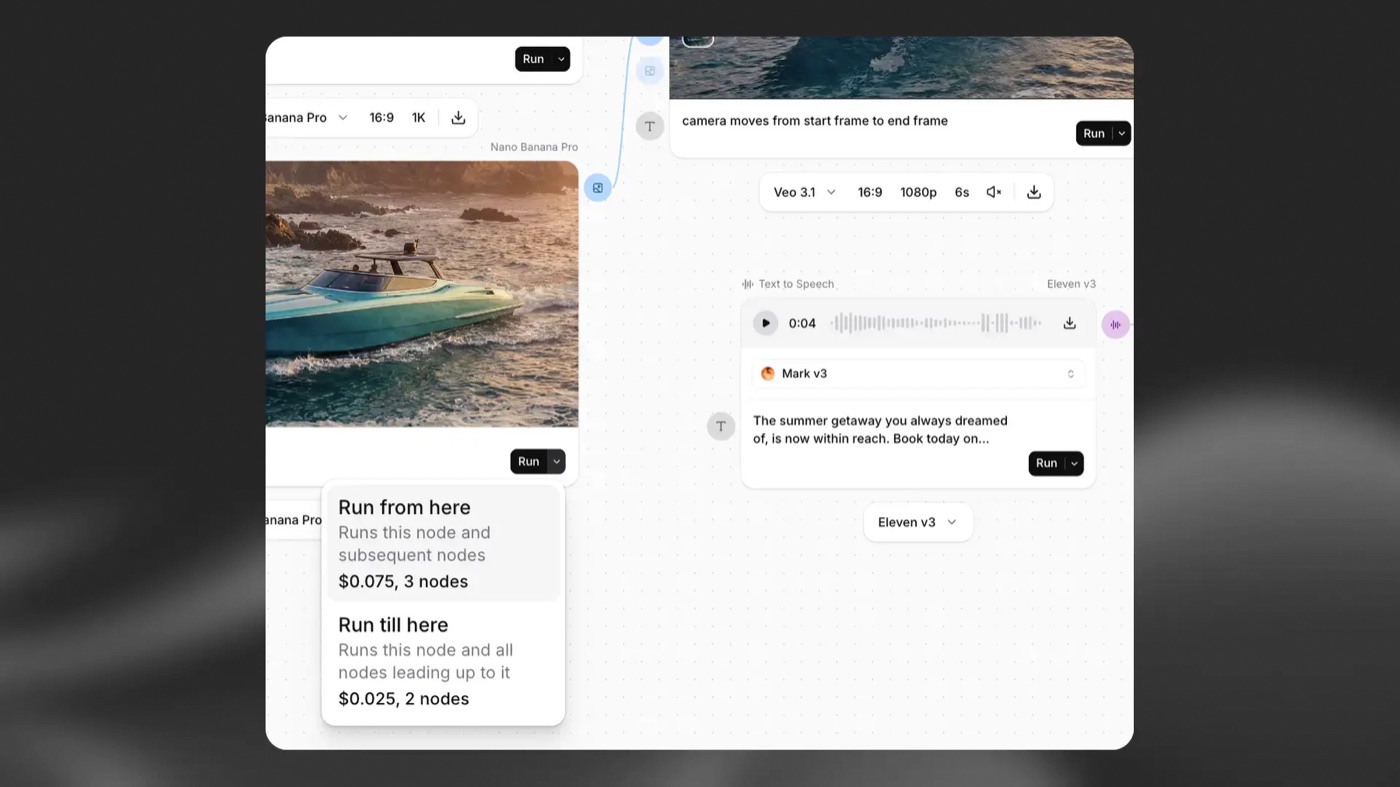
Purpose: Run your pipeline and refine individual nodes without regenerating everything.
Execute your workflow:
- Hover over the Run button on any node to see its credit cost
- Click Run to generate output for that node
- Use “Run from here” to regenerate all downstream outputs when you change an upstream node
- Tweak individual nodes and re-run only what needs updating
Pro tip: Non-destructive iteration means you pay credits only for the nodes you regenerate. Plan your changes to minimize costs.
Success check: You should see generated output in each node’s preview panel.
Step 5: Export or Move to Studio
Purpose: Download files or push assets to the timeline editor for final adjustments.
Export your work using these options:
- Download Direct: Download raw audio or video files to your hard drive and import into your DAW, NLE, game engine, or any other tool manually
- Export to Studio: Click “Export to Studio” to push assets into the linear timeline editor for frame-by-frame adjustments, captions, and track layering
Innovative tools now allow producers to turn drawings into sound using spectral synthesis for additional creative export possibilities.
Success check: You should see your files in your local folder or your assets loaded in Studio.
ElevenLabs Flows pricing: credits per node, not a flat fee
Flows is currently in Alpha and available to all users on paid tiers. There is no flat fee for a Flow. You pay standard ElevenLabs credits based on the specific models used per node. Re-running a node deducts new credits for that node and any connected downstream nodes.
ElevenMusic nodes and TTS v3 nodes have different credit costs. Video generation through Veo 3.1 or Kling O3 costs more than audio-only nodes. Plan your pipeline to minimize unnecessary re-runs.
ElevenLabs also offers Speech-to-Speech technology for voice morphing capabilities across different pricing tiers. API access is planned for future release. Enterprise customers can register interest at elevenlabs.io/flows-api-access-waitlist.
When uploading content, be aware that some files may trigger content policy filters. Review the AI copyright law guidelines from the U.S. Copyright Office for context on generative AI and intellectual property.
How to fix the five most common ElevenLabs Flows errors
Common issues and quick fixes for Flows users:
- Node fails to generate: Check your prompt for unsupported characters. Re-run with simplified text.
- Credit cost higher than expected: Hover over Run to verify cost before clicking. Video nodes cost more than audio nodes.
- Connection error between nodes: Verify output type matches input type. Audio to audio, video to video.
- Media upload rejected: Confirm file format is supported. MP4, WAV, and PNG work reliably.
- Flow runs but produces no output: Check that all upstream nodes completed successfully before running downstream nodes.
What to do when progress blocks:
- Save your flow before making major changes.
- Duplicate the flow to test variations without risking your working version.
- Check the ElevenLabs status page for platform issues.
ElevenLabs Flows Best practices: What to do, What to avoid, and How to save time
Top tips for success with Flows:
- Start with templates before building from scratch.
- Run nodes sequentially to catch errors early.
- Save working flows as templates for future projects.
- Group related nodes visually for easier navigation.
- Check credit costs before running video generation nodes.
What to avoid during setup and use:
- Running entire flows without reviewing individual node outputs.
- Uploading copyrighted content as media context inputs.
- Creating circular node connections.
- Skipping the template library when starting new projects.
Time savers worth adopting:
- Keyboard shortcuts for adding common nodes.
- Batch text inputs for bulk NPC dialogue generation.
- Parallel branches for A/B testing voice options.
- Export to Studio for final polish instead of re-running nodes.
For creators exploring the broader ElevenLabs ecosystem, the ElevenLabs reader app demonstrates how the platform extends beyond music and sound design into consumer audio applications. Artists experimenting with visual-audio synthesis might also explore tools that turn drawings into sound using spectral synthesis.
How to build your first ElevenLabs Flows pipeline today
You now have five profession-specific workflows and the exact steps to build your first ElevenLabs Flows pipeline. Sound designers save hours on Foley generation. Game developers batch-process NPC dialogue with creature voice morphing. Music producers generate cohesive visual storyboards synced to their tracks.
The non-destructive iteration model means experimentation costs less. Tweak one node, keep everything else. Your next project starts with a template, not a blank canvas.
Open ElevenLabs, navigate to Products, Flows, and build your first pipeline today.
FAQ: ElevenLabs Flows for Audio Professionals
Frequently asked questions
Can I upload my own media files to ElevenLabs Flows?
Yes. The Upload Media node accepts audio, images, and video as input and context. This allows you to build highly personalized and contextualized generative pipelines using your own assets.
Do I have to regenerate my entire video if one scene messes up?
No. Flows uses non-destructive iteration. Tweak and re-run a single node, and it will only update that node and its downstream connections. This saves time and credits.
Do I have to regenerate my entire video if one scene messes up?
No. Flows uses non-destructive iteration. You tweak and re-run a single node like a specific video animation or sound effect, and it only updates that node and its downstream connections. This saves time and credits.
What is the difference between ElevenLabs Flows and ElevenLabs Studio?
Flows is a node-based, infinite-canvas workspace designed for building multi-step generative pipelines and brainstorming variations. Studio is a traditional, linear timeline editor used for making precise, frame-by-frame final adjustments to the assets you created in Flows.
Will I lose my whole project if a single node fails to generate?
No. If a node fails during execution, only that specific node and its downstream dependencies are affected. Unconnected branches remain intact, and you re-run the failed node once you adjust your prompt or settings.
How much does ElevenLabs Flows cost?
Flows is available on paid ElevenLabs plans. It operates on a pay-as-you-go system where each node generation costs credits based on the specific AI model you use. TTS v3, Veo 3.1, and Kling O3 each have different credit costs.
What is the Voice Changer node in ElevenLabs Flows?
The Voice Changer node integrates Speech-to-Speech technology. It allows you to take an audio input and morph its texture, making it perfect for creating alien, robotic, or creature voices for game audio and film.
How much does ElevenLabs Flows cost?
Flows is available on paid ElevenLabs plans. It operates on a pay-as-you-go system where each node generation costs credits based on the specific AI model (Veo, Kling, TTS v3, Eleven Music) you use.
Can I create creature or robotic voices in ElevenLabs Flows?
Yes. The Text to Speech node includes character voice presets that allow you to select robotic, alien, and other non-human voice styles. Feed text from a Text node into a TTS node, select the desired character voice, and generate. There is no separate Voice Changer node.
Can I dub existing video into multiple languages using Flows?
You generate dubbed audio in multiple languages by branching your script through parallel Text and TTS nodes. Lip-sync for existing footage requires external software. Export your dubbed audio files and sync them in Premiere, DaVinci, or your preferred NLE. For new talking-head content from scratch, use the Lipsync Generation node with a generated or uploaded image.
Can I export directly to Unreal Engine, FMOD, or my DAW?
Flows does not have direct integrations with game engines or DAWs. Download your generated audio and video files from the canvas, then import them into your preferred tool manually. You can also export to ElevenLabs Studio for timeline-based editing.
About the author

Covering AI music tools, industry shifts, and news for music creators and professionals. Twice-weekly newsletter at aimusicpreneur.com.