Email marketing for musicians: how to build a fan email list and what to send in 2026

My stack My fav 6 tools for AI music after testing 70+
-
 ElevenMusic · Music generation
-
 Moises · Stem separation
-
 Controlla · Voice swap & cloning
-
 Cryo Mix · Mixing + mastering
-
 Neural Frames · Music videos
-
 ONCE · Distribution
Some links are affiliate links — I earn a commission at no cost to you. Every tool here is one I run myself and truly believe in. This stack is proven.
Email marketing for musicians means collecting your fans’ email addresses with something they actually want, then writing to them directly, so every release, show and merch drop reaches people who asked to hear from you. No algorithm sits in between.
I write two newsletters every week on beehiiv, The AI Musicpreneur on Wednesdays and The AI Music Briefing on Fridays, and the setup below is the one I’d use for an artist’s fan list.
This guide covers what email marketing for musicians is, the 3 kinds of email you’ll send, how to get your first 100 subscribers, which tool to pick in 2026, and the rules you have to follow. All my other guides on this are in fans and email lists.
What is email marketing for musicians?
Email marketing for musicians, defined
Email marketing for musicians is the practice of collecting fans’ email addresses, usually in exchange for a free song, an early listen or a discount, and sending them regular emails about new music, shows and merch. The artist owns the list, so each email goes to every subscriber instead of whoever a social algorithm picks.
Is email marketing still worth it for musicians in 2026?
Yes, and the reason is who controls the reach.
A post goes to the followers the app decides to show it to. An email goes to everyone on your list, on the day you pick, and if you ever switch tools, the list comes with you.
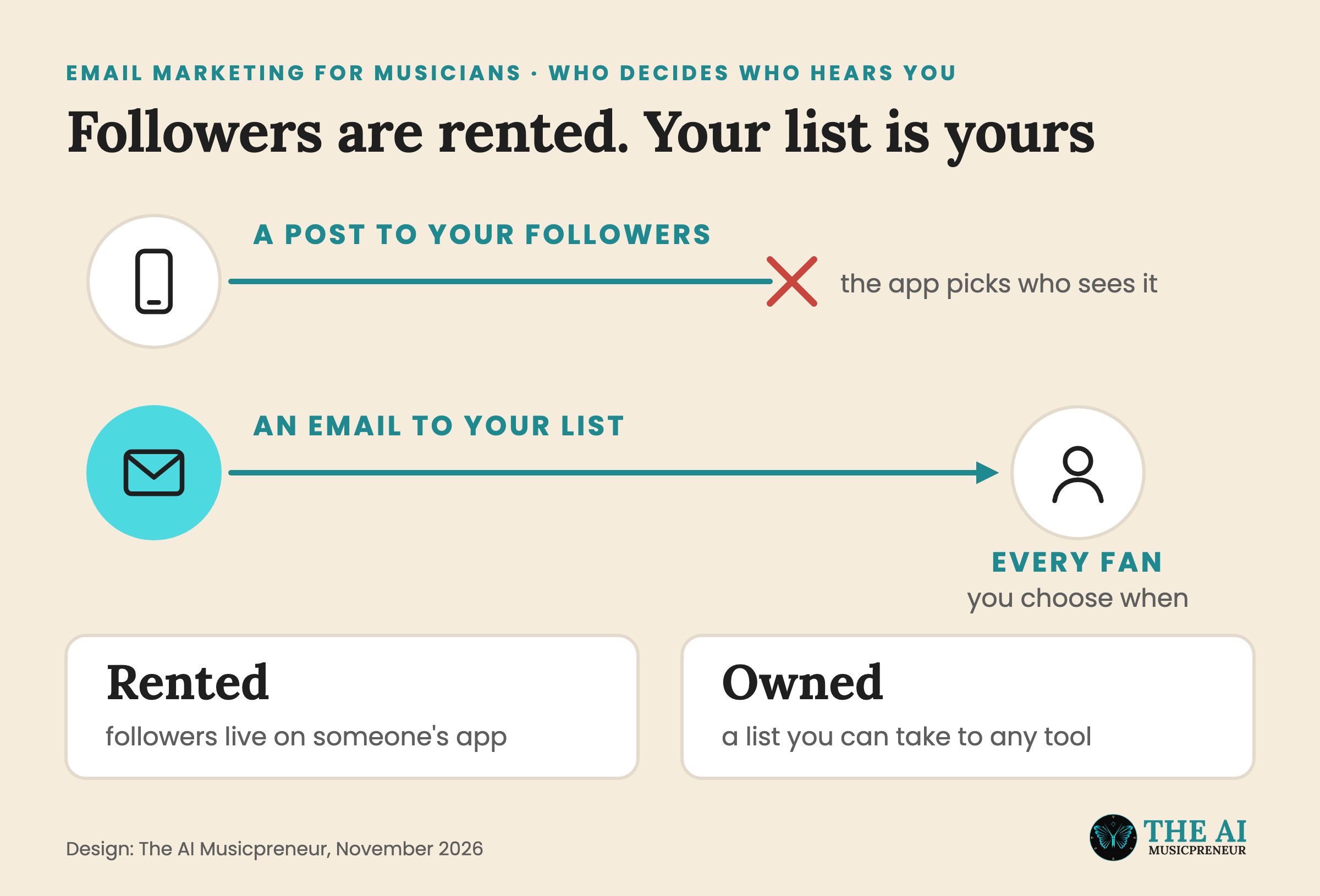
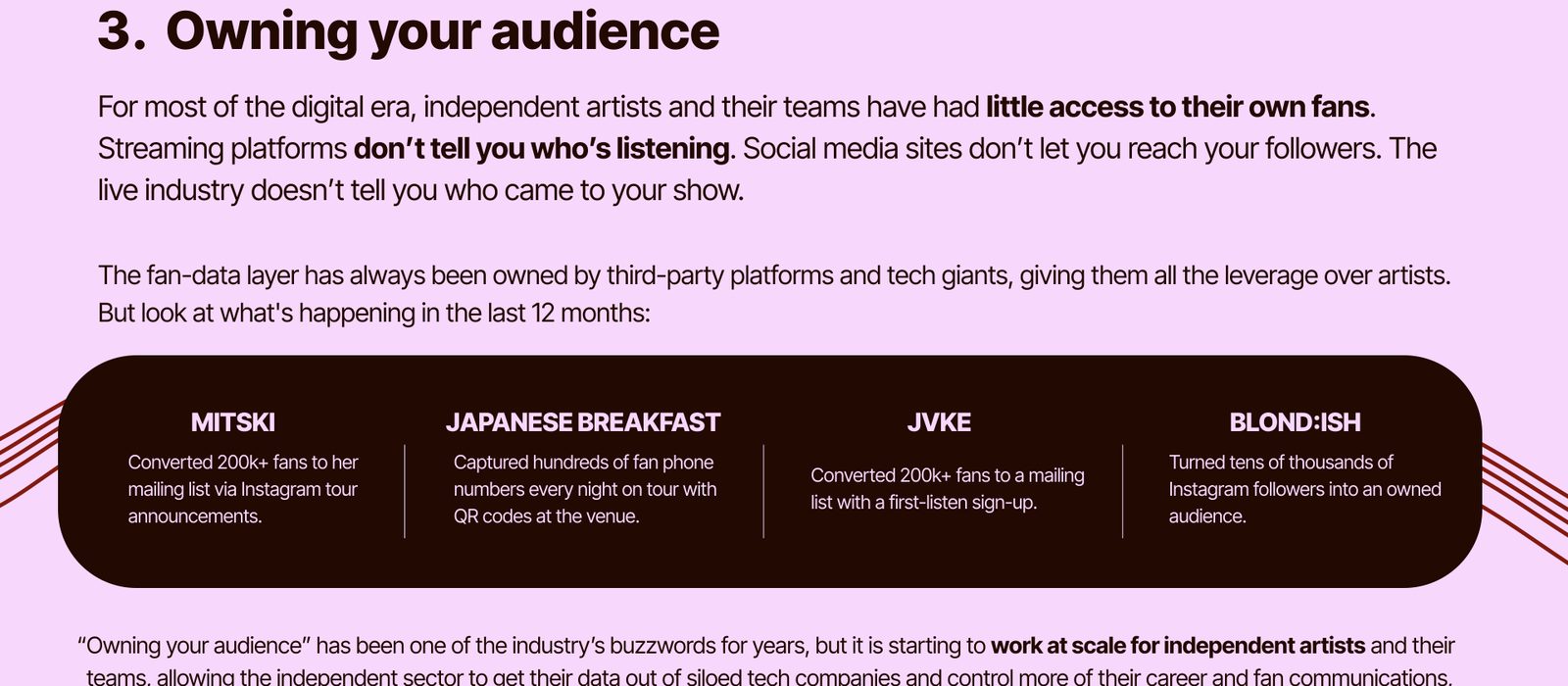
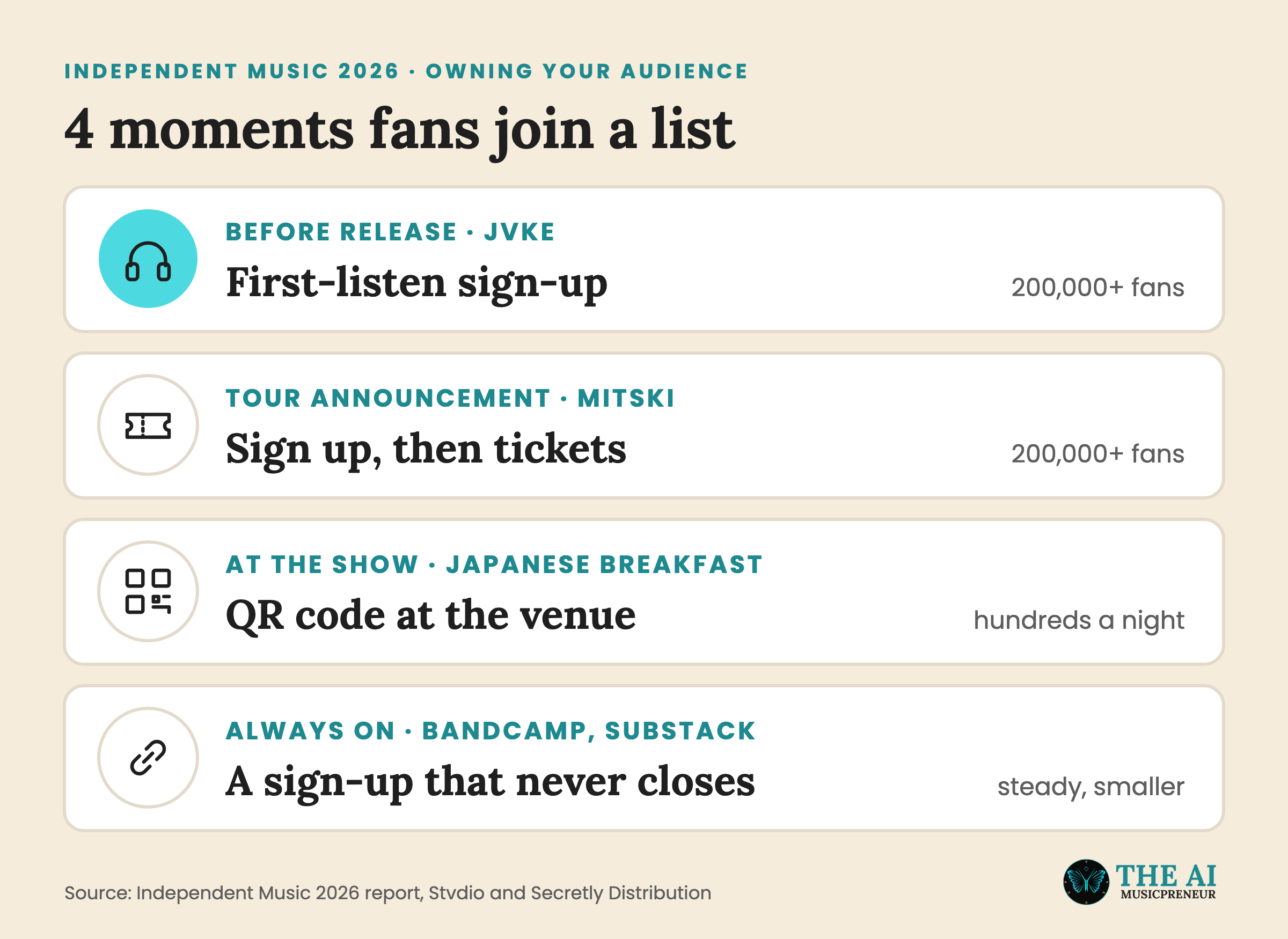
The Independent Music 2026 report by Stvdio and Secretly Distribution puts it bluntly: streaming platforms don’t tell you who’s listening, social platforms don’t let you reach your followers, and the live industry doesn’t tell you who came. It also shows artists fixing that with a list. Mitski and JVKE each moved more than 200,000 fans onto a mailing list, and I broke down how all 4 artists in the report did it.
Once people are on the list, what you send decides whether they stay.
The 3 kinds of music email marketing you’ll send
Music email marketing comes down to 3 kinds of email, and each one does a different job.
1. The welcome sequence
A short series of emails that goes out automatically when someone joins. It delivers the freebie, tells your story and points new fans at your best work. You write it once and it works for every new subscriber, which is why it comes first.
2. Release and tour announcements
The emails that sell something: a new single, a show in their city, a merch drop. These are the ones that make money, and they work far better when fans already know you from the welcome sequence.
3. The regular update
The email that keeps you in their inbox between releases. Behind the scenes from the studio, a demo, the story behind a lyric, a question for fans. It’s what stops your list from going cold, so the next announcement doesn’t land on people who forgot who you are.
All 3 need people on the list first, so that’s where to start.
How to get your first 100 email subscribers as a musician
Building a musicians’ email list is mostly about giving people a clear reason to join and putting that reason in front of them at the right moment. These 5 steps get you from 0 to your first 100.
Step 1: Pick a freebie worth an email address
People hand over an email address for something they can’t get anywhere else.
Freebies that work for musicians:
- An unreleased song or demo that never goes to streaming.
- An early listen to your next single, a few days before release.
- A behind-the-scenes video of how a song was made.
- A discount code for your merch store.
Ask yourself one question before you pick: would I hand over my email address for this? If the honest answer is “maybe”, pick something better.
Step 2: Build a sign-up page with 2 fields
Ask for an email address and a first name. Add a city only if you tour, so you can email fans before a show near them.
Every extra field costs you sign-ups. Even big artists overdo it. In 2024 Ariana Grande’s sign-up form asked for 8 more fields after the email address, from a dropdown to the postal code:
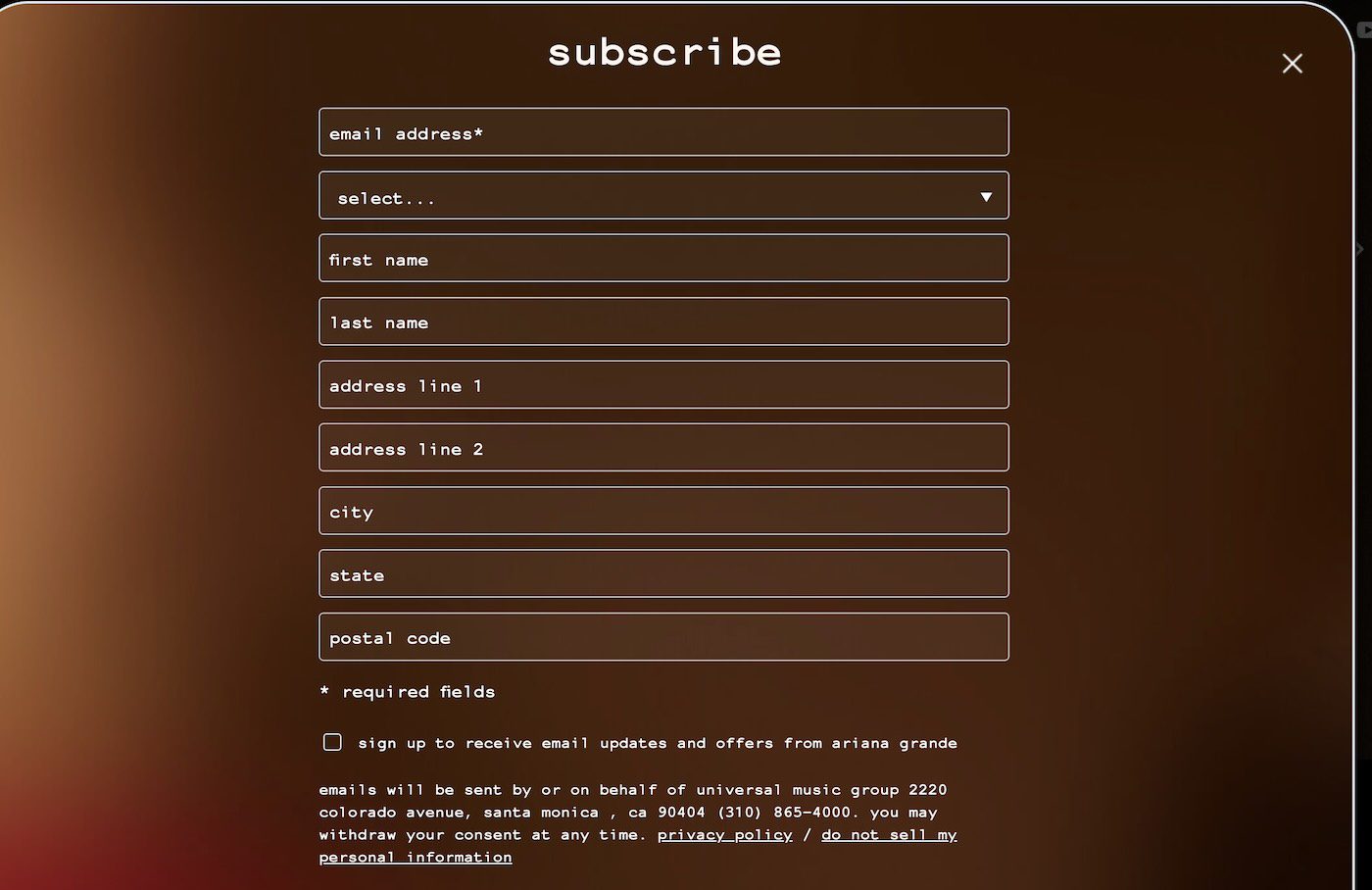
Only the email address was required, which is the part that form got right. Name the freebie in the headline, like “Get my unreleased song”, so fans know exactly what they get for their email.
Step 3: Put one link everywhere you post
Put the sign-up page in your bio on every platform, as the only link or the first one. Then end your videos with a reason to tap it.
The pattern I use for short videos is hook, story, call to action. Open with the line that stops the scroll, tell the story behind the song, then send people to the freebie. My TikTok promotion guide has the full script structure.
Step 4: Collect sign-ups at your shows
A live show is the moment fans like you most, so ask for the email there. Put a QR code on the merch table, on a slide behind you, or on a card at the door that links straight to the sign-up page.
The Independent Music 2026 report says Japanese Breakfast collected hundreds of fan phone numbers every night on tour this way. The same QR code works for email.
Step 5: Offer the next song to your list first
Before your next release, offer an early listen in exchange for an email. JVKE used a first-listen sign-up to put more than 200,000 fans on a mailing list, according to the same report.
Where you are now: a freebie, a 2-field page and a link in every post. The next job is what new fans receive in their first 9 days.
Your first 4 emails: a welcome sequence for new fans
Set this up once in your email tool as an automation, and every new subscriber gets it in order.
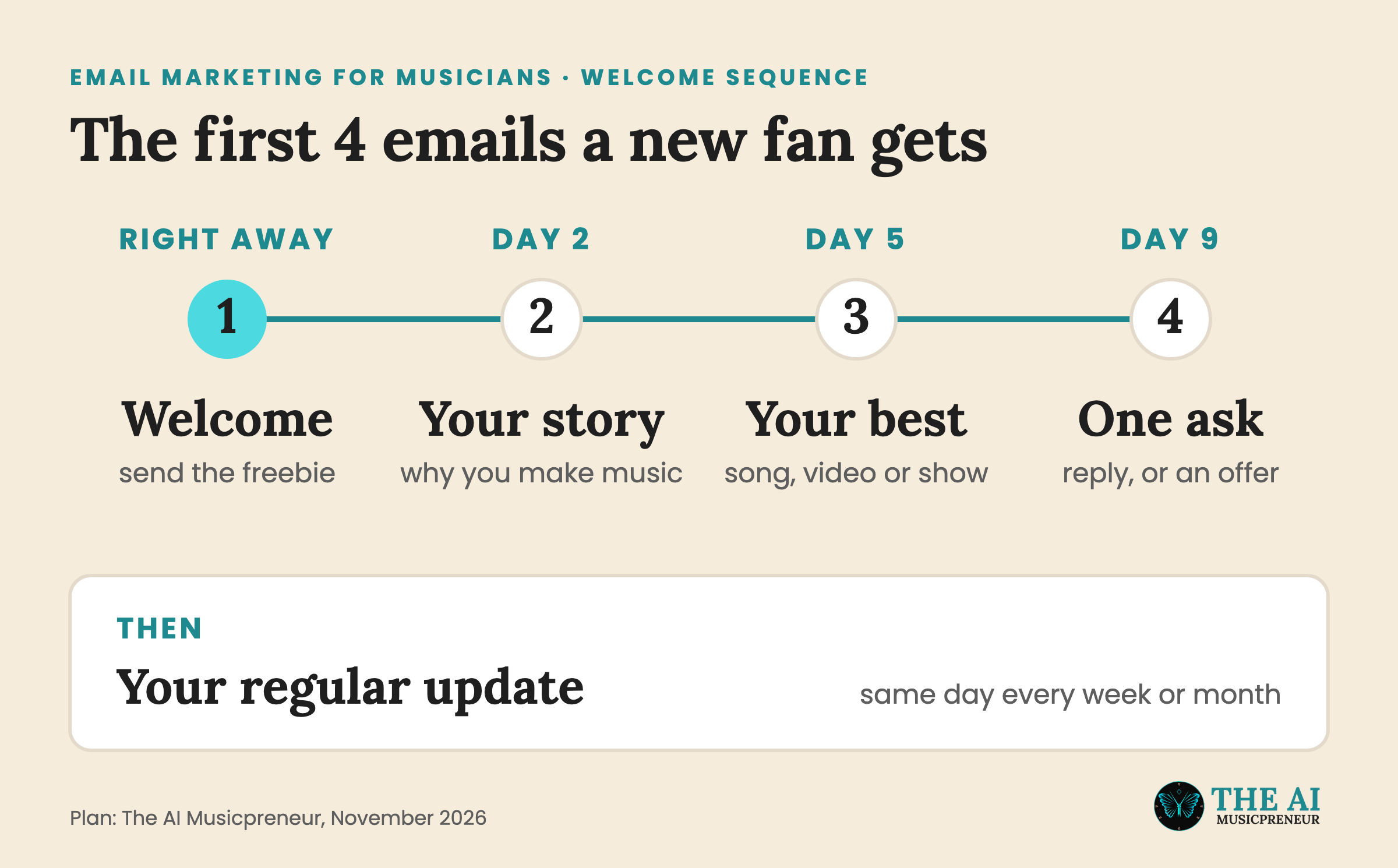
- Right away: welcome. Deliver the freebie in the first line, say thanks, and tell them how often you’ll write.
- Day 2: your story. Why you make music, in a few short paragraphs. This is the email that turns a download into a fan.
- Day 5: your best. The song, video or live clip you’re proudest of, with one link.
- Day 9: one ask. Ask them to hit reply and tell you their favourite song, or make a small offer like a signed print or a ticket presale.
A few rules for every one of them. Write a subject line that says what’s inside, because the FTC’s CAN-SPAM guide bans deceptive subject lines anyway. Use the preview text (the grey line after the subject in most inboxes) as a second subject line. And send yourself a test on your phone before it goes out, because plenty of fans will open it there.
How often should a musician send emails?
Pick a rhythm you can keep for a year, then keep it. For most artists that’s once a month, or every 2 weeks if you have new things to show. A list that hears from you on the same day every month learns to expect you.
Release weeks and tours are the exception. Send more then, because that’s when fans want to hear from you: the release-day email, a reminder 2 days later, and a show reminder to fans in that city the week of the gig.
What hurts a list is silence, then a burst. If fans haven’t heard from you in 6 months, the next email reads like spam to them and some will mark it that way.
Email marketing for artists: which tool to use in 2026
Every tool below lets you start for free. Here’s what each one gives you without paying, as of November 10, 2026:
| Tool | Free plan | What costs money | Good for |
|---|---|---|---|
| Kit | Up to 10,000 subscribers, unlimited broadcasts, forms and tagging | Sequences and visual automations, on Creator from $33 a month billed yearly for 1,000 subscribers | Artists who want a welcome sequence and to sell digital downloads |
| beehiiv | Up to 2,500 subscribers, unlimited sends, landing pages | Automations, paid subscriptions and ads, on the Lite plan and up | Artists who want the newsletter to double as a website |
| Mailchimp | Under 250 contacts | Every list above 250 contacts | Artists already using it for a shop or a band website |
| Bandsintown Email Builder | Free for artists on Bandsintown for Artists | Nothing listed | Touring artists who want to email fans by location and event activity |
My pick for most artists is Kit, because its free plan goes the furthest and the welcome sequence is the reason to pay later. I run both of my newsletters on beehiiv, and its free plan is plenty if you’d rather write a regular update than build automations first. If you tour, add Bandsintown’s builder, because it already knows which fans follow your dates.
One more option if your plan is drops and presales rather than a newsletter: Laylo runs drops and texts fans about them, and its Discovery Agent now texts your shows to opted-in fans nearby who stream you but don’t follow you yet.
How to write music emails with AI
AI won’t know your story, but it writes a solid first draft fast if you give it the facts. Paste this into Claude or ChatGPT and fill in the brackets:
Write a welcome email to new fans of my music.
About me: [genre, where I'm from, 2 lines on why I make music].
The freebie they signed up for: [e.g. an unreleased demo of "Song Title"].
Write 120 words in first person. Put the freebie link in the first line,
tell one short true story about the song, and end with one question
fans can answer by hitting reply. No hype words, no emojis.
Give me 3 subject lines under 50 characters that say what's inside.
Then edit it like it’s yours, because it has to be. Swap one sentence for a detail only you know (the room you wrote it in, the take you almost deleted), and cut anything you wouldn’t say out loud to a fan at the merch table.
Email marketing rules for musicians: consent, CAN-SPAM and GDPR
The rules are simpler than they sound, and your email tool handles most of them. What follows is a plain summary, not legal advice.
Only email people who signed up. Buying a list or adding everyone who ever DMed you skips the consent the GDPR asks for in the EU, and it’s a fast way to get your emails marked as spam anywhere.
In the US, the FTC’s CAN-SPAM guide sets the basics for marketing email:
- The From line has to say who you are, and the subject line can’t mislead.
- Every email needs a valid physical postal address, which can be a registered P.O. box.
- Every email needs a clear way to unsubscribe, and you have to honor it.
Each email that breaks the law can cost up to $53,088 in penalties, per the FTC.
If any of your fans are in the EU, the GDPR defines consent as freely given, specific, informed and unambiguous. In practice that means an unticked opt-in box, a line that says what they’ll get, and a working unsubscribe link. Ariana Grande’s form above does all 3: the box starts empty, it names who sends the emails, and it says fans can withdraw consent at any time.
Bonus email marketing tips for musicians
These are small habits that keep a list healthy once it’s running.
Ask fans to hit reply
Replies tell you more than any open rate. End one email a month with a real question, like which song should be the next single, and read every answer. Some of your best content ideas will come from there.
Segment by city before a tour
If you collected a city at sign-up, email only the fans near each show. Tools like Bandsintown’s builder and Kit’s tagging do this for you, and a fan who gets “I’m playing your city on Friday” is far more likely to buy than one who gets the whole tour list.
Export your list every few months
The list is yours, so keep a copy. Check that your tool lets you download your subscribers (Bandsintown lists import and export as a feature of its builder), and keep the CSV on your own drive, so a closed account or a price rise never costs you your fans.
Key takeaways on email marketing for musicians
Email is the one channel where you decide who hears from you and when. The setup takes a weekend, and it keeps paying for every song you put out after that.
The short version:
- Email marketing for musicians starts with a freebie worth an email address, like an unreleased song or an early listen.
- Ask for 2 fields, put one link in every bio, and collect sign-ups at your shows with a QR code.
- Write a 4-email welcome sequence once: welcome, your story, your best work, one ask.
- Start free on Kit, beehiiv, Mailchimp or Bandsintown, and pay only when you need automations.
- Only email people who signed up, and include a postal address and an unsubscribe link.
If you want the whole release around it, my 30-day single plan shows where the email list fits, from the first teaser to the first sale.
Frequently asked questions
How much does email marketing cost for an independent musician?
Nothing to start. As of November 10, 2026, Kit is free up to 10,000 subscribers, beehiiv up to 2,500, Mailchimp under 250 contacts, and Bandsintown's Email Builder is free for artists. You start paying when you want automated welcome sequences, for example Kit's Creator plan at $33 a month billed yearly for 1,000 subscribers.
Can a musician use a P.O. box as the address in fan emails?
Yes, in the US. The FTC's CAN-SPAM guide says the required physical postal address can be a post office box registered with the US Postal Service or a private mailbox registered with a commercial mail receiving agency, so you don't have to print your home address in every email.
Should musicians use a Linktree for their email sign-up?
Only if the sign-up is the first and most obvious link. A bio page with 10 or 15 links splits a fan's attention, and every extra tap loses people, so point your posts at one page whose only job is the sign-up and the freebie.
Should a musician's newsletter come from the artist name or a real name?
Use the name fans know you by in the From line, which is usually the artist name, and sign off as yourself in the email. The FTC's CAN-SPAM guide requires the From line to accurately identify who sent the message, so a made-up sender name isn't an option.
About the author
Covering AI music tools, industry shifts, and news for music creators and professionals. Twice-weekly newsletter at aimusicpreneur.com.