You finished your track. You uploaded it to Spotify, YouTube, and TikTok. Then you watched the play count stall because you have no video. Shooting a music video costs thousands and takes weeks. Stock footage looks generic. AI generators produce abstract visuals that miss your song’s story.
Music Video Marketplace solves this. You can buy music videos online without hiring a crew or waiting weeks for delivery. Upload your audio file. AI analyses genre, mood, energy, and BPM. The platform matches your track to human-made, professionally directed videos.
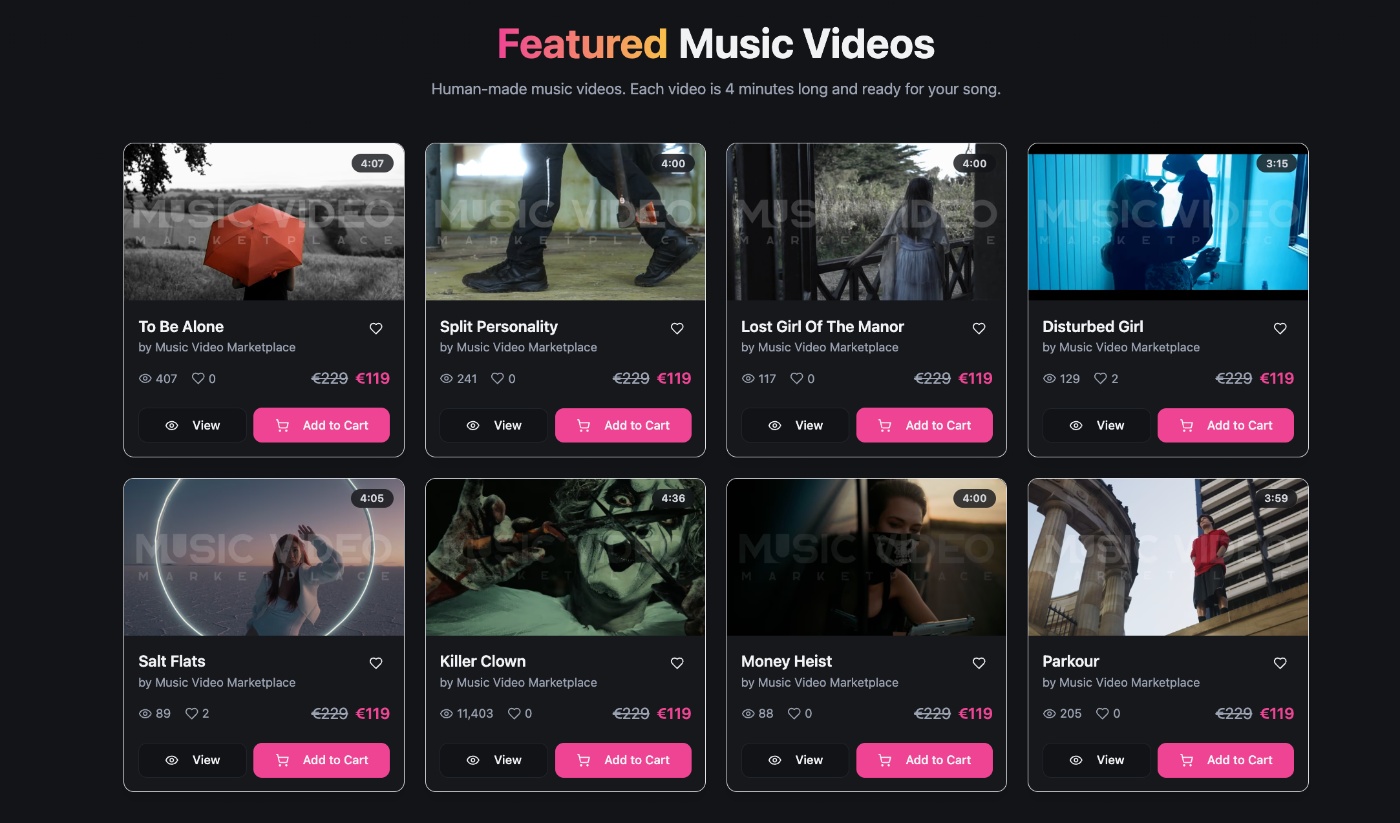
You preview the top matches, license one, and download both horizontal and vertical formats in minutes. Every video is shot by award-winning director Loraa White and her team, sold to a maximum of 50 artists, and cleared for commercial use across YouTube, TikTok, Instagram, Spotify Canvas, and ads.
This guide walks you through account creation, song upload, AI matching, video selection, and licensing. You will leave with a finished 4K music video ready to publish.
Don’t have time to read? Here’s everything you need to know to buy a music video:
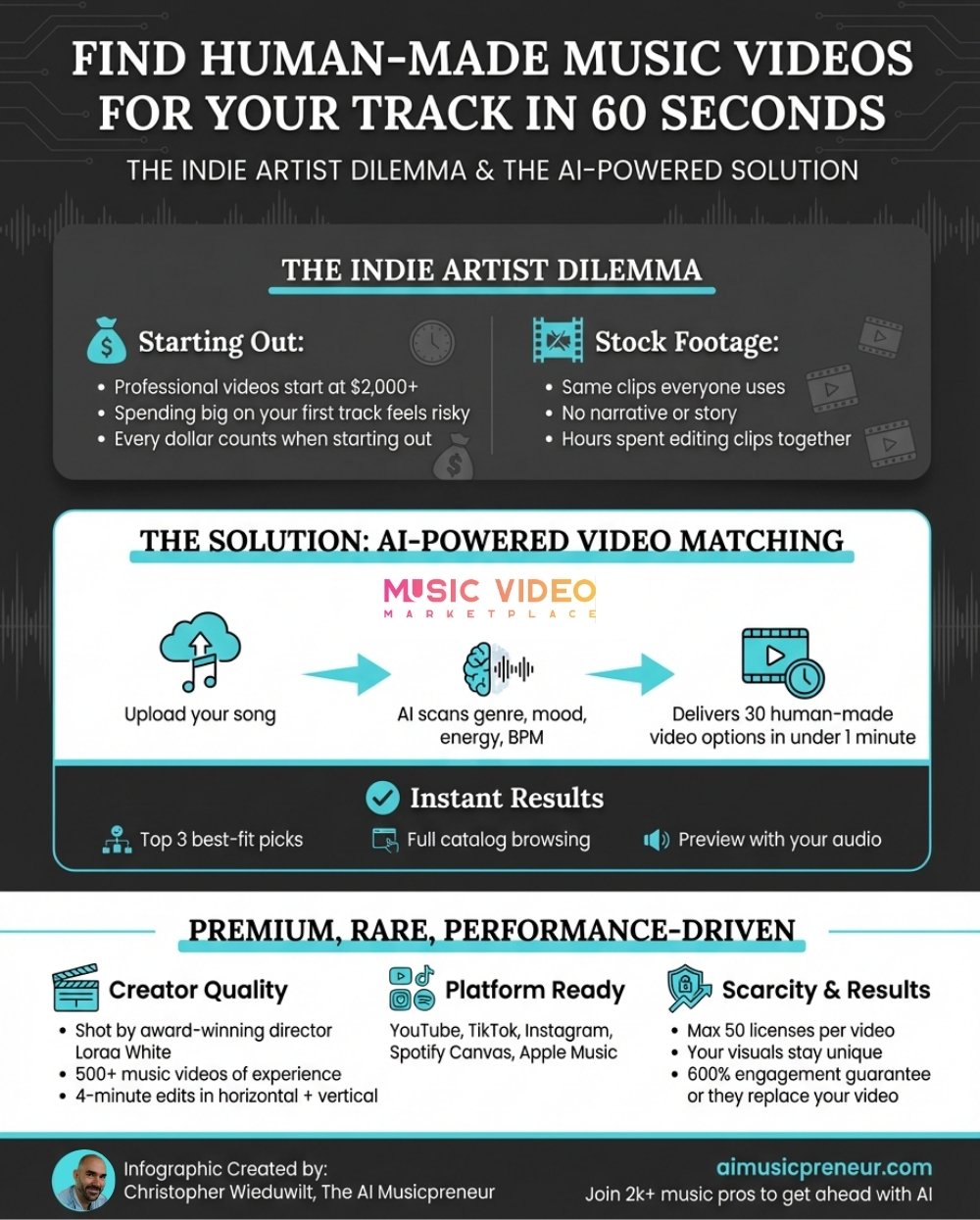
Key Agenda:
Prerequisites before you buy a music video
Required tools and versions:
- Music Video Marketplace account, free to create at musicvideomarketplace.com
- Finished audio file in MP3, WAV, or AAC format, stereo, minimum 128 kbps
- Payment method, credit or debit card for single purchase or subscription
Time commitment and skill level:
- 5 to 10 minutes total, beginner friendly
- No video editing or production experience required
Access and permissions needed:
- Email address for account registration
- Rights to the audio track you upload, you must own or control the master recording
Music Video Marketplace vs. AI Music Video Generators: Which is right for you?
Music Video Marketplace bridges the gap between DIY stock footage and expensive custom shoots. Each video is human-made, story-driven, and shot with music in mind. The platform uses AI for matching, not generation—meaning you get the efficiency of technology without sacrificing the authenticity of real footage and intentional cinematography. The result is cinematic quality without the production timeline or budget of a traditional shoot.
What you get with Music Video Marketplace:
- Videos delivered in both 16:9 horizontal and 9:16 vertical formats—one license covers YouTube, TikTok, Reels, Spotify Canvas, and Meta ads
- No prompting, no iteration, no surprise costs
- Browse, preview, and license a finished video that’s ready to publish instantly
This comes down to a fundamental creative decision—and ultimately, taste and time. Some artists want a human touch in their visuals: real locations, real movement, real storytelling that complements the emotion in their music. Others want to craft every frame themselves, shaping the visual identity from scratch through prompts and iteration.
What AI music video generators offer:
- Neural Frames is audio-reactive, syncing visuals directly to your track’s rhythm and energy, and lets you create a full AI music video on autopilot in around 10 minutes—complete with consistent characters, lip syncs, and more. It also functions as an AI lyric video generator for text-driven visuals.
- Results can range from stylized to strikingly hyper-realistic depending on the model; Kling’s latest model produces footage that’s difficult to distinguish from real video
- Creative possibilities are vast, but there’s a learning curve and costs can escalate quickly when refining scenes
- 16:9 video download included, but manual resizing required for TikTok and Instagram
| Feature | Music Video Marketplace | AI Music Video Generators |
|---|
| Creation method | Human-made, AI-matched | AI-generated from prompts or autopilot |
| Visual range | Cinematic, narrative-driven | Stylized to hyper-realistic (model-dependent) |
| Audio-reactive | No | Yes (Neural Frames) |
| Learning curve | None, browse and license | Beginner-friendly (Autopilot) |
| Cost predictability | Fixed per video | Variable (credit-based) |
| Time to final video | Instant after purchase | 10 minutes to hours / days (depending on your approach) |
| Format delivery | 16:9 + 9:16 included | 16:9 (manual resizing for TikTok/IG) |
| Use cases | Music videos, Spotify Canvas, TikTok, Reels, ads | Music videos, lyric videos, Spotify Canvas, TikTok, Reels, ads |
Rolling Stone UK featured Music Video Marketplace as a new model for independent artists, highlighting the platform’s focus on human creativity and instant licensing. The company stands behind its product with a guarantee: a 600 percent engagement boost or a free video replacement.
Step-by-Step Instructions to buy a music video on musicvideomarketplace.com
1. Create your Music Video Marketplace account

Purpose: Register a free account to access the upload tool and video library.
Follow these account creation steps:
- Navigate to musicvideomarketplace.com in your browser.
- Click Sign Up or Create Account in the top navigation bar.
- Enter your email address, create a password with at least eight characters, and confirm.
- Check your inbox for a verification email and click the confirmation link.
- Log in with your new credentials.
Watch for these pitfalls:
- Verification email lands in spam or promotions folder. Check all folders before requesting a new link.
- Password requirements not met. Use a mix of letters, numbers, and one symbol.
Pro tip:
Use the same email you use for music distribution. This keeps all your release assets in one inbox and simplifies license record keeping.
Success check: You see your account dashboard with an Upload Your Song button or link.
2. Upload your audio track for AI analysis
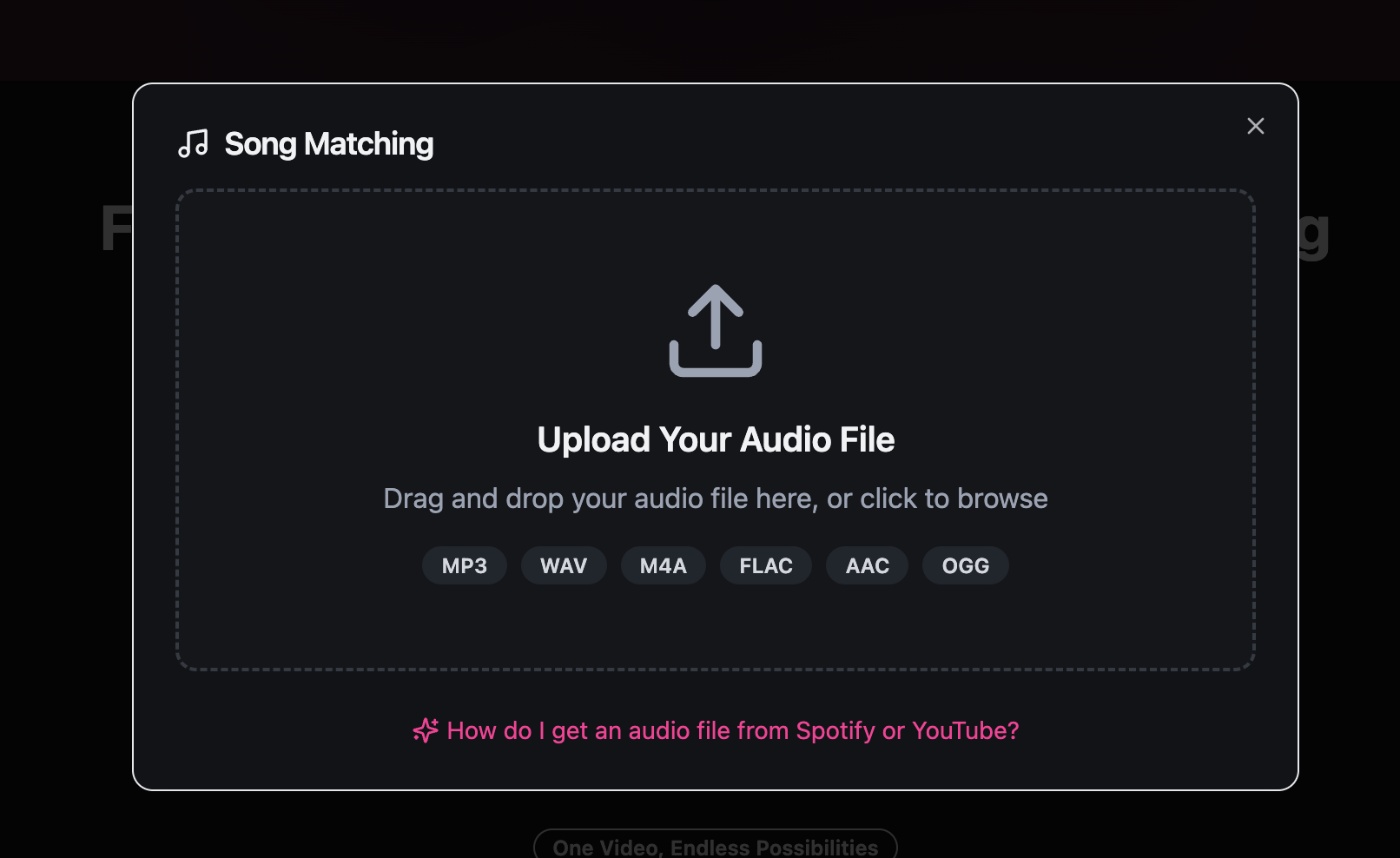
Purpose: Submit your finished song so the platform can extract genre, mood, energy, and BPM.
Complete the upload process:
- Click Upload Your Song or Find Your Video from the dashboard.
- Select your audio file from your local drive, MP3, WAV, or AAC accepted.
- Wait for the progress bar to complete, typically 10 to 30 seconds depending on file size.
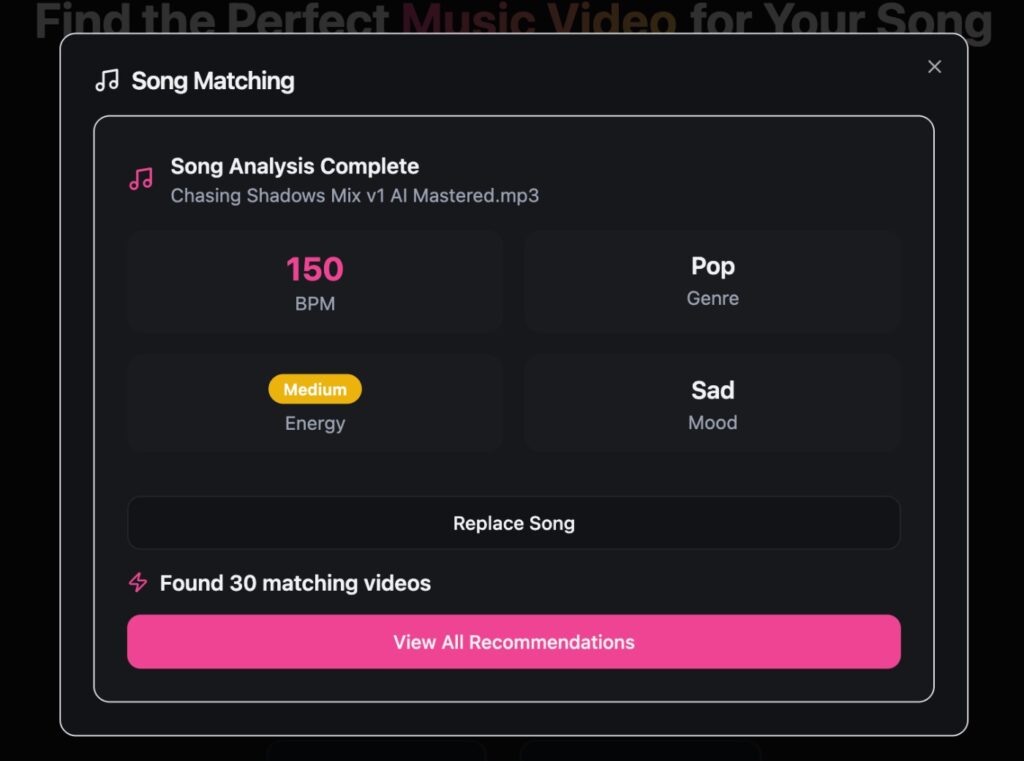
- The AI runs automatically after upload and displays analysis results, genre tags, mood descriptors, energy level, and detected BPM.
Example:
You upload a 3-minute indie-pop track at 120 BPM with a melancholic mood. The platform tags it as Pop, Sad, Relaxed, and mid-energy. These tags drive the video recommendations you see next.
Quick rule:
Upload the final mastered version of your track. The AI reads tempo and dynamics, so demo mixes with inconsistent levels produce less accurate matches.
Success check: You see a results screen listing your song’s detected genre, mood, energy, and BPM with a button to view recommended videos.
3. Browse and preview matched music videos
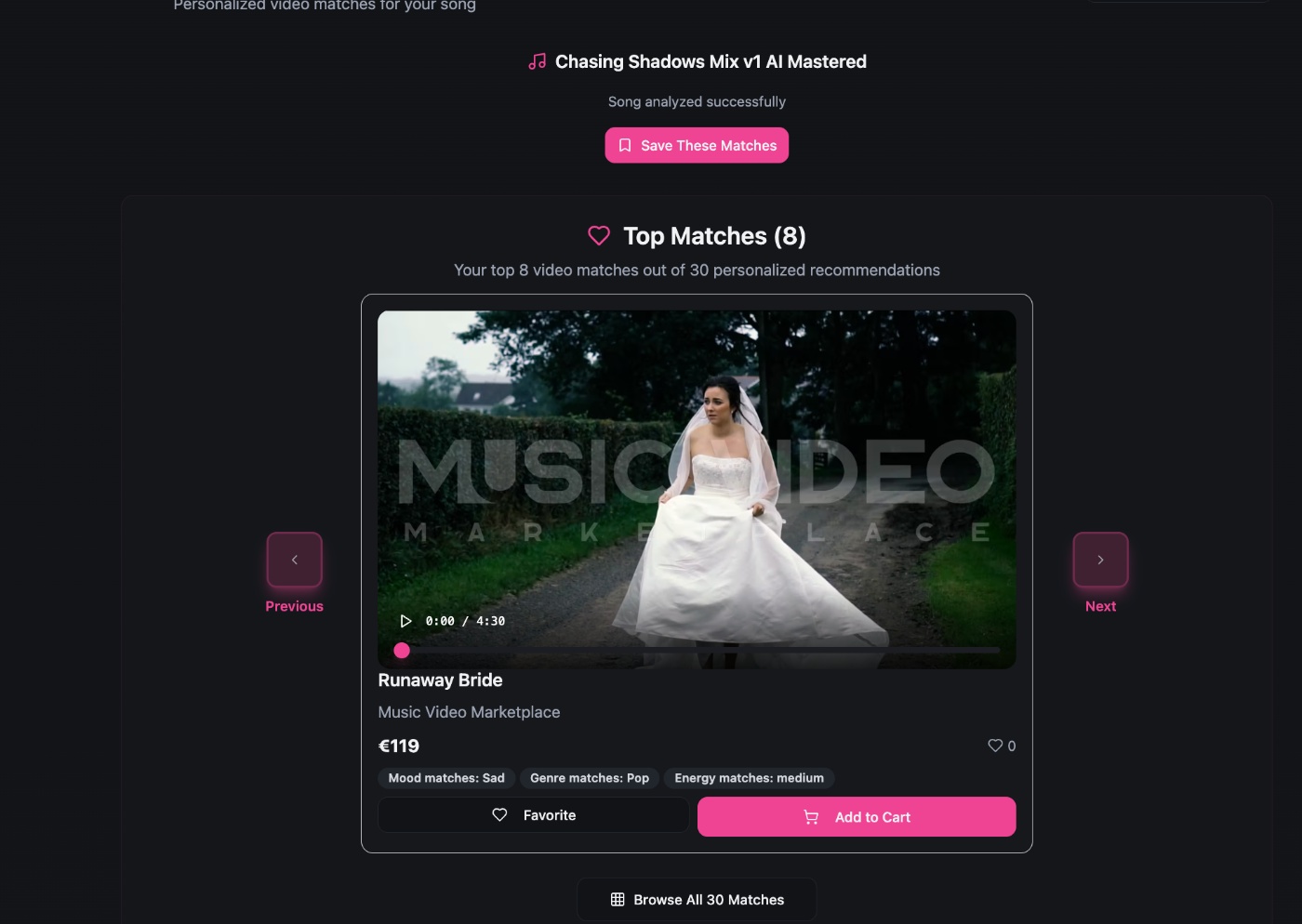
Purpose: Review the top AI-matched videos and explore the full recommendation set to find the best visual fit.
Navigate the recommendation interface:
- The platform displays the top three matches first, sorted by match score.
- Click any thumbnail to open a full-screen preview with your audio synced to the video.
- Filter by category, Cinematic, Dance, Dark, Love, Nature, Party, or other mood tags, to narrow results.
- Preview as many videos as you need. No limit on previews.
Use the Browse All or View 30 Recommendations link to see the extended list:
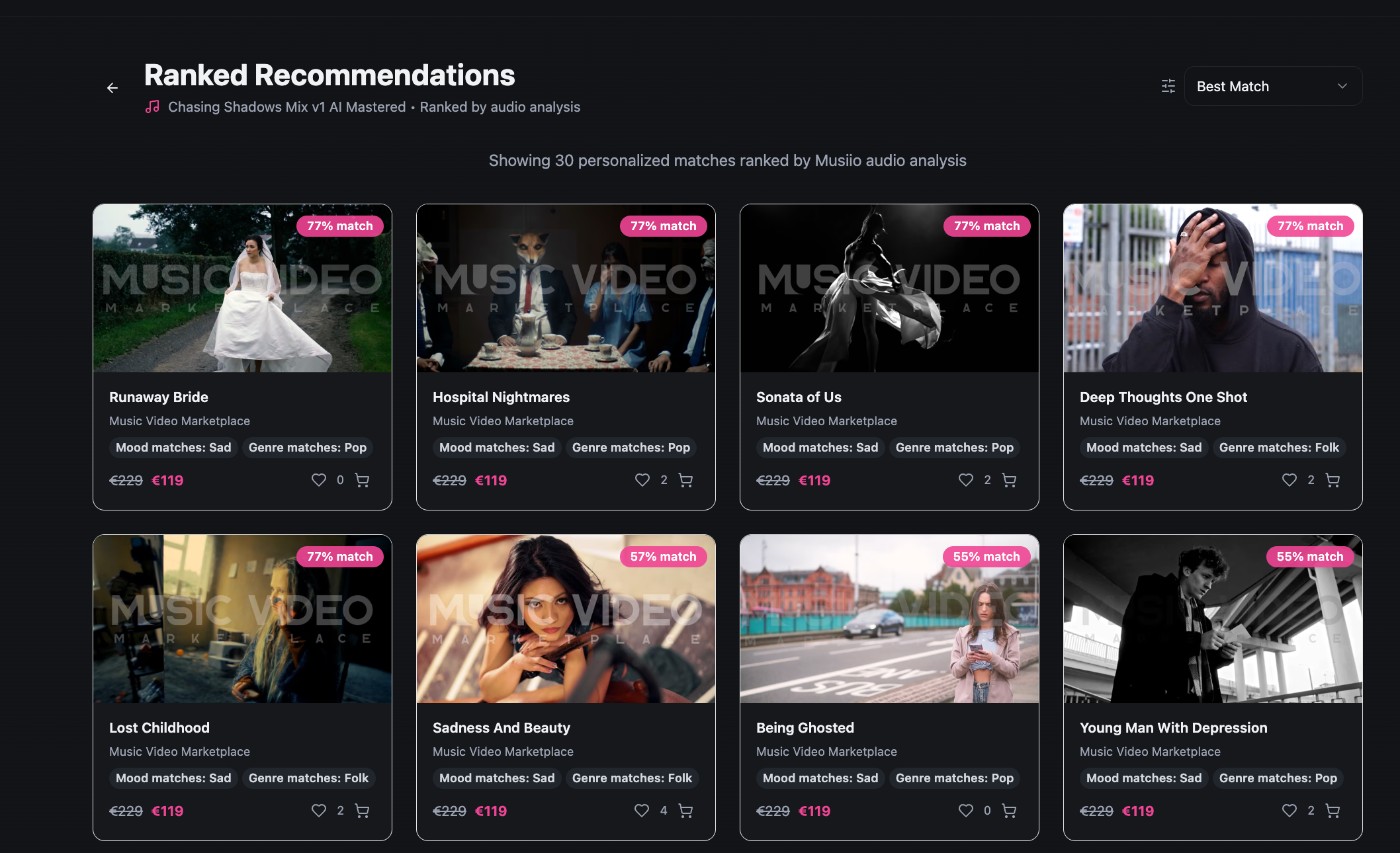
Watch for these pitfalls:
- Video preview does not sync audio automatically: Refresh the page or re-upload if playback fails.
- Top three matches feel off-brand: Scroll the full 30 recommendations or adjust filters. The AI ranks by technical fit, but creative preference is subjective.
Pro tip:
Open previews in new tabs to compare two or three finalists side by side. Look for narrative beats that align with your song structure, verse, chorus, bridge, and outro.
Success check: You identify one video that matches your song’s mood and energy. You see a License or Purchase button on the video detail page.
4. License and download your music video
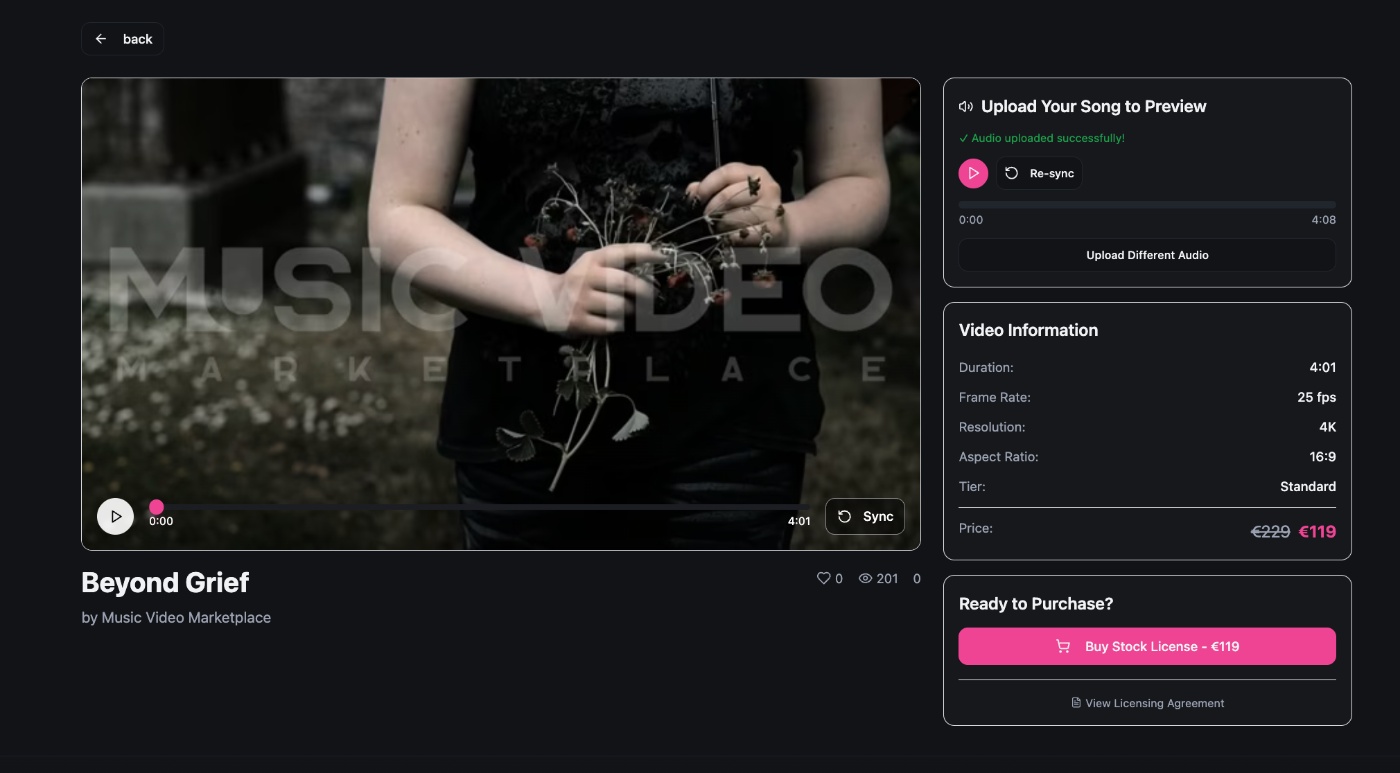
Purpose: Complete payment, receive your commercial license, and download both horizontal and vertical video files.
Follow the licensing workflow:
- If you’re ready to buy click “Buy Stock License” on the video detail page
- Enter payment details and complete checkout. Prices start at €119 for a single 4K video or get a subscription from £19 if you release multiple tracks per month
- After payment confirmation, the platform redirects you to your account dashboard or a download page.
- Download the 16:9 horizontal MP4 for YouTube and the 9:16 vertical MP4 for TikTok, Reels, and Spotify Canvas.
- Save both files to a clearly labeled folder on your drive.
You purchase a cinematic video from Music Video Marketplace for €119. You receive two MP4 files, one 1920×1080 horizontal and one 1080×1920 vertical, both in 4K quality. You upload the horizontal file to YouTube as your official music video and trim the vertical file to an 8-second loop for Spotify Canvas.
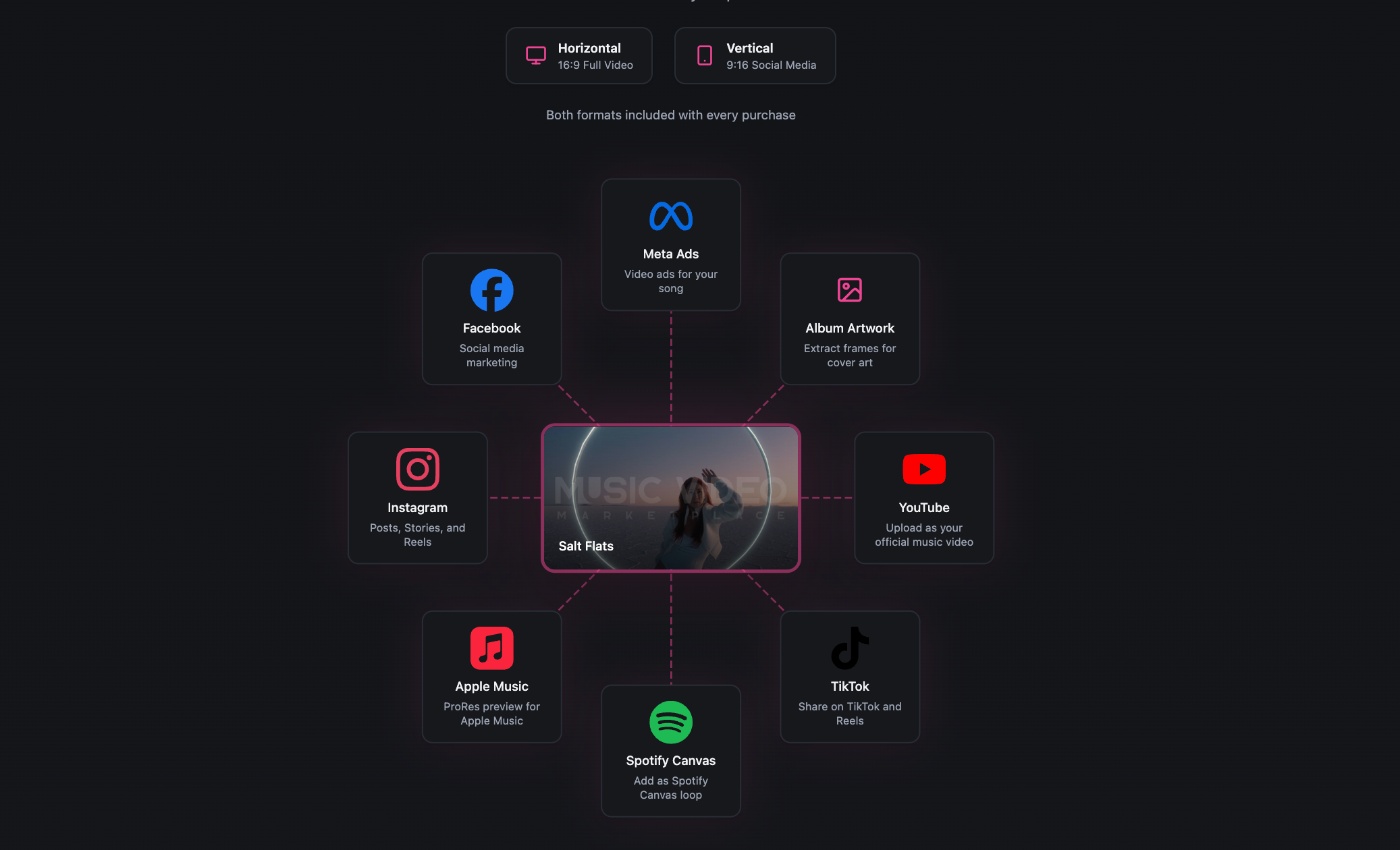
Quick rule:
Download both formats immediately. License confirmation emails include download links, but dashboard access is faster and does not expire.
Success check: You have two MP4 files saved locally. Both play smoothly in your media player with your song audio embedded or ready to sync in your editor.
Need help? How to fix common issues when buying a music video
Context for common issues and quick fixes:
- Upload fails or times out: Check file size, keep under 100 MB, and confirm format is MP3, WAV, or AAC. Compress or convert if needed.
- AI analysis returns no results or generic tags: Re-upload the mastered version. Ensure the file has clear tempo and dynamics. Avoid silent intros longer than 10 seconds.
- Preview video does not play: Clear browser cache, disable ad blockers, and try a different browser. Chrome and Firefox offer the best compatibility.
- Payment declined: Verify card details, billing address, and available balance. Contact your bank if the issue persists. The platform accepts major credit and debit cards.
- Download link missing after purchase: Log in to your account dashboard and navigate to Orders. All licensed videos remain accessible for re-download.
What to do when progress blocks at a step:
- Capture the error message or screenshot the issue.
- Check the platform’s FAQ or contact support via the chat widget on musicvideomarketplace.com.
- Roll back by deleting the uploaded file and starting a fresh upload session.
Buy a music video the smart way (Essential Best Practices)
Top tips for success with this tool:
- Upload your final master, not a rough mix: The AI reads tempo, energy, and dynamics to match videos. Clean audio produces better recommendations.
- Preview the full 30 recommendations before deciding: The top three are algorithmically ranked, but creative fit is subjective. A video ranked tenth might tell your song’s story better.
- Download both formats immediately after purchase: Store them in a labeled release folder with your audio files, artwork, and metadata. This keeps all assets together for distribution.
- Trim the vertical MP4 to 3 to 8 seconds for Spotify Canvas: Use any video editor to loop a compelling moment. Canvas specs require 9:16 ratio and MP4 or JPG format.
- Test your video on one platform before uploading everywhere: Publish to YouTube first, check playback and sync, then roll out to TikTok, Instagram, and Spotify.
What to avoid during setup and use:
- Do not upload copyrighted audio you do not own: The platform requires you to hold rights to the master recording. Licensing a video does not clear third-party music rights.
- Do not skip the preview step: Watch the full video with your audio before purchasing. Refunds are limited, and the 600 percent engagement guarantee requires you to use the video as delivered.
- Do not ignore format requirements for each platform. YouTube accepts 16:9 horizontal. TikTok and Reels require 9:16 vertical. Spotify Canvas needs 3 to 8 seconds looped. Use the correct file for each destination.
- Do not re-edit or alter the video beyond trimming for Canvas. The commercial license covers the video as delivered. Major edits or overlays require additional clearance.
Time savers worth adopting:
- Subscribe to the Basic plan if you release two or more tracks per month: You pay £19 per month for two video downloads instead of €119 per video.
- Bookmark your account dashboard: Direct access skips the homepage and gets you to uploads and downloads faster.
- Create a release checklist template: Include steps for audio upload, video preview, license purchase, format download, and platform-specific export. Reuse it for every release.
So, which path is right for you? – Music Video Marketplace or AI music video generator?
You now have a complete workflow to find, license, and download a professional music video in under 10 minutes. But the right choice depends on what you’re looking for.
Choose an AI music video generator if:
- You want full creative control and the ability to bring your own vision to life frame by frame
- You’re willing to invest time learning the tools and iterating on prompts
- You enjoy the creative process of building visuals from scratch
- Your budget can flex with credit-based pricing as you refine your output
Choose Music Video Marketplace if:
- You need a professional music video fast without a learning curve
- You want predictable, fixed pricing with no surprise costs
- You value human-crafted, narrative-driven footage over AI-generated visuals
- You want videos directed by Loraa White and her team—an award-winning music video director who has shot over 500 music videos over the last 15 years
Both paths get you to a finished music video. AI music video generators give you limitless creative freedom if you’re willing to put in the time. Music Video Marketplace gives you instant access to professionally shot footage without learning a new tool or managing unpredictable costs.
If you value human-crafted visuals, want a streamlined process, and prefer to focus on your music rather than video production, Music Video Marketplace is for you.
Next steps:
- Upload your video to YouTube as your official music video
- Trim the vertical file to an 8-second loop for Spotify Canvas
- Share clips on TikTok and Instagram Reels
- Track engagement over the first week and compare it to audio-only posts
- If you release regularly, explore the Basic or Pro subscription plans to lower per-video costs
Go to musicvideomarketplace.com, create your account, and buy music videos online for your next release today.
Frequently Asked Questions on how to buy a music video
Where can I buy music videos?
You can buy music videos at Music Video Marketplace. The platform offers over 200 professionally directed, 4K music videos created by award-winning director Loraa White and her team. Each video is human-made, not AI-generated, and designed for music storytelling. You upload your track, AI matches it to suitable videos, and you license the one that fits your song. Prices start at €119 for a single video or £19 per month for a Basic subscription with two videos included.
Where can I buy music videos for download?
Music Video Marketplace lets you buy music videos for download directly to your device. After you complete your purchase, the platform provides instant access to both horizontal (16:9) and vertical (9:16) MP4 files. You download them from your account dashboard and save them locally. The files are yours to use across YouTube, TikTok, Instagram, Spotify Canvas, Apple Music, and paid advertising campaigns. No streaming-only restrictions apply. You own the license and the files.
Can you buy music videos?
Yes, you can buy music videos. Music Video Marketplace created this model specifically for independent artists who need professional visuals without the cost and timeline of a custom shoot. You purchase a commercial license that grants you rights to use the video across all major platforms. Each video sells to a maximum of 50 artists, so your content remains relatively exclusive compared to unlimited stock footage. The license covers personal and commercial use, including monetized YouTube uploads and paid Meta or TikTok ads.