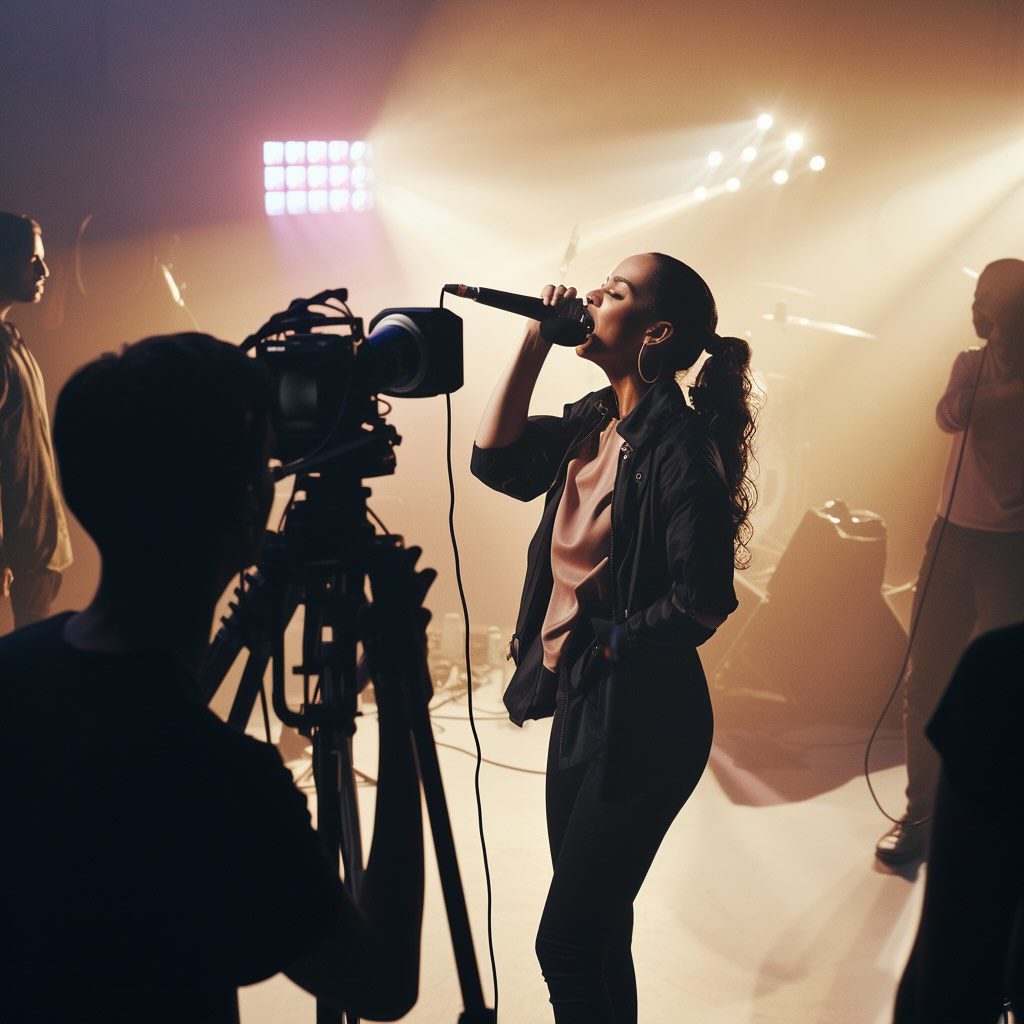
As a music artist and content creator, I’ve experienced firsthand the challenges of creating music videos.
Did you know: A professional music video can start from $2,000 and quickly spiral into the higher five figures?
I didn’t at first. When I started my music career, I thought one great video would be enough.
But then I discovered a harsh truth: In today’s digital age, you need consistent visual content to stay relevant.
Once I realized this, I faced a painful choice:
Either spend my entire budget on one video or leave other songs without visuals.
Music videos are more than just promotional tools.
They’re about storytelling, brand building, and connecting with fans.
Done right, they can transform your music into a complete artistic experience.
The challenge?
↳ Creating multiple high-quality music videos without draining your bank account.
As a former recording artist, I couldn’t justify spending $2,000+ on each video. That’s why I’m excited to share how AI is revolutionizing music video creation in 2026.
Let me walk you through the best AI music video generators like Neural Frames, Kaiber, RunwayML, and PIKA that are making it possible to create stunning visuals for every track on your album – without the traditional headaches of video production.
Table of Contents
When choosing the best AI music video generator tools for beginners in 2026, music artists and creators should prioritize automation over granular control. A beginner tool must be able to take an audio file and generate a cohesive visualization without requiring complex timeline editing or node-based workflows.
Based on my testing, the top choices prioritize “Audio-to-Video” workflows where the AI handles the beat synchronization automatically.
If you have zero video editing experience, here is how the top tools stack up:
| Tool Name | Best “Beginner” Feature | Ease of Use (1-10) | Free Plan? |
| Neural Frames | Autopilot: Generates full music videos from audio analysis. | 9.5/10 | Free Trial (20s) |
| Pika Art | Lip Sync: Best for short, talking/singing headshots. | 8/10 | Yes (Credits) |
| Kaiber | Beat Sync: Pre-made templates that react to audio. | 7/10 | Trial |
| RunwayML | High Control (Not recommended for absolute beginners). | 4/10 | Limited Free |
My Recommendation: For absolute beginners who need a full music video done in under 15 minutes, Neural Frames is the best starting point. Its Autopilot feature removes the need to prompt scene-by-scene, bridging the gap between a raw audio file and a finished 4K video automatically.
Why “Autopilot” Matters for Beginners
Most AI video tools (like RunwayML) generate 4-second clips that you must manually stitch together in a separate editor (like Premiere Pro). This is a high barrier to entry.
Neural Frames is currently the most user-friendly because of its specific Autopilot workflow:
- Drop in your track: The AI listens to the stems (drums, vocals, bass).
- Concept Generation: It reads your lyrics and suggests a visual theme (you can change the video concept however)
- Storyboard: It generates the prompts for you.
- Render: It produces a video that reacts to the beat automatically.
This “One-Stop-Shop” approach is why I rank it as the #1 tool for beginners in 2026, while tools like RunwayML remain better suited for advanced “AI Directors” who want control over camera zoom, pan, and physics.
Advantages of using AI for music videos
| Aspect | Benefits |
|---|
| Accessibility for All Creators | – Democratized video production
– Professional-looking results without experience
– Suitable for both independent artists and hobbyists |
| Endless Creative Possibilities | – Wide range of styles and effects
– Generation from lyrics, audio, or text prompts
– Versatile storytelling options |
| Enhanced Audience Engagement | – Powerful visual medium
– Creates immersive experiences
– Better resonance with listeners |
| Cost and Time Efficiency | – Reduced production costs
– Faster creation process
– More time for music creation |
Criteria for choosing the best AI music video generator.
When selecting the right AI music video generator, consider the following factors:
- Ease of Use: User-friendly interface and simple workflow.
- Quality of Output: High-resolution videos with professional effects.
- Customization Options: Ability to tweak visuals to match your vision.
- Pricing: Affordable plans that offer good value for money.
- Support and Community: Access to tutorials and a community for troubleshooting.
My top AI music video generator pick:
Best AI Music video generator
Neural Frames
6 reasons to try Neural Frames today:
- Generate complete AI music videos in 10 minutes
- Access Kling, Seedance, and Runway models
- Only audio-reactive AI video tool available
- Start free, upgrade from $19 monthly
- Make lip sync and lyric videos
Comparing the 4 best AI music video generators
In this review, I analyze four leading AI music video generator tools that make creating professional-quality clips easier than ever. I break down the features and pricing of Neural Frames, Kaiber, RunwayML and PIKA to help you determine the best fit for your needs.
Here’s a grand overview, before we dive deeper:
| Feature | Neural Frames | Kaiber (Superstudio) | RunwayML | PIKA |
|---|
| Ease of Use | Moderate | Easy to Moderate | Moderate to Complex | Easy |
| Output Quality | High (Up to 4K) | High (Up to 4K with upscale options) | High (1080p) | High (1080p) |
| Customization | Extensive (Audio-reactive & Adaptive) | Extensive (Core Flows, Custom Flows, Elements) | Extensive (Multi-Modal Creativity) | Basic |
| Pricing | From $19/month | From $15/month | From $0/month | Free (Paid plans from $8/month) |
| Unique Features | Audio-Reactiveness & Adaptive Visuals | Superstudio, Collections, Canvases | Multi-Modal AI Creativity, Ownership Rights | Instant Animation |
| Best For | Musicians, Producers | Artists, Musicians, Creators | Content Creators, Filmmakers, Designers | Hobbyists, Beginners |
| Trial Options | Free trial (20 sec) | Free tier available | Free plan available | Free plan available |
💡 Suitable for musicians, music producers, digital artists, and content creators
💰 Start off for free to try (20 seconds). Upgrade from $19/month for 12 minutes of video.
🤖 AI models include Kling (Standard + pro), Seedance (Lite + Pro) & Runway
Neural Frames is the leading AI music video generator from audio, transforming your songs into mesmerizing visuals with unparalleled precision.
As the only audio-reactive AI tool in the market, Neural Frames adapts dynamically to your music, ensuring that every beat and melody is perfectly visualized. Perfect for artists seeking high-quality videos without the hefty price tag. Their free trial lets you explore possibilities before committing.
Neural Frames excels as an AI lyric video generator too for indie musicians and labels automating production across multiple artists, no video editors needed!
5 key features of Neural Frames:
- Build music videos in under 10 minutes
- Create lyric videos with automated text sync
- Use consistent characters to tell stories
- Generate lip sync videos with mouth matching
- Access Kling, Seedance and Runway AI models
AI music video generation on autopilot
 Screenshot
Many musicians spend countless nights trying to piece together decent visuals for their releases, only to end up with something that still doesn’t match the quality of their music.
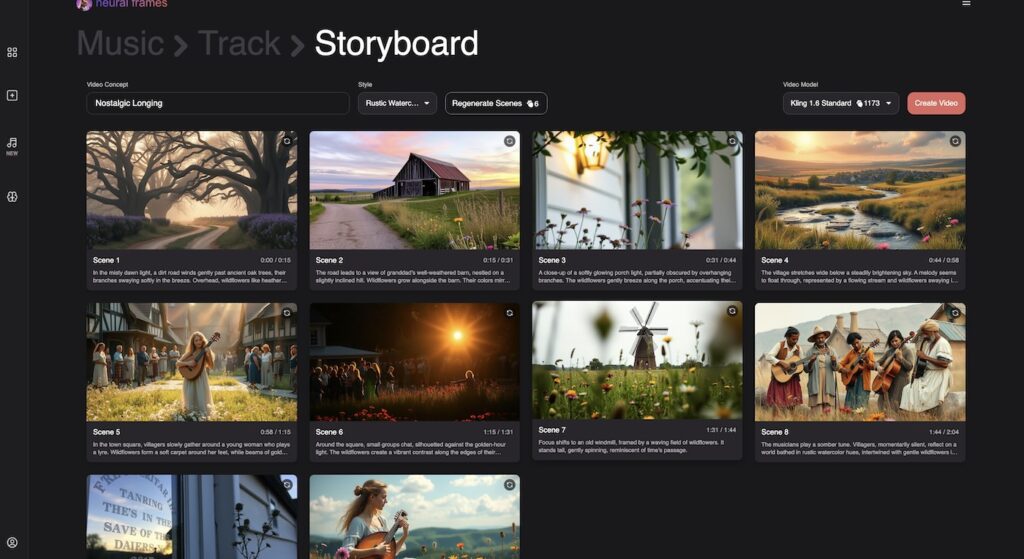
Neural Frames has launched autopilot, the world’s first (almost) autonomous agent allowing you to create premium-grade music videos in just two clicks.
How to use:
- Sign Up here & click on “New” tab
- Upload your track
- Select duration (30 seconds to full track) and format (9:16, 16:9)
- Review the AI-generated storyboard
- Choose your preferred style and video model
- Make adjustments or regenerate scenes if needed
- Click “Create Video” and wait 10-15 minutes
- Share your professional 4K video or further edit on the timeline
Autopilot analyzes your music to create perfectly synchronized visuals that match your sound, allowing you to create entire album visualizers effortlessly.
Creating a lip sync music video with Neural Frames
Neural Frames autopilot feature also includes lip sync functionality. This matches mouth movements to your vocals automatically. You get professional results without video editing skills.
Here’s how you work with Neural Frames:
- Upload your audio file to the platform
- Select the autopilot mode
- Enable the lip sync option
- Let the AI generate your video
- Download and share your content
Musicians use this to promote new releases. Content creators enhance their social media posts. The process takes minutes instead of hours in traditional editing software.
Neural Frames boasts an intuitive interface that’s ideal for both beginners and seasoned creators. Simply upload your song, input a descriptive text prompt, and let the AI work its magic. The platform also offers a free trial, allowing you to generate a 20-second clip to test the waters.
Here’s a step by step guide (if you don’t want to use autopilot):
Step 1 – Getting started:
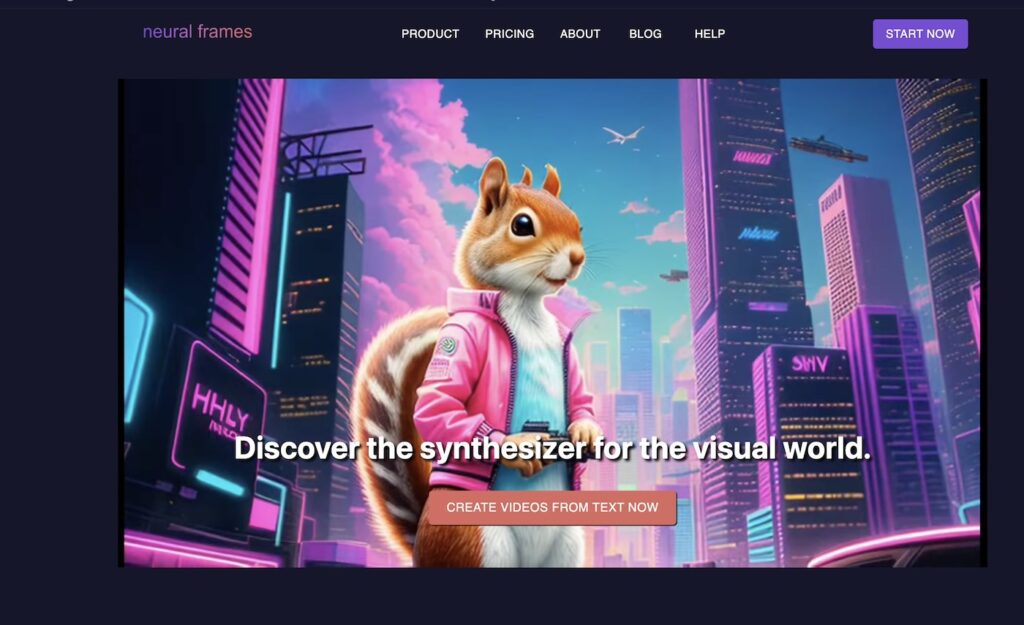
Head to the Neural Frames website and click “Start Now.” Create an account using your email address to begin making AI animations.
Step 2 – Creating a New video.
Click “Create a new video” and browse through the available video models. Each model has different strengths, so pick one that matches what you’re trying to create.
 Screenshot
Step – 3: Create first image or upload an existing image
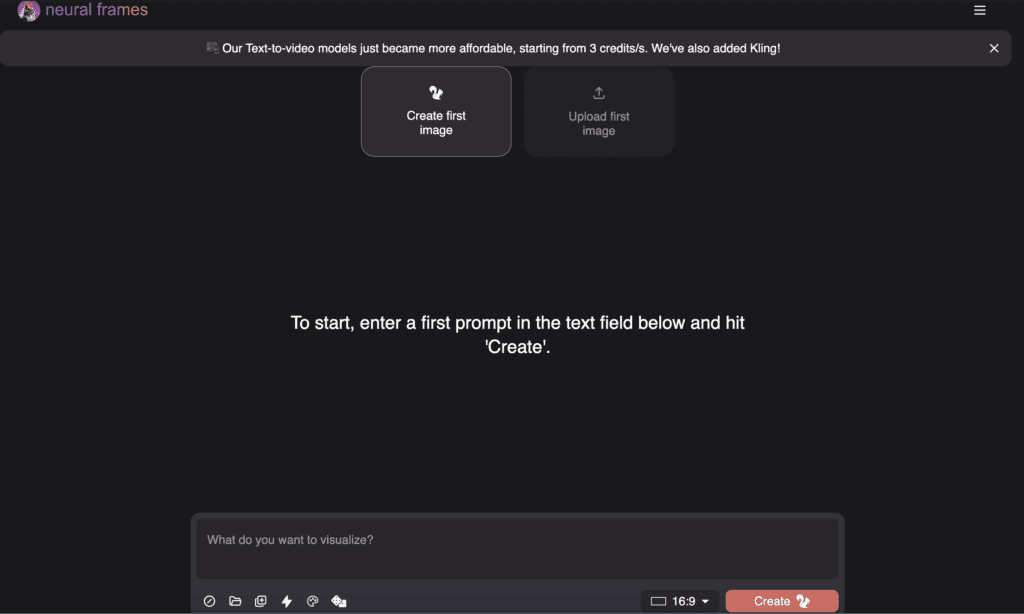 Screenshot
You have two options here:
- Type a description of what you want to see
- Upload an existing image to work with
If writing a prompt:
- Keep it clear and specific
- Use the “Pimp My Prompt” button if you need help improving your description
- Choose your video format (square, portrait, or landscape)
- Click “Create” to generate four image options
- Select your favorite to continue to the editor
Then choose your favorite image to proceed to the Video Editor:
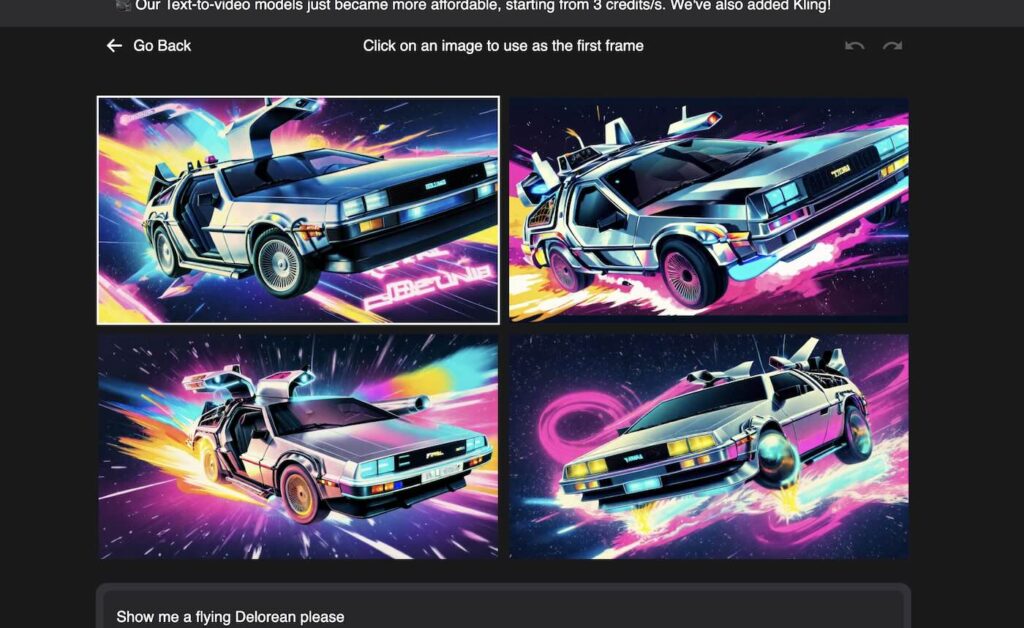 Screenshot
Optional setting: Save your prompts
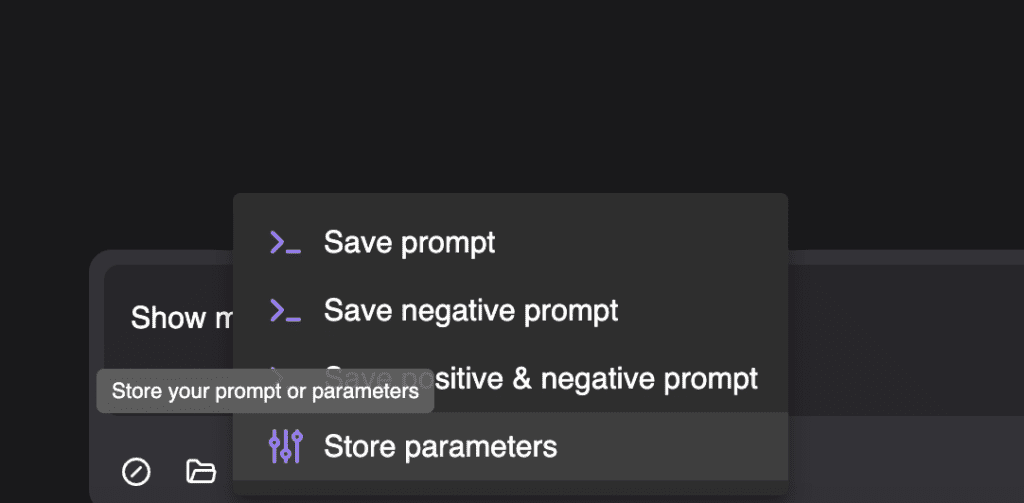
Neural Frames allows you to save prompts for future use, streamlining your workflow.
- Enter a description you like
- Click “Save Prompt”
- Choose what parts to save
- Access them later when making new videos
This feature is ideal for maintaining consistency across multiple videos or experimenting with variations of a prompt.
Optional setting: Choose a Style Reference:
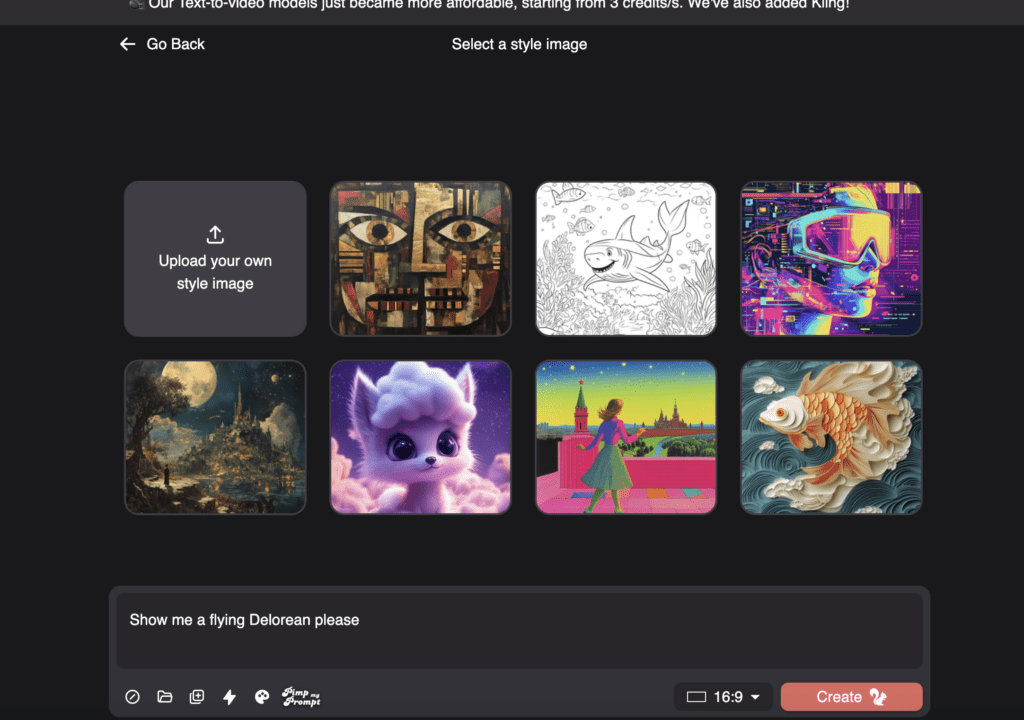
- Click “Select Style Image”
- Choose from the examples or upload your own
- Adjust the “Style Reference Strength” slider:
- Higher = closer to reference style
- Lower = more creative freedom
This feature is particularly useful for achieving specific aesthetics or aligning visuals with an artist’s branding.
Step 4 – Working in the AI Music Video Editor
Make adjustments, continue editing until it’s perfect.
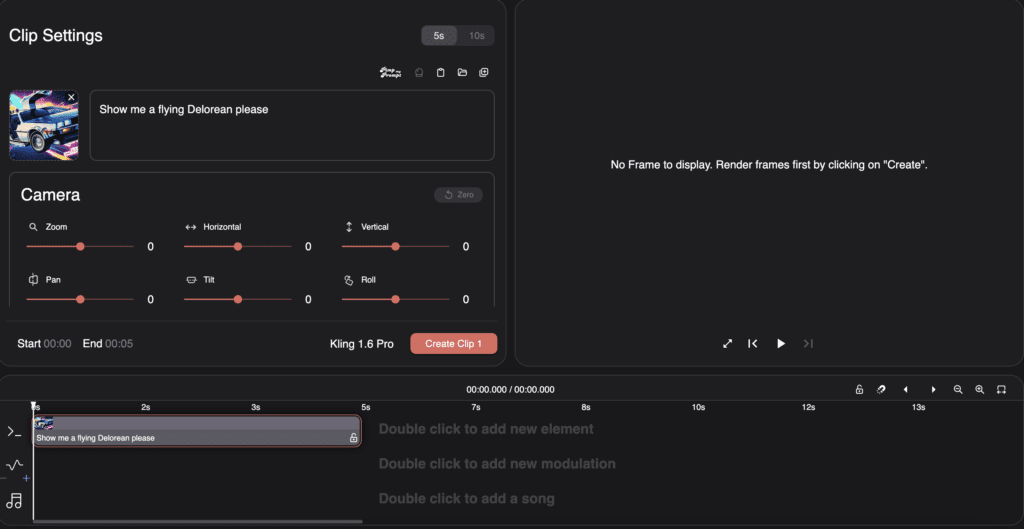
The editor has four main sections:
- Top bar: Basic controls and project settings
- Side panel: Adjustment tools for the current frame
- Center area: Preview of your video
- Bottom area: Timeline showing all your frames
Step 5 – Adding Music
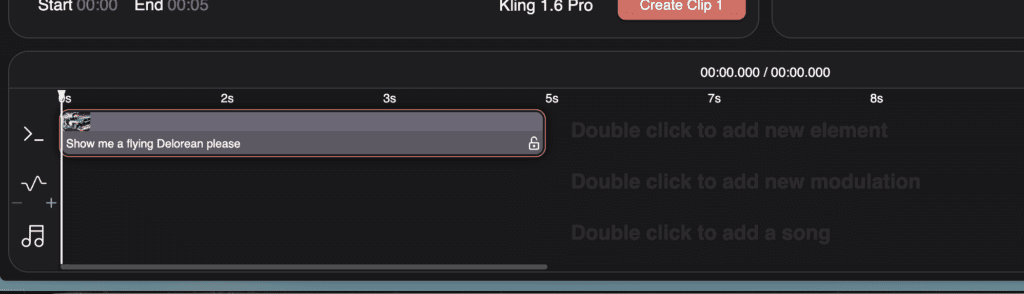
Upload your own music file.
Neural Frames will automatically separate it into different parts (vocals, drums, etc.).
Use these separated elements to make your visuals react to the music:
- Pick which sound element to connect to your visuals
- Adjust how strongly the visuals react
- Fine-tune the timing to match beats and changes in the music
Here’s a tutorial video on how to use Neural frames:
Neural Frames offers flexible pricing with a 20-second free trial.
Pricing
| Plan Name | Price | Video Generation | Stem Extraction | Audio-Reactive Effects | Upscaling |
|---|
| Neural Navigator | $19/month | 16 minutes | No | No | 1080p |
| Neural Knight | $39/month | 40 minutes | Yes | Yes | 1080p |
| Neural Ninja | $99/month | 2 hours | Yes | Yes | 1080p and 4K |
| Neural Nirvana | $299/month | 7 hours | Yes | Yes | 1080p and 4K |
Pros and Cons
| Pros | Cons |
|---|
| Only audio-reactive AI video generator available | Video generation takes 10-15 minutes waiting |
| Creates complete videos in 10 minutes | Higher-tier plans can be pricey for some users. |
| Multiple AI models: Kling, Seedance, Runway | 4K only available on expensive tiers |
| Free trial available before purchasing subscription | |
| Affordable pricing starts at just $19 | |
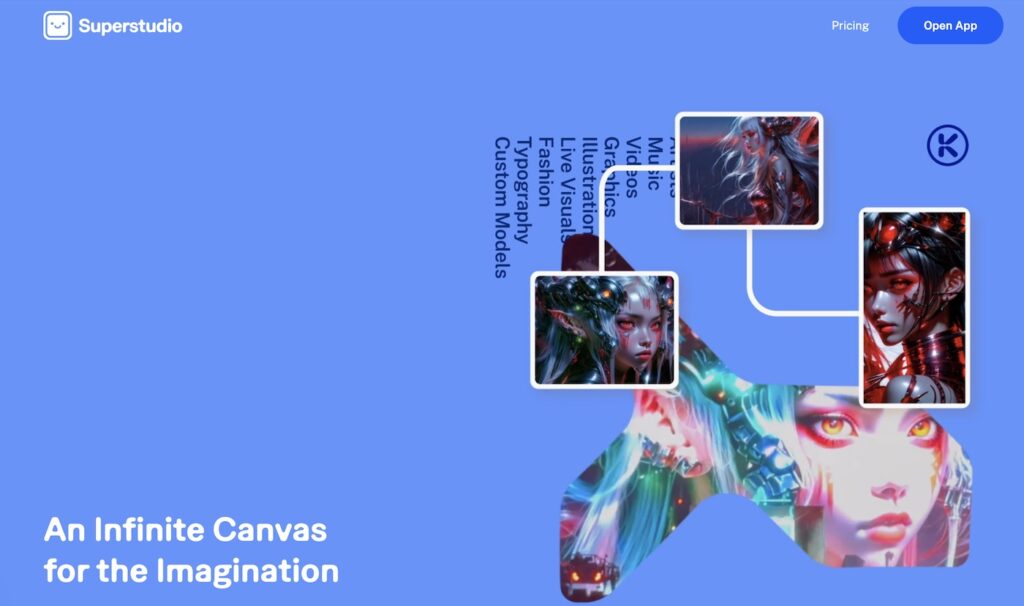 Credit: Kaiber Superstudio website
Kaiber’s Superstudio offers a flexible workspace for creating AI-generated images and videos. It combines multiple AI tools in one place, letting you experiment, iterate, and organize your creations on an infinite canvas.
Key Features of Kaiber:
Kaiber Superstudio is an all-in-one creative hub that combines professional AI generation with a flexible workspace for musicians and artists.
- Infinite Canvas: Organize your entire project—images, videos, and workflows—in one expansive, non-linear space.
- Best-in-Class Models: Access a suite of top-tier AI tools including Luma, Veo, Kling, Minimax, Mochi, and Runway for video, plus Flux, Recraft, and Stability for images.
- Custom Models: Train your own AI models to capture and repeat your unique artistic style across different projects.
- Image & Video Lab: Reimagine visuals and blend reference images to craft new concepts directly on the canvas.
- Audio & Sound Integration: Use AudioShake and Stability to bring music to life with reactive visuals and high-fidelity lip-sync animations.
- Graphics & Logos: Remix logos and map visuals onto anything from digital billboards to physical packaging.
- Professional Video Editor: Features both an automated Beat Sync mode and a traditional Timeline Editor for frame-by-frame precision.
How to use Beat Sync in Superstudio
Upload your music and visuals to the Beat Sync tool on Kaiber to automatically align transitions with your song’s BPM. Choose from templates like High Energy for rapid cuts or Cinematic for moody, dramatic edits without manual timeline work. [00:19]
Learn Beat Sync in 4 Minutes – This official tutorial demonstrates how to use the Beat Sync multiplier to control transition speed and how to move your project to the timeline for final manual polishes. [01:52]
How Kaiber Works
- Start a Flow: Choose from options like Flux Image (for still images) or video generators like Luma or Runway
- Customize: Add elements like aesthetic references, stencils, or layouts
- Generate: Create multiple variations of your idea
- Organize: Group creations into collections that connect to your flows
- Build: Link different elements to create a visual map of your creative process
Here’s a tutorial on how to use Kaiber:
How much does Kaiber cost?
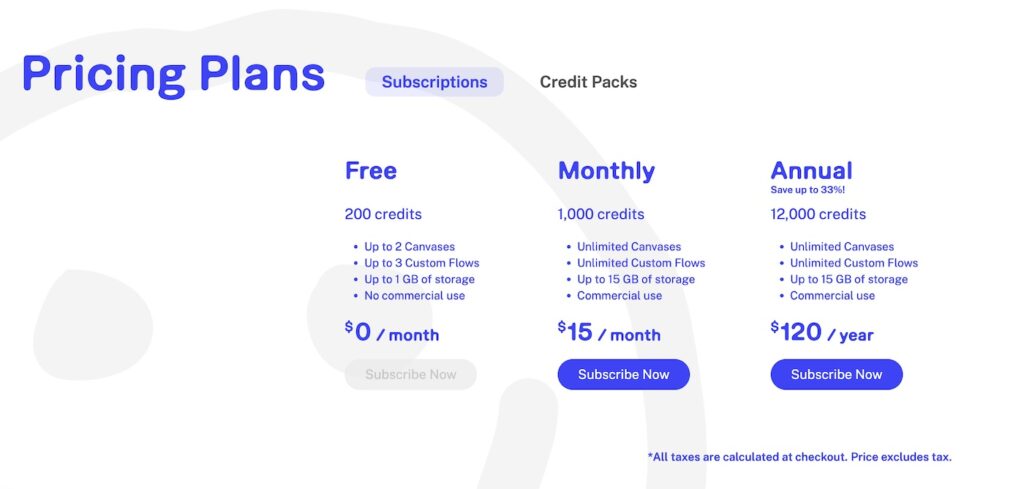
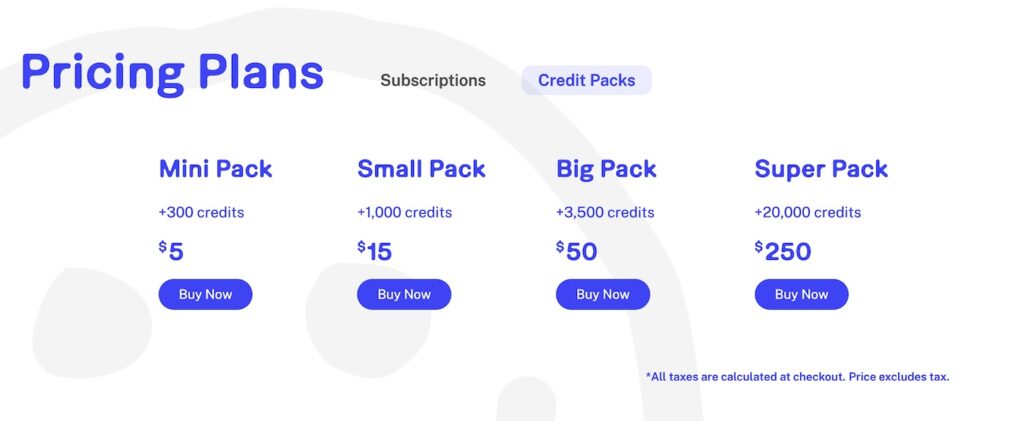
Decide between a subscription or buy credit packs
1 – Get a subscription:
Monthly subscriptions start at just $15, making it accessible for creators at all levels.
2 – Get a credit pack:
2 AI music videos that were created with Kaiber
Kaiber has been used to create professional music videos like:
- Linkin Park’s “Lost”
- Contrast’s “Redemption”
1- Linkin Park – Lost
2. Contrast – Redemption
Kaiber Labs has also collaborated with major artists:
- Visual artist Weirdcore for Yaeji’s Boiler Room set
- Jon Rafman for a Live From Earth rave
- Grimes for her 2024 Coachella performance
Pros and Cons
| Pros | Cons |
|---|
| Combines multiple AI tools in one workspace | Canvas interface has a learning curve |
| Allows style blending through reference images | Can be overwhelming for beginners |
| Supports both image and video generation | Output quality depends on your inputs and prompts |
| Custom model training available | Some features still being developed |
| Audio-reactive capabilities | Organization needed to manage complex projects |
Superstudio works best when you approach it with an experimental mindset. The canvas format might seem unusual at first, but it gives you freedom to connect ideas and build visual workflows that would be difficult in traditional editing programs.
 Screenshot
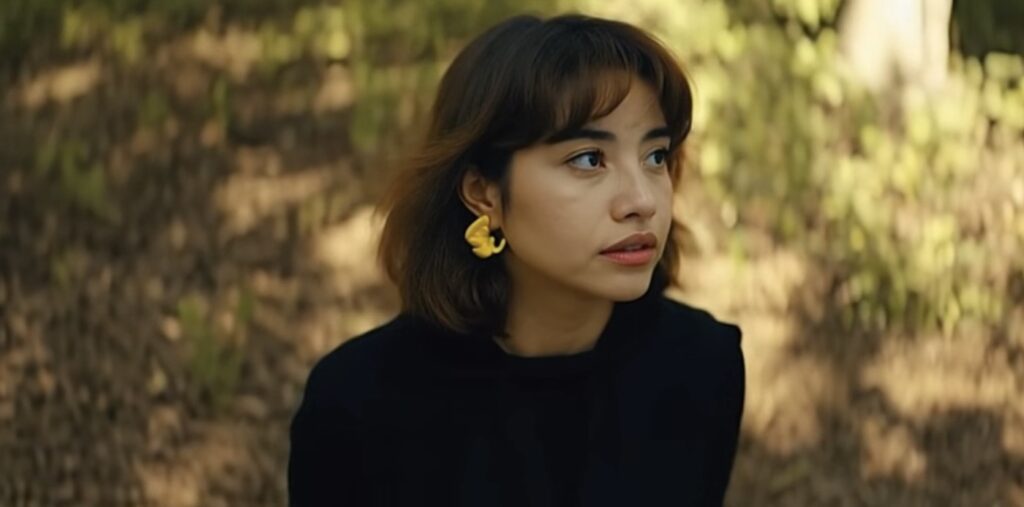
RunwayML has evolved into a powerful AI video generator helping creators tell visual stories. With the introduction of RunwayML Gen-4.5, it now offers unprecedented control over consistent characters, objects, and environments across scenes.
What’s new with Gen-4.5:
Key Features of Gen-4.5
- State-of-the-Art Motion: Objects move with realistic weight, momentum, and force. It masters complex physics like liquid dynamics and believable collisions.
- Unprecedented Fidelity: Fine details like hair strands and material weaves remain coherent and sharp across motion and time.
- Director Mode & Advanced Controls: Provides precise camera movement control including panning, trucking, and orbiting. It supports existing modes like Image to Video, Keyframes, and Video to Video.
- Precise Prompt Adherence: Complex, multi-element compositions are rendered with exact placement and fluid motion for both characters and objects.
- Visual Consistency: Maintains a coherent visual language across photorealistic, cinematic, and stylized animation aesthetics.
How RunwayML works for storytellers:
RunwayML provides tools that bridge the gap between idea and execution:
- Start with a Concept: Input reference images and descriptions
- Generate Consistent Scenes: Create multiple scenes with the same characters and objects
- Explore Variations: Try different angles, lighting, and settings while maintaining consistency
- Add Motion: Generate videos with realistic movement and physics
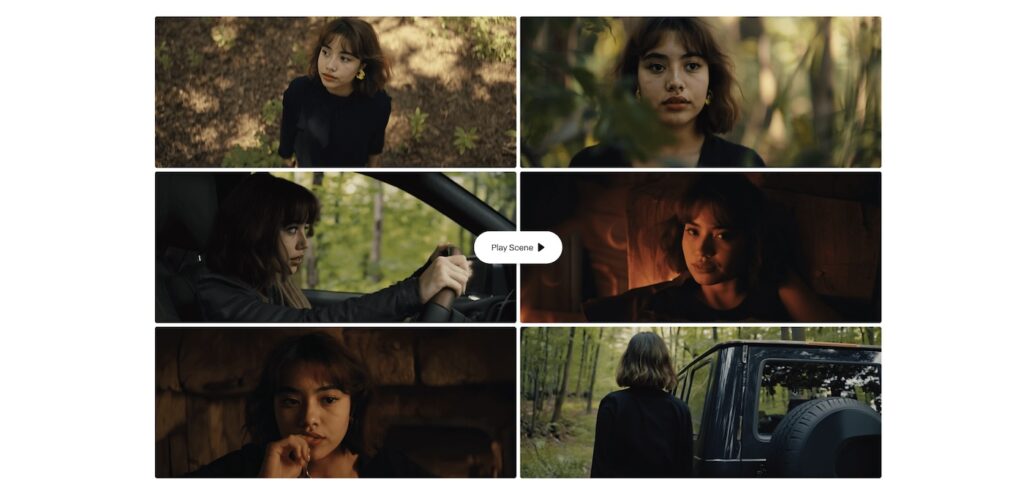
How good is RunwayML for creating an AI music video?
 Screenshot
For music videos, RunwayML offers several approaches:
- Generate consistent characters performing across different settings
- Create visual narratives that maintain style and mood
- Produce physics-based animations and effects
However, it’s worth noting that RunwayML isn’t directly audio-reactive.
To create a music video, you’d need to:
- Generate your scenes and segments separately
- Export them as video clips
- Assemble and sync them with your music in a video editing program
How much does RunwayML cost?
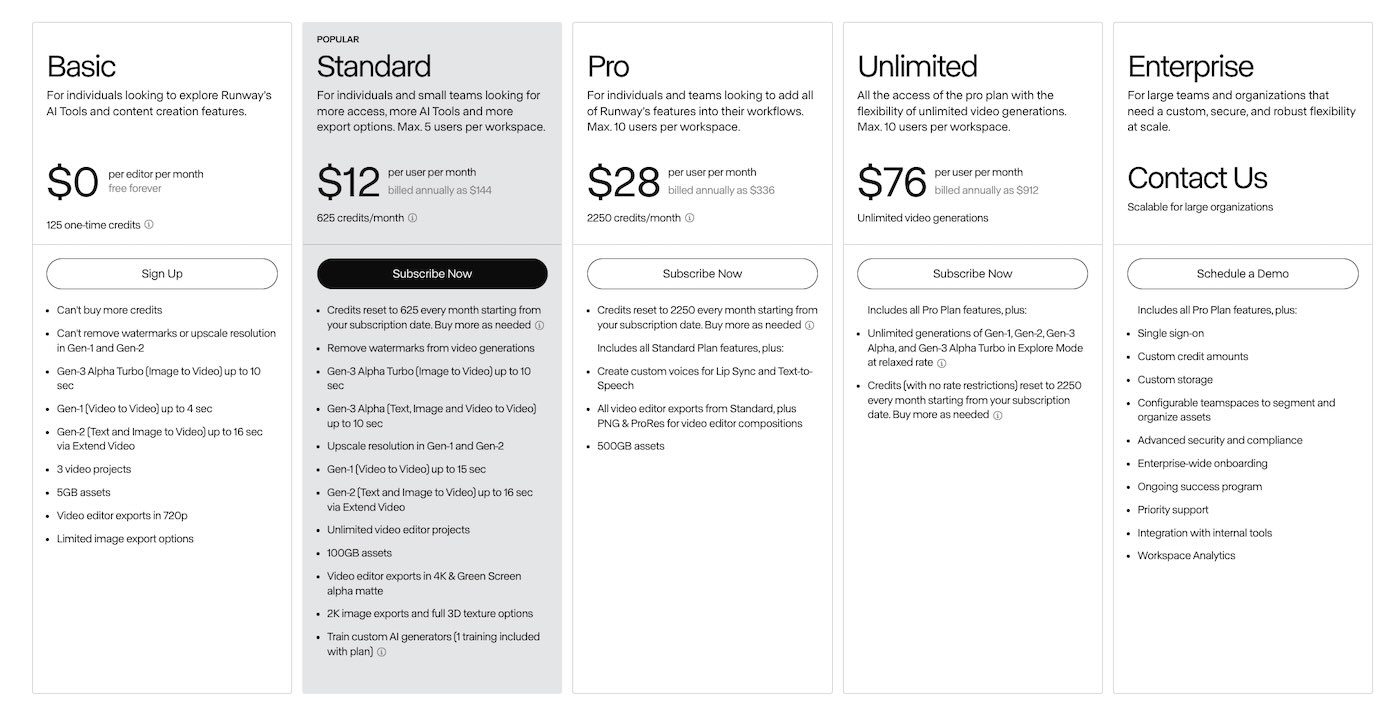
RunwayML offers various subscription plans, from a basic free tier to professional and enterprise options. The more advanced features like Gen-4 are available in higher-tier plans.
Pros and Cons of RunwayML
| Pros | Cons |
| Generates high-quality, realistic videos | No direct audio-reactive features |
| Exceptional character consistency across different scenes | No built-in timeline editor |
| Massive creative freedom with professional camera controls | Requires manual assembly for long-form content |
For storytellers looking to craft visual narratives without traditional production resources, RunwayML’s Gen-4.5 offers new possibilities to bring consistent characters and worlds to life across multiple scenes and perspectives.
Pika is a web-based AI video generator that lets you create animations, effects, and transitions without complex editing skills. The platform continues to evolve with new features that make video creation more accessible.
Key Features of Pika
Pika offers a suite of specialized tools for different creative needs:
| Feature | What It Does | Use Case Example |
|---|
| Pika Frames | Transitions between two images (start/end) | Animating a sketch into a finished artwork |
| Pikaffects | Surreal, playful special effects | Melting, exploding, or inflating objects |
| Pika Scenes | Builds scenes from multiple elements + a prompt | Cleopatra gaming in a neon-lit living room |
| Pikadditions | Adds anyone/anything to any video | Inserting yourself into a movie scene |
| Pikaswaps | Swaps objects/characters, keeps animation intact | Changing a video’s main character |
| Pikatwists | Edits specific objects/characters in a video | Changing a cat’s action in a scene |
The new Pikaformance model by Pika Art is a significant advancement in hyper-realistic lip-sync and character expression. It allows musicians and creators to animate static images with high-fidelity facial movements synced to any audio file, whether it’s singing, rapping, or even animal sounds.
How to Use Pika
Pika’s interface makes it straightforward to create videos:
- Choose Your Tool: Select the feature that matches what you want to create
- Upload or Create: Add images, videos, or describe what you want
- Generate: Let Pika’s AI create your video
- Download and Share: Save your creation and use it in your projects
Here’s a tutorial on how to use Pika:
How much does Pika cost?
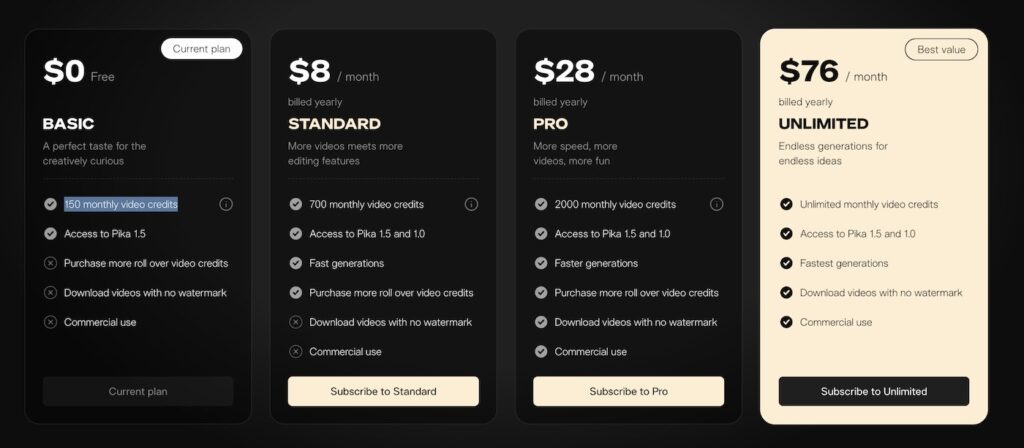
Pika offers several subscription options:
- Free plan with basic features
- Basic plan: $8/month with 150 video credits
- Standard plan: $28/month with 700 credits
- Pro and Unlimited plans: $76/month with additional features like commercial use and watermark-free downloads
Pros and Cons
| Pros | Cons |
|---|
| Easy to use with minimal technical skills | Limited video length (often 5-10 seconds per generation) |
| Creates smooth transitions between images | Lower resolution in free versions |
| Allows precise editing of specific video elements | Requires stitching multiple clips for longer videos |
| Works with both AI-generated and real footage | Some features still being refined and improved |
| Affordable pricing options | May require external software for final editing |
Pika stands out for helping beginners create professional-looking videos quickly. While it doesn’t have a timeline editor or direct audio-reactive features, it excels at transformations, character consistency, and creating short, engaging clips that can be combined into larger projects.
Final Considerations when choosing an AI music video generator
Why should content creators use AI video generators?
- Efficiency: Save time and resources.
- Innovation: Stay ahead with cutting-edge technology.
- Engagement: Enhance audience interaction with compelling visuals.
Which AI Music Video Generator is most user-friendly?
For absolute beginners, Kaiber and PIKA offer the most straightforward experience. If you’re willing to invest time to learn, Neural Frames and RunwayML provide more advanced features.
What is the best AI music video generator?
The “best” tool depends on your specific needs:
- Neural Frames for high-quality, synchronized visuals.
- Kaiber for ease of use and affordability.
- RunwayML for advanced creative projects.
- PIKA for free quick animations.
Final tips
- Try before you buy: Utilize free trials to test each platform.
- Define your goals: Know what you want to achieve with your video.
- Consider your audience: Choose a style that resonates with your listeners.
Bonus: The role of AI in music video production
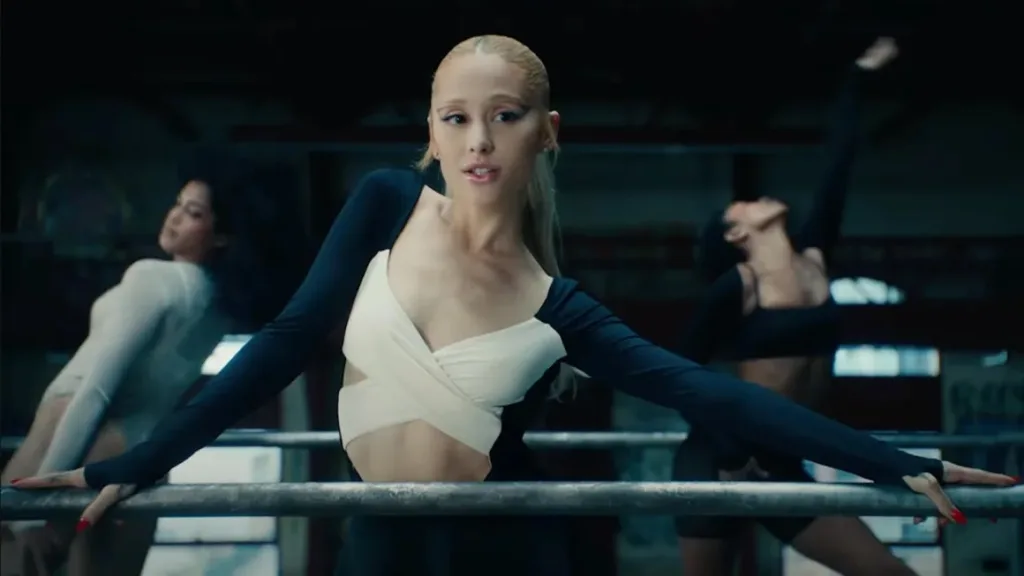
In today’s digital landscape, music videos remain a crucial element of the music industry. They offer a visual storytelling aspect that enhances the listener’s experience, allowing artists to showcase their creativity and style. Music videos help differentiate artists, create a sense of community among fans, and often spark viral trends that bring people together.
Despite the rise of audio-only streaming platforms, many artists still consider music videos an essential component of their marketing strategy. They provide an opportunity to reach wider audiences, engage with fans on a deeper level, and expand their artistic expression beyond the confines of audio.
A brief history of music videos
The concept of music videos dates back to the early 20th century, but it was the advent of MTV in the 1980s that truly brought them into the mainstream. Iconic artists like Michael Jackson, Madonna, and Queen pushed the boundaries of the medium, turning music videos into cultural phenomena.
Over the years, music videos have evolved:
- 1980s: Flashy choreography and innovative storytelling.
- 1990s: High-production visuals and cinematic techniques.
- 2000s to Present: Integration of digital effects and interactive elements.
The Influence of AI in Music Video Production
Today, AI and disruptive technologies are revolutionizing music video production. AI-driven tools offer innovative ways for artists to create visually stunning videos without massive budgets or extensive production teams.
Key AI technologies:
- AI Music Video Generators: Automatically generate visuals that complement the audio by analyzing the music’s rhythm, mood, and style.
- AI Voice Cloning: Enables synthetic vocals, opening up new creative possibilities.
- AI Animation & Visual Effects: Automate tasks like color grading and special effects, making production more efficient.
Benefits:
- Time-Saving: Produce videos in minutes.
- Cost-Effective: Reduce the need for large production crews.
- Creative Freedom: Experiment with styles and effects effortlessly.
Bonus: The future of music videos
Future Trends and Innovations in Music Video Production
Music video production has evolved significantly since its early days, transitioning from simple performance recordings to intricate storytelling and visually stunning experiences. As technology advances, several emerging trends are set to shape the future of music videos:
AI-Powered Tools:
- Automated Editing: AI-driven software can streamline the editing process by handling tasks like color grading, cutting, and applying special effects, thereby reducing production time and costs.
- Generative Imagery and Animation: Artists can leverage AI to create unique visual elements, enabling more creative freedom and innovative storytelling techniques.
Virtual Reality (VR) and Augmented Reality (AR):
- Immersive Experiences: VR allows viewers to enter a fully virtual environment, interacting with the music and visuals in a 360-degree space.
- Enhanced Interactivity: AR can overlay digital content onto the real world, offering interactive elements that engage viewers beyond traditional viewing methods.
Interactive Storytelling:
- Choose-Your-Own-Adventure Formats: Viewers can influence the narrative direction of a music video, creating a personalized experience.
- Real-Time Feedback Integration: Incorporating audience reactions and preferences to dynamically alter video content during streaming.
Impact of Virtual Reality and Augmented Reality
The integration of VR and AR technologies is revolutionizing how audiences engage with music videos:
Enhanced Engagement:
- 360-Degree Viewing: VR provides a comprehensive viewing experience, making viewers feel like they are part of the music video.
- Interactive Elements: AR enables interactive features, such as clickable elements that reveal additional content or narratives.
New Revenue Streams:
- Virtual Concerts: Artists can host immersive virtual performances, expanding their reach and creating new monetization opportunities.
- AR Merchandise Integration: Combining physical products with AR experiences to enhance fan interaction and brand loyalty.
Creative Expression:
- Expanded Artistic Possibilities: VR and AR open up new avenues for visual storytelling, allowing for more complex and imaginative narratives.
- Collaborative Creation: Artists and fans can co-create content within virtual environments, fostering a more inclusive creative process.
As technology evolves, so do the platforms through which music videos are distributed and consumed. Artists must adapt to these changes to stay relevant and reach their audiences effectively:
Social Media Integration:
- Platform-Specific Content: Creating tailored video snippets for platforms like TikTok and Instagram to maximize engagement and shareability.
- Viral Marketing Strategies: Leveraging trends and user-generated content to increase the visibility of music videos.
Streaming Platforms Optimization:
- Algorithm-Friendly Content: Designing music videos that cater to the discovery algorithms of platforms like YouTube and Spotify to enhance visibility.
- High-Quality Production: Ensuring videos meet the technical standards of streaming services to provide an optimal viewing experience.
Cross-Platform Synergy:
- Multi-Channel Distribution: Simultaneously releasing content across various platforms to reach a broader audience.
- Consistent Branding: Maintaining a cohesive visual and thematic presence across all distribution channels to strengthen brand identity.
Embracing sustainability in music video production
With growing awareness of environmental issues, sustainable practices are becoming increasingly important in music video production:
Eco-Friendly Production Techniques:
- Green Filming Practices: Implementing energy-efficient lighting, reducing waste, and utilizing sustainable materials on set.
- Remote Collaboration: Minimizing travel and physical resources by leveraging digital tools for collaboration and production.
Carbon Offset Initiatives:
- Neutral Production Footprint: Investing in carbon offset projects to balance the environmental impact of music video production.
- Sustainable Storytelling: Highlighting environmental themes within music videos to promote awareness and positive change.
The Role of Data Analytics in Music Video Success
Data analytics plays a crucial role in understanding audience preferences and optimizing music video performance:
Audience Insights:
- Viewing Patterns: Analyzing metrics such as watch time, engagement rates, and drop-off points to refine content strategies.
- Demographic Analysis: Identifying key audience segments to tailor content and marketing efforts effectively.
Performance Optimization:
- A/B Testing: Experimenting with different video formats, thumbnails, and release times to determine the most effective strategies.
- Predictive Analytics: Using data trends to forecast the potential success of music videos and inform production decisions.
Ultimate AI Music Video Generator FAQ & Buying Guide:
1. General questions
What is an AI Music Video Generator?
An AI music video generator is a tool that uses artificial intelligence to create music videos automatically. Neural Frames is the only true AI music video generator that is audio-reactive, generating visuals that are directly synchronized with your song. Unlike other tools that produce disconnected visuals based solely on lyrics or generic prompts, Neural Frames ensures that every visual element perfectly matches the rhythm, mood, and nuances of your music, delivering a cohesive and immersive experience.
What is the best AI music video generator?
The “best” tool depends on your specific needs, but for most musicians:
- Neural Frames: Best for full-length music videos (Audio-reactive & Autopilot).
- PIKA: Best for quick social media animations
- Kaiber: Best for stylized, artistic loops and canvas editing.
- RunwayML: Best for high-end cinematic clips (requires external editing).
How does an AI music video generator work?
AI music video generators work by analyzing your input (audio or text) and using machine learning models to synthesize video frames.
Synthesis: The model generates video frames that morph and change in time with the detected beats, creating a synchronized visual experience.
Input: You upload a song and (optionally) type a prompt like “Neon city, cyberpunk vibe.”
Analysis: The AI detects the BPM and audio transients (beats).
Are there any free AI music video generators?
Yes, most top tools offer free trials:
- Kaiber: Free trial period (often 7 days) to test features.
- Neural Frames: Free trial (20 seconds of video generation).
- Pika: Free daily credits for short clips.
- RunwayML: Limited free credits for new accounts.
2. Mobile & App Accessibility
What’s the best AI music video app for mobile editing?
If you need to edit strictly on your phone, Kaiber and RunwayML are the top choices as they offer dedicated iOS apps.
- Kaiber App: Excellent for applying styles to existing videos on your phone roll.
- RunwayML App: Best for generating abstract visuals on the go.
- Note: Neural Frames is web-based but mobile-responsive, meaning you can access it via Chrome/Safari on your phone, but it is best experienced on a desktop for detailed editing.
What’s the best AI music video maker for professional-looking music video on mobile?
Pika Art (via Discord or Web on mobile) is excellent for high-quality “talking head” or lip-sync animations that look professional on small screens (TikTok/Reels).
3. Quality & Features
Which AI music video generator service offers the best quality for the price?
Neural Frames offers the best value for completed music videos. While tools like Runway charge by the “second” of generation (which gets expensive for a 3-minute song), Neural Frames’ subscription allows for longer generation times optimized for full tracks, including 4K upscaling in higher tiers.
What’s the best AI music video generator for high-quality audio-visual music video?
For true audio-visual synchronization (where the video reacts to the bass, drums, and melody), Neural Frames is the unrivaled leader. It is the only tool that separates your audio stems and drives the video animation based on the specific frequencies of your track.
Where can I find AI music video generators with customizable templates?
Kaiber is the king of templates. Their “Styles” library allows you to pick a vibe (e.g., “Cyberpunk,” “Oil Painting,” “Sketch”) and apply it to your video instantly without needing complex prompting.
What’s the best AI music video generator for music cover videos?
For cover videos, you likely want Lip Sync.
- Neural Frames: Best for full-length lyric videos or abstract visualizations that accompany your vocal recording. You can enable the lip sync feature in the storyboard section.
- Pika Art: Best for animating a static photo of you singing.
4. Workflow & Speed
5. Subscriptions & Exports
Where can I buy a subscription for AI music video generation with unlimited exports?
It is important to distinguish between generation and exporting.
- Unlimited Generation: Creating new video content uses expensive GPU power, so “unlimited generation” is rare. However, Neural Frames’ top-tier plans offer very high limits (up to 7 hours of video), which is effectively unlimited for most individual artists.
- Unlimited Exports (Downloads): Almost all paid plans (Neural Frames, Kaiber, Runway) allow you to download your video as many times as you like once it is created. You do not pay per download.
Which AI music video generators support high-resolution video output?
- Neural Frames: Supports up to 4K resolution (via Upscaling).
- Kaiber: Supports up to 4K (via Upscaling).
- RunwayML: Standard output is often 720p/1080p, with higher resolution requiring higher credit costs.